Desertcart purchases this item on your behalf and handles shipping, customs, and support to SINGAPORE.
โก Power your productivity with the ultimate Thunderbolt 5 hubโspeed, power, and visuals that future-proof your setup!
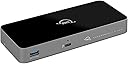
The OWC Thunderbolt 5 Hub is a premium 5-port expansion device delivering up to 80Gb/s data transfer speeds, 140W charging power, and support for three 8K displays. Its fanless aluminum design ensures silent operation, while broad compatibility with Thunderbolt 3, 4, 5, USB4, and USB-C devices makes it the perfect future-proof upgrade for Mac, PC, and iPad users seeking enhanced connectivity and performance.


| ASIN | B0DPKL911T |
| Additional Features | Bandwidth Boost for Video Intensive Usage |
| Best Sellers Rank | #124 in USB Hubs |
| Brand | OWC |
| Color | Black/Space Gray |
| Compatible Devices | Thunderbolt 5, Thunderbolt 4, Thunderbolt 3, USB4 and USB-C compatibile: Macs, iPads, PCs, Chromebooks, Android tablets, and Surface devices Compatible Devices Thunderbolt 5, Thunderbolt 4, Thunderbolt 3, USB4 and USB-C compatibile: Macs, iPads, PCs, Chromebooks, Android tablets, and Surface devices See more |
| Customer Reviews | 3.8 out of 5 stars 157 Reviews |
| Data Transfer Rate | 120 Gigabits Per Second |
| Enclosure Material | Aluminum |
| Hardware Interface | Thunderbolt |
| Item Dimensions L x W x H | 7"L x 3.1"W x 0.9"H |
| Item Weight | 382 Grams |
| Manufacturer | Other World Computing |
| Mfr Part Number | OWCTB5HUB5P |
| Minimum Required Operating System Version | Mac OS 14 Sonoma, Windows 10 |
| Model Number | OWCTB5HUB5P |
| Number of Ports | 4 |
| Operating System | macOS, Windows |
| Special Feature | Bandwidth Boost for Video Intensive Usage |
| Total USB Ports | 4 |
| Total Usb Ports | 4 |
| UPC | 810159628211 |
| Unit Count | 1.0 Count |
| Warranty Description | No Warranty |
M**.
Solid on all points.. love it!
Works perfectly and a fair price, especially happy it can ramp up the power on its USB-A port in order to charge iPads and especially my superdrive, without connecting directly to my MacBook Pro M3 pro. I opted for this thunderbolt 5 hub, even though my MacBook is thunderbolt 4, to future proof myself. Thus, I can't really say I'd buy it again, because I won't need to, so instead I will say I highly recommend it. One caveat is, it's not exactly plug and play right out of the box, so I had to open up the MacBook and give the device permission to be used so that My BenQ monitor would fire up and the driver install to enable superdrive support is a little odd, because you have to roll back the software and driver to an older version for it to work, had to hunt around to find this little tidbit out. I won't hold that hiccup against it, because it is solidly build, silent, warm but not hot, and does everything OWC says it does. I can't really ask for more than that... What I'd like to see is updated software that includes superdrive & iPad/iPhone fast charging working or at least clear messaging about the software roll-back until they get it working in the latest software version.
D**V
The Ultimate Upgrade for High-Speed Data Transfers
This OWC T5 Hub is a game changer. I use it to bridge my Mac mini/MacBook Pro with my OWC Gemini storage, and the efficiency is top-notch. Moving large files is a breeze, and Iโve experienced zero connectivity drops. Itโs expensive, but you definitely get what you pay for in terms of build quality and performance. 5 stars!
C**E
premium price, joke quality
Loose-fitting ports, trash cables, flakey display management. I bought 2 of these hubs, both had super-flakey connections. Lightly brushing cords is enough to cause monitors to lose sync and reset. I replaced the cables and reduced the problems significantly, but could still cause nonrecovering resets by wiggling the new cables. When I put the OWC cables into other hubs I could make them lose connection by wiggling them, also. I can connect one monitor through it at 4K@60, but 2 at that rate cause screen glitches on one and resets on the other. I repeated this behavior connected to all my machines, Mac and Windows, TB4 and TB5. Another different flakey display problem is that, specifically on the Mac Studio M3 ultra, it seems the Mac can send polling or control traffic to this thing fast enough to glitch it out. This can be triggered by opening Display Settings. If that panel is open off-screen it will result in infrequent resets. If it's onscreen then the resets become markedly more frequent. Close that panel and the resets stop. I suspect it's the result of not keeping up with the Mac's display controller because the problem is MUCH worse when you connect an active cable, introducing slight delays in the signal. NOTE: For the tests and FYI: - all tests were computer --> hub --> 8K USB-C-to-DP adapter --> 8K cable --> monitor - Monitors were: LG (glitchy) and Samsung (resets) - all cables were short, passive, certified TB5 cables - Machines were: -- lenovo legion 5i (intel TB4) -- Mac Studio (M3 ultra) -- Macbook Pro (M4 pro) Yes, I used only short passive Thunderbolt 5 cables in all tests, and all tests were connected directly from
T**T
Nice dock but some eject issues
5-21-25 update: So I purchased another TB5 enclosure (Acasis) and now no ejection issues. While the Acasis uses the same TB5 chip it also supports USB3 which means the circuit board is different from the Trebleet which may account for the difference in function. The hub appears to be fine. 5-2-25 update. I purchased another dock and got the same issue of a TB5 drive ejecting occasionally. I then tested another TB5 drive in an enclosure and the results were similar but less ejects. so appears some impact between drives and hubs and OS. I concluded it is not the fault of the hub or drive alone but a combination of the Apple OS (Sequoia 15.4.1) and TB5 hardware through a hub. Perhaps the TB5 system has not yet been finished in design to understand all the interplay between components. I will add another star back to a 4 star rating on this hub. 4-27-25; After using for some time I find that my TB5 drives will still get ejected when connected to this hub. After ejection they reconnect and work without issue until I remove and once again connect to see they eject . My TB5 drives do not eject if connected directly to my Mac Mini. I also found that any of my TB4 drives do stay connected through the hub so it looks like the TB5 drives draw too much current for this hub. I'm dropping my rating down to 3 stars. Original rating: Got this for my Mac Mini m4 pro to add some additional ports. At first any drive I attached got ejected but after a Reboot all is solid. I found that my TB4 drive shows the same speed as when connected directly to my Mac however my TB5 drive is about 20-25% slower on the write speeds which is common in docks. Dock seems high quality overall in design and features.
J**A
Gear for setting up dual monitors with single cable.
Used this to setup dual screens on MacBook Pro M4 Pro chip. Worked like a charm and wife is happy with the single cable setup to charge and transmit video.
M**L
Perfect. Powered USB-C. Works amazing in my podcast studio.
This is awesome! I have two of them and they make it possible to connect all of my peripheral devices that are USB or USB-C, and need power. I use it for my Elgato decks, and my Sony camera. No power issues at all.
J**Z
Doesn't deliver the 140 W posted power
It stops partially working and charging my laptop. I have a power hungry laptop that requires 140W. I also have 1 screen connected to the dock (USB C) and a separate screen connected to the laptop (HDMI as this dock doesn't support HDMI). after working some time, my laptop explicitly says that it is not receiving enough power and stops charging. Really disappointed as I explicitly looked for a Hub with the capacity to charge 140W.
J**A
Powerful and Super Convenient!
The OWC Thunderbolt 5 Hub is a game-changer for my workstation. The three Thunderbolt 5 ports are blazing fast, and the USB-A port adds extra versatility for older devices. Iโm able to connect multiple high-speed drives and monitors with no lag or connectivity issues. The hub feels solid and well-built, and it keeps my setup clean and organized. Absolutely worth it if you need reliable, high-speed expansion for your Thunderbolt devices!
A**O
A mi no me funciono.
Quizรก tuve mala suerte y me toco uno defectuoso. El Hub tenia bajas de voltaje. Desconectaba los perifรฉricos. Probรฉmo con SSD externos, HD externos, monitores y otro tipo de perifรฉricos Thunderbolt como USB-C. despuรฉs de una o dos horas funcionando, tenia bajadas de voltaje y me desconectaba alguno de los puertos. Lamentablemente una mala experiencia.
L**A
Strongly recommend it
It was an amazing addition to my work-from-home setup, especially due to the addition of a MacBook Pro M4 Pro. I strongly recommend it. It works flawlessly.
J**N
funciona perfectamente
funciona perfectamente, tengo dos studio displays a 5K y un caldigit TS4 conectado al hub y el hub conectado a un MB pro M4. No tengo desconexiones ni ningun fallo. Plug and Play
K**U
thunderbolt 5ใใใฏใจใใฆใฏๆๅฎ็ด
ใใฉใใฏใใฉใคใใผใง่ณผๅ ฅใ thunderbolt 5ใใใฏใจใใฆใฏๆๅฎ็ดใง่ณผๅ ฅใงใใฆๆบ่ถณใใฆใใพใใ thunderbolt 5ใฎๆง่ฝใฏ็ใใใใใฆใใพใใใใๅฐๆฅใฎๆ่ณใจใใฆ่ณผๅ ฅใใพใใใ ใขใใฟใผ๏ผๅฐใจ2.5Gๆ็ทLANใไผ่ญฐ็จในใใผใซใผใ็นใใฆใพใใใPCใซใณใผใ1ๆฌ็นใใ ใใง่ช่ญใใฆใใใใฎใง้ๅฎใใฆใใพใใ ใใพใซใขใใฟใผใ่ช่ญใใชใใฃใใใใพใใใๅบใ็ดใใฐ่ช่ญใใฆใใใใฎใงๅ้กใใใพใใใ ็บ็ฑใใปใจใใฉๆฐใซใชใใพใใใ ใใใใใงใใ
G**T
duim op
goede afhandeling van bestelling!
Trustpilot
2 weeks ago
3 weeks ago