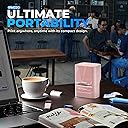
Desertcart purchases this item on your behalf and handles shipping, customs, and support to SINGAPORE.
🎀 Print Bold, Print Smart — Label Like a Pro Anywhere!
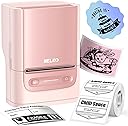
The Nelko PM220 Bluetooth Label Maker in stylish pink offers high-definition 203 dpi thermal printing without ink, supports iOS, Android, and PC via a powerful app with 450+ materials and 90+ fonts, and features fast Bluetooth connectivity. Its compact, portable design makes it ideal for professional-grade labeling in small businesses, home, and creative projects.
| ASIN | B0D9N8GX8F |
| Additional Printer Functions | Print Only |
| B&W Pages per Minute | 45 |
| Best Sellers Rank | #10,552 in Office Products ( See Top 100 in Office Products ) #46 in Desktop Label Printers |
| Brand | Nelko |
| Built-In Media | Label Tape |
| Color | Pink |
| Color Depth | 1 bpp |
| Compatible Devices | PC, Smartphones |
| Connectivity Technology | Bluetooth |
| Control Method | App |
| Controller Type | Android, iOS |
| Customer Reviews | 4.3 out of 5 stars 3,456 Reviews |
| Duplex | Simplex |
| Hardware Interface | Bluetooth |
| Ink Color | Pink |
| Item Dimensions D x W x H | 5.28"D x 3.9"W x 2.76"H |
| Item Type Name | Multifunction Printer |
| Manufacturer | Nelko |
| Maximum Copy Resolution Black and White | 203 |
| Maximum Copy Resolution Color | 203 |
| Maximum Media Size | 48mm |
| Maximum Print Resolution Black and White | 203 dpi |
| Maximum Sheet Capacity | 1 |
| Maximum print Resolution Color | 203 dpi |
| Model Name | PM220 |
| Model Number | PM220 |
| Model Series | PM220 |
| Number of Trays | 1 |
| Other Special Features of the Product | Portable |
| Paper Size | 23-54mm |
| Print media | Labels |
| Printer Connectivity Type | Bluetooth |
| Printer Output Type | Monochrome |
| Printer Type | Thermal |
| Printing Technology | Thermal |
| Resolution | 203 dpi |
| Scanner Type | Portable |
| Series Number | 220 |
| Special Feature | Portable |
| Specific Uses For Product | Office |
| Unit Count | 1 Count |
| Warranty Description | 1 Year |
M**Z
Excelente
I’m very happy with this label maker! It’s easy to use, compact, and works great for organizing things around the house. The labels come out clear and look professional. I also love that it’s simple to set up and use. Overall, it’s a very useful product and I would definitely recommend it to anyone looking for an easy and convenient label maker.
K**W
Blazing 5-second Bluetooth setup, inkless crisp thermal prints, and absolute labeling precision!
I am highly satisfied with the fast-acting performance and extreme versatility of this Nelko PM220 Bluetooth label maker machine. Sourcing this ultra-compact, portable monochrome printer serves as an exceptional business and home organization asset, allowing you to establish immediate link-ups to iOS, Android, or PC platforms via a stable USB or 5-second wireless connection. Adopting cutting-edge direct thermal technology, it delivers incredibly sharp, high-definition 203 DPI prints across broad 0.91-to-2.12 inch tape sizes with zero ink, messy toners, or carbon ribbons required. The companion companion app functions beautifully, packing a comprehensive database of over 90 creative fonts, 450 materials, and native support for complex barcodes, custom tables, and QR codes—while its advanced AI features like automatic OCR text recognition and one-click background removal streamline detailed labeling workflows effortlessly. Complete with an integrated one-button calibration layout that guarantees perfect alignment roll after roll, it is an absolute necessity for retail packaging, price tags, shipping, and home pantry sorting!
V**Z
1,000% reliable and perfect
This is the perfect label maker for any small business! The picture quality is amazing and lasts sooooo long! It’s easy to set up and is easy to use! The compatibility is easy with the app and it’s small enough to take on the go! I know my kids need things labeled and I’ve brought it in to their schools and helped teachers with labels and name tags and this thing is cute and small and perfect!
K**B
Not bad
I’ve been using the Nelko Label Maker Machine (PM220 B) around the house and office for a few weeks, and overall it’s a solid little label maker that gets the job done. Setup was quick and simple. The machine feels light but sturdy enough for regular use. The buttons are easy to navigate, and the display is clear enough to see what you’re typing before printing. I liked that the included tape lasted through the first batch of labels without any issues. Print quality is clean and readable on most surfaces. I’ve labeled storage bins, pantry containers, and some office files, and the labels stick well without peeling. The tape feeds smoothly most of the time, which makes creating multiple labels in a row much less frustrating than some cheaper models I’ve used before. A few honest points to know: • The tape options are limited to the basic black-on-white style. If you want color or specialty tapes, you’ll need to buy extras that fit this model. • The keyboard layout takes a short time to get used to if you’re typing longer words. • The battery compartment (it uses AAA) can be a bit tight when inserting batteries. Overall this is a dependable, easy-to-use label maker with good print quality and straightforward functions. It’s not packed with bells and whistles, but it does exactly what most people need for home and office labeling.
S**.
Perfect simple label maker
Great for labeling in the home or offuce. Easy to use with phone/tablet. Reasonable options for creating unique labels
R**N
Fanatical. Even though I had to buy 2
The fist one I purchased did not print evenly. I had changed Amazon accounts and could not find my receipt to exchange so I took a chance and ordered another. It is amazing! The ability to quickly print out new labels for my products is so convenient. No buying ink or labels for a printer or waiting for me to run home and back to print!
M**A
Easy to use, even offline.
I was on the search for a reasonable priced little thermal printer and bought a Nimbot at first. It worked fine, I suppose, but it was rather cumbersome to get the laptop version of the app to work. It did not want to work off line and every single time I connected to the Internet, it wanted to update and install..... I did not want that app on my phone, so I deleted all of it and got this little Nelko. I primarily use it to label my freeze dried food and stuff.... Love this machine. Once the program is installed, it's quite happy with not being online. You can save created labels, easily change the font sizes or modify the layout of the labels. It even comes with some fun clip art one can use and there's an option to import your own, but I haven't explored that option yet, mostly because I like it simple, when it comes to computer stuff. I haven't had to update anything and it works offline just fine. Refill labels are also well priced and a variety of shapes and colors are available.... This Nelko is definitely far better and easier to use than the other one.
N**0
Unless the demo video lies, I got a defective unit. Other Nelko printers had no issues.
This PM220 is my third Nelko printer. I thought it would be the perfect balance between the other two that I bought (P21 & PM230), that had their limitations ( I thought I would regift one or both of those, thinking this would be the best fit for me) but now I'm having regrets and hoping I got a defective unit because the P21 & PM230 are solidly built and I had zero technical or mechanical issues. I had so many problems with this PM220 unit that I think I may have gotten a defective one. First of all the pink unit I bought comes preloaded with a roll that is not full size, but that is intentional, I think, and not a defect per se, because this was shrink wrapped and looked unused (I checked with Nelko and they verified that I purchased this from their official Amazon storefront, INK SYNC). The pink PM220 unit, when compared to the other Nelko printers I have, did not seem very solidly built. I'm not sure, so I re-ordered this unit in black and white and not as a multi-pack because this ended up not really being a good deal at all given that you only really get 2.5 rolls. I haven't tried out the replacement printer yet. Why I think this pink unit is defective: ■ I had this charging for several hours using the charging cable it came with before first using it, and was able to use the unit, with a lot of frustration, see below. Then the next day I wanted to use it, but it wouldn't even power on. Manufacturer states that so long as you aren't printing a whole bunch of labels the charge will last several days …I only got three usable labels and a whole bunch of waste (pictured). I maybe printed a total of three usable labels and many many blanks and test strips I didn't want. ■ The slider that's supposed to adjust to the roll is REALLY hard to move. I watched the manufacturer's demo video in which it is supposed to slide easily while the roll is in the chamber. This is so hard to move on mine that I had to move it while the roll was out, every time I try to do it it felt like it was on the verge of snapping, and then my roll ended up getting squished several times because there aren't any markers.. I had to push it hard without the roll in the chamber and then hope that I didn't push it too narrow. Again, this is nothing like what is shown in the demo video, where the slider easily moves to adjust. It squished and ruined two of the rolls and resulted in crooked outputs because I could never get the role easily and securely into the chamber. ■ The calibrator which is supposed to set the label in perfectly obviously doesn't work very well, and on it spits out labels if you use the slack they have recommend, so I ended up with a lot of wasted labels (pictured), or having to open up the machine and reroll them backwards. The only way I could get is not to spit out labels with to put in much less slack than is recommended, like 2 mm. ■ The test button doesn't work as it should so I also ended up with a lot of wasted test labels. I'm almost hoping that I did get a defective unit and the black and white single unit without the extra rolls that I ordered to replace this will not have these issues because I really liked the size and quality of the labels themselves. Very easy to take off the roll like the P21 labels they are waterproof and you can reposition and restick them without any residue left behind. RETURNING THE UNIT: When I tried to process a return for this printer it would not let me choose my usual nearby drop off. For some reason it rerouted me to an Amazon Locker drop 30 Miles away. I tried this both in the browser and in the app. I canceled the return and then tried a return on another item (some tape) and it again offered me the usual drop off near near me. Then I tried to return this printer again. Again, I was offered only an Amazon locker drop off location 30 Mi away or the option to drop it off at a UPS Store. I'm not sure what's up with this new inconvenience, whether it's a bug with the newest update to the website and app or they are purposely making it difficult to return these, though you would think that boxing it up and sending it through UPS would be a lot more expensive on there and. It seems like they are making it difficult to return though. _______ Comparison with other Nelko printers: I purchased the Nelko P21 first, (mint color, pictured) and the smaller roll of labels that came with it (not full size!) sit loosely in the chamber, but that doesn't affect how the labels come out, they are not crooked, and when you press the calibration button it sucks the label back in. I personally found the labels a little bit too small to read sometimes though I still find it useful for small items, and it's great for short amounts of text (single words). The labels are plasticy, waterproof and removable so you can move them around and affix them many times. Exactly the quality I was looking for. Next I purchased the Nelko PM230 (white, pictured). It's marketed as a “sticker machine” but the reason I liked it is because it uses continuous rolls, so size is variable and you can also turn text 90° for even larger labels, if you want. Again zero issues with loading the cartridges. The quality of the sticker is different, these are not glossy and waterproof (definitely more papery and water resistant). They be removed easily only on the slickest of surfaces, think high gloss hard plastic or glass without any regularities. Otherwise on regular plastic or metal they will leave an adhesive goo residue behind that you have to scrape off with a plastic razor or mineral oil. Also it takes a bit of practice because the label tape doesn't have much of a lip on it, so it's not very easy to get them off the backing. I tried a weeding tool, and plastic razor and found that with some practice and wasted stickers I could get it off with my fingernail. So it's not as easy and you have to cut the stickers down because there's a lot of slack naturally built into the printable area. It's not as easy as just taking a label off a roll that's pre-cut. But I got this one on sale and I'm not sorry. I found it solidly built, just like the PM21.
R**K
Funktioniert
Super nettes kleines Ding
A**E
Erwartungen übertroffen
Wow, jetzt muss ich tatsächlich auch mal eine Bewertung hinterlassen, da mich der Etikettiermaschine wirklich begeistert. -öffnen, App laden, Rolle einlegen, drucken Dieser ganze Prozess hat einfach in 3min geklappt und ein Druck kommt binnen 3sek raus. -man kann unterschiedliche Größen einlegen, sogar rund 50mm Durchmesser u zusätzlich wird automatisch vom Gerät das eingelegte Format erkannt -die App zum Designen der Labels ist sehr gut gemacht, wirklich sehr gut. Man kann alles abspeichern, auf andere Formate ändern. Es besteht sogar die Möglichkeit Fotos von handy einzufügen mit nur einem Klick ohne landezeit Ich muss echt sagen, 35€ (50% reduziert)für den Nelko PM220 ist echt jeden Cent wert, auch wenn die originalen Nachfüllbänder recht teuer sind. Für die runden bezahlt man ohne Angebot ca. 20€ für 150 labels a 51x51mm, mit dem 50% Angebot jedoch ist es wieder voll OK
B**R
Satisfait
très bien facile a mettre en route et simple d'utilisation......
D**H
I wish I had got this labeler ages ago
Amazon Review for Nelko PM220 Label Printer I had wanted a label printer for some time. I keep all sizes of screws etc. on shelves in my shed in containers left over from our Chinese take aways. Very handy but finding a particular sized screw or bracket is not so easy. Labeling each individual box of screws and brackets would make finding the correct size of screw or type of bracket very simple. I mentioned to senior management that these labelers would also be extremely useful for organizing anything in the kitchen; jams, other pots of sauces, anything. A labeler could help to organise sewing items, boxes of buttons, in fact there’s no end… I was allowed to look for a labeler. I chose the Nelko PM220. I’m so pleased I did. It seemed a pity to open the box when it arrived; it was so neat, wrapped like a very expensive mobile phone and about the same size. The box contained the labeler, a roll of labels, an instruction book, charging cable and instruction card. Loading the roll of labels was extremely easy. Plugging the Nelko into the computer was very easy but linking it to the computer via the app was a bit of a faff and I would be a liar if I said it wasn’t. But, after a number of false starts (and you know what they say, “As a last resort, read the instructions”) I did it. I registered and logged on to the Nelko website and followed the short video on YouTube. And if I can do it, believe me you can. Charging the labeler was a doddle. It needs to be fully charged before first use. While the Nelko was charging I brought some boxes in from the shed to start labeling them up, but the first thing I actually printed was a label for the Nelko labeler’s charging cable. How many cables have I lost because I can’t remember which cable goes with which item? Never again! Watching that first label emerge was extremely satisfying. Then I printed labels for boxes with screws in and others for boxes containing right-angled brackets. Brilliant. It is so easy. You can adjust size, font, position, anything and for good measure there are any number of templates and pictures. You can even print QR codes. I had another idea – I always retain the instruction booklets for power tools. And now I can organise them properly. I put each instruction booklet into separate Ziplock bags and printed out labels to identify each one. Voila! At first, I printed labels on my mac desktop then others on the iPhone using Bluetooth. Easy. It all worked a treat. I am sure that printing would be just as successful on a PC and Android. I can’t recommend this labeler enough.
C**E
Very good value
perfect for what I needed. Love the fact I can charge it versus spending money on batteries. Print quality is clean and crisp. App is very easy to use. I do have one suggestion. How about a variety pack for blank labels?
Trustpilot
1 month ago
1 day ago