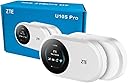
🌍 Stay connected everywhere—your pocket-sized global Wi-Fi powerhouse!
The ZTE U10S Pro is a sleek, unlocked 4G+ LTE mobile Wi-Fi hotspot designed for global travelers and professionals. It supports up to 32 devices simultaneously, powered by a long-lasting 3000mAh battery offering up to 10 hours of use. With no configuration required and smart screen management, it delivers fast, reliable internet on all world networks, making it an essential companion for seamless connectivity on the go.


| ASIN | B0DFZ1MPPT |
| Are Batteries Included | Yes |
| Batteries | 1 Lithium Ion batteries required. (included) |
| Best Sellers Rank | 5,758 in Computers & Accessories ( See Top 100 in Computers & Accessories ) 12 in Mobile Broadband Devices |
| Brand | ZTE |
| Colour | White |
| Customer Reviews | 4.0 4.0 out of 5 stars (2,279) |
| Date First Available | 3 Sept. 2024 |
| Delivery information | We cannot deliver certain products outside mainland UK ( Details ). We will only be able to confirm if this product can be delivered to your chosen address when you enter your delivery address at checkout. |
| Guaranteed software updates until | unknown |
| Item Weight | 200 g |
| Item model number | U10S PRO |
| Lithium Battery Energy Content | 3000 Watt Hours |
| Lithium Battery Packaging | Batteries packed with equipment |
| Manufacturer | ZTE |
| Number Of Lithium Ion Cells | 1 |
| Operating System | Linux |
| Package Dimensions | 12 x 8.6 x 5.2 cm; 200 g |
| Series | U10S PRO |
| Wireless Type | 802.11ax |
P**S
Early impressions positive but only after some key lessons learnt during the set up stage
Please note this review is for the ZTE MF920U, CAT4/4G LTE Mobile Wi-Fi device and not any of the other ZTE models you can find on Amazon. Secondly, I am not a computer / technology nerd, so my review is based on my experience of setting up this portable hotspot device and is meant to help others who may consider themselves less technically inclined avoid some of the pitfalls I encountered. I initially bought this device as I had recently acquired a general use SIM (i.e. one can use in a mobile phone for making calls, texting and having data for accessing the internet) from a well known brand to use with my old portable hotspot or in my Samsung Galaxy S6 Lite tablet. Sadly this general use SIM didn't work in my unlocked devices, so I decided to buy this ZTE device as it offered a 4g/LTE service. However, I then discovered the general sim didn't work in it either (i.e. it wouldn't give me internet access when I tried to link my Amazon Kindle, Windows 10 laptop or Samsung tablet to it). Further research and contact with the helpful folks at the general SIM provider led to a suggestion I should change the APN settings in the ZTE device but this also proved unsuccessful. Lesson 1: Use an appropriate 'data only' SIM (that for me meant one that offers a 4g/LTE service which is what this particular ZTE model and my Samsung need). Funnily enough, Smarty offer a 'data only' option for the free Smarty SIM provided with this device! Assuming you can get a good coverage from Smarty in your area (this can be checked on their website) and before you can use it in this device, you need to create an account with Smarty and select a data only sim package via the Smarty website. Once you have created an account you then need to activate the SIM which took just 10 minutes (but you are warned it could take up to two hours). Lesson 2: This ZTE device uses a 'micro' SIM (the Smarty SIM card comes in a standard size but it is easy to punch out a micro or nano sized SIM from it using the perforations provided). Do not try to fit a nano SIM in the device as you will probably have difficulty extracting it when you discover it doesn't work). Lesson 3: The activated Smarty SIM worked first time in the ZTE device and there was no need to change any APN or other settings. An Internet connection was immediately available on my laptop, kindle and tablet once I looked to see what wifi networks were available. Please note that I am not advocating that only a Smarty SIM will work in this device, as I suspect that other 4g/LTE data only SIMS offered by other mainstream providers will probably work too, but after my experiences, I would be a little cautious about trying to use a more 'general' sim that offers phone and text services in addition to data. So now the ZTE is up and running smoothly, and my stress levels have receded, I am finding this ZTE device a delight to use. It is still early days, but so far so good. I am getting a good signal where I live with reasonably fast download speeds that are good enough to live stream television programmes, etc. In Summary: I hadn't realised how careful one needs to be when selecting a mobile wifi pocket hotspot and pairing it up with an appropriate SIM, so I hope this review is helpful if you are considering buying the ZTE MF920U, CAT4/4G LTE Mobile Wi-Fi device.
R**B
Exceeds expectations
Small and smart looking 110x65x18 mm light weight and pocket sized. What looks like the screen is simply a shiny black panel with 4 LED indicators down one side. Came with over 50% charge so was no delay in setting up. Micro sim fits easily in the covered slot on the base. There is a WPS button and an ON/OFF button on the base - both are activated by pushing for 5 seconds. With an activated sim in the router the turn on to internet connection takes only about 30 seconds. I dumped the DATA only SMARTY sim and used one I already own. The passwords for wifi and router access are on the label on the back - I used my PC to access the setup in USB mode - 192.168.0.1 and enter the router password - once into the admin page changed router password, wifi password and SSID. WIFI can be turned off if USB mode only is needed. In my front room at peak times I get around 8 Mb/s download over USB - with the router in an upstairs window and with the shiny black panel pointed at the cell tower I get between 20 and 35Mb/s download over the 2.4Ghz wifi. I don't know how long a battery charge lasts but is stated at 10 hours - time will tell. Only negative points so far are the shape - it is not so good for standing on its base and can't be stood on its base with USB cable attached - I 3D printed a stand in PETG that I found on thingiverse which acts as a stable stand with USB access and easy orientation towards a cell tower. (search ZTE) Not sure how many wifi devices can be attached to the router as I only use one PC with wifi. For the money this little USB modem router is very good One thing to be aware of - if using Windows 11 or 10 in USB mode the device loads software onto your PC - I found this to be a problem so restored my W11 PC and now only use the wifi to connect. In Linux Mint the device works in USB mode with no issues.
M**N
Excellent for the price
Had a little Wi-Fi internet dongle ages ago, 3g, eventually gave up with it as everything had moved on and I wasn't really using it. I have unlimited data on my mobile so why would I need one? Well I work in Cumbria and often my phone signal is non existent or very poor, I also work at a place with a fantastic EE mast that everyone uses so you can get a full 5 bar signal and no data or phone, my alternative was to visit 3 and see about a Wi-Fi dongle again, I now have a 120gb data sim for little money a month but the cost of the dongle was prohibitive. I thought this was worth a try, and it's well worth the price. Set up was easy, put card into slot, charge and turn on, getting into the setting also easy and everything worked. So I used it to help out with coverage of a no rules football game on Tuesday night, it worked. But it did have to be re-set at one point as it froze, and by the end of the night even with wireless strength turned down to maximise the battery it was almost done after 4.5 hours. all in all an excellent bit of kit for the price.
L**A
Stopped working after 2 months. Screen shows charging and nothing else.
S**N
De momento me va genial
L**I
Sehr gut!
S**A
Very good product.
A**D
Vere nice
Trustpilot
2 months ago
1 month ago