


Desertcart purchases this item on your behalf and handles shipping, customs, and support to SINGAPORE.
🎥 Capture Every Moment, Charge Every Move — Stay Ahead of the Stream!
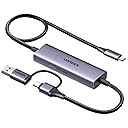
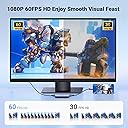
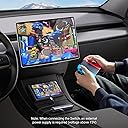
The UGREEN 2K 30FPS 1080P 60FPS USB C Video Capture Card is a high-performance streaming tool designed for USB-C devices like Switch, Steam Deck, and iPhone 18 Pro. It supports up to 4K@30Hz input and records at 2K@30fps or 1080P@60fps, delivering crisp, lag-free video capture with a 5Gbps data rate. Featuring 100W Power Delivery fast charging, it lets you stream and power your device simultaneously. Compatible across Windows, MacOS, iPadOS, and Android, this plug-and-play capture card is built for professional-grade content creation and gaming without HDMI support.







| ASIN | B0CN2Q32HJ |
| AV Output | HDMI, H.264/H.265 |
| Antenna Location | Video Recording |
| Best Sellers Rank | #75 in Internal TV Tuner & Video Capture Cards |
| Brand | UGREEN |
| Built-In Media | Capture Card |
| Compatible Devices | Personal Computer, Samsung Galaxy S25 Ultra/S24 Ultra/iPhone 17/iPhone 18 Pro, Switch/ Steam Deck, Tablet, USB-C and USB-A laptops |
| Customer Reviews | 4.1 out of 5 stars 460 Reviews |
| Hardware Interface | USB 3.0 Type C |
| Item Dimensions | 39.37 x 10.63 x 1.57 inches |
| Item Highlight | 100W Power Delivery, Type C to 4K USB3.0, Compatible with Switch, iPad, Quest 3, Steam Deck, iPhone 18 Pro |
| Manufacturer | Ugreen Group Limited |
| Mfr Part Number | 25772 |
| Minimum System Requirements | A device with a USB 3.0 or USB-C port and compatible operating system (Windows 11/10/8.1, MacOS, iPadOS 17, or Android) |
| Model Name | 25772 |
| Model Number | UGC2772 |
| Number of Items | 1 |
| Operating System | Android, Linux, Mac OS, Windows 8/10/11 |
| Other Special Features of the Product | fast charging and low latency |
| Platform | Android, Windows |
| Recommended Uses For Product | Video Recording |
| Special Feature | fast charging and low latency |
| Video Capture Resolution | 1080p, 2K |
| Warranty Description | 24 Months |
Y**G
Works with the Nintendo Switch unlike the Hagibis cable!
I bought both this UGreen capture cable and the popular Hagibis capture cable. I have to say this UGreen cable is superior. First, this cable has USB C on both ends whereas the Hagibis cable has an HDMI port on the other end which necessitates a HDMI to USB-C adapter. This is fine if you want to plug in directly to a laptop, video card, or video game console. Unfortunately for my usage I don't plan on playing Playstation or Xbox via my Quest 3. I only want to use this with my laptop and my steam deck and Switch so I appreciate not having to use another separate dongle. I tried all of my devices with the Hagibis able and unfortunately only the Switch doesn't work. This is more of a problem of the Switch as it requires a power in input as well as video out for the Switch to change into "docked" mode with external HDMI video output. Basically the Switch needs to think it is in its dock with power to enable 1080 graphics and extra wattage to boost the CPU/GPU in order to switch to external output. The Hagibis unfortunately only supplies power to the input device (Quest 3) but not to the outputting device (Switch). The UGreen has the opposite problem - namely it supplies power (if you plug in a USBC power cable in) to the output device and not the inputting device. So the Switch will immediately recognize it is in docked mode and output a HDMI signal. So if you plug in a power source, it will charge your Switch, Steam deck, or laptop while connected. Unfortunately this means your Quest will not receive any power. It's really your choice in whether you want to power the game console or the monitor. The UGreen also connects much faster than the Hagibis. You plug it in, and you get video within 5 seconds. The Hagibis takes much longer and you often wait around for the signal to work only to wait much longer and find out there is a loose connection. The UGreen you know fairly quickly if everything is right. The UGreen is not without its own problems as well. Namely one small issue is that the cable is about a foot shorter than the Hagibis. This is fine for handhelds but if you want to move further away from your source like a laptop, computer, or game console, you are limited. Also the capture card electronics is near the output end of the UGreen where the Hagibis correctly puts the electronics near the the input source. It's a bit annoying to be flopping around with a Quest and an additional heavy rectangle.
J**N
Play video on ipad
Works great! Able to play external video on my ipad with this.
M**L
Works to stream my PC screen to my Quest 2.
This cable works on my Quest 2, I can now connect the VR headset to my work PC without having to install any special apps. It's sometimes difficult to get working if I disconnect it and reconnect; I find that I have to fully reboot my headset to get it to connect again. But I suspect that's more because of the Meta HDMI Link app, so I'm not taking a star off for that. My only criticism: the end that plugs into my headset (with the USB-A adapter) should be at a 90 degree angle rather than straight, so that it can hang down without straining the cable.
C**C
DOES NOT WORK WITH SWITCH 2
Despite saying it’s compatible with Switch 2, it is NOT. My switch 1 worked instantly with it and came up on OBS. Plugged into my switch 2 and it does not work at all and says no signal no matter what I do. So the seller needs to change their main description bc that is incorrect. Very disappointed and false advertising is just plain wrong. Test your products and check your advertising with a fine tooth comb before putting products out there.
P**T
Works great with a Steam Deck and Meta Quest 3.
The image quality is excellent and the frame rate is a solid 60 fps. One thing to consider though, is that the power delivery only goes one way. It charges my Steam Deck, but not my Quest. I found a work around, but it's rather clunky. I have an Anker USB C hub with a PD port. I plugged that into my Quest 3 and plugged the UGREEN's output into the Anker's USB C data port. With this tangled mess, I can charge both devices at once if needed. If i could change one thing about this product, it would be the ability to charge both devices at once, so maybe a second PD port. Something else to consider, is the direction of the USB C cables plugged in. In order to get the 1080p at 60fps on the Quest 3, I had to flip my USB C connections in some cases.
P**G
Works. technically...
The cable does allow you to stream your iPad if that's what you're trying, BUT you should know that despite saying it's 1080P the image quality is very muddy and blurred compared to what's actually on your iPad. It's slightly improved when using the native USB-C cable without the adapter, so I'd avoid stepping the signal down through that USB adapter. But even then, it's not the best quality.
J**.
Good capture card for iPad
Being able to plug in devices to my iPad and be able to capture them or just as a pass-through with really low latency.
A**R
Limited use cases.
The implementation and instructions for this product and great, but the use cases for it are limited. This capture card essentially can capture video out from any USB-C device that’s video enabled. I tested this using an iPhone 15 pro max. Just follow their simple instructions and you quickly will be recording footage using OBStudio which I’d argue is the gold standard for video capture today. After getting everything working I had to stop myself and wonder what a person would use this for. Many apps or built in tools can do screen recording more easily than this. So what’s the main use case? My guess is actually for streaming. You can just as easily hook up a phone or other mobile device and stream mobile game footage using OBS. Overall it’s a simple and effect product, but unless you are a streamer I’m not sure why you would need this.
C**N
¡Lo mejor para el Meta Quest 3!
Ahora entiendo por qué este cable es tan recomendado por los youtubers que crean contenido sobre realidad virtual. No encontré otro cable a este precio que ofrezca tanta comodidad al evitar el uso de adaptadores para añadir entrada de video al Meta Quest 3. Funciona perfectamente para transmitir contenido desde dispositivos como Steam Deck, iPhone con USB-C o Android con salida de video. Sin duda, una opción práctica y asequible para quienes buscan conveniencia y calidad. Solamente hay que cuidar no tocar mucho la entrada al Quest o jalar un poco el cable porqué se pierde la conectividad y es algo molesto.
H**H
High quality
Perfekt
V**A
Best 1080 p 60 fps streaming device
Quality value for money compatiblty connectivity video quality heat best capture card for 1080 p 60 fps streaming no lag no quality compromise best aal in one play and plug device
J**.
Gutes Teil, um damit sein Android-Tablet an einer Handheld als Bildschirm zu nutzen
Wer (wie ich) sein Steam Deck mit einem Android-Tablet (in meinem Fall ein Galaxy Tab S7) verbinden möchte, um besagtes Tablet als Bildschirm zu nutzen, ist hier genau richtig. Ich habe nichts weiter getan, als auf dem Tablet eine USB-C Camera Standard App aus dem Playstore herunterzuladen (kostenlos, keine lästige Werbung, simple Bedienung keine unnötigen Freigaben - nur eine Empfehlung für Noobs wie mich, weil sie im Gegensatz zu anderen Apps funktioniert und einem eine Menge Sucherei und Kopfschmerzen erspart), diese Capture Card hier zwischen Deck und Tablet zu stecken, die genannte App für den Zugriff auf die Capture Card auszuwählen, die Einstellungen des jeweiligen Spiels auf dem Deck z.B. auf 1280x800 zu setzen, dies gegebenenfalls noch einmal Ingame zu wiederholen, die App auf dem Tablet auf Fullscreen zu schalten, und siehe da: Es läuft! Wer seine Apps streng einschränkt, sollte u.U. noch mal durchchecken, ob wichtige Funktionen eingeschränkt sind und dies ändern. Ich hatte z.B. ein paar Sachen wie Smart Switch deaktiviert, da ich es für meine übliche Nutzung nie brauchte. Aber ansonsten bin ich über keine nennenswerten Probleme gestolpert. Diese Video Capture-Lösung ist für meine Zwecke absolut spitze geeignet; die Nutzung ist völlig unproblematisch, das Deck wird mit Strom versorgt, nur das Tablet läuft über den eigenen Akku. Warm wurde die Card beim Betrieb am Deck auch nicht nennenswert. Die Gesamtlänge der Kabel beträgt etwa 1,39m, davon ist das Kabel zur Quelle etwa 1,05m lang, zum Empfänger hin ca. 25cm. Das Kabel zum Deck ist also - für meine Begriffe - definitiv lang genug, um bequem zu zocken, wenn man das Tablet auf dem Schreibtisch vor sich stehen hat. Ursprünglich wollte ich das Tablet mit einem ausrangierten Router und Steam Link über WLAN nutzen, aber das ist an Steam Link gescheitert, das zwar alles korrekt erkannte, aber keine Verbindung herstellen wollte (auch nicht über LAN); ich wollte nicht extra an Beta teilnehmen, um es eventuell doch noch zum Laufen zu bringen (und mich dafür möglicherweise regelmäßig mit anderen Problemen rumärgern zu müssen). Die Capture Card von UGreen ist da für mich die ideale Alternative. Wer kein Problem mit maximal 2K bei 30Hz hat (1280x800 läuft prima mit 60Hz), sich nicht am Kabel stört und einfach bloß ohne viel Gebastel mit seiner Handheld am Android-Tablet als Monitor zocken will, kann hier meiner Ansicht nach nichts falsch machen. Für mich jedenfalls ist das Teil optimal. Vorausgesetzt natürlich, es geht nicht innerhalb kurzer Zeit kaputt - das könnte als einziges noch schiefgehen... Ansonsten bin ich glücklich, mein Tablet mit diesem Hilfsmittel erstmal zeitlich unbegrenzt und sinnvoll weiter nutzen zu können. Diese Capture Card bedeutet für mich vor allem eine Menge Spaß. P.S. - Für Switch-Nutzer, die Hori-Controller besitzen: Diese lassen sich nach Anschluss der Capture Card im Handheld-Modus nicht mehr für die Steuerung nutzen. Die Standard-Controller sollten aber problemlos funktionieren - ich hab's allerdings nicht getestet, daher keine Gewähr. Und... Darauf, dass die Capture Card Blu Ray Signale überträgt, würde ich nicht wetten. Ich meine, einer der englischsprachigen Rezensenten hat das auch schon erwähnt.
D**J
Does not work with switch 2
Be warned that this dosent seem to work with the switch 2. Im trying to connect the switch to my quest 3. It displays the capture card and says no signal. The switch 2 dosent give a signal to the capture card.
Trustpilot
5 days ago
3 weeks ago