


Desertcart purchases this item on your behalf and handles shipping, customs, and support to SINGAPORE.
🚀 Upgrade to Wi-Fi 7: Because buffering is so last decade!
The NICGIGA WiFi 7 Wireless Card Intel BE200 NGW delivers cutting-edge tri-band Wi-Fi 7 speeds up to 8774Mbps and Bluetooth 5.4 connectivity. Compatible with Intel CPU motherboards featuring M.2 NGFF 2230 A/E key slots, it supports Windows 10/11 (64-bit) and Linux systems. Ideal for professionals seeking ultra-fast, low-latency wireless performance with reliable warranty and lifetime support.
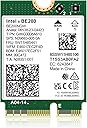
| ASIN | B0CPPHCQXD |
| Best Sellers Rank | #109,672 in Computers ( See Top 100 in Computers ) #256 in Network Cards |
| Brand | NICGIGA |
| Built-In Media | BE200NGW |
| Compatible Devices | Desktop, Laptop |
| Compatible Operating System Family | Linux, Windows |
| Compatible devices | Desktop, Laptop |
| Customer Reviews | 4.4 out of 5 stars 275 Reviews |
| Data Link Protocol | Ethernet |
| Data Transfer Rate | 5800 Megabits Per Second |
| Data link protocol | Ethernet |
| Data transfer rate | 5800 Megabits Per Second |
| Hardware Interface | Bluetooth |
| Hardware interface | Bluetooth |
| Item Weight | 0.06 Kilograms |
| Item weight | 0.06 Kilograms |
| Manufacturer | NICGIGA |
| Mfr Part Number | NIC-BE200-EU |
| Minimum Required Operating System Version | Windows 10 |
| Model Number | BE200 |
| Number of Items | 1 |
| Number of Packs | 1 |
| UPC | 790885293443 |
| Unit Count | 1.0 Count |
K**S
WiFi 7, what's not to like
Upgraded my Asus ROG laptop from WiFi 6E to WiFi 7. I can now see it connected to all 3 frequencies simultaneously using the MLO function on Tp-link deco be65. Also able to verify download speeds directly from main unit.
M**.
Solid Upgrade with Wi-Fi 7 Support – Just Don’t Expect a Huge Leap
The Intel BE200 upgrade provided a seamless transition from the AX200, with setup being straightforward and effortless. While the performance increase is noticeable, averaging 100-200 Mbps faster, it may not be a drastic improvement in everyday use. (1Gbps Up/Down) However, the adapter still delivers smooth experiences for streaming, downloads, and gaming. If you already have a Wi-Fi 7 router, the BE200 is a reliable and forward-thinking option, but it's essential to have realistic expectations if you're upgrading from a stable AX adapter. NOTE: Have your drivers pre-downloaded before you install this card. My Windows 11 did pick up the card, however it was from an older driver. It's always best to use the latest from Intel.
R**O
Funktioniert super bei mir (siehe meine Hinweise im Rezensionstext)
Bei mir funktioniert die Karte super; ich erreiche damit jetzt meine 250MB Downloadgeschwindigkeit via WLAN. Zur Information: ich habe einen Lenovo-Laptop "ideapad 330" mit einer i7-8750H CPU @ 2.20 GHz. Hier noch meine persönlichen Hinweise zur Installation: Vor dem Austausch sollten die neuen intel-Treiber heruntergeladen werden, dann spart ihr euch später die LAN-Verbindung. Anschließend die neue Karte installieren. Nach dem Einbau die aktuellen WiFi- und BT-Treiber laden und den Rechner neu starten. Wichtig: Für den Internetzugang ist dann das WLAN-Passwort für den Router erneut einzugeben. Evtl. installiert Windows auch noch ein paar Sachen nach und verlangt einen Reboot. Meine Bluetooth-Geräte habe ich aus Windows entfernt und neu eingerichtet und funktionieren. Ich habe eine Internetleitung mit 250MB abonniert, welche mir jetzt auch bei einer Breitbandmessung mit der neuen WLAN-Karte angezeigt wird.
N**I
Works as expected
Very happy with this BE200 card and super fast, wifi6 also works great
T**2
Replaced TP-Link TBE9300 (MediaTek) with Intel BE200 — fixed latency, Bluetooth, and more
After issues with a TP-Link TBE9300 (MediaTek WiFi 7 adapter, which I am returning), I switched to an Intel BE200, and the difference was immediate. Instead of buying another full PCIe card, I reused my existing Intel AX210 PCIe adapter and simply swapped in the BE200 M.2 module. That made the upgrade inexpensive and straightforward. Many desktop WiFi PCIe cards are just adapters for an M.2 (E-key) wireless module, so you may not need to replace the entire card. In my case, I reused the PCIe adapter from my Intel AX210 and replaced only the module with the BE200. This worked perfectly and saved me from buying another full adapter. Before upgrading, make sure your PCIe adapter uses an M.2 E-key module (not soldered), has antenna leads (U.FL / IPEX connectors), and that your system supports the card. The BE200 requires Windows 11. For laptops, make sure you also have an M.2 E-key slot and are running Windows 11. Test setup: Intel i9-12900K desktop, Windows 11, Ubiquiti WiFi 6E / WiFi 7 access point, AT&T multi-gig fiber, approximately 15–20 feet from the AP through a hallway, with an external elevated antenna. Latency and stability were a major improvement. At idle, latency averaged around 2 ms and was very stable. Under load, latency averaged around 7 ms with occasional spikes up to about 113 ms, which is expected on high-speed WiFi without traffic shaping. There was no packet loss. Latency is predictable and stable when the connection is not saturated. Bluetooth stability was one of the biggest differences. With the previous MediaTek-based adapter, I experienced frequent disconnects and unstable behavior using Windows Phone Link. With the Intel BE200, Bluetooth has been completely stable and Phone Link works reliably with no disconnect issues. This alone made the upgrade worthwhile. The TP-Link TBE9300 (MediaTek) showed idle latency spikes, occasional packet loss, unstable Bluetooth behavior, and limited driver support. The Intel BE200 resolved all of these issues. Driver support is also much better. Intel drivers installed cleanly and have been stable. On Linux, current kernels already include support for Intel wireless hardware, so there is no need for third-party drivers or manual workarounds. If you are upgrading to WiFi 7, you may not need a new PCIe card. If your adapter supports M.2 modules, you can simply swap the module. The Intel BE200 provides stable performance, reliable Bluetooth, predictable latency, and strong throughput. In the same system and network environment, the Intel BE200 behaved consistently and predictably, while the MediaTek-based card did not. 5/5 — highly recommended.
Trustpilot
1 month ago
3 weeks ago