🚀 Elevate Your Home Network to WiFi 7 Supremacy — Don’t Get Left Behind!
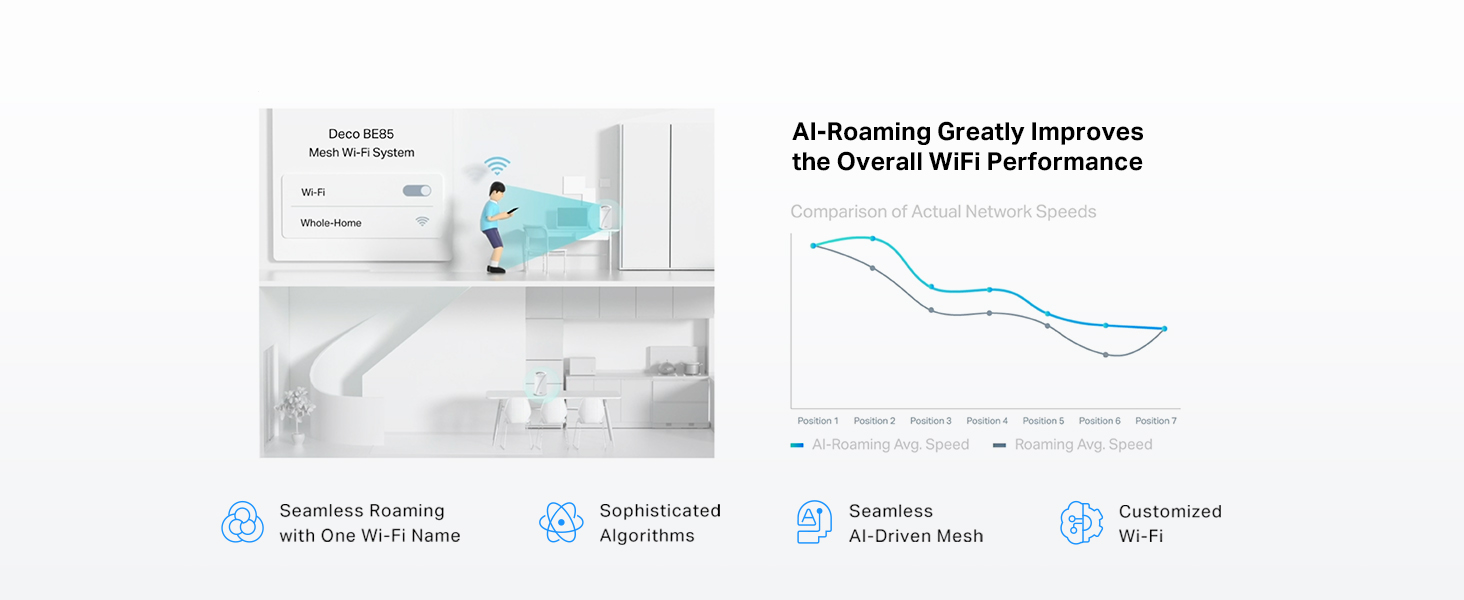
The TP-Link Deco BE85 is a cutting-edge WiFi 7 tri-band mesh system delivering up to 22 Gbps combined speeds with 12-stream technology. It features dual 10G WAN/LAN ports, two 2.5G ports, and simultaneous wired and wireless backhaul for unparalleled coverage and reliability. AI-driven seamless roaming and TP-Link HomeShield security suite ensure a smart, secure, and future-ready home network. Ideal for professional millennials demanding high performance, extensive device support, and easy management via app and voice control.


| ASIN | B0CR5C4RZN |
| Best Sellers Rank | #39,500 in Computers ( See Top 100 in Computers ) #127 in Whole Home & Mesh Wi-Fi Systems |
| Brand | TP-Link |
| Color | White |
| Connectivity Type | Wi-Fi |
| Customer Reviews | 4.0 4.0 out of 5 stars (217) |
| Date First Available | 20 May 2024 |
| Item Weight | 1.46 Kilograms |
| Item model number | Deco BE85(1-Pack) |
| Manufacturer | TP-Link |
| Operating System | TP-Link proprietary firmware |
| Product Dimensions | 12.8 x 12.8 x 23.6 cm; 1.46 kg |
| Series | WiFi 7 Mesh System |
| Wireless Type | 802.11.be, 802.11ac, 802.11ax, 802.11g, 802.11n |
M**I
Very bad
Very bad items and not recommended to buy it
K**N
The quick rundown is: The house is an approximately 3,500 SF single-level home with many brick-solid doors and twists and turns. The modem is in the center of the house in my office. Wi-Fi without a mesh system would drop off in the back rooms to a crawl. I previously had an ORBI RBS850 for my Cox 1GIG Down / 35 Up plan (they just changed to 100 up before I switched). The ORBI did fine for the last three years I had it. However, even though I would move the satellites around, I would still get reduced speeds in the furthest rooms. Based on ORBI, the RBS850 with two satellites should have been overkill, but it wasn’t. I recently received FIBER and opted for the 1Gig Up/Down. Since the speed is overprovisioned, I’m able to get 1,300 Up/Down. My ORBI was limited to 1 GIG port, so I was limited to around 945 with overhead down and the full upload speeds. Since I do a lot of CAD and video work, I am also considering moving to the 2 or 5-GIG plan in the future. I researched many of the new Wi-Fi 7 mesh systems. Note that I currently do not have any Wi-Fi 7 devices, but I might in the future. I narrowed it down to the new ORBI 970, the Deco BE 95, the Deco BE85, and the Eero Max 7. I chose the Deco BE85 due to its two 10 Gig ports and two 2.5 Gib ports and the price factor. The ORBI was way overpriced, and the BE95 offered me nothing extra. Though the Max 7 was tempting, I ultimately went with the BE85 since I would have wired backhaul on both satellites. My out-of-the-box experience: 1. The Deco comes packaged in a very nice, easy-to-open container. 2. You are presented with three identical Deco units, three power adapters, and a cord for each that can be removed, making it easier to fish power cords for the Deco. 3. I appreciate that the plug-in on the Deco is a normal size and isn’t one of those that take up three or four plug-ins due to its shape/design. 4. I already had my BGW320-500 modem set to bridge mode and the ORBI as the router. 5. I downloaded the TP-Link APP and started to install the Deco BE85 Mesh system. 6. The app asked me to scan the bottom of one of the Decos (it didn’t matter which, as it would become the main). 7. The app did not list a BE85. Maybe it is listed as a BE2200? Nope. 8. I then continue to install but choose Install MANUALLY. 9. I turn off my printers (you will really want to do that) 10. Unplug my BGW320-500 Fiber Modem. 11. I disconnected from all of the ORBIs. 12. I take a photo of the bottom of the Deco I choose to be the Main so I can add the MAC Address 13. I then connect to Deco’s Wi-Fi through my phone. 14. It then tells me that the Deco I chose doesn’t match the one I’m installing. ( I KNOW THAT.) 15. It asks me if I want to change it to the BE85. Of course I do. I say yes and click Next. 16. It tells me to connect the Fiber Ethernet to my Deco and then to my Switch. 17. I connect to the top 10G port on the Deco and then to the switch on the bottom 10G port of the Deco. 18. Since I have a switch with two 10G ports and 6 2.5 G Ports, I connect all the drops to my other rooms to my switch. 19. Deco warns me that only one 10G port can be used and that the bottom is a combo port. For a second, I thought, why give me two ports if I can only use one? Then, it dawned on me that the warning was poorly written. What they mean is you can use the bottom port as a 10G ethernet port by taking out the plug and using the bottom SFP+ port (if needed), but you can’t use both at the same time. 20. I then placed my first Deco satellite Unit in Room 1, connected the wired ethernet drop to the top 10G port, and connected the lower 10G port to my Switch in Room 2. 21. I then plug in the first Deco Satellite, and it connects almost immediately. 22. I do the same thing for Room 2, connecting it the same way as Room 1. 23. I then change the SSID to match my old SSID and password Exactly. 24. Make note that both are case-sensitive. 25. It takes it, and Now I don’t have to change all my Wi-Fi log-ins on 50+ devices. 26. Before I started, I had an Excel spreadsheet with all my devices' MAC addresses. You should do the same if you can. 27. I looked at the Deco app on my iPhone and noticed that most of the devices did not have very good descriptions. I simply went into the app, looked at the connected MAC address, referenced it with my spreadsheet, and copied the name from my spreadsheet into the Deco app. (Note that I had the spreadsheet on Dropbox, so I was able to copy from my iPhone to the Deco app without typing them all out. 28. In about 10 minutes, I had all my devices with good descriptions. 29. I then noticed that there was a section for devices that were not currently online, like TVs, PS5s, etc. I changed the names of these devices, too. 30. I checked everything out and noticed the 6Gz channel had my SSID followed by _6Ghz, I do have some phones that are 6Ghz so I went in and changed the SSID to match my other SSID by removing the _6Ghz at the end of the name. 31. My phones were not connecting to the 6Ghz. 32. I then found a place under Advanced called Fast Roaming. It was off by default. I turned it on, and my phone connected to the 6Ghz channel. NOTE: If you have some older 2.4Ghz devices, this could cause them not to connect, and you will have to turn them off or get updated devices. 33. I then noticed the Deco App had a DARK mode. I changed it, and my eyes thanked me. 34. I noticed in the app that there is a delay, so give it a moment. 35. I downloaded the App on both my personal and work phone, and they synced perfectly, but there was also a delay there. 36. I noticed you can access your network even when your phone is not connected to the network. This can come in handy. 37. I then noticed four devices I had never seen before. After much investigation, I noticed it was showing me the switches connected to it. It was strange because they were TP-Link switches but were showing as Android 1-2,3,4. I corrected those names as well. 38. I then ran the network optimization tool, which lets you know if there is interference with the main unit or a satellite. Moving them slightly or moving something away from them can help. This was actually a handy feature. 39. I tested my speeds, and the connected PCs (all but one connected by ethernet) are 1250-1300 Up/Down. 40. iPhone 15 Max is quite fast in every room. I get speeds of at least 750 Up/Down depending on the room I’m in, and if I’m close to the Main or a satellite, it is even faster. 41. The Web interface for the Deco is…Just use the phone App. 42. The Decos are warmer than my ORBIs, so keep them in a ventilated area. 43. I wish they would come in different colors. 44. If you can, WIRED BACKHAUL is the way to go. 45. My TVs are all Sony Bravias. I got a USB to RJ45 adapter and plugged it into the USB3 port on the TV, then connected that into either the Deco or the switch (same speed on both). As you can see in the photo, 950+ speeds up/down. (I don't know if it will work on other model TV's) 46. If your TV supports it, this is the way to go. It is faster than the 100MB limited switch on the TV and faster than Wi-Fi, even with the satellite sitting right next to the TV. 47. I don’t know how this will work yet, but I set the Deco to check for updates nightly. Hopefully, this will prevent a problem with a rogue firmware update. 48. Set notifications when new devices join the network. 49. I didn’t opt in for their Parent Control. My kids are 34-28 and alone, so there is no need. 50. I didn’t get their protection as I have my own, and they should have included it for free. 51. Crazy thing happened. On an ATT modem set to passthrough, you need to enter the router's Mac address (I had the ORBI entered first, then changed to the Deco when I replaced it). You go to your AT&T status page on the web 192.168.1.254, enter your credentials, and go to Firewall > IP Passthrough. Change Allocation Mode to Passthrough, Passthrough Fixed MAC address you can select from list or enter the entry Manual. The manual is fine. Now, here is the crazy part. I still had my disconnected ORBI as the manual entry, and everything worked fine. I couldn’t see any issues. I changed it to match my Main Deco unit, and all is still fine. I really don’t know how it worked before. 52. Take a photo of the main unit to have it when you change the MAC address. 53. One last thing: when I had my ORBI as the router, all my IP addresses were 172. xxx, and with the Deco as the Router, all my IP addresses changed to 192. xxx. I don’t know why, but everything is working. 54. NOW, back to the printers. If they are off when you get everything connected and then turn them on, they will connect easily. However, depending on the printer model, they may get lost, and everything will be connected except your printers. So, to be on the safe side, turn them off, and once everything is connected, turn them on. 55. Well, I hope this helps someone with their Deco.
M**D
الجهاز ممتاز من ناحية الأداء، الثبات، وسهولة الإعداد. لكن المنتج مُعلن كـ BE22000، بينما الجهاز الذي وصلني مكتوب على العلبة BE19000. لا يوجد فرق واضح في الاستخدام اليومي، لكن وصف السرعة لا يطابق النسخة الفعلية. يفضّل تصحيح الوصف لتجنب اللبس للمشترين.
L**Y
TP-Link Deco BE22000 Tri-Band WiFi 7 Mesh System (Deco BE85) - 12-Stream 22 Gbps, 2× 10G + 2× 2.5G Ports Wired Backhaul, 8× High-Gain Antennas, VPN, AI-Roaming, 4×4 MU-MIMO, HomeShield (1-Pack) This is a pretty beefy WiFi node. It's double the size of the older WiFi 6e Xe75 NODE units. There's a tonne of reviews out there. So I'm going to offer my thoughts for my deco mesh upgrade I have 8 Indoor xe75 and 3 outdoor x50s in my mesh. One main xe75 malfunctioned in a brownout so I needed to replace it. Luckily it still boots up but for whatever reason it was ultra flakey. I briskly bought this newer be85 as a main node replacement. Deco app allows you to do a "replace main" node procedure. It basically takes you thru a series of boot ups and configuration transfers and then ultimately it makes you swap the Ethernet cables form old deco to new be85. This process was not smooth. The config transfer failed a couple times for whatever reason, but tirs times a charm. It worked!! My entire router setup including vlan and isp login worked flawlessly once the transfer was a success.. I was able to keep all my existing satellites and just swap this main node . Very happy ! Otherwise it means I need to make a new network and re-add all the satellites, very time consuming process That out of the way my network is humming really well. Able to get full 800mbps from my fiber optic Internet wired. WiFi wise , I get around 500mbps. I setup the MLO wifi (basically carrier aggregation with 5 and 6 ghz bands) and this works however I found it Slower than just 6ghz. With MLO ssid I get around 400mbps. (Tested in same location with my pixel 9 XL pro WiFi support). I'm not sure why MLO is slower. But what MLO offers is a stabler setting with multi band support. I'm happy to have it but likely not going to use it much. With such a complex network I find things seem to work better with this be85. It's likely because the CPU cores are much faster. Things seem to run quicker on my network. File transfers quicker inler load , network reboots make satellites reconnect really really fast compared to older xe75, and oddly enough my 2ghz iot devices seems to drop less and keep stable. Even if you're not needing wifi 7, this is actually a worthy networking upgrade due to the speed of things , in a complex mesh network. I'm very happy to have upgraded to this be85 rather than buy yet another xe75 replacement main node. The 2.5g Ethernet is a nice future proofing . Met network is just 1gbps so I can't take advantage of that . So if there are any folks out there who have similar large mesh network with decos , I recommend buying this newer gen be85 unit to be your one main node whilst keeping your other xe75's or x60's as satellites Since the time of review , I have bought a be65 WiFi node to replace my busiest satellite node. The extra processing power for be65/85 series is a notificible enough ugorade. It really is that good.
P**R
Es un producto realmente impresionante. Mi conexión a Internet es por 700Megas ahora simétrico. MI casa es de 110m cuadrados, pero tenía un WIFI-PowerExtender puesto que la señal inalambrica del modem no llegaba hasta las recamaras al fondo de la casa alrrededor de unos 10-15 metros del router principal y con más de 3 paredes entre ellos. El Wifi PowerExtedner (solución anterior) solo me daba 20 a 26 Megas en las recamaras de atrás como mucho y los aparatos WIFI allá tenian muchas desconexiones, era frustrante. Tiré ese sistema a la basura y puse dos antenas DECO BE22000 y tengo 700MB completos en ambas recamaras atrás y 700 completos en el estudio. Es verdaderamente impresionante que el Streaming e incluso el Playstation de la recamara funcionan como si estuvieran conectados directos por cable al router de salida. RECOMENDADO AMPLIAMENTE!
M**F
Este fue el primer set de routers que me permitió tener internet de alta velocidad en mi casa de 2 pisos. Probé otros routers de la misma marca y no tienen la misma potencia que este. Excelente producto!
Trustpilot
3 weeks ago
3 weeks ago