Buy anything from 5,000+ international stores. One checkout price. No surprise fees. Join 2M+ shoppers on Desertcart.
Desertcart purchases this item on your behalf and handles shipping, customs, and support to SINGAPORE.
🚀 Elevate your WiFi game—connect faster, farther, smarter!
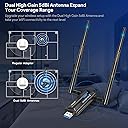
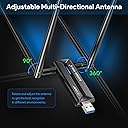
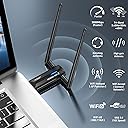
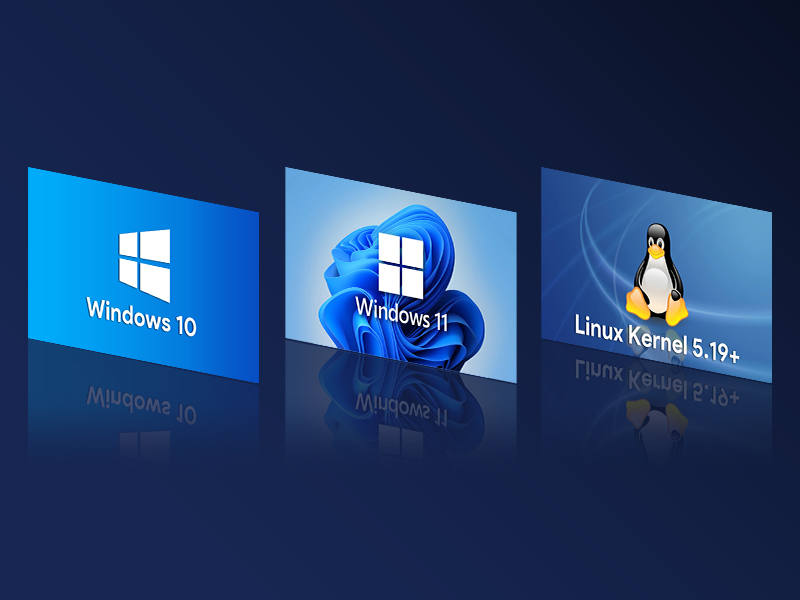
The EDUP USB 3.0 WiFi 6E Adapter (AXE3000) is a tri-band wireless dongle supporting 6GHz, 5GHz, and 2.4GHz frequencies with up to 3000 Mbps speeds. Featuring dual 5dBi antennas and USB 3.0 interface, it ensures extended range and high-speed data transfer. Compatible with Windows 10/11 (driver install required) and Linux (plug & play), it offers robust, stable connectivity ideal for professional multitasking, gaming, and streaming. Backed by a 3-year warranty and praised for ease of use and performance in challenging environments.


| ASIN | B0CZ82RM5L |
| Best Sellers Rank | #124 in USB Computer Network Adapters |
| Brand | EDUP |
| Built-In Media | 1* U Disk Driver, 1* USB WiFi 6E Adapter |
| Color | Black |
| Compatible Devices | Laptop, Desktop |
| Compatible Operating System Family | Windows |
| Customer Reviews | 4.2 out of 5 stars 247 Reviews |
| Data Link Protocol | USB |
| Data Transfer Rate | 5000 Megabits Per Second |
| Hardware Interface | USB 3.0 |
| Item Weight | 0.07 Kilograms |
| Manufacturer | EDUP |
| Minimum Required Operating System Version | Windows 10, Windows 11 |
| Model Number | EP-AX1672 |
| Unit Count | 1.0 Count |
| Warranty Description | 3 years warranty |
A**R
plug&play and surprisingly good performance in 5GHz band in the presence of obstructions
The adapter works in Linux out of the box (I use Raspberry Pi 5). 5 GHz connection is very stable even when the signal is week (-78dB separated from the router by two thick concrete walls, many APs creating interference). This adapter outperformed my other adapters and surprisingly even Asus router in WISP mode in terms of speed and stability. 2.4 GHz band worked as expected. I couldn' t very get very good performance on 6 GHz band even in the same room with the router, but I don't have many other 6E devices to compare, just a router and this adapter. I would recommend this adapter solely based on the ease of installation (plug&play in linux), good performance in 2.4 and 5GHz bands, and seller's excellent and helpful customer service. I think it is a good value for money and will be durable when handled with care.
T**V
this is the one you want for Kali.
Use this strictly for my penetration testing needs. I have an m1 MacBook Pro and as you may or may not know, Apple locks these things down pretty well. It's not like the good old Intel-based MacBook days where you could just boot whatever you wanted. So in order to get Kali up and running, I had to acquire the ARM-based variant and load up VMware fusion. Once in the VM, the internal wifi from the MacBook can only be bridged making monitor mode impossible so you need an external Wi-Fi adapter such as this one. Now, with the super long backstory out of the way, let's talk about this adapter. It's great! I plug it in and it's immediately recognized by both the host and the VM and the range in this this is superb! I can pick up my Wi-Fi about 10m further away than I can with my internal adapter. As far as I read, I think the wifi 6 spec only works in Linux out of the box, but can work in Windows with customized drivers. But it works great in Kali. Plug and play. And the removable antenna are great so I can attached my various other longer range antenna for testing long range equipment. Highly recommended.
V**D
Does not function as wifi 6 at 6ghz - Update
I have extensive experience with computers and was an IT director for 5 years. I build my own computers. Recently, our internet service provider upgraded our cable modem/router to eero Pro 6E which uses wifi 6 and can communicate at 6 ghz. My existing wireless adapter is a tp-link AC1300 which can handle 5MHZ but not wifi 6 and 6 ghz. So, I ordered this EDUP AX3000 hoping it would connect to the router using wifi 6 at 6ghz. I installed it and updated the driver. First time, it connected at 2.4ghz. I started changing its configuration in the control manager and was able to connect at 5mhz. Then, all of a sudden it dropped back to 2.4 ghz. After multiple changes of connection protocol using 802.11ac, then 802.11n, etc. , I managed to get it stabilize it to not drop to 2.4ghz. However, no matter what I did, the adapter would not connect to eero at 6 ghz. It should be noted that my iphone 15 connects to the router using the 6ghz band at top speed of the eero. Update January 19, 2025. I changed my rating for this wireless adapter from 1 star to 4 star because of the good vendor's customer service. After I returned the first unit and requested refund, the vendor refunded my money but also contacted me offering a free unit to test. She asked me the configuration of my computer and I gave it to her. The free unit arrived on Friday and I installed it today. The driver file for the adapter comes on a USB stick which was included with it. This time, the installation went very smoothly because there was only one exe file on the stick. I installed the driver, rebooted the computer and the adapter connected to my eero router. At first, it connected via 2.4 ghz, but soon switched to 5 ghz band. The adapter still does not connect via the 6ghz band. However, the speed is much improved and connection is now consistent. The adapter does not drop to 2.4 ghz band upon system restart. It should be note that the speed of the communication between the adapter and your router depends greatly on how far your system is from the router and also how much metal structures are in between. I managed to reach a down load speed of 200 meg (our router max speed is 300 meg but the pc is not in line of sight). To close, this vendor has excellent customer service.
C**E
Great price, works perfectly!
Great price on an antenna that works great! Driver setup wasn't flawless, but for the price, it was still worth it and still a 5-stars product. Using this I got amazing signal for my office WiFi signals and was running almost 3 times what a co-worker was getting with a USB alternative. To be fair, I paired this with a USB 3.0 extender cable and set this in a slightly elevated position. But even with the cable, the cost was still was half of a name brand alternative and it works perfectly for me. Also, gotta give these folks kudos on the packaging. In a day and age of plastic packaging with no indication of recyclability, this packaging was a paper box with a plastic tray inside that has a plastic recycle number on it. Circled in red top right in my image. Thank you, keep up the great work!!
B**M
Disconnects randomly, possibly overheating when vertical
EDUP AX3000 USB (EP-AX1672) Windows 11 Enterprise. + Great when it works. - Unsigned, unversioned drivers for Win 10-11 and Linux only. Possible security issue if this fly-by-night brand is really a conduit for backdooring Western systems. - Disconnects randomly without warning and then won't reconnect. Not usable at all.
R**R
Plug and play Ubuntu 24.04
Plug and play on Ubuntu 24.04. Worked immediately and received a strong signal on both bands
G**T
Good speed
On 6GHz, I got around 750 Mbps at about 15 feet with a clear line of sight to my router. Turning off power management on the stick might help with connectivity issues. I pulled about 150 Mbps on both my 2.4GHz and 5GHz bands, but I have those limited to 20MHz channel width. My AI mentioned this stick might be limited to an 80MHz channel width, though I don't know if that is true.
S**S
True plug-n-play and doesn't use R-T chipset
This doesn't use the R***T** chip set which for some reason (have had 3 with the RT chipset) don't consistently connect and spontaneous drop outs. Was getting tired of using backdated driver to make it work. This has worked without interruption or drops outs for 3 weeks.
J**S
Excelente adaptador USB Wi-Fi 6E EDUP
O produto está funcionando corretamente, a velocidade deste adaptador está super rápida e tem ótima compatibilidade com Linux. É exatamente esse adaptador que queria tanto.
C**N
Plug and play en Linux!
Tengo dos de estos en maquinas de Linux. Sirve directo, sin necesidad de "drivers". Son suportados directo del Kernel. Muy buena señal y velocidad.
C**A
Funcionou perfeitamente.
Trustpilot
2 weeks ago
1 day ago