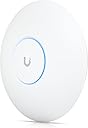
🚀 Elevate your network game with Wi-Fi 7 power and pro-level control!
The Ubiquiti UniFi U7 Pro is a professional-grade indoor Wi-Fi 7 access point delivering dual-band connectivity with up to 5.7 Gbps throughput on the 6 GHz band and 688 Mbps on 2.4 GHz. Engineered for high-density environments, it supports over 300 clients simultaneously and excels at penetrating tough building materials like reinforced concrete. Featuring PoE for streamlined installation and advanced network management via UniFi Controller, it’s ideal for professionals upgrading from consumer-grade systems to a future-proof, enterprise-style wireless network.
| ASIN | B0CSR63FMH |
| Best Sellers Rank | #1,557 in Computers ( See Top 100 in Computers ) #4 in Wireless Access Points |
| Item model number | 10876583 |
| Language | German |
| Manufacturer | UBIQUITI |
A**N
From Gryphon to UniFi U7 Pro : A Worthwhile Leap to True Wi-Fi 7
I moved to the Ubiquiti UniFi U7 Pro Wall after years of using a Gryphon consumer Wi-Fi system. Gryphon served me well for simplicity and deep parental controls, but my ISP provides a 1 Gbps connection, and Gryphon was consistently topping out around 450 Mbps. Hardware limitations - not reliability - ultimately forced the decision to move. Setup Experience I’ll admit upfront: I was apprehensive. Moving from a very easy plug-and-play system to a configurable setup sounded intimidating. I spent a few long, slightly sleepless nights researching and planning the move, worried about complexity. Oh boy, was I in for a surprise - the setup was far less technically challenging than expected. With some guidance where I got stuck, the core network was up and running in about two hours. Adding the In-Wall AP later was a complete non-event - adoption was instant, configuration seamless, and no rework required. So now I have taken the leap from consumer Wi-Fi into a properly architected home network using Firewalla and UniFi. My Network Setup - Home Size: ~2,500 sq. ft., two floors, reinforced concrete walls - Firewall / Router: Firewalla (routing, security, and VLAN management) - Switching & Power: TP-Link PoE switch powering all UniFi access points - Wi-Fi Management: UniFi Controller running in Docker Firewalla manages VLANs cleanly (main LAN, IoT, guest, etc.), while UniFi handles SSIDs, wireless behavior, and client policies. VLAN tagging passes seamlessly from firewall → switch → access points. There is no “primary AP” - all access points operate as peers, which is one of the most elegant strengths of the UniFi ecosystem. I do miss WiFiman integration due to running the controller in Docker, but that’s a small trade-off for the flexibility and control this setup provides. Access Point Deployment - Ground floor: UniFi U7 Pro Wall - Study (remote room with concrete walls): UniFi In-Wall AP - First floor: UniFi U7 Pro Ceiling-mounted AP Wi-Fi coverage across the house is excellent, with zero dead spots. Roaming is seamless, signal strength is consistent, and performance holds up well even through thick concrete walls. Performance & Real-World Use This is true Wi-Fi 7 hardware, with 6 spatial streams and 6 GHz support. Even with a mixed client environment (Wi-Fi 6, 6E, and older devices), overall throughput, latency, and stability are dramatically better than my previous setup. Multiple 4K streams, video calls, work-from-home usage, and heavy multi-device loads run without jitter or drops. Most importantly, I can finally make full use of my 1 Gbps internet connection - something the Gryphon hardware simply could not deliver. The “Enterprise Feel” Difference One small but impactful example: I now run a custom guest splash page. Guests connect to Wi-Fi and are greeted with a clean, branded landing page instead of a generic password share. It looks neat, professional, and intentional — a small detail that really highlights how far this setup is from a consumer system. While the overall cost ended up slightly higher than Gryphon, what I gained is a network that looks, behaves, and performs like something you’d expect in a professional or enterprise environment, not a consumer mesh. Pros - Genuine Wi-Fi 7 performance with 6 GHz support - Excellent coverage across two floors with concrete walls - Seamless VLAN handling with Firewalla + UniFi - Flexible controller options (including Docker) - Clean wall-mount design and solid build quality - PoE (No more running separate cables for power, and while i was cringing at the idea of POE, i will from now always try to get POE where available) - Professional features like guest splash pages Some Prerequisites (not really CONs) - Requires PoE and UniFi Controller (not a standalone consumer product) - Some networking knowledge helps, though setup is very manageable - Full Wi-Fi 7 benefits require compatible client devices Who This Is For: If you’re outgrowing consumer Wi-Fi systems (Gryphon, Eero, Orbi, etc.) due to performance ceilings, lack of control, or scalability, and want a future-proof Wi-Fi 7 setup, the UniFi U7 Pro Wall is an excellent choice. Bottom Line The UniFi U7 Pro Wall made my transition from consumer mesh to a Firewalla + UniFi architecture absolutely worth it. Slightly higher cost, vastly higher capability. Powerful, flexible, and genuinely satisfying to run — this is Wi-Fi done properly. ⭐⭐⭐⭐⭐
M**O
still buggy
You need to separate Wi-Fi 7 from the Wi-Fi 6 to make It work.This Wi-Fi device requires a UniFi UDM or another suitable device for proper performance.You need a device that supports Wi-Fi 7, If you don’t have you’ll have to look at other options. However, if Wi-Fi 6 is sufficient for your needs, I recommend the U6 Pro. It offers excellent coverage and a good price compared to Wi-Fi 7 devices. You can power the device using a Cat6 cable with PoE+, but you’ll need a switch or a UDM Pro to do so. In terms of speed, the maximum it has reached is 1.5 Gbps. Keep in mind that my network speed is 5 Gbps.
M**V
Ridiculously impossible to setup
Just didn’t understand or find the right process to setup. Nothing simple or powerful about it
R**M
Excellent appareil. Je recommande totalement. Mais trop puissant pour une habitation standard. Pour une habitation normale, choisissez un U7 Lite, c'est largement suffisant.
C**O
Aprendo il pacco ci troviamo subito l acces point incartato rigorosamente in una specie di cartone (quello dei router per intenderci) con a fianco le viti , una dima per il fissaggio e dei dischi in metallo sempre il montaggio a soffitto che è consigliato per le migliori prestazioni ma si puo montare benissimo a parere . Ho anche il fratello piu piccolino u7 lite associamo ad un unifi cloud gateway ultra mentre lui l ho associato ad una dream machine . I 2 acces point da lomtano sono simili ma avvicinandosi questo u7 pro è decisamente piu grande, pesante e la parte sul retro è in metallo quindi 1000 punti a favore rispetto all u7 lite in semplice plastica ma alla fine è un acces point non bisogna metterlo sulla scrivania e guardarlo . Sulle prestazioni beh direi che ci siamo . Non ho una fibra molto veloce ma lui viaggia benissimo ma soprattutto copre una casa intera 2 piani . Lui è posizionato al piano superiore. Al piano inferiore va in 2,4 5 ghz e prende molto bene ovviamente il 6 ghz si sfrutta solo al piano superiore ma in tutte le stanze quindi molto buono . Luce fantastica notturna professionale unico neo: se si potesse cambiare il colore sarebbe davvero Top come sullo schermo dell udm pro
A**Y
It's definitely better than the built-in WiFi from the router combo provided by the ISP. If you're at home and don't have a PoE switch, you will also need to purchase a PoE injector.
S**E
Borne Wifi au top, parfaitement intégrée dans mon écosystème Unifi !
J**E
So far this thing is solid. I've noticed a few issues if you try using it in mesh with older APs (likely enabling 6ghz which isn't supported on the older APs) but I'm still working out the kinks.
Trustpilot
3 weeks ago
1 month ago