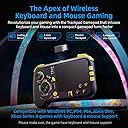
🎯 Elevate your game with precision and freedom—never miss a move again!
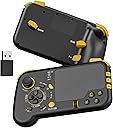
The GTP01 is a cutting-edge 2.4GHz wireless gaming touchpad combining keyboard, mouse, and gyro controls into a compact gamepad shape. Featuring a highly responsive trackpad with 6 adjustable speeds, 3 gyro modes with customizable axes, and an optimized button layout including micro switch buttons and ALPS joystick, it delivers unparalleled accuracy and flexibility. Compatible with major consoles (Xbox Series X/S, Xbox One, PS4, PS5) and PC/Mac platforms, it’s designed for gamers demanding precision and versatility without the clutter of wires or drivers.


| ASIN | B0CLQ6WV4P |
| Antenna Location | Gaming |
| Are Batteries Required | Yes |
| Best Sellers Rank | 88,498 in Computers & Accessories ( See Top 100 in Computers & Accessories ) 628 in Computer Keyboard & Mouse Combos |
| Brand | IFYOO |
| Brand Name | IFYOO |
| Colour | Black2 |
| Compatible Devices | Gaming Console, Personal Computer |
| Compatible Operating System Family | Windows |
| Compatible devices | Gaming Console, Personal Computer |
| Connectivity technology | 2.4GHz Wireless |
| Customer Reviews | 3.8 out of 5 stars 234 Reviews |
| Item Weight | 0.37 Kilograms |
| Keyboard Description | Gaming |
| Keyboard Layout | Dvorak |
| Keyboard description | Gaming |
| Manufacturer | IFYOO |
| Manufacturer Part Number | IFYOO-GTP01P-Black2 |
| Minimum Required Operating System Version | Windows 7 |
| Model Number | IFYOO-GTP01P-Black2 |
| Movement Detection | Gyroscopic |
| Network Connectivity Technology | 2.4GHz Wireless |
| Number of Batteries | 1 Lithium Ion batteries required. (included) |
| Number of Keys | 21 |
| Number of Packs | 1 |
| Operating System | Windows, macOS |
| Other Special Features of the Product | Touchpad, Wireless |
| Power Source | Battery Powered |
| Product Warranty | 90 Day Warranty Against Manufacturer Defects |
| Special feature | Touchpad, Wireless |
| Unit Count | 1.0 count |
R**.
Finally!! and so far so good
Been over a week and its so versatile. I'm thinking, everything from Duke Nukem, Decent, Steet fighter 4, Need for speed, retro emulatos to CIV3&4. It all works as it should, its really easy to map the controller on a PC, it instantly registered as a keyboard and touchpad which meant I could use the touchpad to navigate the configuration. Love the position of the triggers on the back. It is meant to be held like a controller on the left side, while on the right your hand isn't suppose to grip it like a traditional controller. Let it rest on the right ring finger, with the index on first finger on the triggers, your thumb free to navigate half of the controller WITHOUT your palm griping it. Can't comment on the Gyro controls yet, I really would like more feedback from games on whether or not they recommend or have tested the game with different controller schemes like steering wheels and accelerometers. I know I can play a lot of RPG's one handed which is a really nice idea. You always could with a keyboard, never a controller, but not anymore. And I know its a complete game changer for FPS games, more immersive, more fun. Ricky.
L**N
Not bad but not great either
I found it interesting and quite fun, needs time to get used to using it and set up.
G**S
Steamdeck usage
I bought this as a controller for playing pc keyboard games on the steamdeck but.... For it to work it needs to be in the dock wired. it does work for me if needed but if your sat at a distance then this won't work for you im afraid. Just a note I really don't know if there is a way to set it up wireless on steamdeck im sure there is but im not technically minded enough for that.
R**N
Great for older console players transferring to pc
Really happy with this keyboard/mouse in a controller form...as a long time console player this really is a awesome way to transition to pc gaming I actually really like that all the inputs are labelled as pc inputs as it makes learning the pad a lot easier than mapping controller buttons via steam and trying to remember what's where...if your finding using mouse and keyboard hard to use id definitely recommend trying this I really like it.
Ø**.
Warning: Terrible product quality, unable to return defective product **DO NOT BUY**
The touchpad is not working anymore suddenly, even after factory reset. The product is three months old and has seen very light and limited usage. All other buttons and even the gyroscope are working, confirming that the problem is limited to the essential touchpad. I am unable to get any support or to return the product after multiple attempts. A total of around £80-90 GBP wasted and lost paying for a defective product, shipping and customs VAT. WARNING: DO NOT BUY THIS PRODUCT. LACK OF CUSTOMER SUPPORT AND A PRODUCT RETURN OPTION IS COMPLETELY UNACCEPTABLE FOR ANY SELF-RESPECTING CONSUMER.
D**E
Not had too long !!
Only just received and gave it a go on Xbox series x , wow talk about all over the place think this will take time to master as I normally play with controller, but I can see once I get my head around the difference button inputs will be a very good controller, build quality is ok, touch response is very good, gyro is also very good just the button placement but that just a learning process overall a good controller but will take time to master.
D**Y
Config poor
You know, if it came with software to tweak gyro and button sensitivity it would have been amazing. New version of it in the summer with added software
S**1
rubbish signal, randonly turns off
just what i was looking for and i wanted to like this but the 2.4ghz signal is terrible. only seems to work line of sight. device also intermittently powers off. maybe mine is faulty, but im not gonna try another one.
C**F
Know What you're Getting it For!!!
I Use this for Apex Legends & Warzone. Once you understand Coefficiency and DPI, meaning the difference you'll have to calibrate for travel and speed with the thumb instead of your whole arm, this is an absolute game changer that literally puts you in such an advantage! I cannot touch a controller or regular keyboard and mouse anymore. The MOST Important part to consider and understand is that each game will have a complete different configuration/keybinds that you yourself will have to figure out, but once you figure it out & dial it in, DON'T Change it! Just memorize & get used to it Until you realize that you have the speed and precision of a mouse, Gyro With ANY Keybind you want, tons of different Touchpad & Gyro Speeds, all within basically a controller. For the first few hours that I held it, I thought that it felt terrible and I would never get used to it or it would Never get comfortable. After about 8 hours of use All together, it felt so bad to try & pick up a controller or a regular mouse and keyboard afterwards! I'm serious though, you'd have to give it that amount of time for muscle memory to Kick in and your hands to get comfortable holding something so lightweight and small! The wired version without gyro is fine but it is on a complete different level with the wireless pro version. And the gyros still works fine even while using it plugged in. I noticed no latency on console or PC wired or using the wireless dongle! And I'm hypersensitive to Latency so I'm not just saying that to say it. Sure this machine could use some improvements or alterations, but it's still a straight up gift as it is in my opinion! It just takes time to get used to it that's It. Trust me, it's Gonna Feel FOREIGN FEELING FOR A WHILE UNTIL YOU REALLY GET DIALED IN. BLESSINGS.
A**O
great for the exercise bike!
I set up my gaming laptop on a music stand behind my exercise bike and use this as a controller for COD it works perfect!
Y**I
ジャイロ機能は、限定的。
パソコンでFPSをプレイする為に購入。 元々はAndroidスマートフォンでプレイ していたゲームを、パソコン版でプレイ する必要に迫られての購入。 スマートフォン側では容量が128GBで、 大容量のゲーム等を、複数はインストールしづらい。 パソコン版があるものに関しては、 なるべくパソコン版に移行する必要性が あった。 しかしFPSに関しては、操作方法が 全く異なる。 レースゲームはまぁ、ゲームパッドの コントローラを使えば問題はない。 パソコン版のFPSは、基本的に マウスとキーボードが一般的だ。 この商品は、そのプレイスタイルを スマートフォン操作に近い操作感で プレイ出来るようになりそうだ、 と考えて購入してみた。 とてもよい商品だが、 ジャイロ機能に関しては、少し問題がある。 スマートフォン版のFPSは、 画面に向かって立てた垂線に対して 奥行き方向のジャイロが使える。 私は平常、スマートフォン版では、 画面を寝かせずに、立てて、構えて、 ゲーミングチェアに深く腰掛けて、 プレイしている。 この商品で、同じ姿勢で構えて、 パソコンの画面に対して、平行に、 板状の入力機部分を立てて使用すると、 ジャイロ機能はマトモに役に立たない。 これは重大な問題点だ。 ゲームパッドのジャイロ機能は、 基本的に、アナログスティックを、 地面に対し垂直に構えるのが一般的で、 この商品もそれに準拠した作りになっている。 キャリブレーションもその様になっている。 しかしこれではスマートフォンからの 移行組のユーザー、プレイヤーは、 ジャイロ機能を用いて、エイム時の、 射撃の反動を、下に抑えつける挙動と 同じ動作でのジャイロ入力が出来ない。 これに関しては、ジャイロ機能の、 切り替え機能があれば、 この商品は完璧だったと云えるだろう。 板状の入力部分を、PCのディスプレイ 画面と平行に立てて構えて、 画面奥行き方向に対しての、 正確なジャイロ情報が使えれば、 この商品は完璧だった。 その点がとても惜しい。 改良版のリリースに期待する。 改良版が出たら、私は必ず買う。
K**3
戦績向上を目的としなければ、そこそこ快適にプレイできる道具かと思います。
Valorant をゲームコントローラーに近い感覚でプレイするために購入しました。 戦績向上を目的としなければ、そこそこ快適にプレイできる道具かと思います。 少なくとも勝つために使うものではないと思います。 左側のスティックは家庭用ゲーム機のコントローラーと変わらないレベルです。 サイズが合うものがあれば、エイムリングとかFPSフリーク的なものを付けても 良いでしょう。私は鬼エイムさんの高さ調整パーツを付けています。 ボタンは異様に多いですね。通常のコントローラーではこんなに使いませんが Valorant 向けにはちょうど良いか少し足りないぐらいです。FNボタンによって 2種類の機能を使い分けられるので、不便ですけど数は足りると思います。 いくつか問題もあります。 ① 右側のパッドが独特で感度が高いため、ソフト側で調整が必要 ② トリガーボタン(RT)は左手の人差指での操作なので慣れがいる ③ 右手側はグリップさせないデザインのため、持ち方が安定しない 良くも悪くもオリジナルティに溢れていますが、まだまだ熟れていません。 製品としてはベータ版という感じですね。この製品の品質がどうとかではなく、 このスタイルのデバイス自体が殆ど存在していないため、ノウハウがまだまだ 溜まっていないと思います。より改良していけばもっと使えるデバイスになる 可能性はありますが、まだまだ試行錯誤の段階かなと思いました。 上記で挙げたように、通常のコントローラーは両手でしっかりホールドする ことによって高い安定性をもたらしますが、まずはそれを実現することが先決 だと思います。現状では1時間でも持っているだけで疲れます。 トリガーボタンが左であることも慣れるのは大変でしょう。ずっと右の人差指が トリガーであると身体に記憶されているでしょうからね。ソフト側の設定で右に 変えれば良いんでしょうが、右の親指でタッチパッド操作をすることになるので 右の人差指をトリガーにするとタッチパッドの操作性に影響する気がします。 恐らくそれが開発段階で分かっていたので、左側にトリガー(右クリック)を 配置したんでしょうね。その判断は分かる気がします。 ここまで読めばこれが戦績向上のためではなく、あくまで快適性向上のための 特殊デバイスであることがお分かりいただけるかと思います。このデバイスは キーボードのWASDによる移動操作が嫌いな方を対象としています。その点では 有用だと思いました。ですので、利用目的に対する評価として ★4 とします。
J**S
4 out 5 because of size
Basically it a it's like playing on a laptop with the comfort of it being in a controller. Buttons are in good location and covers all keys you will need. Works good on old games and games lacking controller support. Aiming is fantastic but you got to adjust settings in game for sensitivity to get it just right. I'm using it on wired connections and have no input lag, wireless is a little spotty but I have a lot of interference in my area so this is possibly the issue and why I use wired over wireless everything. I will say it's not heavy and I think that makes it feel cheap but it not and the buttons are very solid. Now modern games for example bf6 after some tweaking to aim speed and sensitivity this is the best way to play it if you looking for the best of both worlds experience being able to flick with my thumb is op. This is probably not for everyone if you are someone that struggles with mnk games in general then this is not going to make it easier. Practice with it on a single player game before getting mad and saying it's no good. My only issue is size I feel the touch pad could be smaller and buttons closer together not trigger button or shoulder the are in the right places
Trustpilot
3 weeks ago
4 days ago