Desertcart purchases this item on your behalf and handles shipping, customs, and support to SINGAPORE.
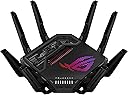
🚀 Dominate your digital domain with the ROG Rapture GT-BE98 Pro — where speed meets precision.
The ASUS ROG Rapture GT-BE98 Pro is a cutting-edge quad-band WiFi 7 gaming router delivering up to 30 Gbps speeds via dual 6 GHz bands and Multi-link Operation. Equipped with 8 external antennas and advanced wired connectivity including dual 10G ports, it ensures expansive coverage, ultra-low latency, and seamless multi-device performance tailored for professional gamers and high-demand users.


| Antenna Location | Business, Gaming, Home |
| Antenna Type | Fixed |
| Asin | B0CPQYSXCW |
| Best Sellers Rank | #481 in Computers & Accessories (See Top 100 in Computers & Accessories) #39 in Computer Routers |
| Brand | ASUS |
| Built In Media | GT-BE98 Pro quad-band gaming router, Power adapter, Quick start guide, RJ-45 cable, Warranty card |
| Color | BLACK |
| Compatible Devices | Gaming Console, Personal Computer, Smart Television, Smartphone, Tablet |
| Connectivity Protocol | Wi-Fi, Ethernet, USB |
| Connectivity Technology | Ethernet, USB, Wi-Fi |
| Control Method | App, Touch |
| Controller Type | App Control, Push Button, Web GUI |
| Coverage | [Inferred] Improved signal strength and efficiency |
| Customer Reviews | 4.3 4.3 out of 5 stars (593) 4.3 out of 5 stars |
| Data Transfer Rate | 30000 megabits_per_second |
| Frequency | 6 GHz |
| Frequency Band Class | Quad-Band |
| Item Dimensions L X W X H | 13.7"L x 8.6"W x 13.7"H |
| Item Weight | 4.4 pounds |
| Lan Port Bandwidth | 10 Gigabit |
| Manufacturer | ASUS |
| Maximum Upstream Data Transfer Rate | 1 megabits_per_second |
| Mfr Part Number | GT-BE98 PRO |
| Model Name | GT-BE98 PRO |
| Model Number | GT-BE98 |
| Number Of Antennas | 8 |
| Number Of Ports | 7 |
| Operating System | App, Linus, Mac OS, Windows |
| Other Special Features Of The Product | Access Point Mode, Guest Mode, Internet Security, Parental Control, QoS |
| Ram Memory Installed | 2 GB |
| Router Firewall Security Level | High |
| Router Network Type | Mesh |
| Security Protocol | WPA2-Enterprise, WPA3-Personal, WPS |
| Upc | 197105086463 |
| Voltage | 110 volts |
| Warranty Description | 3 Years Warranty |
| Wi Fi Generation | WiFi 7 |
| Wireless Compability | 802.11.be |
User
Outstanding Wi-Fi 7 Router with Excellent Performance and Features
I purchased the ASUS ROG GT-BE98 Pro to replace an older ASUS router and upgrade my home network to Wi-Fi 7. After using it extensively, I can confidently say it has exceeded my expectations.Setup was straightforward, and the web interface is intuitive while still offering an incredible number of advanced networking features. Whether you're looking for a simple plug-and-play experience or want to customize your network, this router provides the flexibility to do both.One of my favorite aspects is the extensive feature set. Built-in VPN server support, Dynamic DNS, advanced security options, quality of service, and numerous customization settings allowed me to configure my home network exactly the way I wanted. I also appreciate the security features that help identify potential vulnerabilities and make it easy to keep the network protected.Performance has been outstanding. Wi-Fi coverage throughout my home has been excellent, all of my devices maintain reliable connections, and I have not experienced any unexpected reboots, crashes, or Wi-Fi disconnects since installing it. Everything has been stable and dependable.I've owned several ASUS networking products over the years, and this router continues that positive experience. While it offers so many advanced features that new users may need a little time to explore everything it can do, the interface is well organized and makes learning those features straightforward.Overall, this is an excellent premium Wi-Fi 7 router. If you're looking for outstanding performance, strong security, excellent coverage, and the flexibility to customize your network, I highly recommend the ASUS ROG GT-BE98 Pro.
User
Initially buggy, ... but board and firmware revisions now equal a winner
Too Long Don't Wish to Read - The quad-band ASUS ROG Rapture GT-BE98 Pro (hereafter noted as the "98 Pro") (released in March of 2024) takes the underwear of other Wifi 7 flagship routers and pulls them up over their heads and then slaps em silly. Although initially buggy with incomplete functions, … new motherboard versions (Hardware Version 3.0 {also known as 1.2a}, released in February of 2025) combined with firmware updates (38984 {August, 2025}, 39112 {October, 2025}, 39260 {March, 2026}, and 39262 {May, 2026}) have slowly transformed this router from a three-star device into the more mature product that was promised by ASUS back in early 2024. The GT-BE98 Pro has been a five star product since about March of 2025.The long version - Few people are going to be able to afford the quad-band GT-BE98 Pro, ... much less set it up correctly, ... but for those who can, this router can perform some fairly rare functions while using the very latest standards. Initial versions (models sold until November of 2024) of the BE98 came with the slightly buggy Hardware Version 1.0 motherboard and suffered from a few half-baked functions in the firmware. In many ways, those initial 98 Pro's were inferior to the prior ROG Rapture GT-AXE16000 and GT-AXE11000 routers, especially when it came to Wifi 6 and 6E clients. As of February, 2025, ASUS is currently on their third motherboard revision (Hardware Version 3.0 {also known as 1.2a}) and updated the firmware on May 5th, 2026 to 3.0.0.6.102_39262 (for United States owners). This latest board version and past several firmware versions have hammered out most of the bugs, nags, and missing features that plagued most of 2024 and early 2025. Let’s look at some of the current features:Build Quality – Although the initial motherboards had some small bugs (these router boards are noted as "Hardware Version 1.0" on the underside of the router and were released in March 2024), some problems were ironed out with Hardware Version 2.0 (which were released in November, 2024) (these boards are also noted as 1.1). The 98 Pro finally reached a more mature state in February of 2025 with the release of the Hardware Version 3.0 boards (1.2a). Firmware updates will work on all the boards, so no worries about needing separate versions. Due to the 2.6 GHz quad-core processor and the amount of clients it can handle, heat release is paramount to the 98 Pro's design. Mine, sitting about two feet off the ground (see pic) in an open space gets slightly warm but never hot (the CPU typically runs at about 42 deg C). Also, … the eight antennae feature two internal dipole elements each and need to be extended (per the user manual) for the best throughput. The 98 Pro also features separate amplifiers for each radio chain (and this is what helps it to saturate a large home for example). The 98 Pro also features two 10G ports and four 2.5G ports on the back, … in short, you are covered for the latest fiber optic speeds up to 10G. (The more technically inclined here may wonder how does a 2.6 GHz CPU process 10 Gbit/sec of incoming data. The answer in part is that the router uses ASIC {Application Specific Integrated Circuits} for forwarding combined with packet processing offload. {electrical engineer here, ... you're in good hands}) Finally, the 98 Pro is covered in LEDs and Aura lighting, which can all be controlled through the web interface. The styling is, ... well, ... let's call the design, ... spiderbot. Some will love it and some will hate it. I don't mind the styling but I wish they had removed the stickers from the clear window portion and expanded that area with more heatsinks for the CPU. Overall, the build quality is exactly what you would expect from such a high-end router. Please be aware that this router is sold as the GT-BE98 without the "Pro" designation in Canada and Europe due to those countries' respective regulations concerning the 6 GHz bands (other than that, the two routers are identical).Initial Setup – A new owner has the option to either use ASUS’s smartphone Router app (which I don’t recommend due to security concerns) or the far better web interface (usually reached by typing 192.168.50.1 into your address bar). The start up procedure will ask the owner a bunch of simple questions to set up your password, Smart Connect and/or separate SSIDs, mesh networking, and so on. It only takes a few minutes but works well. The one thing I do not like is that you cannot setup the router until you have internet access. The 98 Pro really needs the ability to be accessed for troubleshooting even if the internet is down (id est, ... particularly when the internet is down).Firmware Features – In short, the 98 Pro is stacked with just about every possible feature a home user could want or need. Smart Connect is configured stock and works very well for those who don’t want separate SSIDs. The 98 Pro will support up to 32 separate networks (and SSIDs) for those that need it. I, myself, have my 98 Pro set up with a separate SSID for each band (2.4 GHz, 5 GHz, 6 GHz (1), and 6 GHz (2)) along with a separate network for guests (aptly named, "Alien_Anal_Probe_for_Guests") and a separate network for IoT devices (security cams, etc ...). The 98 Pro also supports Multiple-Link Operation (MLO) networks which combine the 2.4 GHz and 5 GHz and 6 GHz bands together, which also works well as of November, 2024. Since March of 2024, there have been about twelve firmware updates for the 98 Pro, but I do wish that they would release firmware updates about once a month though to keep everything fully current.Protection - The 98 Pro also offers the usual firewall services (iPv4, iPv6, etc ...), NAT, etc … tools but also offers Trend Micro’s AI Protection free of subscription fees. While it won’t stop everything, the service is a nice extra add-on for a home user. ASUS also offers ADGuard DNS through its firmware under the parental controls section (also a free subscription although you have to sign up for it). I have been testing it and so far have found it does indeed cut down on sites that try to blind you with 40 ads popping up. The downside is that the free ADGuard only protects against so many ads per month (and of course, they then want you to go to their site and sign up for one of their paid versions). The 98 Pro also supports fairly extensive Parental Controls. If you have little ones in the house and don't want them headed to websites that rhyme with "hub," it is fairly easy to set that up with this router.Gaming Features - True to its Republic of Gamers (ROG) moniker, the 98 Pro provides several services to help out online gamers. The Game Booster page offers three levels of Quality of Service (QOS) adjustments and there are separate settings for managing ping to well known game servers (Call of Duty, War Thunder, Arma, Eve Online, etc ….). The end user also has numerous customizable options for tailoring any game connection to their liking and there is even the ability for the router to recognize other ROG devices (like motherboards). I use the Game Booster features for DCS World online flight simming combat and have brought my average ping down from about 14 milliseconds to about 12 milliseconds for the two preferred servers I enjoy playing on. Nothing Earth shattering, ... but any boost I can get is welcome. I will say that I think ASUS ROG routers in general do a better job of ping optimization than any other brand currently on the market.WiFi 7 – The IEEE introduced Wifi 7, also known as 802.11be back in January of 2024. From a technical standpoint, Wifi 7 offers MLO, MIMO, Flexible Channel, and MRU improvements to Wifi 6 and 6E standards. The Wifi Alliance states that Wifi 7 allows up to 23 Gbits per second but that is purely theoretical. In the real-world, Wifi 7 using the 98 Pro will realistically reach around 4 Gbit/sec (with 2x2, 320 MHz) while the prior Wifi 6E (with 2x2, 160 MHz) reaches about 1.7 Gbit/sec. The 98 Pro can also utilize 8x8 connections at 320 Hz but I have yet to see any clients on the market offered with that hardware. While the Wifi Alliance promises Wifi 7 speeds out to 98 feet indoors, realistically you are looking at more like 15 to 25 feet, … so you need to be in the same room with no walls blocking the signal. Truth be told, … Wifi 7 is really a bit of a short range gimmick. That said, does the 98 Pro fulfill Wifi 7 speeds? … Yes, as of November, 2024, it can indeed reach these speeds as long as the client is less than 25 feet from the router. As of Hardware Version 3.0 (1.2a) (starting mid-Feb, 2025) and the latest firmware versions (38984 {August}, 39112 {October}, 39260 {March, 2026}, and 39262 {May, 2026}) .. excellent. My Pixel 10 Pro XL and my wife's iPhone 17 Pro Max both work excellently (both have sadly been handicapped with only 2x2, 160 MHz MIMO configurations {hardware limitation of their Wifi chips}) although only within the same room and only out to about 8 meters or so. Testing some file transfers (with iperf 3), I was able to reach speeds of 2000 Mbps from 3 feet away and 1700 Mbps from 15 feet away, ... smoking fast! Am I ever going to need file transfers that fast? …. Not really, … but it is nice to have.Wifi 6 and 6E – As noted previously, … initially the 98 Pro performed poorly compared to dedicated Wifi 6E routers like the GT-AXE16000. Much of these problems were ironed out (finally) from Nov to Jan of 2025. The 98 Pro now delivers full Wifi 6 and 6E throughput if the client supports those standards. I use a Meta Quest Pro VR headset (which uses Wifi 6E at 2x2 MIMO, 160 MHz but not Wifi 7) in wireless mode to fly virtual aircraft in MSFS 2024/2020, DCS World, and IL2 (I have my first 6 GHz band setup exclusively for the Quest Pro headset so there is no interference). I have tested the Quest Pro with numerous routers and the 98 Pro now exceeds the GT-AXE11000 as the best router I have ever used for connecting the headset, If I connect by way of the Meta Air Link protocol, I often reach speeds of 225 Mbps using the H.265 (HEVC) codec. With Steam VR Link which also uses H.265, I often reach speeds of 250 Mbps with less error rates. If I use the alternative Virtual Desktop and the H.264 codec, I often reach speeds of about 1300 Mbps from three meters. My dream of flying in high fidelity and with all settings maxed in DCS World without a Meta Quest Link cable has finally been realized.Wifi 5 and 2.4 GHz - So far, excellent. The 98 Pro has the highest speeds I have ever seen on the 5 GHz band at roughly 1100 Mbps (from 25 feet) (upstairs and through three walls I am getting roughly 740 Mbps). (To measure this correctly, you need to do so with iperf 3 and professional packet transfer tools. You can't measure this with Speedtest or Wifi Analyzer.) With the 2.4 GHz band, I am getting excellent penetration throughout the house (about 129 Mbps at three meters and 23 Mbps at 30 meters) and all of my 23 IoT devices can connect without problems or delays, even cameras 95 feet away on my back fence.Network Attached Storage - The 98 Pro features one 3.2 USB port and one 2.0 USB port. I have my 2TB Samsung T9 SSD attached to the USB 3.2 port and am getting file transfer speeds around 1750 Mbps! I did briefly try out ASUS's AICloud feature but it seemed half-baked and more of a security risk, so I turned that feature off. I have never tried their Samba setup, so can't comment there.Custom Firmware - The 98 Pro is compatible with the WRT Merlin custom firmware releases which give the router some additional features not found in the stock firmware. It is also nice to be able to use this firmware if you find a feature in the stock firmware is not working as well as you wished. Sadly, the 98 Pro cannot use DD-WRT custom firmware at this point in time.Conclusion – Anytime the IEEE releases a new Wifi standard, it is always going to take a few years for real-world products to actually fully implement those standards. The 98 Pro is no different. When the 98 Pro was first released in March of 2024, it was somewhat buggy and had numerous small issues with both Wifi 7 and 6E connectivity. In short, … it was a three star router. It reached a four star router level around Dec of 2024. Now that there have been two motherboard changes and several firmware releases, the 98 Pro is indeed reaching true Wifi 7 speeds and has fixed most of the small bugs and 6E connectivity issues that plagued it in 2024 and early 2025. Overall, it is now a five star product.
User
Excellent Performance, Frustrating VPN Experience, and Overly Complex Setup
Product Review — ASUS ROG Rapture GT-BE98 ProFlagship-level hardware, strong Wi-Fi 7 speeds, excellent coverage, and powerful gaming/QoS features. Performance potential is top-tier once configured correctly.Biggest weakness: VPN setup usability. Manual config uploads and fragile routing behavior can break full-network connectivity if misconfigured. Advanced users will manage fine; average households may find VPN Fusion frustrating without careful setup.Unified Wi-Fi + VPN Fusion SetupStep = Meaning | Straight to the pointPART 1 — Combine All Wi-Fi Bands FirstStep 1 = Enable Smart Connect / Unified SSIDMeaning: Merge 2.4G + 5G + 6G into one network.Step 2 = One name + one passwordMeaning: Devices auto-select best band.Step 3 = Let Wi-Fi 7 Multi-Link manage trafficMeaning: Router balances load across bands automatically.Step 4 = Avoid band separationMeaning: Prevent congestion and device signal lock-in.Result: Stable, optimized, multi-band throughput instead of single-channel overload.PART 2 — Airtime & Traffic FairnessStep 5 = Airtime Fairness ONMeaning: No device hogs bandwidth.Step 6 = WMM ONMeaning: Full Wi-Fi speed protocols active.Step 7 = WMM No-Ack OFFMeaning: Prevent packet loss + false connectivity.PART 3 — VPN Fusion Safe SetupStep 8 = Create VPN profileMeaning: Add OpenVPN inside VPN Fusion.Step 9 = Upload server file + certificateMeaning: Authenticate tunnel correctly.Step 10 = Enter VPN login credentialsMeaning: Account authorization.Step 11 = Disable “Apply to all devices”Meaning: Prevent full-network tunnel routing.Step 12 = Click Apply SettingsMeaning: Save profile safely.Step 13 = Connect VPNMeaning: Tunnel activates.Correct status:VPN = ConnectedInternet = ConnectedMeaning: Split routing stable.If Internet BreaksStep 14 = Disconnect VPNMeaning: Restore ISP path.Step 15 = Verify global apply OFFMeaning: Remove forced routing.Step 16 = Unassign all devicesMeaning: Clear tunnel mapping.Reconnect safely.Cooling & Hardware Stability Add-On (Review Update)Step 17 = Use external router cooling fanMeaning: Prevent thermal throttling.Step 18 = Don’t rely only on built-in coolingMeaning: Dust + heat reduce router performance over time.Overheating can cause:Connection instability.Throughput drops.Random disconnects.Final Configuration LogicUnified Wi-Fi = Multi-band load balancing.Airtime Fairness = Equal device distribution.VPN = Router-level tunnel only.Global apply = Disabled.Outcome: Stable connection, fast loading, no household outages, no factory reset rebuilds.
User
Very Solid, Great Router For My Use Case.
This router works great, replacing my older ASUS GT-AXE16000. The added band is nice. It was very easy to setup, updating the firmware before proceeding with the setup, all guided by the ASUS app. I get a little download speeds over a wired connection, and typical wifi speed tests are getting 1.1 GB / sec from various test servers at different distances. For example from CLT to Duke University, I get the same speeds as from a test server only 7 miles away. So far I'm very impressed. The (2) 6Ghz bands are connecting well at a signal strength of -38 RSSI, which is better than my older ASUS GT-AXE16000 tri-band router. I plan on resetting my older ASUS router to factory defaults and making it part of my AI Mesh setup, easily guided by the ASUS app. One thing to note, is that is a large router, about the same as my GT-AXE16000. So, for now I am happy with consistent speeds and no dropped connections. The router is easy to navigate and change the settings if desired, and drill deeper into advanced settings if desired. I recommend this router if you have a Gig or higher internet connection.
User
READ BEFORE YOU PURCHASE, Major Kernel level Broadcom driver bugs in several of their models!
These routers are huge and expensive. No question about that. I've been an owner of Asus ROG routers for 3 ROG generations. The main issue with this is the 2.4ghz connectivity. i didn't notice at first and it has haunted me for the past 3 days. I have many IOT devices that run on 2.4ghz and I need fast (sub 10ms) response times from one end of the mesh to the other. When first installed, that is what I saw. Everything was faster than my previous Wifi-7 routers including 6Ghz because this is dual band 6ghz and that part works great.However, after 30 minutes, you can look at the AIMesh page and you will find all of your IOT devices are playing musical chairs between the mesh nodes. If you attempt to connect to one of them, it isn't connected long enough to do anything. Motion sensors, Shelly Products, everything was receiving disconnect errors and reconnecting frequently. They have an IOT network that I set that supposed to be 'More compatible' but as others noted, that also does not work. I tried every suggestion from posts to from AI and disabled everything possible including making sure that WIFI7 mode was turned off.This next part is why I have no choice but to return all 3 routers. This is not a newly released router and I'm running the latest software. (v3.0.0.6.102_39262). This issue was first reported well over 6 months ago and it has not been fixed. Some of the solutions I found for this exact version can no longer be applied as they removed the option to set the mode to 802.11b/g/n Mixed or any combination of that. My cell phones and other devices I have also support AC but those also wouldn't remain connected longer than 30 seconds. I tried a firmware reset on all 3 routers after upgrading them to the latest version and this issue remains. When you pay 3 times the advertised price, you expect a better product than you bought from this company 5 years ago.. It is not better and very buggy.. I won't buy Asus again.I have other devices like cell phones that will do the exact same thing, they are IOT devices.Further research indicates there are kernel level bugs that Asus has still not addressed. Even after adding my previous routers as access points for 2.4 ghz devices, I'm still finding these errors in the log.Search for these two errors in your favorite search engine. It will give you the reason and what you can do to work around the issue until Asus solves the problem. However, I'm not purchasing 3 routers for this price just to have to nurse it until they fix it. This discussion has been in several forums including ASUS ZenTalk and others for well over 6 months. This tells me either they don't care or they can't fix it. Either way, I can invest 3x the purchase price on a hope and a prayer. These bugs are well known for ASUS routers using the Broadcom chipset.Kernel: mdhd_pktfwd_lut_lkup: dhd_pktfwd_lut_lkup: pool 1 and unit 15 mismatchedKernel: WLC_SCB_DEAUTHORIZE error (-30)Read the workarounds and if you are good with them, go for it becuase one day this might be worth the investment. This isn't the only router of theirs with these major issues yet they keep using the same chipset and developing more routers with the same bugs. I have the logs and at best, this router and others should be in Alpha test, not Beta test and definitely not selling for $700+ each!
User
Best Router Ever
This router is amazing. I have very thick walls in my house, and this router gives me amazing wifi connection throughout my entire house, including the 2nd floor areas.This router was rather expensive and worth every penny. My computer man told me to buy it, he uses the same one in his house. That was good enough for me! And, he was absolutely right about the strength of the wifi connection.
User
Great performance at a great value with a few issues.
TLDR: I have two of these setup with a 10Gb wired backhaul. The LAN and WAN performance is fantastic. There are a few issues with features that do not really work; however, these can always be fixed in software if ASUS takes this product line support seriously.More detail:I need two network nodes to adequately cover WIFI across my entire home. At first I picked one of these up to replace my main router. I’ve been using ASUS networking gear for the last few years (I’ve used Netgear, Belkin, TPLink, and EnGenius in the past), and have been enjoying the AiMesh features.I haven’t been able to test the 6Ghz channels because I do not have any WIFI 7 devices yet. I’ll be picking a few up this holiday season, so I should be able to test it out then.Pros:1. Best 2.4/5Ghz WIFI performance I’ve ever tested at home.The 5Ghz performance is fantastic. My WAN testing has always been faster with my wired devices than my WIFI. For the first time, my 5Ghz clients connected to the BE-98Pro are keeping up with my 1Gb wired ethernet devices. As I moved my laptop to my older mesh node, the WAN performance dropped to previous performance.So I took the gamble and purchased a second BE-98Pro and replaced my mesh node. I have the two BE-98Pros connected with the wired 10Gb backhaul, and my main router connected with the 10Gb WAN port. Now I have the same WAN performance of my 5Ghz clients seamlessly throughout the house. I couldn’t be happier.2. AiMesh is easy to setupAs long as you know your fundamentals, setup is a breeze. I do like that all network configuration is then setup through your main router. This makes configuration, maintenance, etc, easier since you just need to log into one device. It also simplifies WIFI management, and provides seamless coverage across all nodes.3. Built in security options without subscriptionThis is one of the best selling features for ASUS IMHO. While the software offering is not commercial grade, it offers some really nice features for home users WITHOUT subscriptions.4. Nice gaming and openNAT optionsIf there are gamers on your network, the interface for configuring performance tweaks is super easy to use. My eldest and I like to game, and the performance improvements are palpable.5. Awesome WRT communityIf you’re looking to push your hardware to its fullest potential, and you are very knowledgeable when it comes to networking, this unlocks a lot of fun and additional tweaks to customize what you may need.Cons:1. Router tries to be too helpful and gets in the way.When my ISP dropped service due to maintenance, I could no longer log into my modem. I’ve never experienced this with any other router, ever. I tried going straight to the IP address of my router (if you’re a networking person, you know what I’m talking about), and the router redirected me back to it’s main page with a note explaining that WAN connectivity was down. There was no way around this, so I had to bypass my router. This is not acceptable.When my ISP service was restored, and the modem came back up, everything worked fine again. I could log into my modem just fine and the router stopped getting in the way.2. URL filtering doesn’t work.Not a huge issue, but frustrating regardless. Domain blocking is a much better approach in general if you need to block access to certain sites; however, implementing a simple lexical parse of URLs is not process intensive. ASUS isn’t alone in this failure, but from a consumer perspective: just fix the feature. It’s not difficult.3. Guest networking can result in all WIFI clients being dropped.I have guests come by the home and having a separate SSID , password, and DMZ, for them to use is nice for added security; however, this feature does not fully work as of writing this. When this feature is enabled, it will eventually lead to all WIFI channels refusing client authentication. In other words, your entire WIFI network becomes unusable. If you disable guest networking, this issue is not a prevalent.4.) WIFI periodically drops out for no reason.While item 3 above is a sure fire way to get this to happen, WIFI still drops periodically. I’ve been using the product for a few months now, and have only experienced this twice; however, it’s twice too many. When I say WIFI drops, I mean you can no longer authenticate and connect. The workaround is to sign into the router from a wired system and reboot the router. At this point, everything works fine again.Summary:When this product works, it is fantastic. ASUS has been providing some great MOBO and networking gear for years, and are one of my goto brands.If ASUS can correct the guest networking issue (which would most likely also solve the periodic WIFI drop issue), and stop blocking access to modems when WAN connectivity goes down, this will be a pretty solid solution. To anyone from ASUS who might read this: fix your lex. It’s a simple update and this just looks bad.
User
Expensive, but worth it for a large home network.
Upgraded from an Asus ASUS RT-AX89X that I have had for over 7 years. I had zero problems with the precious Asus router, but I recently was able to get a gigabit fiber connection and I have a network that runs through several buildings around the farm soni wanted a router that would direct traffic without having packet loss or disconnects. I also like to game, so with so many devices connected to the network it is nice that I can do a hardline connection to my gaming PC and console and have the gaming priority over everyone else on the network when multiple people are streaming or downloading and taking up a lot of bandwidth. There are so many features with this router that even after a couple of weeks i'm still reading theough the online manual and trying out different settings to help with security and anonymity without slowing down my ping or overall speed while gaming. The GT-BE98 Pro an extremely expensive router, but it should hopefully future proof my network for several years. I have had good luck with Asus routers in the past couple of decades where I can get my settings how I like them then I don't have to mess with thr router again unless I want to; no random disconnects and I have never had to do a reboot to fix any lag or instability.
User
Totalmente recomendado Wifi 7
Lo tengo como router principal de una red mesh y puedo confirmar que este producto es excelente, la calidad de la señal del wifi, el numero de bandas, el rendimiento con muchos aparatos tanto por cable como inalambricos.Sin mencionar que su nivel de configuración es altisimo, ademas visualmente es muy bonito y moderno, vale lo que cuesta.
User
Une bête de course Wi-Fi 7 : Adieu les bogues et la latence !
Le meilleur investissement réseau pour une maison très connectéeJ'ai fait l'acquisition du ASUS ROG Rapture GT-BE98 Pro pour remplacer la borne fournie par mon fournisseur d'accès (Telus) et régler des problèmes de saturation réseau. Le routeur est branché directement sur le boîtier fibre (ONT) via le port haute vitesse.Le résultat dépasse toutes mes attentes. Voici mon retour d'expérience après installation :🚀 Performances et vitesses réellesVitesse sans fil impressionnante : En Wi-Fi, j'obtiens des records de vitesse allant jusqu'à 1 115 Mbps en téléchargement et 1 714 Mbps en téléversement ! Lors des tests de charge maximale sur la ligne, le routeur monte à plus de 3 100 Mbps.Latence au minimum absolu : Pour le jeu en ligne, c'est le jour et la nuit. Les outils de mesure affichent 1 ms de latence entre mes appareils et le routeur, et seulement 7 ms au total vers Internet, avec une note de réactivité et de fiabilité parfaites (100 %).📡 Gestion de la charge (40+ appareils)Chez moi, le réseau gère plus de 40 équipements en simultané (objets connectés domotiques 2.4 GHz, PC de jeu filaires, télévisions 4K, consoles et cellulaires).Là où les bornes classiques saturent et créent des déconnexions, le processeur Quad-Core de 2.6 GHz du GT-BE98 Pro gère tout en arrière-plan sans chauffer et sans le moindre ralentissement.Le Smart Connect regroupe les bandes efficacement, et les fonctions Wi-Fi 7 (MLO) apportent une stabilité imbattable aux appareils compatibles.🔥 Les vrais plus du produit :Ports 10G & 2.5G dédiés : Le port 10G Gaming accorde une priorité matérielle automatique au PC ou à la console branchée dessus.Interface ASUSWRT complète : Les menus sont ultra-complets (QoS adaptatif pour donner la priorité au jeu ou au streaming, sécurité AiProtection Pro gratuite à vie, création de sous-réseaux isolés via Guest Network Pro).Refroidissement passif efficace : L'appareil dissipe très bien la chaleur naturellement (maintenu autour de 55-57 °C chez moi), ce qui garantit une excellente durée de vie.💡 Verdict :Certes, c'est un investissement haut de gamme, mais il vaut chaque dollar dépensé si vous voulez exploiter à 100 % votre connexion fibre optique, éliminer le lag en jeu et offrir un réseau en béton armé à toute la maison. Recommandé à 100 % !
User
Asus GT-BE98 Pro wifi 7
ITS A GREAT PIECE OF KIT! just expensive, but it does what it says on the box very very well! Easy to setup and it has boosted our connection 3 fold and great for gaming, fingers crossed it will last us 10 yrs (x)
User
Monster Beast of a Router
Five stars - blazing fast, powerful, and packed with next-level gaming features for unbeatable performance.
User
Insane
INSANE
Trustpilot
4 days ago
1 month ago