Desertcart purchases this item on your behalf and handles shipping, customs, and support to SINGAPORE.
๐จ๏ธ Elevate your workspace with pro-level printing that keeps you ahead of the curve!
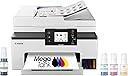
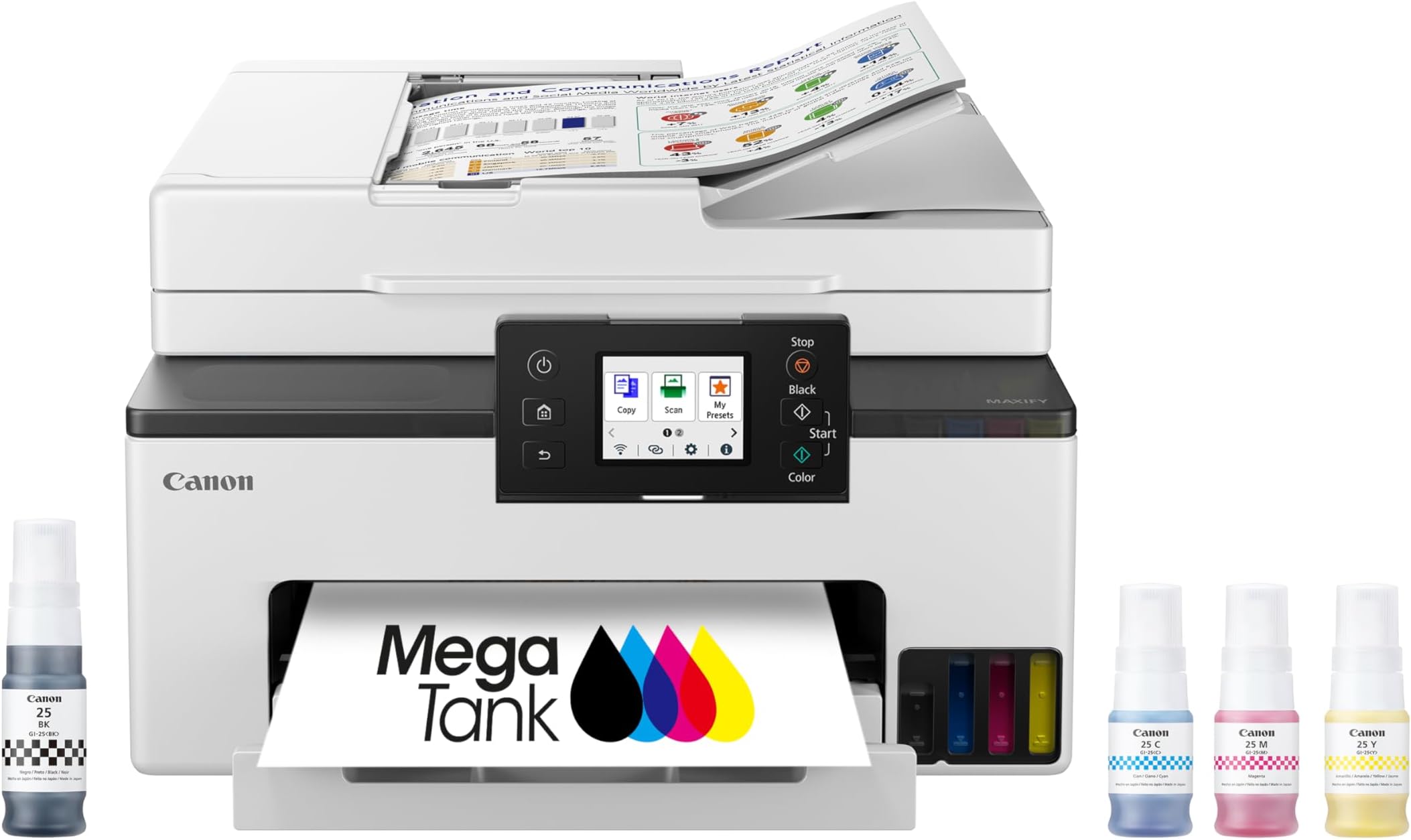
The Canon MegaTank MAXIFY GX2020 is a compact all-in-one inkjet printer designed for home and office professionals who demand high-quality, cost-efficient printing. Featuring a refillable tank system that delivers up to 3,000 black and color pages per ink set, dual-band WiFi for stable wireless connectivity, a 35-sheet automatic document feeder, and a user-friendly 2.7-inch color touchscreen, it combines productivity with convenience. Its automatic duplex printing and versatile media support make it ideal for diverse printing needs, backed by a 3-year warranty for peace of mind.


| ASIN | B0CHLHDHRT |
| Additional Printer Functions | All In One |
| B&W Pages per Minute | 15 |
| Best Sellers Rank | #14,717 in Office Products ( See Top 100 in Office Products ) #148 in Computer Printers |
| Brand | Canon |
| Built-In Media | Documentation & Power Cord, Fax Modular Cable, MAXIFY GX2020, MAXIFY GX2020 Wireless MegaTank Small Office All-in-One Printer, Set Up Ink Bottles (GI-25: BK, C, M, Y) |
| Color | White |
| Color Depth | 24 bpp |
| Color Pages per Minute | 10 |
| Compatible Cartridge | GI-25 Pigment-Based Ink Bottles (Cyan, Magenta, Yellow, Black) |
| Compatible Devices | PC |
| Connectivity Technology | USB, Wi-Fiยฎ (Wireless LAN, 2.4/5 GHz, IIEEE 802.11b/g/n/a/ac), Wired LAN 100BASE-TX / 10BASE-T |
| Control Method | Touch |
| Controller Type | Touch Screen |
| Customer Reviews | 3.9 out of 5 stars 836 Reviews |
| Display Type | LCD |
| Duplex | Automatic |
| Global Trade Identification Number | 00013803359497 |
| Hardware Interface | USB |
| Ink Color | Cyan, Magenta, Yellow, Black |
| Item Dimensions D x W x H | 14.8"D x 15"W x 8.9"H |
| Item Type Name | Inkjet Printer |
| Item Weight | 17.8 pounds |
| Manufacturer | Canon |
| Maximum Copy Resolution Black and White | 1200 x 2400 dpi |
| Maximum Copy Resolution Color | 1200 x 2400 dpi |
| Maximum Copy Speed Black and White | 14 pages_per_minute |
| Maximum Media Size | 8 x 10 inch |
| Maximum Print Resolution Black and White | 1200 x 2400 dpi |
| Maximum Sheet Capacity | 250 |
| Maximum print Resolution Color | Up to 600 x 1200 dpi |
| Model Name | MAXIFY GX2020 |
| Model Number | 6171C002 |
| Model Series | Canon MegaTank MAXIFY |
| Number of Drivers | 1 |
| Number of Trays | 2 |
| Other Special Features of the Product | Auto Document Feeder, Energy Star, Touch Screen |
| Output sheet capacity | 250 |
| Paper Size | Cassette: LTR, A5, B5, A4, 4" x 6", 5" x 7", 7" x 10", 8" x 10" Custom Size: 3.5โ - 8.5โ / Length: 5.0โ x 14.0โ |
| Power Consumption | 22 watts |
| Print media | Envelopes, Glossy photo paper, High-resolution paper, Paper (plain) |
| Printer Connectivity Type | USB, Wi-Fiยฎ (Wireless LAN, 2.4/5 GHz, IIEEE 802.11b/g/n/a/ac), Wired LAN 100BASE-TX / 10BASE-T |
| Printer Output Type | Color |
| Printer Type | Inkjet |
| Printing Technology | Inkjet |
| Resolution | 600 x 1200 dpi |
| Scanner Type | Flatbed |
| Special Feature | Auto Document Feeder , Energy Star, Touch Screen |
| Specific Uses For Product | Multi-Purpose |
| Total Usb Ports | 1 |
| UPC | 013803359503 |
| Unit Count | 1 Count |
| Warranty Description | 3 year |
| Warranty Type | Limited |
| Wattage | 22 watts |
D**E
We love it!
Great picture quality, I really like the ink bottle system, but I can't testify to savings in ink yet. The auto sheet feeder works well; it copies and scans very well. The software set up easily and the networking too. I really like the software interface. I was pleasantly surprised as being used to the crap I get from my old printer. It scans in high res. and prints very nice too. It's a good buy for the money.
K**E
Easy set up.
Very easy set up with on-screen instructions. Very easy to install two printer heads and four bottles of ink - no mess. Simple enough to link phones and computers to this printer with minimal retry or other sna-foos. Print quality is great. I like the document feeder and paper feeder tray. This a relatively quiet machine.
S**E
I don't recommend this printer
I cannot express how much I do not like this printer. And note that, the only reason why it gets one โญ instead of none is because #1, we can't and #2 it does print black and white documents well and at a decent pace. I did research on photo printers and this one came up time and time again as a good quailty printer. For plain documents with no images, sure. But for it to boast that it does great photo printing, it absolutely does not. This printer is a terrible photo or image printer. And yes, I checked the types of paper that are compatible with it. Let me tell you why I dislike it so much... -Images are blurry and dull. (I tried the Canon print app, the Canon create app, just plain printing from the open photo, and from Publisher. The last was the best, but still not great.) - EVERY SINGLE TIME you load the paper, you have to select the paper size. For 8 1/2 X 11, standard size paper, you just have to click that setting each and every time. But outside of that, different names for the sizes without explanation are a hassle to figure out, and then when you're printing you have to select the size that you put in the paper tray. It doesn't seem complicated , extra yes, but complicated you wouldn't think so... until for instance you put 5x7 envelope paper in the tray and you choose the setting envelope (not D10), and then when you try to print on said envelope it won't print. Why?! why!? If the printer thinks that what you're printing isn't the same as what you put in the tray based on the settings, it won't print. So even though I put the envelopes in the tray, and I set it to envelopes, and then I tried to print envelopes, they still wouldn't print regardless of what app I used. I had this with several things I tried to print that we're not envelopes, and for the record, there are only two envelope settings. I tried printing on eight and a half by 11 cardstock and it wouldn't print because I didn't select the right option (but note, weight options aren't clear or specified), but heavyweight paper and cardstock weren't options on the printer so I couldn't get them to print and you can't choose plain paper for everything because that won't print either. You can't use plain paper and try to print photos because that won't print! It makes no sense! -Most of the paper settings aren't American standard, several of them are Japanese specific paper settings and sizes, that even though I looked them up, I still couldn't figure out how to make the printer print. I tried the Canon FAQs and help site, and it was not as helpful as they thought it would be. There were a few okay features: - The starter ink is a lot. More than an entire fill for each color. -It does print regular B&W documents well and pretty quickly. -After you connect the first device for wireless printing, it's really easy to connect other devices. Those were worth the 1 star. I would never recommend this printer to anyone. I don't even want to keep it myself. Even though I got a deal, it's not a deal if it doesn't do what you need it to.
W**N
A true review
Iโve been using the Canon MegaTank MAXIFY GX2020 for a few months now, and Iโm genuinely impressed with how well it performs across the board. Setup was straightforward it walked me through each step right on the touchscreen, and within minutes, I had it connected to Wi-Fi and ready to print from my laptop and phone. The build quality feels solid, and the compact design fits nicely on my desk without taking up too much space. The print quality is excellent crisp text, deep blacks, and vibrant colors, whether Iโm printing business documents, marketing materials, or the occasional photo. The speed is surprisingly fast for an inkjet, and it handles double-sided printing automatically, which saves both time and paper. What really makes this printer stand out is the MegaTank system. The refillable ink tanks are a game-changer. Instead of constantly buying expensive cartridges, I just top off the tanks when needed and after hundreds of pages, Iโve barely made a dent in the ink levels. Itโs economical, eco-friendly, and ideal for anyone who prints frequently. The scanner and copier functions are equally smooth. The automatic document feeder is convenient for multi-page scans, and the quality remains sharp. Iโve used the Canon PRINT app for remote printing, and itโs intuitive I can print straight from my phone, even when Iโm not home. Overall, this printer delivers professional-grade performance for both home and small office use. Between the low cost per page, impressive quality, and reliable wireless features, the Canon MAXIFY GX2020 easily earns a solid five stars from me. Itโs one of those devices that just works efficiently, quietly, and consistently every time. Highly recommended for anyone tired of overpriced cartridges or unreliable printers.
A**R
Replacement Ink is reasonably priced
Fairly easy setup (up to a point.) The ink bottles were sturdy with screw on caps. The ink bottles have an unusual opening, that fits into a slot in the ink housing, which ensures no leaks. It also means that you have to be sure to purchase replacement ink that comes in a bottle that will fit this printer. The ink was gravity fed and filled the reservoir quickly. I like that there is a front window that shows the ink level in the reservoir. Instructions on backlit screen were clear and easy to follow - until it came time to connect to wifi, where it said to follow instructions on pc or mobile device. In order to setup wifi on this printer, you have to first download an app onto your device (which I was not pleased with.). The app requests to โshareโ data for quality control. I declined everything not required. They lost a star because of this feature. The front loading paper tray was easy to open and closed smoothly. The paper guides adjusted easily. Print quality is very good. Loved the ink reservoir windows, as well as the paper tray window. The backlit control screen is adjustable and a nice feature. Since this is a new printer, I cannot speak to ink consumption yet. But given the amount of ink, the bottles held, compared to what an ink cartridge would hold, I expect it to last a very long time. I priced out replacement ink before buying. A set of the three colors plus black from Canon ran about $50 in summer 2026. A set of generic ink, same as before, ran $30. Kudos to Cannon for not making the ink nozzles proprietary.
M**A
A Good buy
Great printer so far! We replaced a Brother with this one. I must say, I like the controls better. It's easy to make a copy without going through several steps. The quality of the printing is very good.
J**.
Great printer, low cost of operation.
I just simply love this printer. We use it for a lot of office work, no photos. Easy setup and has been reliable, and great for printing on #10 envelopes.
E**.
No user manual
The Canon MegaTank MAXIFY GX2020 is a nice-looking printer, and it operates quietly. Print quality for standard documents is good, but the color output looks dull compared to what Iโm used to from HP printers . Print speed is also noticeably slower than my previous HP model, not as fast as the HP printer I am replacing.. Where this printer really lost stars for me was the setup experience. There were no setup instructions included โ not even a basic manual โ and the printerโs onโscreen prompts kept telling me to โrefer to the manual,โ which simply wasnโt provided . I had to rely on YouTube and online guides to figure out how to connect it to WiโFi and get it running. If it was not for the internet and YouTube, I probably would not have gotten my printer up and running.. The only cables included were the power cord and a fax/telephone cord, so WiโFi was the only way to connect it to my computer. During registration / warranty, I also ran into issues uploading my receipt โ Canonโs website kept rejecting the file as โtoo large,โ even though it was only 4 KB and well under the 5 MB limit. At one point, I honestly considered returning it and going back to HP because the setup process was so frustrating . Overall, itโs a quiet, attractive printer with decent output, but the lack of instructions and setup difficulties make it a mixed experience.
N**Y
It works
Setup was easy. So far so good
E**Y
Great and easy to use
Amazing, love that you can physically see the liquid ink levels
P**H
Decent Printer.
The printer works great, with print quality, especially photo printing, not the best.
J**L
IT WORKS VERY WELL, great price
This printer is packed well! Pulling the printer out of the box is smooth and easy. Inside is the manual, couple with other items, the cord, the telephone connection and ground wire. The setup is so easy by following the direction on the printer screen. The setup direction was user friendly including the wifi setup. One feature I was very impressed with, while the printer is off. You can send a printing request, it turns itself on and prints the requested info.
D**R
Nice printer !
The printer does his job where good .
Trustpilot
1 week ago
5 days ago