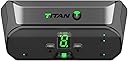
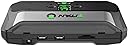
🎯 Dominate every platform with one device—game smarter, not harder!
The Titan Two is a cutting-edge, fully programmable gaming adapter that unifies your favorite controllers and peripherals across PlayStation, Xbox, Nintendo Switch, PC, and Android. Powered by a 66MHz 32-bit RISC micro-controller and USB 2.0 high-speed ports, it delivers zero-latency performance and supports advanced scripting for custom combos and macros. With Bluetooth and USB wireless support, plus compatibility with keyboards, mice, fight-sticks, and more, Titan Two future-proofs your gaming setup with unmatched versatility and precision.
| ASIN | B078J2HQ9D |
| Best Sellers Rank | #64,765 in Video Games ( See Top 100 in Video Games ) #2,629 in PlayStation 3 Games, Consoles & Accessories #3,394 in Xbox 360 Games, Consoles & Accessories #5,227 in Xbox One Games, Consoles & Accessories |
| Brand | Collective Minds |
| Color | black |
| Compatible Devices | Gaming Console, Computer, Keyboard, Mouse, Fight-Stick, Joystick |
| Connector Type | Micro USB |
| Customer Reviews | 4.0 out of 5 stars 546 Reviews |
| Item Dimensions | 4.33 x 9.84 x 1.38 inches |
| Item Weight | 5.6 ounces |
| Item dimensions L x W x H | 4.33 x 9.84 x 1.38 inches |
| Manufacturer | TITAN |
| Mfr Part Number | CT-TITAN2 |
| Model Number | CT-TITAN2 |
| Number of Items | 1 |
| Number of Ports | 4 |
| Package Quantity | 1 |
| Power Plug Type | No Plug |
| Smart Home Compatibility | Not Smart Home Compatible |
| Unit Count | 1.0 Count |
P**E
Works great after you figure it out—read this review
Great product, works exactly as advertised. I use my titan two to play with a DS4 controller on my PC. While setting it up, I couldn’t find any guidance online to specifically use it with a DS4 on PC. However, I searches “titan two setup instructions” and found a nice guide on consoletuner.com (the manufacturer’s website). It gave me almost all the information I needed. The one part I got stuck on, however, was configuring the input/output types and the polling rate in the GTuner software. I was trying to set them on the “Device Monitor” tab. This resulted in my Titan giving me an “AU” (Authenticator) error. It turned out I actually had to set those parameters on the “Device Configuration” tab (found in the lower right of the screen). The consoletuner instructions had information on what values to use for my application. There is a large community of people that use the titan two. I found tons of scripts for free in the Gtuner app. I primarily play Warzone, and I found plenty of scripts/youtube videos to help set them up. Once I figured out the initial setup, the rest was easy. Depending on how complex you want to get with your scripts, you can spend hours or minutes tuning it. One downside—unless you buy the expansion pack, you can only use 3 scripts. I really wish the expansion pack was included, and I wish these were stocked better so the price wasn’t so high above msrp. One last thing I would like to add is, that I found a lot of reviews saying this product was a scam. I was very skeptical and reluctant to buy the titan two because of this. Even after searching the internet for reviews and info, it still seemed sketchy. Eventually I found a few articles on reddit and some other forums that described bad blood between the makers of Cronus Max and titan two. Supposedly the owners of the two designs were in business together, and the Cronus guy kicked the titan guy out of the company and stole his designs. The titan guy, who did all the technical work, started his own company making titan ones. I don’t know if its true, but I think maybe there’s some beef between the companies causing some fake bad reviews to go around...or maybe some people couldn’t find the right instructions to figure the product out. I personally think the information I included in this review should be enough to help anyone set up their titan.
A**E
Bought it to enable game streaming on any console with Parsec + Elgato HD60 S
I use this product for a pretty niche purpose. There exists software that allows you to stream games with minimal latency called Parsec. Using that software paired with a capture card that also has minimal latency, such as the Elgato HD60 S, it allows me to stream my game console anywhere in the world. This even allows me to let someone be player 2 on a non-online game. It also lets me play a game with a friend, even if they don't have said console. They just need any desktop/laptop/smartphone/Raspberry Pi and a controller. It works great for this purpose. The only downside is the current software doesn't support multiple players. Only one remote player at a time, so either you or your friend. There are workarounds you can do, but it involves multiple computers, and multiplies the bandwidth used.
"**"
Plagued by intermittent disconnects
Had to buy three devices before finding one without constant disconnects and authentication issues. To be fair, it is easy to program with free drag and drop scripts. Performs great when it is working, but expect disconnects every ten minutes on PS4 for most units and random disconnects on XB1 if you get a lemon. Also, many of them have the painted backwards the arrows for cycling through scripts.
D**T
Best Device on the market, period.
This is the true all-in-one Hardcore Gamers device.. I have owned the xim4 and the xim4 apex, the venom x and the Brooks sniper the cronusmax and Titan one... Simply put this beats them all, run complicated macros at the push of a button.. use any controller with any system.. use a keyboard and or mouse (best set up yet Sony move controller + 19 button mouse(amazing!)) My k:d numbers have improved 300%+ the mouse movement can be finely tuned or just use someone else's script... It's response rate is the best on the market (as in sub 1ms (read zero lag/instant response) not the 1ms to 8ms the apex has) it's as close to 1:1 mouse ratio as you can get on console.. better yet once tuned to the individual user it feels natural.. only cons are software can be intimidating.. but great news the support is amazing... So much to the designer actually personality helped me.. I mean where else can you get that kind of attention... The pros. Best device on the market. Costs less then it's closest rival.. (how I don't know as the technical specifications on this are better) Does macros (rapid fire/jitter/jumpshot/auto reload) Can reassign buttons however you like I recommend it to everyone Pubg Bf1 Cod ESOs complex sequences Warframe World of tanks Halo Rainbow 6 I mean.. any game.. amazing. The cons: At first the software can be intimidating Overview: Best of the best.
N**7
This is worth trying even w/out experience
Let me start by saying you don't need to be a programmer. I got a basic rapid fire and set of controls only using my mouse and a few minutes of my time. I like the device. Being an electronics hobbyist playing with avrs, mcu, raspberry pi's, and having programmed in a handful of languages, this device is very flexible and easy. What I don't like is how much you're paying for something that feels much less complete to say a $35 single board computer *cough* a pi *cough*. However it has a lot of development being done even as I get this review out. User friendliness is on their priority and I expect things to be easier in the future. Lets address a few things: First off: People who reviewed saying programming knowledge is required. This isn't true in anyway. You at most just need to read what other people's work may be. Many scripts are already written and it's as simple as a drag and drop to get basic things going. Anything custom and particular that is very abstract is where you will wanna learn to code. Second: Getting this thing working. This is very quick and easy so long as you make sure everything is up to date first before you begin doing anything. After that it's plug and play for nearly any scenario. This device is very open minded and so it the software. It's flexible to new users and users who wanna make everything custom. If your a tinker, this will be a great addition for your gaming sessions. This lets you dive a lot deeper into what you want to do.
T**Y
Awesome!
As long as you are not technologically illiterate this thing is awesome. It takes some time to get set up, but was totally worth it. Personally, I use it for controller function scripts with a wired controller, so I can't speak to other features. It is much more functional than a modded controller or mod pack, and will likely last much longer. Lots of scripts available for many of todays popular shooters, as well as some universal type scripts available too.
S**N
Great hardware but lacking elsewhere
I bought the Titan Two over the other options because the hardware and features are superior but I am disappointed in the "game packs" and scripts that are available compared to the competition. I ended up also buying the cronusmax plus and to be honest that's the one I'm actually using because it has a better selection of packs for games even though their hardware is not as nice, it can't connect my Xbox one controller wireless, and their software is worse. All of those features of the Titan Two are really nice but they are useless if there isn't a game pack or script for what you want to play. If you want a device that will have packs/scripts available for more than the latest FPS games then you may want to look elsewhere.
M**X
Great for running scripts on your condole of choice!
Incredible device for running scripts on your console of choice. I use mine on Xbox and PS4. I also use a Xim Apex for mouse movement because as wonderful as the Titan Two is at running scripts, it is not as user friendly for mouse movements. I would consider both devices as must have for people who like to run scripts, and gamers who can't play with controllers. If you run the Titan Two with a Xim product you may run into power issues. Both devices can be powered, so if you have issues try to power each unit to solve your power problems. I also initially had issues with my Titan Two not working correctly with an Xbox One S controller. I had to switch to an Xbox One X controller, and then it worked perfectly. If you run into problems, please post a message on the support forums and someone will help you get your issue solved!
A**2
LA NUOVA CRONUSMAX
Dispositivo di ottima qualità preso in sostituzione alla cronusmax plus che ormai ha un hardware datato. Con questo dispositivo ora finalmente funziona l’audio attraverso il jack del controller e cosa ancora più importante funziona con i nuovi joystick come il razer raiju ultimate o i nuovi nacon che sulla cronusmax non verranno mai aggiunti visto che gli sviluppatori hanno detto che non c’e Più memoria per renderli compatibili. Infine aggiungo che non serve alcun hub usb per usare ad esempio l’elite controller Xbox su Ps4 ( chi ha usato cronusmax sa di che parlo )
G**T
Bueno para Xbox series s
Sirvió para usar un control para ps4 marca Scuf versión "Impact" en un Xbox Series S. El único detalle es que es solo por cable, cuesta 70 dls mas agregarle el bluetooth. Y no admitió el headset de ps4 por usb, solo por auxiliar por el control. En lo general muy bueno, de repente el sonido no llega a los audífonos y hay que conectar y desconectar todo de nuevo. Igual el control de repente se desconecta unos segundos, pero eso pasa cada nunca. En lo general muy bueno.
B**Y
PS4のゲームをPC用コントローラーで動かす
PS4電車でGO!!を三鶯重工のPC用マスターコントローラーで動かす為のコンバーターとして導入しました。 接続もインストール作業もアッサリ終わるので、すぐに遊ぶ事ができます。 インプットAにマスコン、インプットBにPS4純正コントローラーを、アウトプットをPS4本体にそれぞれ接続します。 操作はラグも無く安定しているので、あっさり難易度レジェンドの1周ミッションがクリアできてしまうほど、操作感はダイレクトでした。
Z**D
ゲーミングコンバーターXIMAPEXと組み合わせれば最強
APEX LEGENDSのCS版、PC版で使ってます エイムアシスト使いながらマウスで狙えるので重宝しています アンチリコイルは完璧に行えます キーボード・マウスで操作がしたいならXIMAPEXも一緒に買いましょう 色々と設定が必要ですが「TITANTWO XIMAPEX」と検索すれば 設定は公開されていると思うので簡単に行なえます
C**N
Titan two
Arrivato nei tempi previsti,ottima la confezione perfetto e funzionante il tiran
Trustpilot
2 months ago
4 days ago