


Buy anything from 5,000+ international stores. One checkout price. No surprise fees. Join 2M+ shoppers on Desertcart.
Desertcart purchases this item on your behalf and handles shipping, customs, and support to SINGAPORE.
🚀 Elevate your workflow—scan smarter, faster, and cleaner with Xerox DocuMate 6440!
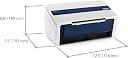
The Xerox DocuMate 6440 is a high-speed duplex document scanner featuring an 80-page automatic feeder and 40 ppm scanning speed at 300 dpi. It supports versatile media types including plastic cards and photos, and instantly converts scans into searchable PDFs using advanced OCR technology. Compatible with both PC and Mac via USB, it’s designed for professional environments demanding efficient, reliable document digitization.





| ASIN | B01HJZ1QT2 |
| Best Sellers Rank | #349,118 in Office Products ( See Top 100 in Office Products ) #403 in Document Scanners |
| Brand | Xerox |
| Connection Type | USB |
| Connectivity Technology | USB |
| Customer Reviews | 3.8 out of 5 stars 55 Reviews |
| Global Trade Identification Number | 00785414118120 |
| Item Type Name | Scanner |
| Item Weight | 13.25 Pounds |
| Manufacturer | Visioneer |
| Media Type | ID Card, Paper, Photo, Receipt |
| Minimum System Requirements | Windows 7 |
| Model Name | Xerox DocuMate 6440 Duplex Scanner with Document Feeder |
| Resolution | 300 |
| Scanner Type | Document, ID Card |
| Standard Sheet Capacity | 80 |
| UPC | 785414118120 |
| Unit Count | 1.0 Count |
| Warranty Description | Limited Manufacturer Warranty |
D**E
LOVE THIS SCANNER
This is my third purchase of this scanner to be used in my law office. We have used a Xerox printer, scanner, fax combination for over 10 years. Love the ease of the Xerox brand. But with COVID forcing the court systems and attorneys to use digital filing, the need for a printer is becoming less and less. I bought the first desk top scanner for my real estate practice as I am the Master Commissioner for our court system, the second desk top scanner for another general secretary, and finally this unit for myself so that I do not have to run to their offices everytime I want to scan my notes from court. The simplex and duplex buttons make scanning and saving to the cloud based date server a breeze. Very fast unit for scanner and saving PDFs. I will be purchasing a 4th unit for home office just as soon as the equipment budget will allow.
V**D
Not working after a little over a month...
i have only had this for a month and half and stopped working. I have used this scanner a few time and it will not pick up the paper to scan. Now I'm stuck with a 500.00 paper weight.
K**N
Powerful, Crisp, and Efficient
When it comes to scanners, over the years I have owned them all: HP, Brother, Epson and more! This is my second purchase of the Xerox 6440 as I want my associate to be as efficient as me! The 6440 interface is fast and very effective. The speed is great and maintains very crisp and clear quality... essentially the same as the original, whether on simplex or duplex. I had one tech issue (my brain) which was politely solved with a quick call to the Support Team. I can't say enough great things about this solid product.
C**E
Nice scanner, Weak support.
This device is the very last thing that is requiring me to still run a Windoze computer.
C**P
Great scanner and SOFTWARE
The quality of the scanner is great, and I use it to process daily vendor invoices (about 30-50 invoices a day). The ABBYY PDF software (come with the scanner for FREE) is super helpful to modify and add the comment. Delete the extra pages and add or merge from the different files.
G**O
Get's the clutter out of your office!
We were buried under mountains of shipping receipts, tracking and other day to day papers and we got the Documate 6440 to help go digital quickly and we couldn't be happier. The OCR and Visioneer software makes cataloging and finding things a breeze which is so helpful. Large scanning capacity and small footprint makes this a great addition to our company. Good product.
N**K
No Mac 10.15 Cortana Support as of Nov 2019
I purchased this scanner specifically because I have a MacBook Pro and the advertisement said this scanner works with Mac. After installing the drivers and software from the Xerox website nothing worked. The software freezes up. Called Xerox support and was rushed by the tech support. He seemed to not have time to listen to my issues but after a few attempts to explain my issues he finally told me that the newest Mac Catalina is not supported yet. He told me that if I uninstalled the Visioneer software that the scanner would work through Mac's native scanner app. Well...I was unable to uninstall the software. I tried dragging it to the trash bin and it would not go. I looked in the Applications folder and the software is not there. No telling where it installed to. The app shortcut was on the launcher, but not in the applications. No way to uninstall so no way to use the Mac native scanner app. If you are running Mac 10.15 I suggest you not install Visioneer software...just use Mac's native scanner app. I have no idea if it works, but tech support said it would. I wound up installing Parallels to make a virtual machine to install windows so I could install the windows software that comes with the scanner. That failed also. But at least I was able to uninstall the software on the windows installation and then use windows drivers and Adobe Acrobat to run scans. The scanner is pretty fast and makes great images with the exception of the edges. I get black edges on the bottom and right side of every scan. Too bad it doesn't have a sort of calibration setting to correct that. I have to crop every page I scan in order to get rid of those edges. Tech support told me they would email me when they figure out the issues with Mac OS Catalina. I asked when or if there was an estimate of when that would happen and he laughed at me. No problem if you can afford a license for virtual machine and license for windows, on top of the 3 grand you spend on a Mac and $500 for the scanner. It's only money...we can always make more, right? Overall though...if you are using windows computer this is a great little scanner.
L**R
Constant error message - multiple pages
11/15/24 set up today & started scanning frequent errors to retry as multiple pages fed through this happened approx 10 times in a 50 page scan
S**A
La mejor inversión para ahorrar tiempo
Te ahorra muchísimo tiempo y me quedé impresionada de la velocidad de escaneo. También me gusta que automáticamente escanea a doble cara o a una cara!
D**Z
One Star
Not compatible with Mac... hey guys we are in 2 0 1 7... not 1987
Trustpilot
1 month ago
3 weeks ago