Desertcart purchases this item on your behalf and handles shipping, customs, and support to SINGAPORE.
โจ๏ธ Elevate your desk game with silent power and vibrant style!
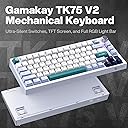
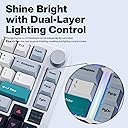
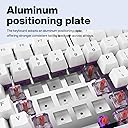
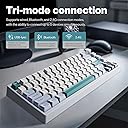
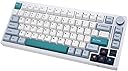
The GK GAMAKAY TK75 V2 is a premium 75% silent mechanical keyboard featuring versatile Bluetooth 5.0, 2.4GHz wireless, and USB-C wired connectivity. Equipped with II Pre-lub GamaKay Pegasus switches, it offers a quiet yet tactile typing experience ideal for professionals and gamers alike. Its standout 0.85-inch TFT screen provides real-time updates and customizable animations, while dual-layer RGB lighting lets you tailor your setupโs ambiance. Built with an aluminum plate and durable PBT keycaps, it balances portability with robust performance, supported by a long-lasting 4000mAh battery for uninterrupted productivity.


| ASIN | B0BRPRZJ1N |
| Additional Features | Customizable Lighting, Hot-Swappable, II Pre-lub GamaKay V2 Switch, Shine Bright with Dual-Layer Lighting Control, TFT Screen |
| Antenna Location | Business, Everyday Use, Gaming, Personal, Student |
| Best Sellers Rank | #9,855 in Video Games ( See Top 100 in Video Games ) #58 in Mac Gaming Keyboards #709 in PC Gaming Keyboards |
| Brand | GK GAMAKAY |
| Built-In Media | USB Cable |
| Button Quantity | 84 |
| Color | GamaKay Pegasus Switch |
| Compatible Amazon Tablet Models | Amazon Fire HD 10 11th Generation, Amazon Fire HD 10 13th Generation, Amazon Fire HD 10 5th Generation, Amazon Fire HD 10 7th Generation, Amazon Fire HD 10 9th Generation, Amazon Fire HD 10 Kids 11th Generation, Amazon Fire HD 10 Kids 13th Generation, Amazon Fire HD 10 Kids 7th Generation, Amazon Fire HD 10 Kids 9th Generation, Amazon Fire HD 10 Kids Pro 11th Generation, Amazon Fire HD 10 Kids Proโฆ |
| Compatible Devices | Laptop, PC |
| Compatible Operating System Family | MacOS, Windows |
| Compatible Tablet Computer Models | AAUB P30 |
| Connectivity Technology | Bluetooth, USB-C |
| Customer Reviews | 4.2 out of 5 stars 148 Reviews |
| Enclosure Material | Polybutylene Terephthalate |
| Hand Orientation | Ambidextrous |
| Item Dimensions L x W x H | 12.95"L x 5.68"W x 1.1"H |
| Item Highlight | Hot Swap RGB Bluetooth 5.0/2.4GHz Wireless/USB-C Wired PBT Cherry Profile Keycaps Gaming Keyboard (GamaKay Pegasus Switch) |
| Keyboard Backlighting Color Support | RGB |
| Keyboard Description | Mechanical |
| Keyboard Layout | QWERTY |
| Keyboard Plate Material | Aluminum |
| Manufacturer | GK GAMAKAY |
| Mfr Part Number | TK75 |
| Model Name | TK75 V2 |
| Model Number | TK75 |
| Number of Batteries Required | 1 |
| Number of Items | 1 |
| Number of Keys | 81 |
| Number of Packs | 1 |
| Number of Sections | 4 |
| Power Source | Battery Powered |
| Recommended Uses For Product | Business, Everyday Use, Gaming, Personal, Student |
| Series Number | 2 |
| Special Feature | Customizable Lighting, Hot-Swappable, II Pre-lub GamaKay V2 Switch, Shine Bright with Dual-Layer Lighting Control, TFT Screen Special Feature Customizable Lighting, Hot-Swappable, II Pre-lub GamaKay V2 Switch, Shine Bright with Dual-Layer Lighting Control, TFT Screen See more |
| Style Name | Contemporary |
| Switch Type | Tactile |
| Theme | gaming |
| Unit Count | 1 Count |
| Warranty Description | 1 |
S**Z
9.5 out of 10 (If you are having issues with battery/connection, please read)
Tldr; Bad manual, software is laggy, but overall great value. good build quality. Silent keys. Feel: 10/10 Sound: 10/10 (I got the Pegasus silent keys, absolute dream) Size: 10/10 Macros: 10/10 (takes a bit of messing around with) User Manual: 6/10 (Needs work) Why I bought this keyboard: I want to preface this with that I am not a "keyboard head". I don't know what is "thocciest", but I imagine this would be "creamy". I don't want to spend 4 hours lubing my switches. I just wanted a keyboard that felt good, was somewhat portable (hence 75%, though would have prefered 60%, but it was hard to find something that came prebuilt with silent keys), and quiet. I plan to take this to work, as now we are required to go back to the office soon, and you have to use a flexible/unassigned desk, it is hit or miss that you get a keyboard that is not grimy. Also I have gotten used to my Corsair keyboard feel, so the low profile ones are a bit less comfortable now. I received this keyboard today. Let me tell you, it is amazing how quiet it is. My mouse click is 3 times as loud. The keyboard feels great! I wasn't too thrilled about the caps, especially the lighter color, but they are growing on me. The software is ok at best. It is slow, and take some time to get used to, but once you figure out the macros, you can modify it pretty easy. Love macros on my old corsair. If you are into the gamer LED look, you will be pleased. It has a good range of options and customizations directly controllable on the keyboard. (NOTE: To change the mode, press FN+\, the user manual isnt too clear) I prefer not to attract attention and feel it looks a bit tacky, so I preferer white backlight or no lights. Its easy to change light settings directly with the keyboard function keys. I don't use the HOME, PAGE UP, or PAGE DOWN Keys so these are what I programmed my Macros as. I also changed to volume knob press function to pause/play music as the default is mute/unmute. Macros DO require the software though. I had issues when trying to connect Bluetooth. I connected fine the first time, however my battery seemed to hold no charge. It displayed 1% on the windows Bluetooth setting app, and would disconnect if I removed the power cord. And when I tried to connect it to another device it seemed to fail due to batter not lasting long enough to register connection. I contacted their customer support but had no answer, so I planned to return. BUT THERE IS HOPE. . . I was able to fix this issue! If you are having similar issues try these steps. I am not sure which steps solved this. 1. The switch on the back of the keyboard should be pushed to the far right side if set down (Closest to the mouse if you are right handed) 2. Reset the keyboard. FN+ESC for a couple second. 3. Hold the FN+1/2/3 for a 3-5 seconds. It will slow pulse red on the middle right light, and when released it should pulse faster. 4. Connect via TK75 5.0 (TK75 3.0 will not show you your batter life) 5. If you are having issues with 5.0 vs 3.0 unpair from your computer and repeat the steps above. Hope that helps! I was about to return this and write a terrible review, but I was able to fix the issue. Battery now shows 100% and I wrote this review with THIS keyboard! I will update if any other issues come up, but as of right now I love this keyboard. If you like building keyboards then maybe its not for you, but again I am not about wasting time lubing keys for 4 hours.
E**D
Amazing keyboard for an amazing price
Gamakay tk75v2 with pegasus v2 switches Pros : * Very silent * Good tactile response and doesn't feel too heavy for long typing sessions * Good compatibility with mac and windows * Initially I thought the tft screen was just a gimmick and would be useless, but after using it, I feel this makes the keyboard complete and the display is very sharp, bright and responsive * Good build quality [ even though the body is made out of plastic it feels very premium, better than aluminum keyboards at the same price ] * Good and stable connectivity * The keycaps are dye sub pbt, they have good thickness and don't feel cheap Cons : Haven't found any yet, will update if I find something Who should consider this keyboard ? * Office users * Roommates who ask you to be quiet * People who use macos, this is better than keychron k2 [ functionality, build quality and performance ], Not having function row keys when using macos [ like 67% keyboard ] is a pain as there will some struggle with the number row keys and function row keys * In general if you are someone who prefers silence over a thocky or a rainy keyboard, although it sounds like a membrane keyboard, the typing experience feels like a mechanical keyboard
S**A
High-Performance and Stylish: GK GAMAKAY TK75 V2 Silent Mechanical Keyboard
The GK GAMAKAY TK75 V2 Silent Mechanical Keyboard is an outstanding choice for gamers and typists alike. The 75% layout provides a compact design without sacrificing functionality, and the GamaKay Pegasus switches offer a smooth, silent typing experience. The inclusion of a TFT screen is a unique touch, providing quick access to settings and customization, while the hot-swappable keys give you the flexibility to try different switches. The keyboard offers multiple connection options, including Bluetooth 5.0, 2.4GHz wireless, and USB-C wired, making it incredibly versatile. However, the keycaps, though PBT and durable, might feel a bit slippery for some users, especially during long typing sessions. Additionally, the Bluetooth connection can sometimes experience minor lag when switching between devices. Despite these drawbacks, it remains a feature-packed and stylish mechanical keyboard that excels in both performance and aesthetics.
L**S
Very good!
It is an extremely lovely equipment to have and use. I'm an aspiring programmer, game developer, and novel writer. It's not far fetch for me to be up past midnight typing away at my various hobbies especially after a long day at my non computer job. It allows peace of mind for myself and others since its very quiet. The fan I use at the lowest setting during summer is much louder than my fast pace typing. I grew quite fond of this smaller sized keyboard.
A**L
Be careful
Its a good keyboard but its faulty, I only had my keyboard for a month and some change, my bluetooth doesn't connect anymore and is not responsive, wouldn't buy again
M**.
More quiet!
I solely bought this keyboard cause I was banking on it being silent. And for the most part, it's silent when you're very light with it. With all my force on the keys it goes to lower than normal key clicking. Def an audible difference from a normal keyboard with Pegasus keys. With noise canceling headphones on while I'm gaming it's no noise. The keyboard glows, but I switched a keycap to see if it does glow for see thru letter keys and it does not unfortunately (I was just glad it was rbg and quiet) The keys feel AMAZING prob the only keyboard I've wanted to touch constantly. I did change some hotkeys on my keyboard with a different software cause my windows button was bugging out at first (didn't know fn plus windows can lock the windows button while I was messing with lights, so I feel dumb contacting customer support for that, they never replied). Bluetooth/the port thing works great for 2 ish days before it dies without warning, charges via plugging it into your pc anyway so might as well leave it plugged in. Overall great keyboard, good investment. It taught me a lot about switches, keycaps, changing those parts and etc with the tiny parts and tool they give you. For the vague symbol keys on the keyboard, they do give you replacements with the actual command keys so you can swap most of them out which is nice if you're worried about those!
A**R
Excellent, silent or extremely quiet keyboard.
The mini size is great (takes up way less desk space). The keys themselves are almost like a soft silicone, so very nice feel-wise. The letters themselves DO NOT light up within the keys themselves (but you probably shouldn't be typing in complete darkness anyway for your eyes). There's three different types of bluetooth connection, in addition to the USB cable and USB wireless connection options! It's extremely sturdy, probably good for traveling with it if you have a case?! I'm using it on the USB wireless 2.4Ghz option as my computer is dual boot for windows and ubuntu. It seems like the battery lasts in here a pretty long time, so shouldn't have issues there I assume. All around, I'm very happy with this keyboard, no more clickity clack from my other mechanical keyboard. This one is excellent (although I do wish there was just an all black version maybe with green, oh well)!
T**R
NIce Budget Keyboard
I got this for work since I have a use case that is much better with having a function key row. And, as the headline reads, this is a nice budget keyboard for getting into mechanical keyboards. I like the default programmer themed keycaps. Although I had to use the more boring keycaps for the DEL, HOME, PGUP, and PGDN keys. Also, I did not like the pegasus switches. I swapped them out with the griffin switches and it is all good. The stabilizers on this keyboard do not seem to rattle or anything. And, this is stock. The knob has a nice click to it when pressed. But everything is not all sunshines and rainbows. For whatever reason the color selection did not work for me without installing the software. Note it was only the LED color change key combo all the other worked like a charm. Since I had to install the software drivers for the keyboard I tried the different lighting schemes. The music (EDM) scheme was not very good. I could not tell if it was reacting to the music or not. Then when I switched to my bluetooth headphones from the laptop speakers it stopped working altogether. There is a little bit of a QC issue with the feet of my board. So, there is a wobble if I press on the top-right or bottom-left of the keyboard. Overall this is a very nice keyboard. If you are going for a nice silent build it delivers with either of the griffins or the pegasus switches.
K**H
Keyboard bluetooth not in use
Not charging
E**L
Amore a prima vista
Perfetta per me. Spero solo di non farla cadere. Se la rompo mi picchio da solo.
A**N
best keyboard i have ever tried
i love the tactile feel of the keys and they don't really feel mushy or anything and THE SOUND (or lack thereof) !!! i have heard the switches in videos and reviews on youtube and they honestly don't do it justice since they boost the noise of it all and make it seem louder than it does in real life. but it's almost dead silent when using and it feels really good to type and game on as well I'm honestly making this review longer than it should be just out of the sheer enjoyment I'm getting from typing on this thing. connectivity is great, no input delay noticed at all, and the build quality feels solid. the one thing i would say is a con (which is down to personal preference really) is the green/arrow keys which i'm not really a fan of since they ruin the white/grey clean aesthetic of it all but that should be easily replaceable when i get newer key caps later the software isn't the worst, but it could be made better still as the screen controls don't offer alot of customization in my opinion but that's fine if you just wanna set up a gif or something like i did
J**A
its great but it has its flaws
not the best keyboard but most people will see it one of the best keyboard every build, its heavy . Sturdy for this unit a silent mechanical keyboard is the best , typing experience is very good , size is minimalist , value for money and functionality the only down side is firmware update and functionality of wireless to wired
R**.
Pegasus switch
Sehr leise. Top
Trustpilot
5 days ago
1 month ago