Buy anything from 5,000+ international stores. One checkout price. No surprise fees. Join 2M+ shoppers on Desertcart.
Desertcart purchases this item on your behalf and handles shipping, customs, and support to SINGAPORE.
๐ Clone smarter, upgrade faster โ never miss a byte!
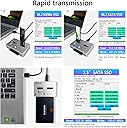
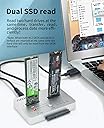
The AOKO M.2 Duplicator Docking Station is a professional-grade, bidirectional offline cloner supporting M.2 NVMe, M.2 SATA, and 2.5"/3.5" SATA SSD/HDD drives. Featuring USB 3.1 Gen2 speeds, an all-aluminum heat-dissipating chassis, and tool-free operation, it empowers tech-savvy professionals to effortlessly back up, upgrade, or recover data with versatile cloning modesโall without connecting to a PC.


| ASIN | B0B41NDY3H |
| Best Sellers Rank | 59,638 in Computers & Accessories ( See Top 100 in Computers & Accessories ) 166 in Hard Drive Docking Stations |
| Box Contents | NO |
| Brand Name | AOKO |
| Colour | NVMe & SATA SSD/HDD Mutual Clone |
| Compatible Devices | M.2 NVMe, SATA, 2.5" 3.5" SATA |
| Customer Reviews | 4.0 4.0 out of 5 stars (63) |
| Hardware Interface | USB Type C |
| Input Voltage | 12 Volts (DC) |
| Item Weight | 0.32 Kilograms |
| Manufacturer | AOKO |
| Manufacturer Part Number | M.2 Duplicator +SATA Adapter |
| Model Number | M.2 Duplicator +SATA Adapter |
| Number of Ports | 1 |
| Total USB Ports | 1 |
| UPC | 752844230609 |
S**N
Sadly not happy
Been trying two day get clone sadly donโt work for me.
B**D
Works great and is very fast -- less than an hour to clone a 256GB SATA SSD (with very little space left) to a 512GB NVMe. A couple of tips you might find helpful: - If you're cloning to a larger drive, be sure to turn Bitlocker off first. Unless the drive is completely decrypted, you won't be able to extend your old volume to include the extra space now available in your new drive. [Note: Your target drive must be the same size or larger than your source drive. You cannot clone to a smaller size drive.] - To extend your existing volume to include the extra space of your larger drive, use a freeware product like Partition Mini-tool. - To clone NVMe to NVMe, you must first clone to a SATA drive (no larger than your target NVMe), then clone that SATA drive to your target NVMe.
G**N
The product seems well constructed. It takes a bit to get it to recognize two drives. I used it once to clone from an NVMe to a Sata 2.5" drive successfully. However, I was very disappointed to find out I could not clone from NVMe to NVMe. For what it does, so far its worked.
P**N
I use 4tb NVME and SATA 4tb SSD HDD. Back up drive time are 10 to 12 hours. Everyone worked purchase 4 will order 2 more. I use it to data backup my laptops.
A**R
I thought I would try it out, read reviews on it not working. Decided that I'll try it for myself. It didn't work, could not clone anything, just did a left and right blink pattern. 25% and 50% would blink. Then 75% and 100% would blink. No explanations on what this blink code means, probably a dead unit. Doesn't matter if you have bitlocker or not, will not clone. This is a pass for me.
D**A
Used it today to recover an NVE drive and cloned it to a SATA SSD. 1TB in about 1 hour. Amazing offline cloning!
Trustpilot
2 months ago
2 weeks ago