Buy anything from 5,000+ international stores. One checkout price. No surprise fees. Join 2M+ shoppers on Desertcart.
Desertcart purchases this item on your behalf and handles shipping, customs, and support to SINGAPORE.
🖱️ Elevate your workflow with silent precision and vibrant style.
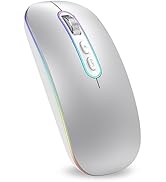
The cimetech Rechargeable Wireless Mouse combines Bluetooth 5.0 and 2.4G dual-mode connectivity with a rechargeable battery offering up to one week of use. Featuring a silent click design that reduces noise by 80%, 1600 DPI optical precision, and a slim ergonomic build with sweat-resistant finish, it’s compatible across Mac, Windows, and Linux platforms. Its dynamic 7-color LED lighting adds a stylish touch, making it ideal for professionals seeking a sleek, versatile, and distraction-free mouse.


| Brand | cimetech |
| Colour | Black |
| Connectivity technology | Bluetooth, USB |
| Movement detection technology | Optical |
| Number of buttons | 4 |
| Special feature | LED Lights , Lightweight, Portable, Rechargeable, Wireless |
M**R
Good product to a reasonable price
Nice and easy to use. Mine is connected to 2 computers and I can swap very easily from 1 computer to another to a push of a switch. Buttons are not hard to push down and silent. Something I like. Good ergo in your hand too. Easy glide on any surface. And finally, the precision is good. I used my mouse for some CAD work and it is OK.
A**R
Great mouse, great value, very hard to beat at any price.
For the money this mouse is incredible value. It very light in the hand comfortable for long term use. smooth to use. The button clicks are perfectly set at the right pressure with a very satisfying tactile response and a soft quiet sounding click. The jog wheel as the same perfect feel and sound to it. The lights I can take or leave but they are a very nice addition. This is a very good mouse. I use it with an old Dell inspiron 7000 laptop running kde neon linux and a M2 MacBook pro via bluetooth. On my first attempt to connect it to the MacBook via bluetooth it wouldn't connect. However it did via the supplied 2.4GHz dongle. I tried again 24 hours later and it did connect. At first the MacBook thought it was a keyboard, I just ignored all that it seems to work fine now. Just be prepared for it to take a little effort to get it to work with Apple systems. It is worth the little extra effort. Its a great mouse.
S**K
Good product
Works well, dosnt need charging but a bit flat
A**I
A great option
Needed a secondary mouse for my tv setup. Thought no harm in trying this option. Boy was a surprised. A certain company named after a fruit cant get this right. They actually placed the charging port in a usable position. Apart from that win. The mouse itself feels of good value the build quality and materials are very good. The size and ease of use us just perfect. I really appreciate the feature where you can switch from the different Bluetooth options. The most important thing the click. I can tell you it is a really good click. Feels nice.
D**N
A great compact mouse with lots of battery life
I particularly wanted a Mouse to go along with my MacBook Pro M2 which means that it also has to be Bluetooth enabled. After a lot of searching around I decided on this one, and I have not been disappointed. Now why would anyone want/need a separate Mouse for a MacBook? Basically it is for the 3rd button when using apps such as CAD or 3D Slicers, that 3rd button is vital and is not simulated on the Touchpad or Apple Mouse. Connecting to the MacBook - is trivial, as if an Apple Mouse really. After powering it up in BT mode (it also supports 2.4G using its USB dongle) the MacBook Settings app found it instantly. After binding to the MacBook I was away and running with it. The Mouse has been 100% compatible, I am able to use the 3rd button on the required apps and I have even found myself using the Mouse in lieu of the Touchpad most of the time. It is comfortable, works every time, has a good resolution and the battery life is extraordinary. I have not run out of power using it for extended times, several days on end! I can highly recommend this Mouse, especially for MacBook users, but of course equally applicable to other systems.
T**T
Excellent
Excellent and useful mouse.
W**.
Worse than just useless
This mouse is useless. The way it tracks movement is completely erratic; its movement bears no resemblance to how the mouse is being moved: sometimes the cursor doesn’t respond at all, sometimes it jumps around – it never does what you expect. It’s impossible to work with this mouse. The fault clearly lies with the mouse, as swapping it for another one completely eliminated all the problems. To make matters worse, it has the old USB connector, which requires a lot of finesse. I’ve never bought such a ‘fussy’ device – steer clear of it.
K**T
Loved it but then had issues
I am reviewing it based on the unit I received. The mouse itself is very ergonomic. Loved the texture at the top of the mouse. Scroll wheel very nice and smooth. Ghe buttons were tactile. DPI button works well and the asthetics are really good. The LED lighting worked ok as well. It's a personal choice, but I really don't need that lighting to be honest. But the good thing is you can turn it off if you don't need it. The Bluetooth /2.5g /off switch worked really well. Charging with USB C isn't a problem at all. The size diwn to personal preference and their palm size - it is really slim and compact, just at the slimmest possible to be ergonomic. So, people may feel it differently as it is at the tip of going either way. Cons: 1. The antislip(?) pads at the bottom of the mouse is glossy and looks like it is orone to scratches. (Don't think it's a deal breaker) 2. The clicks aren't fully silent. You can call it semi silent. 3. It wasn't very sturdy at least for the piece I got and in couple of days the right button came out a bit and stopped working. It lloks like the fabcy LED strip is the culprit which seem to have misaligned the keys. Had to return it. Although I loved when used it initially, I had to rate it 3 because of the cons, specially the last one. Again, it could be down to the unit I got. Another thing I noticed is that the seller has listed this new model of mouse under on older listing and hence the rating we see is not really the original reciew rating if the new product which is only a handful (about 14+) against 1500+ of those for the old product.
A**G
Ottimo acquisto!
Ottimo prodotto, qualità/prezzo top! Leggero e maneggevole. Lo utilizzo collegato con il bluetooth e va benissimo. La chiavetta per la connessione in wi-fi è alloggiata sotto al mouse con applicazione magnetica. Una volta ricaricato l'ho utilizzato per un giorno e mezzo prima che si scaricasse. Si può utilizzare anche collegandolo al PC tramite il cavo usb in dotazione. Consigliatissimo!
E**A
Good
Zgodny z zamówieniem
J**E
Souris d’ordinateur
Facile à utiliser
S**R
Scrollrad Edelstahl, ab 3-Meter Abstand zum PC verzögertes Ausführen von Klicks, langer Akku
Die Cimetech Maus wurde gekauft, weil die letzte in der Preisklasse mit anderem Label drauf nach 2,5 Jahren mit selbigen Funktionen (und absolut baugleich) vom Akku her schlapp gemacht hat. Überraschung! Selbe Qualität, sauberes Handling, gute Verarbeitung. Verbesserung zum vergleichbaren Vorgänger: Schnellere Abschaltung automatisch der RGB-Beleuchtung, präziseres Edelstahl-Scrollrad. Längere Akkuleistung. Ein voller Arbeitstag mit 16 Stunden am Schreibtisch hält sie locker durch. Wer nur gelegentlich beim Heimkino die Filme steuert (abends 2-3 Filme) - der wird 3 Wochen ohne neues Aufladen mit ihr auskommen. Metallplatte an der Unterseite, flüsterleises Klicken. Kaufempfehlung.
C**M
Love it. No regrets.
Feels wonderful. Admittedly, I can only comment on the initial feel and function of the mouse after using it for a few minutes after charging it. I love the neat mouse which is not loud at all. I love the type of control it gives, too - the mouse is very responsive. I have no idea how long it lasts on one charge though, (I am using the Bluetooh aspect). After I charged it, my computer recognised it immediately. - So easy! Just make sure you have the button selected underneath, being swiched to 'BT'. UPDATE: After a few hours use, I mnoticed that the mouse disconnects with the screen. So I have to try to jam the button with 3 settings underneath the mouse over to the farleft (BT Blue Tooth) in order to 'wake it up'. Since I don't feel mouses should do this, I am returning but re-ordering a new one, presuming this is just a one-off manufacturing fault. Loved the mouse - so it is worth the try.
Trustpilot
1 month ago
2 months ago