Buy anything from 5,000+ international stores. One checkout price. No surprise fees. Join 2M+ shoppers on Desertcart.
Desertcart purchases this item on your behalf and handles shipping, customs, and support to SINGAPORE.
โจ๏ธ Elevate your workflow with comfort, color, and connectivity!
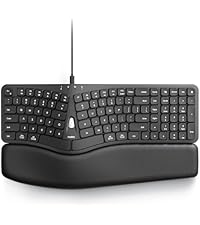
The Nulea Wireless Ergonomic Keyboard combines a split, curved design with multi-device Bluetooth and 2.4G USB connectivity, featuring a rechargeable 2000mAh battery with USB-C charging, customizable 7-color backlighting, and adjustable tilt legs to optimize comfort and productivity for Windows and Mac users.


| ASIN | B0BFVYYYN7 |
| Additional Features | Backlit, Rechargeable, Split Keyset Design |
| Antenna Location | Office |
| Best Sellers Rank | #110 in Computer Keyboards |
| Brand | Nulea |
| Built-In Media | Ergonomic Keyboard x1, USB Cable, User Manual |
| Button Quantity | 78 |
| Color | Black |
| Compatible Amazon Tablet Models | Amazon Fire 5th Generation, Amazon Fire 7 12th Generation, Amazon Fire 7 5th Generation, Amazon Fire 7 7th Generation, Amazon Fire 7 9th Generation, Amazon Fire HD 10 11th Generation, Amazon Fire HD 10 13th Generation, Amazon Fire HD 10 5th Generation, Amazon Fire HD 10 7th Generation, Amazon Fire HD 10 9th Generation, Amazon Fire HD 8 10th Generation, Amazon Fire HD 8 11th Generation, Amazon Fireโฆ |
| Compatible Devices | Laptop, PC, Smartphone, Tablet |
| Compatible Operating System Family | Windows |
| Compatible Tablet Computer Models | Amazon Fire 5th Generation |
| Connectivity Technology | 2.4G USB, Bluetooth |
| Customer Reviews | 4.2 out of 5 stars 1,710 Reviews |
| Enclosure Material | Plastic |
| Hand Orientation | Ambidextrous |
| Item Dimensions L x W x H | 16.5"L x 9.6"W x 1.3"H |
| Keyboard Backlighting Color Support | Single Color |
| Keyboard Description | Wireless |
| Keyboard Layout | QWERTY |
| Manufacturer | Nulea |
| Mfr Part Number | RT05 |
| Model Name | RT05 |
| Model Number | RT05 |
| Number of Keys | 101 |
| Number of Sections | 1 |
| Power Source | Battery Powered |
| Recommended Uses For Product | Office |
| Special Feature | Backlit, Rechargeable, Split Keyset Design |
| Style Name | Contemporary |
| Switch Type | Mechanical |
| Theme | ergonomic keyboard |
| Unit Count | 1.0 Count |
| Warranty Description | 2 year |
| Water Resistance Level | Not Water Resistant |
B**E
Really happy with this keyboard
My Microsoft keyboard decided to start randomly inserting multiple characters, so it was time to replace it. My keyboard lives in a tray under my desk, which leaves it in the dark. I've had a motion-activated strip light adhered to the inside top of the drawer and used it that way for several years. The problem was the light was just too much and bothered my eyes. This keyboard has solved the light issue! I love it that the lights turn themselves off when the keyboard goes idle and immediately comes on when you start typing. You don't have to turn them on and off, but you can if you want to since they added a key just for that purpose. The length of time it takes the lights to go off is very reasonable. I read complaints from people on other lighted keyboards that the lights went off really fast. This definitely doesn't do that. Also, the keys are not just backlit, it actually shines through the keys so you see the letters on the keys as well. I really like the feel of the action on the keys. The space bars might be a little louder than some other keyboards, but not by a whole lot. I just don't have much negative to say about this. Battery life is pretty good. I think I had it a month before I had to recharge it. I noticed that the lights weren't coming on anymore and realized it probably needed to be charged. Didn't take long to charge it up. I don't notice any lag or hesitation at all using this on Bluetooth. If you're thinking about getting this keyboard, I would just do it. The layout is a little different than the ones with the space between the keys and the number pad, but it didn't take me long at all to adjust to it. The arrow keys took a little longer, but all-in-all, the adjustment period was worth it. Since I've only had it for a couple months, I can't say anything on the longevity of it's lifespan, but I'm sincerely hoping it will last a long time. As a matter of fact, I thought about buying another one and keeping it in reserve. I'm not familiar with the manufacturer of this keyboard and hope they will be around for a long time. They're building a quality device and I plan on using it for the foreseeable future.
A**W
Good keyboard, good price
I needed a new keyboard for work. I was using a Microsoft Sculpt. I LOVE that keyboard and how comfortable it is. However, after only a year of use it started disconnecting randomly and it was super annoying. I tried new batteries, making sure drivers are updated, etc. I am on a computer for work 40+ hours a week and need my keyboard to be reliable. So, I begin searching. I wanted something that was split again, had options for tilting, backlit and not too expensive. This one came up in my search and after reading several reviews I decided to give it a try. Unboxing and getting it connected was super easy. It can connect by blue tooth of USB piece. I also love that I can set it up to be connected to my laptop, and to my phone and can toggle between the two. The color options for the backlight are a nice touch. You can also adjust how bright they are. There was a bit of a learning curve in getting used to typing again as my sculpt had a lifter on it that made the keyboard angle down in the back more. I liked that, and the feet on this keyboard do not give me quite the same angle. I may use the old riser from my sculpt on this one somehow, but for now its not super uncomfortable or anything. My typing speed is just as fast. The keys feel nice when pressing them and they are not super loud. Battery life seems pretty good so far. I do like that there is an off/on switch so that I can turn the keyboard off when I go to lunch and when I leave for the day. Time will tell, but so far I am impressed with this keyboard.
B**N
Great keyboard, amazing customer service
This is the best keyboard Iโve ever owned, by far! Itโs ergonomic with a padded wrist rest, but smaller than most full size keyboards so it fits in my keyboard tray with just enough room left over for my mouse. Yet they still managed to fit a 10 key number pad in! Itโs super quiet, a little quieter than my new MacBook. It also has two Bluetooth channels so I can use one keyboard for my Mac and my pc. It has some LED backlighting which is nice I guess but my keyboard sits in a slide out tray so I donโt really get to appreciate the colors much. Which brings me to the only minor downside is that the backspace key doesnโt have any distinctive tactile feel so if Iโm not looking at it (which I canโt unless I pull the tray out) I often mistake the backspace and backslash keys. I fixed this by putting two tiny drops of super glue on the backspace key so I could feel it without looking. As for the customer support I mentioned, I had an issue with a key cap that came loose. I contacted them to see about getting a replacement key cap but they donโt sell key caps and the keyboard was well past warranty but they sent me a whole new keyboard instead! That was really delightful and unexpected!
Y**K
The keyboard Volume is too high... :S
Feb 29 2024: This is an initial review. I have just received this keyboard, fully charged it, then attempted to connect via Bluetooth. It is likely my PC and the lack of a BT antenna but BT connectivity was not good. I'll try again at some point, once I put an antenna on it (run wired LAN and just never needed the BT for the game PC). I'm migrating from an MS Natural (the 4000 series) so the layout is a bit of a change. I've seen some complaints that this keyboard is large. It's about 4 inches shorter, width wise and about 4 times less massive overall than the MS Natural. This saves me a TON of desktop real estate. The keys are flat and have very little travel; as previously stated, will take some adjustment, but I'm adaptable :). Pros so far : - it looks great - key layout is somewhat different but adaptable - its not a crazy layout with a tiny backspace key and a delete key where the home key should be or anything like that, just different. - the backlighting is subtle and not overwhelming; while I could have tolerated a little brighter (the max brightness is maybe 20-30 lumens max) it does not overshadow the letters on the keys. Its adjustable as well and has a timely sleep function. - Connection via wifi dongle is seamless. No synch was needed and the keyboard is very responsive (tried a bit of gaming and it'll work for me just fine) - It has a quality feel to it - not flimsy and the ergonomics are pretty good (better for me than Logitech but not as good as Microsoft (why they quit producing the Natural, I will never know). Cons so far: - the yellow ESC and Space bar look great if you set the backlighting to yellow. Otherwise it clashes with the backlighting. - the center of the keyboard could be raised more to provide more ergonomic relief by maybe 0.5" - The backlighting could have one more brightness level, but I understand battery life concerns. Thats it. As for the Headline of this review: one of the feature rating selections was "Volume Control" so... Update 03/17/2024: Battery life: the LED backlighting stopped working on this day due to the battery level, but the keyboard itself was still working fine and the battery indicator light had not yet come on. This was still running off the first charge from out of box. Not shabby - and it DOES let you keep using the keyboard while it charges. The Bluetooth connection is flawless now that I have an antenna connected to my wifi out from the PC; however, since BIOS and safe mode don't work with BT, I just kept using the 2.4mhz dongle.
K**R
Ergonomic, easy to use, multi-computer support is great, company backs their product
Got one of these about a year and a half ago. Great connectivity, easy to use, keys feel comfortable. Very good design, ergonomic layout means I'm never feeling any wrist or finger soreness even after a full day of typing (I use this every day at work and home). I love the switching function (to switch between 2 computers) - it's easy and fast to do. Also means I only need 1 keyboard to work with 2 machines. It had a shift key that started coming up - I contacted them with images of the problem and after basic troubleshooting, they shipped me a new one with no hassle. It's rare to find a company that will stand behind its product. Highly recommended - sounds like they're in it for the long run and are dedicated to making a quality product!
A**R
Has a nice feel to it.
Look you may need to get used to the curved surface of the keys, but I want o say that it is not like the old MS curved boards that were, for me, impossible to type on. The cushioned wrist pad has a really comfortable feel and is helpful. I feel some keys are actually easier for me to get to without looking. I have not figured out how the whole top row of keys works yet, so I don't have much to say about that. For some reason that made it so that the space bar key clicks. It is the only thing that I don't understand. Maybe, for some people completely silent typing would have been annoying, don't know. I would recommend this. In the first few months, I contacted CS and they did not speak English well, and were not very thorough, but I went along with it Most recently (mid-December) keyboard went on strike. I am pretty computer savvy but everything that I would normally do to unlock a keyboard did not work, so I contacted CS again. They asked to see the invoice, which I provided, and they also asked to do a video, which I responded with, "What do you want to see that the green like is on and me pounding on the keys with no print showing up and my having to use the cumbersome on screen windows keyboard. I told them I had a paper I needed to finish typing up, but there was not response for days. I finally got an inexpensive wired keyboard and wrist pad. When I sent them an email saying that I was reporting them to BBB and the attorney general's office, suddenly I hear from them again with a lengthy response of a complicated process, of a type that in 30 yrs. I have never seen before, and a second process if that did not work. This info should have been sent to me immediately, when they heard what I had tried and they knew my keyboard was locked up. I told them that they were too late and this explanation should have been offered to me right away because my first email expressed what I had already tried. What I am telling you that their skimpy double sided info sheet that they send lacks effective trouble shooting methods, and they will make you sweat to get good information.
D**E
Perfect - but not for Windows
I'm really at a loss as to how to rate this keyboard. I'm a professional programmer and I use Windows OS. There is a lot to like about this keyboard and not much to dislike. The keys are perfect - just the right spread and feel. The keys are concave and fit the fingers well. The ergonomic split is perfect. The keyboard slant and the wrist rest are perfect. The weight and feel are perfect. (Do you notice a trend yet?). The battery is rechargeable, which I really like. There are a couple of things that I dislike - so much so that I am returning the keyboard. First, the home, end, page up, and page down keys are just sort of stuck at the top of the rest of the keys - there is no dedicated key block for this. Same for the arrow keys - just sort of smooshed in with the rest of the keys. The backspace key is where it is supposed to be but the delete key is in an unusual position (think MacOS). As a professional programmer, I am used to having the keys in separate blocks. This way, I can just feel for the key positions without having to take my eyes off the screen to hunt for them. This is a huge downer for me. Second, the function keys are all dual-purpose. This would be OK but the dual purpose function is active by default. To use a function key (F1, F5, etc.) it is necessary to press the Fn button. This is completely unacceptable. It would be nice to have a button that would flip the key layout from normal to alt function keys and leave it there so that I could set it for the most common use. These two things are show stoppers for me. I still rated the keyboard as a 5 overall because it is so well implemented. But it is not a traditional Windows keyboard. Windows users use the backspace *and* the delete key a lot so it's nice to have them findable by feel. Also, Windows users use function keys (F1-F10) a lot so it's nice to have them accessible by default. If Nulea were to put out a Windows style keyboard with Bluetooth I would buy it in a minute. In fact, I'd probably buy 3 or 4. I wound up buying a competitor's keyboard that I don't like nearly as much but it fits my coding style better. Sigh.
C**)
Great Ergonomic Start, But Long-Term Reliability Falls Short
Iโve been using the Nulea RT05 Wireless Ergonomic Keyboard daily for general typing over the past six months, and while it started strong, some frustrating issues have really hurt its long-term value. On the positive side, the ergonomic layout is genuinely comfortable. It helped reduce strain during long typing sessions, and the wireless connection was smooth at first. The overall design and initial performance were enough to make it a standout choice early on. But over time, battery life has significantly declined. What used to last weeks now barely makes it through a few days. Even with moderate, everyday use, the frequent recharging is becoming a real annoyance. Worse, the keyboard has developed phantom key behaviorโit randomly acts as if keys are being held down, filling documents or emails with repeated characters. Itโs not a physical sticking issue, but a digital glitch that makes typing unpredictable and frustrating. For general typing tasks, this becomes a major productivity killer. In short, the Nulea RT05 has great potential and performs well out of the box, but serious long-term issues like battery degradation and erratic key behavior knock it down several notches. Itโs a tough sell unless these reliability problems get addressed. ~~~~~~~~~~~~~~~~~~~~~~~~~~~~~~~~~~~~~~~~~~~~~~~~~~~~~~~~~~~~~~~~~~~~~~~~~~~~~~~~~~~~~~~~~~ The Nulea RT05 Wireless Ergonomic Keyboard has been a fantastic addition to my setup, and I couldnโt be more impressed. The ergonomic design is spot on, providing a comfortable typing experience that minimizes strain, even during long work sessions. As someone with larger hands, I appreciate the spacious layout and well-positioned keys that make it easy to type without feeling cramped. Not only is it comfortable, but itโs also incredibly stylish. The backlit feature adds a modern touch, and itโs practical tooโworking in low light is no problem at all. The key clicks are satisfyingly tactile, offering just the right amount of feedback without being too loud, which is perfect for those who enjoy a responsive typing experience. Another standout feature is the USB-C charging capability. Itโs a major convenience, and I love that I can use the same charger for multiple devices. The battery life has been impressive so far, and I appreciate the quick recharge time. Overall, the Nulea RT05 is an excellent choice for anyone looking for a comfortable, stylish, and functional keyboard, especially those with larger hands. Highly recommended for anyone who values both form and function!
A**O
Todo bien
Hasta ahorita todo bien. Buen desempeรฑo, buena iluminaciรณn
B**D
Beautiful, comfortable keyboard - once you get used to the ergonomic style
These keyboards can be polarizing - you tend to either love them or hate them. I'm typing this review on this keyboard and I'm really enjoying it! My daily driver keyboards are a Logitech KB 350 (for work) and a Logitech MX Mechanical (for play), so I'm already quite used to the split/tilted/angled style of the keys - but to be fair, this Nulea wireless keyboard raises the bar on that. There are a bunch of borrowed styles and designs integrated into this keyboard: multi-PC connectivity via Bluetooth (two connections) and a 2.4 gigahertz USB A dongle that stows away neatly on the underside. Multi-coloured under-key LED lighting, cupped keys and a fully integrated/non-removable wrist rest. Pretty much all the best ideas we've seen for many years are rolled into this keyboard. Aesthetically, the keyboard is beautiful. The colours, plastics and shape of everything are super sleek, elegant, and very suitable for professional office use in my opinion. The wrist rest is butter soft with a firm, light padding that feels like nothing at all to me, and I'm guessing that's the point - you are fully supported so feel zero strain on your wrists or tendons because everything is aligned where it should be to type (as natural as that can be for humans, I suppose). I really like the keyboard shortcuts to flip between the various Bluetooth and 2.4G dongle options (Fn-Q, W, or E}. I like the layout of the option keys so that they can be used on Windows or Mac - and you can flip back and forth quickly between them! I like the status LEDs that report which connection you are using and battery charge status (super clear from any angle and very bright). I like how the keys are very quiet (definitely feels like a good quality membrane keyboard with a nice, tactile bump on all keys). I love the foldaway feet to raise either the front OR the back of the keyboard - perfectly suited for portable lap-desk use and this REALLY reduces typing stress on the back of my hands. The Bluetooth latency is much less perceptible to me than on my MX Mechanical (way to go, Logitech - this keyboard is a quarter of the price!). A couple of things I didn't like: -no right control key! (did we really need a dedicated light button?) -the butter-soft vinyl on the wrist rest might not stand the test of time. It's pretty thin/light and wraps around a hard front edge of the wrist rest that may wear it out prematurely if you are heavy handed Overall, I love the way this Nulea wireless keyboard looks, and I'm able to type at the same speed as my daily drivers. So to me, this is an absolute win. I'm still getting used to the beautiful, intense colour changes I have at my fingertips. Highly recommended!
H**S
Full size keyboard in an ergonomic design. Backlit for the win!
5 out of 5 Stars (5) โญโญโญโญโญ [REVIEW UPDATES] [TL;DR] [QUALITY] (5/5) [VALUE] (5/5) [EASE OF USE] (5/5) [MET EXPECTATIONS] (5/5) [PACKAGING] (5/5) [REVIEW REMARKS] Being new to using an ergonomic keyboard, there was a brief learning curve and acclimatization period. The comfort level is undeniable and the low profile keys are really wonderful to type on. When backlit, you are able to select from seven (7) different colours, which is nice to be able to match any other glowy-glowy devices I have. The wrist rest is so comfortable to use and your wrists are always at the right height. The Bluetooth connection is handy, however, the USB dongle is far more stable. With that said, having the ability to connect to a device via Bluetooth is very handy, especially to be able to use a single keyboard with multiple cross platform devices. As ergonomic keyboards are something new for me to use, I found that this model keeps my hands and wrists in a more natural position. The split spacebar is not something that I thought I would appreciate. I noticed the wear marks on my previous keyboards have wear only on one side, as I only tap the spacebar using my right hand. Getting away from this is going to take some work, as I am not a 'touch-type' like my wife is. She types with precision and speed, and she uses both hands to tap the spacebar depending what side the last keystroke is on. I like how my posture has evolved since using this keyboard to type on. The jury is still out regarding if this will become my primary keyboard, or if I will switch back to my previous. Old habits. This is also wireless keyboard that is rechargeable using a USB-C cable. The battery life is excellent. I have used this just over three weeks on the same charge. I like that it uses USB-C and not a proprietary cable. All in all, this has been a terrific keyboard to date. I love the added comfort that the ergonomic contour brings to typing on this keyboard. The backlit make this keyboard easier to read, especially in dim lighting. The dual wireless connectivity protocol is handy for multiple device pairing, and hot-swapping between devices is surprisingly easy to sync up and increases productivity by only needing one input device. Recommended. In the event that experiences change or evolve, updates may be made to this review to address such developments.
R**U
Not worth for many reasons
1. The price is too much when compared with the quality of the product, I paid almost 12k. 2. The plastic was smelling when I opened the keyboard from box. 3. The control buttons are not at the right position, right control button is missing which makes harder to work. 4. The Pam rester cushion was coming out. 5. Left arrow button was almost coming out as well.
T**A
great keyboard and confortable
I have been using this keyboard for about 4 months. The design is great and helps to relieve some of the pain in my hands from typing. The wrist support that is attached is confortable also. The backlit keypad is great especially in low lght places. The internal battery ast forever. I think i have only charged it 2 or 3 times. The CTRL key came off so I emailed the company. They responded within a couple hours, we emailed back and forth about a replacement and what options I had once. Within 24 hours they are sending out a replacement at no charge. I would 100% recommend this keyboard.
Trustpilot
1 month ago
1 week ago