Desertcart purchases this item on your behalf and handles shipping, customs, and support to SINGAPORE.
⌨️ Elevate your workspace with silent power and seamless switching!
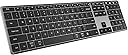
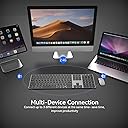
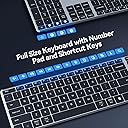
The AUSDOM 2.4G Wireless Bluetooth Keyboard combines a sleek, ultra-slim full-size design with multi-device connectivity via Bluetooth 5.0 and 2.4Ghz USB receiver. Featuring quiet scissor-switch keys for a distraction-free typing experience, it offers over 30 days of rechargeable battery life and broad compatibility across Mac, Windows, iOS, and Android devices—perfect for professionals who demand efficiency and style on the go.


| ASIN | B0BKT1MS2P |
| Additional Features | Lightweight, Low-Profile Key, Quiet, Rechargeable, Silent |
| Antenna Location | Business, Office, Student, Study Education |
| Best Sellers Rank | #681 in Computer Keyboards |
| Brand | AUSDOM |
| Built-In Media | 1*USB Receiver, 1*Wireless Keyboard, USB Cable, User Manual |
| Button Quantity | 104 |
| Color | Black Grey |
| Compatible Devices | Laptop, PC, Smart TV, Smartphone, Tablet iPad |
| Compatible Operating System Family | Windows |
| Connectivity Technology | 2.4G RF, Bluetooth |
| Customer Reviews | 3.9 out of 5 stars 878 Reviews |
| Enclosure Material | Aluminum, Plastic |
| Hand Orientation | Ambidextrous |
| Item Dimensions L x W x H | 16.73"L x 4.49"W x 0.5"H |
| Item Weight | 16.4 Ounces |
| Keyboard Description | 2.4GHz Wireless + BT 5.0 |
| Keyboard Layout | QWERTY |
| Manufacturer | AUSDOM |
| Model Number | Sofkeys 4 |
| Number of Keys | 110 |
| Power Source | Battery Powered |
| Recommended Uses For Product | Business, Office, Student, Study Education |
| Special Feature | Lightweight, Low-Profile Key, Quiet, Rechargeable, Silent |
| Style Name | Contemporary |
| Switch Type | Scissor-switch |
| Unit Count | 1.0 Count |
| Warranty Description | 1 year manufacturer warranty |
P**W
Power button stuck
I was okay with it as a replacement for my laptop keyboard while working at home, and it seemed to be working okay. I was annoyed a little with its sometiumes difficulty connecting with the laptop bluetooth but if you were patient for a little while it would eventually get connected. Battery life seems fine and it certainly is lightweight. My only disappointments were minor such as it tends to warp so that while typing it clackity-clacks if it's not flat. But it's overall a pretty good value for the money. Unfortunately, I came home today to find that the power button would not operate - it is stuck in the off position and will not power up. Now it's a useless hunk of plastic and springs. My return window closed a month ago. Alas. I will contact the manufacturer and see if they will voluntarily send me a replacement. UPDATE: THE SELLER OFFERED TO SEND ME A NEW ONE OR TO REFUND, MY OPTION. EXCELLENT CUSTOMER SERVICE VERY RESPONSIVE. Upgrading from three stars to five.
D**N
INSANE quality for a GREAT price!
Every part of my experience with this keyboard has been fantastic. Unboxing: Starting from the unboxing. I really was expecting a lackluster box with cheap materials, but it was a surprisingly premium experience. After the Apple-esq box opening (The box itself being made of very nice material), you are greeted with a semi-opaque leaflet bearing the company's name stamped in silver, as if to put their best foot forward. It was a very good first impression to be sure. The keyboard itself was contained in a minimal bag for sanitation. The box also contains an instruction booklet as well as a USB A to C charging cable. The box itself is very similar in feel and structure to that of an iPad or other Apple product so it is clear that AUSDOM is very interested in a premium experience. Physical Features: They keyboard itself is very firm/sturdy and does not flex very much when twisted. Its rubber feet keep it firmly in place when on a smooth surface. This keyboard comes with the ability to use Bluetooth as well as the included Bluetooth/RF dongle, with the ability to hot swap between the dongle and 2 other bluetooth paired computers by using dedicated buttons. (Allow me to talk about this dongle for a minute. This dongle comes with the keyboard embedded in an indentation on the bottom of the keyboard. It is secured there with a dedicated MAGNET that keeps it firmly in place while not being hard to remove. It assists with putting the dongle back in place. This was such a surprising feature! A fine example of going the extra mile! I tip my hat to the engineer[s] that designed each part of this.) The keys themselves are reminiscent of what you would find on a modern MAC book, although lacking the slight dip in the middle of the keys. The tactile experience is not bad. Being an ultra-low profile keyboard, this keyboard uses a membrane for its tactile feedback, so it is similar to that which you might find on an better than average laptop, being a bit more stiff than what you would find on a MAC. The function keys on the top of the keyboard have plenty of useful hotkeys, though some of them being somewhat pointless (F9-f12 being hotkeys for copy, paste, cut, and select all, which are pointless because it is more inconvenient to use them than the normal hotkeys (Ctrl/Cmd+C,V,X,A)). I also somewhat wish that the function keys were divided into groups of 4 which is sortof an unspoken standard practice for increasing accessibility. Software Experience: The dongle works immediately without hassle and connecting via Bluetooth is intuitive and painless. Switching between devices is as easy as it will ever get, with the push of a button letting you switch immediately to the desired device and start typing immediately. Overall: Overall, this product is premium and does everything I expected it to AND MORE. The price I paid ($34 on sale) is more than worth the absolute goldmine of quality you get from this company. It is thin, durable, and feels quite nice to use. It is quiet and wont disturb others, even when typing quite hard on the keyboard. I am very impressed thus far and I will keep this company on my radar. I look forward to seeing products they put out in the future. I plan to take this to my work to use in a very dynamic IT environment which requires constant switching between sources as well as the portability of a wireless keyboard. The USB dongle is absolutely essential for me to use with KVMs and it is the reason I first looked at this keyboard.
J**N
Died after 3 months of use
I have had this keyboard for 3+ months now and have become increasingly frustrated with it. I was thrilled when I got the keyboard because of the low profile keys, quiet keystrokes, and integrated stand. It met all my needs. It was very easy to set up and could use it immediately. I also liked that it was rechargeable instead of requiring batteries. Unfortunately, I very quickly discovered that I couldn't have my keyboard more than 1'-0" from my computer otherwise it would start to glitch. If the keyboard was too far away, less than 2'-0", the keyboard would not register all my keystrokes resulting in A LOT of unnecessary typos. I found this became more frequent as the battery would run out, so I made a point to charge the keyboard regularly. Today, my keyboard started to act up a lot, not recognizing my keystrokes or just intermittently working. I decided to try charging it again to make sure that wasn't the problem. I tried unpairing from my computer and then reestablishing the connection. I also restarted my computer. None of the options worked and it appears that the keyboard will no longer work. I do not like the keyboard on my laptop because the keyboard is undersized and it is crucial for my job to use my keyboard all day. I deliberately chose to buy a keyboard that was more than $20 knowing it was going to be my primary keyboard and would have to possibly travel with it from time to time. The fact that the keyboard quit on me during the work day has really set me back with my work making the situation really frustrating. I tried looking on Amazon to find a way to get help but kept getting taken to a "help" page with worthless information. I also tried going to the manufacturer's site to see if I could get any help there. I did learn on the manufacturer's website that they have a 12 month warranty for their products, but they deferred back to Amazon and said that I would have to get my issue resolved there since I purchased the keyboard from Amazon. Honestly, I wouldn't be leaving such a bad review if Amazon's customer service was much easier to deal with. I would like to be optimistic and hope that I received a defective keyboard and would be willing to replace it with a new one. Sadly, I'm having trouble speaking with someone from Amazon that understands my request to resolve the issue.
H**T
What you need to know between PC and Mac
I have used apple magic keyboards for a very long time. I needed a keyboard that allowed me to switch between PC and multiple macs seamlessly. I attached the 2.4ghz receiver to a KVM switch, and this has met the promise of switch seamlessly. Initial impressions - The keyboard feel is very similar to apple's keyboard. I am typing this review on the new keyboard, and I am not making too many typos. This is something I could not achieve with logitech keyboards for instance, the key feel is just slightly off. - In mac, I had to remap the command and option keys. Annoying, but one time, and it is "per keyboard", so not a big deal. You do this in system settings\keyboard\modifier keys .. ensure you pick the right keyboard as you make this change. - The function key is in a different spot than the apple keyboards, this is going to take some getting used to - you can remap the function key, but then you lose the function keys functionality. - If the function lock gets stuck, press the Fn + Search button (right of F12) to unlock. - Physically speaking, the keyboard is nice to look at, is lighter than apple keyboard, and much lighter than logitechs (1/2 weight). But heavy enough that does not feel flimsy or not stay put on the desk. Although I would have preferred a slightly heavier keyboard, this is not a huge big deal. - I like apple's wedge design. This has a nub where batteries are, and the underside is hollow. I would have preferred they had filled the entire underside with batteries, that would give us better battery life and more weight. But then the cost would go up. One odd thing, I plugged it to charge on USB-C and it was drawing no power, yet the charging light was red. I'll update this review once I have a better handle on battery life etc. But if it is fully charged out of the box, why is not drawing any power? And if it is not drawing any power, why is that light red? Odd. I'll update this review after having tried it on PC and with a review of battery life. But so far so good. I deducted one star for the position of the function keys. I wish they had kept it exactly the same as apple keyboard, muscle memory is a real issue. Update: I've been using this keyboard for quite some time now. I had some issues with the 2.4g connection being stable. I plugged the receiver into a powered USB hub, and no issues now. I'm happy with this keyboard, I really like it's minimalist design. The logitech in comparison has a bar at the top which just looks ugly and an afterthought. It is always nice to see a third party manufacturer come up with good products at a much lower price point than the established players. Some products have gotten so overpriced for no good reason, keyboards being one of them.
D**W
One year latter
One year later and this is still working perfectly with zero issues. The battery life is awesome I think I've only had to charge it twice the entire year.
T**.
Love it
Love this thing. Keys feel great, not super loud but good feedback. It's very heavy and feels quality. Switching between three channels (fob, then two Bluetooth channels) is crucial, because I have two personal and a work computer. I always want full size keyboards so I can use the number pad. Overall, great wireless keyboard at a good size.
A**M
Having to Replace it Already :(
Pros: Lightweight, quiet, visually appealing, cord or cordless, 10-key, wrist angle. Cons: The “2” key on the 10-key started sticking in the first week of use and became unusable after two months. The delete key started losing responsiveness at 3 months. A keyboard that can’t key is just a piece of plastic. I bought a piece of plastic. My previous logitech lasted 8 years, so it’s not that I’m so hard on keyboards that they break in the first week of use.
D**P
Sturdy but has connectivity issues.
I’ve gone through a few wireless keyboards over the years, and this one is definitely sturdier than most. I travel back and forth between working from home and the office, and toss the keyboard in my backpack. Other ones I’ve had have bent or warped, but this one has held up really well. I also like that the keys are quiet and the keyboard is full-sized with the number pad on the right... it makes it more comfortable when working with numbers. That said, the connectivity is frustrating. Sometimes it won’t connect properly via Bluetooth, and even with the dongle it doesn’t always work with my laptop. The glitches while typing are the most frustrating part, on one occasion the backspace key got stuck and started deleting my entire report on its own (thank goodness for Ctrl+Z). Overall, it’s solid and well-built, but the connection issues and random glitches make it hard to rely on. For me, it’s about a 2.5 to 3-star keyboard. Maybe I just got a faulty one?
C**N
Let’s and space bar stopped working
A few letters and space bar just randomly stopped working after having it for just over a year.
D**I
Very disappointed, stopped working within 6 months
Bought this keyboard in December 2024, started malfunctioning in May 2025. When I hit the space button it goes to the top menu bar. Very disappointing. I had a cheaper Kmart keyboard last longer.
Trustpilot
1 week ago
1 month ago