Desertcart purchases this item on your behalf and handles shipping, customs, and support to SINGAPORE.
๐ Power up your productivity with the battery that means business!
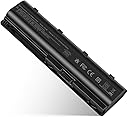
The TREE.NB Replacement Battery delivers a robust 5200mAh lithium-ion power source at 11.1 volts, engineered specifically for select HP and Compaq laptop models. Lightweight at 346 grams and backed by a 1-year warranty, it offers a reliable, direct-from-manufacturer solution to keep your professional workflow uninterrupted.


| ASIN | B073VJVH1N |
| Antenna Location | Adults |
| Battery Capacity | 5200 milliampere_hour |
| Battery Cell Composition | Lithium Ion |
| Battery Cell Type | Lithium Ion |
| Battery Weight | 346 g |
| Best Sellers Rank | #819 in Computers & Accessories ( See Top 100 in Computers & Accessories ) #27 in Laptop Batteries |
| Brand | TREE.NB |
| Compatible Phone Models | MU06 MU09 593553-001 593554-001 636631-001 G62 584037-001 593550-001 593562-001 Pavilion G7 G6 G4 DM4 HSTNN-LB0W HP Presario CQ42 CQ56 CQ57 CQ62 586006-121, 586006-123, 586006-241, 586006-242, 586006-321, 586006-361, 586006-541, 586006-761, 586007-001, 586007-141, 586007-161, 586007-241, 586007-251, 586007-421, 586007-541, 586007-542, 586007-741, 593553-01, 593555-001, HSTNN-CBOW, HSTNN-CBOX, HSTNโฆ |
| Customer Reviews | 4.4 out of 5 stars 19,735 Reviews |
| Item Dimensions | 3.94 x 0.79 x 1.06 inches |
| Item Weight | 8.16 ounces |
| Manufacturer | Dongguan Lewe Electronics Co., Ltd |
| Model Name | CQ42 |
| Model Number | CQ42 |
| Number of Batteries | 1 Lithium Ion batteries required. (included) |
| Recommended Uses For Product | Adults |
| Reusability | Rechargeable |
| UPC | 698545910139 |
| Unit Count | 1 Count |
| Voltage | 11.1 volts_of_alternating_current |
| Warranty Description | 1 year |
P**N
Laptop battery
My battery in my old laptop would not stay charged. I still needed information from that laptop and every time I would use it I would have to stay plugged in. I saw this battery and ordered and it is working great. Would recommend.
C**R
Replacement laptop battery
This battery fits my old HP Pavilion laptop perfectly. I followed the directions for charging it properly and the battery came up to 100% with no problem. I find that it loses small amounts of power even though the laptop is always plugged in. Using a technique that I found online, I unplug from the outlet, remove the battery, wait a about 10-15 seconds, replace the battery, and finally plug the cord back into the outlet. The battery will then come back up to 100%. However, I do not think this is a fault of the battery but rather Windows 10 since I have seen this complaint on various internet posts. My laptop is 8 years old, and I keep it as a spare because it still works fine. I would recommend buying this replacement battery if it fits your laptop. I have not had it long enough to comment on longevity.
S**Y
Perfect fit
Brought life back to an old laptop that was needed for a recent project. Snapped right into place of the old battery with no issues. Charged it overnight and is still going strong after several hours of use. Would recommend.
J**W
Works great (so far); and don't panic if you get a CMOS error the first time.
HP didn't make changing the battery on my wife's dq-14 easy, so it was rather pleasant to have this replacement battery fit right in place and charge up normally straight out of the box. Instructions aren't included, so you'll need to find other sources for that, and the plastic tool that came with my battery is shaped like a guitar pick rather than what is shown in the product photos, so I have to deduct a star for those, but other than that I'm pretty happy with the product so far. Now of course, it hasn't even been a week yet, so I have no way of knowing what the longevity is like; but the battery has done what I've expected from it thus far. Tip: I didn't know this beforehand, and it scared the bejeebers out of me, but after installing the battery and powering up for the first time, you're (most likely) going to get a "CMOS checksum error" page displayed, along with the message that it is going to revert to factory defaults! This is after the laptop had already taken an unusually L-O-N-G time to start up. So long, in fact, that I thought the battery was defective... and then to get a CMOS error on top of that? I had visions of my wife losing all her files, you know?! If it happens to you, don't panic. It's normal. The BIOS just has to get the new hardware registered internally. It only happens the first time after installation/charging. See why I deduct a star for no instructions? Panic could have easily been averted if they had just mentioned that up front. Actually, I can't really say they didn't provide "any" instructions, just nothing useful. All they give you are the "covering our asses" safety instructions for morons (you know, like don't work on your computer while it's plugged in and those sorts of things). Anyway, back on point, a CMOS error after installing the battery is not the end of the world.
D**R
HP MU06 MU09 Laptop Battery
It seems to work well!
M**L
great price
I found this at one quarter of the price that the company was charging.
W**D
Arrived dead - won't take a charge (SMBus lockout)
Battery arrived DOA (dead on arrival), no charge on the pack at all. Tested with a multimeter straight out of the box, essentially 0V at the terminals. This is a smart battery with SMBus/fuel-gauge protection circuitry, so once it drops below the lockout threshold it won't take a charge through the normal terminals no matter what charger or laptop you plug it into. Requested a return same day. If yours shows up dead, don't waste time troubleshooting your laptop, it's the battery. Just received the second battery (replacement) and it is also DOA. NO more chances.
C**A
Recomendado!
Exelente!
Trustpilot
1 week ago
1 month ago