Desertcart purchases this item on your behalf and handles shipping, customs, and support to SINGAPORE.
🎬 Upgrade your screens, upgrade your life!
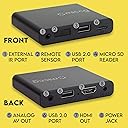
The Micca G3 Speck is a compact, affordable digital media player that transforms any TV into a smart media hub. It plays ultra-smooth 2K Quad-HD videos at 60fps, upscaling to 4K UHD via HDMI, and supports massive USB and microSD storage options up to 8TB and 1TB respectively. Designed for both home entertainment and professional digital signage, it features auto-looping, resume playback, and versatile connectivity including analog AV output. Compatible with a wide range of video, audio, and photo formats, the Micca G3 is the perfect all-in-one media player for the modern multitasking millennial.
| ASIN | B0B1P4NLLT |
| Best Sellers Rank | #2,189 in Electronics ( See Top 100 in Electronics ) #20 in Streaming Media Players |
| Brand | Micca |
| Built-In Media | Media Player, Remote Control, Power Adapter, AV Cable, Manual |
| Color | Black |
| Compatible Devices | Television |
| Connectivity Technology | HDMI, USB |
| Connector Type | HDMI, Analog AV |
| Controller Type | Remote Control |
| Customer Reviews | 4.1 out of 5 stars 358 Reviews |
| Form Factor | TV Box |
| Item Highlight | Plays H.265/HEVC H.264/AVC MP4 MKV Videos MP3 Music JPG Photos, Reads 8TB Drives, Autoplay, Looping, Resume, Analog AV |
| Item Weight | 62 g |
| Manufacturer | Micca |
| Mfr Part Number | Speck G3 |
| Model Name | Speck |
| Model Number | Speck G3 |
| Number of Items | 1 |
| Number of Packs | 1 |
| Other Special Features of the Product | Compact |
| Resolution | 4k |
| Special Feature | Compact |
| UPC | 843528100162 |
| Unit Count | 1 Count |
| Video Codec | H.265/HEVC, H.264/AVC |
| Video Output Resolution | 3840 x 2160 pixels |
| Warranty Description | 1 Year Manufacturer |
P**R
Easy to use media player that does what it's supposed to do.
This is so easy to use! Attach it to a TV or monitor with an HDMI cable, plug a thumb drive into it with videos or photos, and go. You can have a video looping on it (we used it for a gallery exhibit with a constantly looping video). You can even have it remember where you left off in the video for when you start it up again. You can have a folder of images and have it play them as a smooth slideshow.
K**R
Simple but superb!
I purchased in order to play videos for kids on road trips. Used with a portable monitor. The speakers on the monitor are a bit weak for a noisy carful, so we also attached a battery powered speaker via 3.5mm cable. I love this set up! Such a simple device but powerful in what it does. Zero complaints. I expect this thing to last for years. Remote is weak point, but not a big deal for us.
J**E
Micca Solved My MKV and Subtitle Problem...love it!!!
I have a Sony Blu ray player which I use to play videos I have on flash drives, however it will not play MKV files and with foreign films you cannot add a subtitle unless it is embedded. I had read that Samsung and LG players could play MKV files, however after looking at the factory specs, it appears they cannot. You can play these files on a VLC player on the PC or tablet, however I wanted it for my Samsung Smart tv. Micca to the rescue! It plays MKV files and after a little exprimentation, srt subtitles also work. Set up for a smart tv was simply plugging in the power jack and connecting the HDMI cable and then putting in two AAA batteries in the remote. As some have remarked the srt subtitle has to be exactly like the video file name with dots and spacing plus the .srt at the end. If the subtitle does work at first you may have to adjust the way you have the file written and then when rechecking to see if it works, do not resume video but restart it instead. I could not be happier and I would do a commercial for them! And the cost is under $50 and the size is so compact and small. I have "Micca" sitting on top of the DVD player and should I wish to play a DVD which I seldom do, all I have to do is disconnect the HDMI and plug it into the Sony. I might also add, I had some trepidation in that many times you will order something electronic and it does not work as expected and you send it back easily with Amazon,,,little "Micca" is most definitely a keeper.
S**Y
Worst player ever
Worst digital player I've ever seen. I plug it in and all it does is blink, it didn't even come with batteries for the remote and by the time i get batteries and the time to set it up the return window closed so I can't send it back
J**R
A versatile player
It's a solid player, I've bought one for myself for work, another for my fiancee for home, and finally, one for a christmas present for a friend. It's versatile, portable and useful. A few upsides I've noticed: It does support unpowered (I haven't tested it with powered ones) USB hubs, so if you're using External Solid State Drives, you can actually go beyond the limit, but how much depends on their power draw. Another is that it will automatically play through the contents of a folder if you navigate to it. A big downside I haven't seen reported here is file size limitations - I've had issues with getting it to play files larger than 4gb, but I don't know for sure if it's a limitation of the player or of the file system. Also, make sure the audio for your files is in a format the player recognizes, even if the video is a type it does.
C**H
Beats Cinavia
The best thing about this device is Cinavia don't work on it. Rip off your disk to mkv,or mp4,if Cinavia is encoded in the file,it's still plays without detection. Awesome device!!
P**H
It works, but the navigation frequently becomes unresponsive for 30 to 60 seconds.
This is a review of the Micca G3 QHD digital media player. I'm using this media player with a 512 GB USB drive, and it works. However, it sometimes becomes completely unresponsive when I'm navigating through the folders to select a video, and I have to wait about 30 to 60 seconds for it to finally respond. Similarly, when I'm playing a video, the video playback will sometimes pause for a few seconds before resuming, especially if the video file is particularly large. Finally, it doesn't automatically scale anamorphic video to 16:9 aspect ratio. (This is where the video is saved with a different aspect ratio, like 720x480, but with a pixel aspect ratio which should tell the player to stretch it to 16:9. This works correctly in computer/smartphone apps like VLC Media Player.) This ratio issue can be fixed each time the video is played by using the ratio button on the remote, but it's still a mild annoyance.
B**B
Excellent little media player for the price.
This thing is a champ it has played every field type I have thrown at it.
G**R
Worth every penny
This little gadget has been a game changer for me!
B**.
Desperate product
Desperate product. Never worked.
D**E
Works well with my Full HD 1080p TV and 1TB Portable Solid State Drive
An excellent device to make my old Full HD 1080p TV smarter. I connected a Silicon Power PC60 portable 1TB SSD, as my media storage device, to the Micca G3 and the two work together seamlessly. Brilliant. I have successfully played the following file types on the Micca G3 with no issues: vob (1GB), avi, wmv, ts, jpg, png, gif, webp, mp3, flac. The Micca G3 was able to play most, but not all, of the MP4 video files from my Windows PC (mainly downloaded from Youtube). For the MP4s that the Micca G3 initially could not play, I used the FILE CONVERSION function in the VLC media player application (free open source) on my PC, with the output profile "Video for MPEG4 1080p TV/device", to convert my MP4 files into a more standard version of MP4. Then they were fine on the Micca G3. The User Manual also contains other options for dealing with unsupported MP4 codecs. Display Resolution: the player can output video in a wide range of resolutions. For best results, configure the player’s Settings > Display Resolution to match the highest quality setting supported by the TV. “Auto” (the default) is recommended when the player is connected using an HDMI cable. Available settings: AUTO, 2160P, 1080P, 720P, 576P, 480P The player handles all my file types and sizes, quick menu response, no buffering. The G3 is a definite improvement on the previous G2 model. NOTE: the Micca G3 comes with a power supply (input 100-240V AC) suitable for use in Australia (output 5.0V DC 2A), but it has a TWO PRONG US style plug, so you will need to order a PLUG ADAPTER (US to Australian) such as the LEESAD travel adaptor for about $9. You will also need batteries for the remote (2 x AAA), and an HDMI cable. Firmware updates for the Micca G3 android operating system and PDF User Manuals are available for download at: https://www.miccatron.com/micca-speck-g3-4k-digital-media-player/ I find that the Micca remote control is very directional – you have to point it directly at the player, or it doesn't register. If you point the remote directly at or below the player, it works fine. But if the remote points slightly to the left, right, or above the player, there is no response. Overall, a very useful, versatile, solid product, and reasonably priced.
P**E
Works great.
After trying various ways to view MP4 videos easily, I tried this unit and it works perfectly with my external hard drive. No set up, literally just plug it in, attach the TV or monitor and it's ready to go. Two AAA batteries will be needed.
M**G
Un lettore di file necessario ove la tv non lo permetta correttamente
Acquisto obbligato perché Samsung (maledizione!) ha tolto la possibilità sulle nuove TV di vedere file video come AVI e tanti altri tramite usb. Micca fa il suo dovere, legge tutti i tipi di file senza problemi.
Trustpilot
1 month ago
2 months ago