


🖨️ Print smarter, live bolder — your all-in-one creative powerhouse!
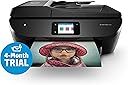
The HP Envy Photo 7830 is a sleek all-in-one inkjet printer designed for professionals and creatives who demand high-quality photo and document printing. Featuring fast 15 ppm black-and-white printing, ultra-sharp 4800 x 1200 dpi color resolution, and seamless wireless connectivity, it supports mobile printing and includes a 12-month HP Instant Ink subscription to keep you printing without interruption. Its multifunction capabilities—print, scan, copy, fax—combined with a vibrant touchscreen and automatic duplexing, make it a reliable, versatile home office essential that elevates productivity and creativity.






| ASIN | B0751B7SHC |
| Additional Printer Functions | All In One |
| B&W Pages per Minute | 15 ppm |
| Best Sellers Rank | 98,122 in Computers & Accessories ( See Top 100 in Computers & Accessories ) 188 in All-In-One Printers |
| Box Contents | 4 |
| Brand | HP |
| Brand Name | HP |
| Color Depth | 24 bpp |
| Color Pages per Minute | 10 ppm |
| Colour | Black |
| Compatible Devices | Camera, Smartphones |
| Connectivity technology | HDMI |
| Control Method | App |
| Controller Type | Android |
| Customer Reviews | 4.3 out of 5 stars 2,329 Reviews |
| Display Type | Touchscreen |
| Dual-sided printing | Yes |
| Duplex | Automatic |
| Global Trade Identification Number | 00190781030713 |
| Hardware Interface | USB 2.0 |
| Ink Colour | Black |
| Item Dimensions D x W x H | 9D x 20W x 19H millimetres |
| Item Type Name | HP ENVY Photo 7830 All in One Printer |
| Item Weight | 7.8 kg |
| Manufacturer | HP |
| Maximum Copies Per Run | 50 |
| Maximum Copy Resolution Black and White | 1000 dpi |
| Maximum Copy Resolution Color | 4800 x 1200 dpi |
| Maximum Copy Speed Black and White | 13 ppm |
| Maximum Print Resolution Black and White | 4800 dpi |
| Maximum Sheet Capacity | 125 |
| Maximum Supported Paper Size | 8.5 x 11 inch |
| Maximum print Resolution Color | 4800 x 1200 DPI |
| Model Name | ENVY Photo 7830 |
| Model Number | 7830 |
| Model Series | ENVY Photo |
| Model name | ENVY Photo 7830 |
| Network Connectivity Technology | HDMI |
| Number of Drivers | 2 |
| Number of Trays | 1 |
| Other Special Features of the Product | HP Instant Ink Photo Printer |
| Output sheet capacity | 100 |
| Paper Size | A4 |
| Power Consumption Size | 13.95 Watts |
| Print media | Paper (plain) |
| Printer Output Type | Colour |
| Printer Type | Inkjet |
| Printing technology | Inkjet |
| Processor Count | 1 |
| Product Warranty | 1 Year |
| Resolution | 4800 x 1200 |
| Scanner Type | Photo |
| Series Number | 7830 |
| Special feature | HP Instant Ink Photo Printer |
| Specific Uses For Product | Home office, photo printing, document printing |
| Total USB 2.0 Ports | 1 |
| Total USB Ports | 2 |
| UPC | 190781030720 190781030713 |
| Unit Count | 1.0 count |
| Warranty Type | limited warranty |
| Wattage | 13.95 watts |
D**N
*edit* 50 sheet instant plan now %100 more expensive
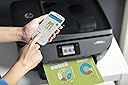
Edit, August 2024 From £1.99 for 50 sheets it's gone up to £3.99 so with printing less and the 10 sheet a month plan still £1.99, I've cancelled my plan... The ink in it and the 2 new ones they sent will be bricked this month when my subscription stops. I'll look for alternatives of either HP branded or 3rd Party when I've researched the reviews. Had this since 2017 and not skipped a beat. It's wi-fi so you can either print from the memory card slot, usb stick, email the device or direct print from your smartphone or pc/mac. my partner, who's not a techy, loves using Google Keep Notes and now sends her shopping list from the App wirelessly to it. i use it for printing rotas at work, plus printing presents for family, maps for visitors, instruction manuals for tech, paperwork for buying leave at work, collages... all manner of hard-copies. i mainly either send documents via email, or direct from my smartphone the "print" option is easy with the HP Smart app to pick the orientation, quality and if colour etc. i used to get frustrated with sending jpg files wanting them on A4 and it would always default to the 5x7 glossy photo paper tray, now with the app you can see it'll got via A4. use standard 80 gsm but you can easily upgrade for smarter reproductions. scanning is made much easier if you've lots to do - feeder just keeps pulling each sheet in, or singles can be your preferred method. you can output it to the SD card, or usb or email it or put it directly into Dropbox or Google drive... need to explore OneDrive now that i've ditched Dropbox for only giving 2GB on their free plan, I've 25GB but i can't be bothered boosting my partner's up from that with the referral scheme inventing lots of Gmail accounts!!! being used to lightning fast response of smartphones, the only downsides i see are the slightly slow touchscreen, it has 256MB of DDR3 RAM but you can't expect iPhone buttery smooth speed... i don't mind, if i needed that level of quality, i'd be spending hundreds and not £75 - discounted from £150 on the black friday deal. superbly reliable and has survived a few house moves too.... kept original packaging. you can obviously copy and fax too, but less common, although making quick copies of driving licences or other important documents has been handy. quality workhorse with features to burn.
G**R
Great quality prints and cheap to run. Get SIX months free ink too!
First, let me say this is a review of the HP Envy Photo 7830 printer. I say this because some of the reviews appear to be for other printers. This review was updated after using it for 10 months. It has been 100% reliable, has used very little ink (I'm still on the first set of top-up cartridges!) and the family are able to easily use it too from iPhone/iPad. It has a reasonably small footprint so doesn't take up much desk space, but it is quite tall because of the scanner feeder on top. I'm a professional photographer but I bought this printer to replace a Canon Photo printer that was used for A4 photo proofs and for general office and by my kids for printing homework. This printer is a great replacement, producing great quality pages with text and graphics, as well as full page photos. It's also much quicker than the old printer, and it has two paper trays - one for A4 paper and one for smaller photo paper. The best bit is the price of the printing! HP send you ink by post just before it runs out (HP monitor the ink usage over the internet). The lowest price plan works great, and I print a reasonable number of prints. This is a revelation for me, because I'm used to paying £30 a time for cartridges. For 6 months free ink, you switch on your printer, connect it to the internet and then print out a sheet that shows the printers unique 'printer code'. You then enter this at (hpinstantink.com). You need to enter PayPal or bank card details but it won't use these until the free offer ends. You'll automatically be given 4 months free, if you then enter "mjv9fc" you'll get another month free. Finally, you can use the code 'FREEINK' for another month! That's a total of 6 months!
A**R
Not as bad to setup as I feared
I feared the worst after reading the reviews, but it turned out tricky to setup, but not impossible. The instructions are basic, but don't cover all scenarios. The app took a good 20mins to find the printer, whereas my laptop found it immediately. There was a lot of spinning, with a blank white screen. Opted for manual setup on the printer, and that sorted it. Neither the app nor the windows 10 installation made any reference to installing the ink cartridges, it just seems pretty obvious. Every wireless printer I've owned in the last 10 years has been pretty awful to setup, this was no worse. It's not a 'huge beast' as mentioned elsewhere, in fact it's smaller than my previous Canon pixma that refused to print black. I ended up with two installations of HP Smart on my laptop, neither which printed Excel, but worked fine when I went into excel to print. The quality is acceptable, and the print speed adequate. It also took card at 210gsm, which I liked. I kept getting the 'out of paper' error message in HP Smart, but it still prints anyway, and if you push the paper further into the tray, the error message goes away. The wireless signal has been found even after turning the printer off/on a few times. Summary Not perfect, but about as problematic as anything technical these days, quite frankly things were easier with USB and Plugn Play. The ink saving scheme seems okay, reasonably priced. Fast delivery, and I didn't have to hit it with a hammer (yet)
S**E
So far so good
Purchased this printer after our old ‘Photo printer’ packed in. As a family we need a printer suitable for everyday printing for work and school for the kids with the added ability to infrequently print photos. The set up was easy. Found our WiFi instantly and connecting was a breeze, printing from anywhere in the house using numerous devices has so far proved effortless. I was surprised at the photo printing quality this is capable of, it’s printing photos of the same quality I had come to expect only available from companies using far superior printing machines. The images crisp and clear, just ensure you purchase decent quality print paper as that makes a huge difference. Printing documents etc are decent and prints at a reasonable speed you would expect at this price range and for a home printer. The footprint of the machine was smaller than I was expecting so that was a bonus. Only had the machine a month or so but so far so good. We signed up to the ink package that came with the printer and for now happily testing the printer out without worry of extra cost of ink. Recommended.
M**A
The BE@ST!!!
At first, I was skeptical when checked few reviews that did rated the product as 1 out of 5. Then, I started looking at couple of videos and reviews from YouTube and hp website and finally opted to buy this lovely machine. Below is my experience 1. Unpacking: pretty straight forward. The cartridges are placed on top of the package. The 2 connectors out of 1st plug issuitable for Indian plug boards and the 2nd is for UK plug boards. Manual provided is quite clear. 2. Installations: Installing cartridges (one colour and other jet black) is very easy to clip-in. And, connecting the plug is as easy as connecting a charger to mobile. 3. Startup: An on/off button to click and it starts. 4 steps in total to start using for prints. 1. Select language 2. Connect to WI-FI 3. Install HP smart app 4. Connect and Print. There is also a surprising gift of HP Everyday gloss sheets(5 units) that comes with this product. Thanks to HP. It's been 24hours passed and couple of new software updates for installed automatically. I have attached pictures of my pet printed on a plain paper(A4) size and on HP Everyday gloss sheet(10×15cm)
H**E
The good overshadwoed by the bad
One expects an element of product quality, resilience, good design and reliability from HP - clearly many experience great things! however on this ocassion, the HP Envy Photo 7830 has let me down in all respects. The colour control panel is fiddly, not very sensitive and not accurate. I have average fingers (not sausage sized digits!). Each screen interaction takes a number of attempts and 'dabs' to either hit the right icon option and or activate that option. I've had better success using a cheap rubber ended stylus. Wireless connectivty is the biggy for me and i suspect many others too, thinking of buying similar models. My experience of the 7830 is as poor as it gets. 1. the device is regularily in an offline state for my apple and windows devices trying to connect. 2. trying to re establish a connection is an obsolute trial - I've given up on numerous ocassions 3. The router sees and assigns an IP address, however my devices fail to see and or interact with it on the home private network. 4. the paper loading features constantly fail, with the printer reporting paper out when it isnt. Often the printer fails to retrieve a sheet from the tray, so fundamental issues exist with the grab mechanism. The photo paper tray is the worse affected of the two. With 1/5 prints actually starting and finishing a print, worse still it doesnt recognise hp paper size and formats. Looking at numerous online forums for the behaviour of this and similar models, the connectivity issue is widely reported and the source of many if not most user complaints. Despite having an 'ideal' wireless environment, the moment the device is not in use it enters and stays offline. Any devices therefater trying to communicate simply fail. In an attempt to remedy this, HP supports users through long protracted fixes involving the computer/mobile and the router being turned off and back on in a particular sequence, as well as the notion of corrupt drivers, but all these simply fail to address the underlying issues. HP in my view are losing the wireless printer battle. My 3 y/o wireless Epson is a great workhorse and ive subsequently returned to it. The connection quality is good and reliable, it doesnt go offline. It's a real shame that these issues exist, particularly when the HP ink replacement service is such a revelation. Any value and beneits of this facility are soon shadowed by the problems I and others continue to encounter. The issues for me are compeling. For the reasons described, I've given one star, however i'll be starting a returns process using 'not fit for the purpose intended'.
D**D
Excellent, Must have
I Love this printer, But it took me a while to setup due to the fact that the software took ages to download. I eventually phoned HP and they were very nice and help me setup the printer. I also did a comparison with the photo printing. I compared the HP Envy Photo 7830 and the HP Envy 5640 and the HP Envy Photo 7830 had richer colour compared to the Envy 5640 which was more muted in colour. I like the Automatic Document Feeder (ADF) because it is very useful but i would not recommend using the ADF on glossy photo paper in case it damages the paper or ADF (I tested using the ADF on glossy photo paper once although it did not damage the photo or ADF, a loud squeaking sound was audible). The only problem i see with this printer is the cost of the cartridges but because i am a long term Instant Ink customer it is not a problem for me. Why i like instant ink; I think it is good and i recommend it for you because it stops you from running out and even if it does cost you more long term, it makes the ink more affordable
D**E
GOT 9 MONTHS OF FREE TRIAL UP TO 700 PAGES/MONTH
GOT 9 MONTHS FREE TRIAL using refer a friend code and promotional codes. You can get it too if you buy this printer and enroll in the free instant ink trial. Promo is until 31 Oct 2021 only so enroll in instant ink service ASAP. You may use my refer a friend code bz5b9b (3 months free, for you and me ) and FREEINK (1 month free) on top of the 4 months trial! I got a total of 5 months trial though from trying the codes on the Q and A section and reviews, which mostly worked. That's until 29 May 2022 before I get billed! Perfect for school, work or business because its all-in-one! I bought this for for studies and photo printing. The print quality is good and instant ink is cheaper than buying regular cartridge which costs almost £33 for BLACK AND TRICOLOR 303 traditional cartridge. After the trial, you may opt for as low as £ 0.99 for 15 pages per month and the allowance rolls over if unsed,its like getting billed per page for light use. The good news is you can cancel it anytime or downgrade the plan on the next cycle, no commitments! Perfect plan options for everyone's needs. Also, the HP website sells this model for £145 and I only got it here for less. Couldn't be any happier with my purchase, a great deal and it is so convenient. It's easy to navigate and set up. Just make sure to make a new HP account if you had an existing one from countries without instant ink support to avoid issues. I had an HP account set up from Asia and it won't allow me to enroll to the instant ink service initially because I cannot change the country on the account. I signed up for a new account using another email and it worked! Lastly, choose this printer now as tech radar reviewed this printer and included this as the cheapest of the best photo printers in the market too. :)
H**R
Vergesst die Tests, überzeugt euch selbst. Der Envy 7830 ist ein tolles Gerät.
Der HP Envy Photo 7830 ersetzt meinen alten Photosmart C8180 aufgrund eines Defekts am Druckkopf nachdem ich eine alternative Tinte verwendet habe. Im Vergleich zum C8180 der damals ca. EUR 400 gekostet hat, ist der Envy 7830 für ca. EUR 120 ein Schnäppchen. Aber stimmt die Qualität noch? In den diversen Test wird dieses Gerät regelrecht zerrissen. Kritisiert werden: Zu lautes Drucken (5,2 Sone), zu sperrige Bauweise, nur mittelmäßige Scans, schlecht funktionierender Blatteinzug, nur 2 Patronen (schwarz und Farbe), nur 3 Farben und vor allem die horrenden Kosten für die Druckpatronen. Ich weiß nicht mit welchen Ansprüchen die Tester den Envy 7830 getestet haben, ich kann jedenfalls einige Kritikpunkte nicht nachvollziehen. So ist der Drucker nicht lauter als mein alter Photosmart C8180, der vor zig Jahren eine ausgezeichnete Bewertung erhielt. Das Design gefällt mir sehr gut, denn das matte und semi-matte Schwarz ist weniger kratzempfindlich als jedes Hochglanz-Finish. Dass die Papierhalterung automatisch mechanisch ausfährt, ist einzigartig. Die Verarbeitung ist tadellos und wirkt hochwertig. Der Scanner hat eine physikalische Auflösung von 1.200 x 1.200 dpi. Das ist wesentlich geringer als die Auflösung des C8180 (4.800 x 1.200), jedoch können mit dem Envy 7830 auch keine Dias eingescannt werden. Wer eine Dia-Scan-Funktion benötigt, liegt mit einem Kombigerät sowieso falsch. Für gewöhnliche Fotos oder Kopie reicht in der Praxis eine Auflösung von 600 dpi. Kopien werden per Default mit 600 dpi ausgeführt. Die Scan- und Kopierqualität genügt meinen Ansprüchen. Den automatischen Papiereinzug fürs Kopieren oder Scannen ist ein Traum. Einfach die Blätter nach oben gerichtet einlegen und Kopieren oder als PDF an den PC scannen; einfacher geht’s nicht! Die Ausdrucke in schwarz auf Normalpapier sowie der Druck von Fotos auf das HP Advanced Fotopapier sind gestochen scharf. Praktisch ist auch das separate Fach für 15x10 Fotopapier. Die Farben wirken lebendig. Die Fotoprints haben jedoch einen leichten Grünstich. Für den Druck von Schnappschüssen und Familienfotos reicht die Qualität allemal. Die Druckkosten sind ohne Instant Ink hoch. Wer jedoch das Instant Ink Abo aktiviert, kann monatlich 15 Seiten kostenlos drucken. Ein weiteres 10 Seiten-Kontingent kostet dann EUR 1. Das Abo für 50 Seiten im Monat kostet EUR 2.99 / Monat. Ab April können dann bis zu 100 Seiten mitgenommen werden. So geht das Kontingent z.B. in der Urlaubszeit, oder wenn sehr wenig gedruckt wird, nicht verloren. Wir reden hier dann von 600 Ausdrucke (ca. EUR 36,00) / Jahr; unabhängig davon, ob in Farbe, schwarz oder kombiniert gedruckt wird. Früher habe ich farbige Vorlagen immer in Grautönen gedruckt, um die teuren Farbpatronen zu sparen. Mit dem Instant Ink Abo muss ich mich über höhere Kosten für Farbdrucke nicht mehr sorgen. Wer rechnen kann, merkt, dass der Drucker dann hohe Druckkosten verursacht, wenn hauptsächlich schwarz gedruckt wird. Wer ausschließlich schwarz druckt, sollte sich auch keinen Fotodrucker kaufen. Im Vergleich einem Epson EcoTank 4750, der EUR 400 kostet, kann ich 7,8 Jahre drucken, bis ich auf die Gesamtkosten von EUR 400 für die Anschaffung des Epson Druckers komme. Bei 1200 Seiten (ca. EUR 60) / Jahr sind es noch immer 4,6 Jahre. Hält die Hardware überhaupt noch 4-8 Jahre? Die Installation verläuft etwas anders, als man es von früher gewohnt ist. Drucker einschalten, Druckpatronen einsetzen und dann das WLAN, falls vorhanden, einrichten. Danach kann über 123.hp.com das Setup ausgeführt werden. Ohne Internet ist die vollständige Installation aller Features nicht möglich, da keine Treiberdisk enthalten ist. Das ist lobenswert, da die Treiber auf der Disk nie aktuell sind und so unnötiger Müll erspart bleibt. Fazit: Der Envy 7830 ist ein schönes und gelungenes Kombigerät. Ich muss zum alten teuren Photosmart C8180 keine Abstriche in Kauf nehmen. Alles was HP an Funktionen mit diesem Druck anbietet funktioniert tadellos (Fax wurde nicht getestet). Ich kann diesen günstigen Kombidrucker für den Einsatz im privaten Umfeld wärmstens empfehlen.
J**N
Conectividad wifi fácil y rápida
Muy facil de instalar. Por seguridad desconectar la conexión por bluetooth mejor sólo wifi. Compartimento para papel fotográfico 10x15 muy útil, separado del papel corriente a4...en general una gran impresora para uso doméstico. Genial el scanner con carga automática, aunque se desde mantener el visor muy limpio para evitar manchas que rayen todo el documento. Un poco cara para impresora domestica, pero merece la pena y la garantía HP lo justifica. Al ser doméstica y con poco uso el elevado precio de los cartuchos no influye. No la recomiendo para uso profesional porque resulta cara de mantenimiento.
R**K
Stampante e scanner di qualità, almeno per il mio uso domestico
Siccome la mia precedente hp mi ha abbandonato dopo circa 10 anni di onorata carriera ho cercato in rete come rimpiazzarla valutando multifunzioni di tutte le marche note. Ho scelto hp sia perchè la precedente non mi ha mai dato problemi, se non quelli di normale usura , sia attirato dal servizio instant ink. Arrivata in 1 giorno e mezzo con spedizione STANDAR. Nella confezione si trova la stampante, vari mauali, 2 cavi di alimentazione (uno italiano e uno inglese), 5 fogli di carta fotografica advanced hp 10 x 15 cm e un cavo telefonico per il fax. Installazione guidata facile, basta seguire le istruzioni sul display e scaricare dal sito che ti indicano i drivers. Collegata via usb (cavo che già avevo standar da stampante e che quasi nessuno include). La stampa di foto e testo a mio giudizio ottime valutando che è una stampante in quadricromia. Per errore mio ho stampato una foto 10 x 15 cm su carta comune e devo dire che il risultato non è male, ovviamente con carta fotografica si ottengono risultati migliori. Scanner che mi ha convinto sia dal vano adf che sul piatto principlae. la funzione fax non l'ho provata perchè non mi interessa. Il display a colori della stampante è chiaro e ben leggibile con tutte le funzioni necessarie. Collegamento ad internet tramite wi-fi riuscito subito al primo tentativo e ora me la vede anche lo smartphone da cui posso gestire la stampante tramite l'app dedicata. Stamattina mi sono inscritto al piano instant ink di hp per avere a casa le future cartucce. Per chi aquista dal 1 marzo al 31 maggio 2019 si ha 12 mesi di prova gratuita del servizio. per ora ho 300 pagine al mese poi facilmente passerò alle 50 pagine a 2,99 € al mese. Ti mandano le cartucce a casa quando l'inchistrosta per finire senza spese extra. Esiste anche un piano da 15 pagine al mese gratuito per chi stampa poco. In conclusione consiglio l'acquisto di questa stampante multifunzione a chiunque cerchi un prodotto semplice e completo per uso domestico e/o di piccolo ufficio. Se dovessi notare problemi in futuro aggiornerò la recensione.
J**R
Bonne machine.
En remplacement d'une HP Photosmart C3180 de 15 ans. Aucun regrets, la qualité d'impression, la fidélité des couleurs sans être au top du top, sont bien meilleurs, suffisant en tous cas pour l'usage ponctuel que j'en ai. Très simple d'emploi, les pictogrammes de l'écran sont immédiatement compréhensibles. Après avoir galéré pour l’appairage avec mon smartphone, je me suis aperçu que ça fonctionnait sans faire de manips compliqué comme indiqué. Bref, j'ai rien pigé, mais ça marche. Offre reconditionnée, sans cartouches, ce qui avec l'achat des cartouches la mettait au prix du neuf. Merci à Amazon qui du coup, m'a consentie une réduction supplémentaire.
Y**A
Good only for first few months then quality declines exponentially
Purchased in 2021, came without ink or manual, the box was not original from HP, yet I gave it a try after purchasing ink separately from Amazon, after the 1st set of cartridges were empty purchased replacement cartridges and since then it never printed properly, tried out multiple replacements of ink (genuine HP ink only) and no luck. 2 negative reviews from my side: 1- Amazon: how do you allow selling items not in their original box? I've used Amazon for over 10 years and never had this happening to me before, where's you QC process?!!! 2- HP: Do really not know how to design hardware based on consumer usability?!!! Never assume a consumer to use the product (especially a printer) on daily basis, durability of the product should also assume the end user to use occasionally and there is a chance that ink has to be replaced (I'm ok with that to an extent) but then the printer cannot properly carry out head cleaning?!!!
Trustpilot
2 weeks ago
1 week ago