Buy anything from 5,000+ international stores. One checkout price. No surprise fees. Join 2M+ shoppers on Desertcart.
Desertcart purchases this item on your behalf and handles shipping, customs, and support to SINGAPORE.
๐ Elevate your labeling gameโwireless, effortless, and ink-free!
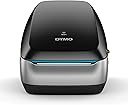
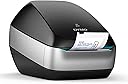
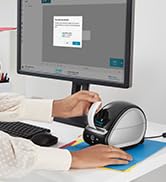
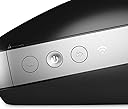
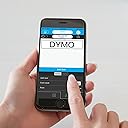
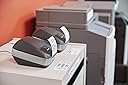
The DYMO LabelWriter Wireless Label Printer offers high-resolution thermal printing with built-in Wi-Fi, enabling cable-free label printing from Macs, PCs, smartphones, and tablets. Compatible with Windows 7+, MacOS 10.10+, iOS 9.0+, and Android 5+, it includes free DYMO software and Microsoft Office plugins for quick label design and printing. Ideal for home, office, and school environments, it eliminates ink and toner costs while supporting network sharing for team-wide access.






| ASIN | B073GXFZQW |
| Additional Printer Functions | Print Only |
| Best Sellers Rank | 57,802 in Business, Industry & Science ( See Top 100 in Business, Industry & Science ) 297 in Label Makers 538 in Labels & Labelling Equipment |
| Box Contents | Labels |
| Brand Name | Dymo |
| Colour | black |
| Compatible Devices | PC, Smartphones, Tablets |
| Control Method | App |
| Controller Type | Android, iOS |
| Country of Origin | China |
| Customer Reviews | 3.6 3.6 out of 5 stars (180) |
| Dual-sided printing | No |
| Duplex | Simplex |
| Global Trade Identification Number | 03501170009321 |
| Hardware Interface | USB |
| Ink Colour | black |
| Item Type Name | DYMO LabelWriter Wireless Label Printer, Black |
| Item Weight | 0.96 Kilograms |
| Manufacturer | Newell Rubbermaid |
| Maximum Copy Resolution Black and White | 600 dpi |
| Maximum Copy Resolution Color | 600 x 300 dpi |
| Maximum Print Resolution Black and White | 600 dpi |
| Maximum Sheet Capacity | 71 |
| Maximum Supported Paper Size | 71mm |
| Maximum print Resolution Color | 600 x 300 dpi |
| Model Name | 2000932 |
| Model Number | 2000932 |
| Model Series | LabelWriter |
| Network Connectivity Technology | Wi-Fi |
| Other Special Features of the Product | Wireless |
| Output sheet capacity | 71 |
| Paper Size | Labels |
| Print media | Labels |
| Printer Output Type | Monochrome |
| Printer Type | Thermal |
| Product Warranty | 3 Years |
| Resolution | 600 x 300 |
| Specific Uses For Product | labeling tasks in home, office, and school environments |
| Total USB 2.0 Ports | 1 |
| Total USB Ports | 1 |
| Unit Count | 1.0 count |
| Warranty Type | limited warranty |
A**Y
Brilliant Connected to home network via instructions
Brilliant Connected to home network via instructions, to windows 10 and my iPhone. A little tricky but punching in IP address sorted it. This replaced my trusty old 330 turbo which has served me well and still works, but it now sits in new cupboard and not able to be plugged into PC, hence the new WiFi model, and the 330 is on ebay.
A**R
what a atrocious excuse for a wifi label printer
disappointed would be an understatement, lets start with the configuration, after 3 attempts to pair to my network via WPS, it managed to pair. only to lose the configuration when you turned off the printer, ended up pairing the system via the web interface, which was fine. then we get to app software dymo connect on an iPhone, thats about a glitchy as it gets, it freezes and takes about 5 attempts at pressing a print button for something to happen, while the ideas behind the app are excellent, it just doesn't work!. When you give up on the phone app and go to the dymo pc version and try and print from there, here never managed to print anything!, just gave me printing errors. Im more than capable at using the software, having used non wifi labelmaker 430 turbo, so i know it not me! i then put the software on a mac and managed to print a label!. The printer cannot cope with being linked to several devices. I did try hard wiring via the usb cable but that didn't work either. i basically packed it up and set it back, its the worse product i have seen from dymo, how they have released this product and app is amazing.
C**E
WOW!
I have received this today and i have to say - what other reviewers are saying has to be false. Either that or I'm the only lucky one! I use to have the label-writer 450 and it was good. Needed to use it pretty much every day. Especially as my spare bedroom is like a warehouse and have lots of online orders coming in through the day. But, what the problem was that every-time i wanted a label, had to start up the software, make the label, then go up to the 'warehouse' and connect my laptop up (find the USB, plug it in, wait for it to tell the printer, etc etc). A bit of a pain. Not anymore; i can sit in the lounge and print them all from there and just pop up to the 'warehouse' once finished. No connecting or waiting mess. This was set up in less than 5 minutes. Flawless. I haven't tried the WPS, but whats the point if you have the static option? Much more reliable. Found the network, typed in the IP address and boom; up came the DYMO page to set it all up. Then just download the DYMO software and add it as a printer. Its as simple as that! The app is also good. Its always connected. Always ready to print. Much quicker than the 450 too. Would totally recommend this. (yes i know its still early days, but will update the review if i encounter any problems!)
T**A
On fence with this one!
Not sure about this one. It was easy enough to set up the software and the machine but the message doesnโt always get across that a print job has been sent wirelessly. One tip, ensure that you select the correct label that is inserted in the machine or your labels will be misaligned! Time will tell what this machine is like but I have read so many very negative reviews I am a little concerned! I had to change this review because I realised my mistake after posting my original review โ I hadnโt selected the correct label number, DOH!!
J**E
Good but few issues and a bit expensive
Got the dymo and connected perfectly once the connected it stayed connected and u could connect to the printer through its own WiFi (its a bit of a security flow as anyone can get on it and start printing) anyhow day 2 the printer jammed on paper and the motor stopped working, waiting to get a refund and get another one.
M**R
Let down by the software
Nice product. Advertised as iPhone friendly but my iPhone 11 wonโt work with the app however my older iPad mini 4 does work and itโs slow but does the job. Glad Iโm not relying solely on my iPhone or Iโd me stuffed. App clearly needs an urgent update. But overall does want I need it to do.
S**D
Great concept, very poor WiFi connection, very poor app
The Dymo wireless Label printer is a great piece of quality hardware let down by the program and app. To print-you have to connect directly with wifi to the Dymo network (iphone/ipad settings-wifi-Dymoxxxx) and not through your house network-router. It will not print if connected to your normal wifi network!!! and be in range with the printer-say 10 metres direct. You cannot print from anywhere in the house/office on your Cat 5 network To select a label size-search-key in the label serial number type, not select from the badly displayed pictures Cut the ABC from the new-add text-and type your label-print
L**D
Good quality, fast and easy to use
We already have a DYMO connected printer, and now have got this one for its wireless ability. It looks great, was super easy to set-up, prints labels fast and cleanly, and everyone connects fine to it. Really nice product. Very happy with it.
Trustpilot
1 month ago
5 days ago