Buy anything from 5,000+ international stores. One checkout price. No surprise fees. Join 2M+ shoppers on Desertcart.
Desertcart purchases this item on your behalf and handles shipping, customs, and support to SINGAPORE.
🖨️ Print smarter, save bigger, and stay effortlessly connected.
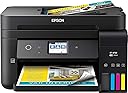
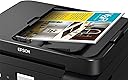
The Epson WorkForce ET-4750 EcoTank is a wireless all-in-one printer designed for professionals who demand high-volume, cost-efficient printing. Featuring supersized refillable ink tanks that last up to 2 years, a 250-sheet tray, automatic duplexing, and a 2.4" color touchscreen, it supports scanning, copying, faxing, and wired/wireless networking. Ideal for medium-duty office use, it balances reliable performance with significant ink cost savings and versatile media handling.


| ASIN | B074V4QLXF |
| Additional Printer Functions | Scan |
| B&W Pages per Minute | 11 ppm |
| Best Sellers Rank | #358,350 in Office Products ( See Top 100 in Office Products ) #213 in Ink Tank Printers |
| Brand | Epson |
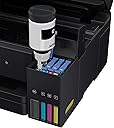
| Built-In Media | 2x bottles 502 Black (127 mL), 2x bottles each 502 Cyan, Magenta, Yellow (70 mL), CD-ROM for product setup, Power Cord, WorkForce ET-4750 EcoTank all-in-one, manual |
| Color | 4-ink |
| Color Depth | 48 bpp |
| Color Pages per Minute | 5.5 ppm |
| Compatible Devices | Laptops, PC |
| Connectivity Technology | Hi-Speed USB 2.0, Wi-Fi (802.11n only), Wi-Fi direct, Ethernet |
| Control Method | Voice |
| Controller Type | Amazon Alexa, Vera |
| Customer Reviews | 4.0 out of 5 stars 791 Reviews |
| Display Type | LCD or LED |
| Dual-sided printing | Yes |
| Duplex | Automatic |
| Global Trade Identification Number | 00010343936287 |
| Hardware Interface | Ethernet |
| Ink Color | Cyan, Magenta, Yellow, Black |
| Item Dimensions D x W x H | 16.4"D x 19.8"W x 10"H |
| Item Type Name | Epson WorkForce ET-4750 EcoTank Wireless Color All-in-One Supertank Printer with Scanner, Copier, Fax and Ethernet |
| Item Weight | 15 Pounds |
| Manufacturer | Epson |
| Maximum Copies Per Run | 99 |
| Maximum Copy Resolution Black and White | 2400 dpi |
| Maximum Copy Resolution Color | 2400x2400 dpi |
| Maximum Copy Speed Black and White | 11 ppm |
| Maximum Media Size | 8.5 x 14 inch |
| Maximum Print Resolution Black and White | 1200 dpi |
| Maximum Sheet Capacity | 250 |
| Maximum print Resolution Color | 2400 dpi |
| Model Name | ET-4750 |
| Model Number | C11CG19201 |
| Model Series | WorkForce |
| Number of Trays | 1 |
| Other Special Features of the Product | Ethernet,Wireless |
| Output sheet capacity | 250 |
| Paper Size | 3.5" x 5", 4" x 6", 5" x 7", 8" x 10", 8.5" x 11", 8.5" x 14", A4, A6, half letter, executive, user definable (3.5" x 5" – 8.5" x 47") |
| Power Consumption | 12 Watts |
| Print media | Paper (plain) |
| Printer Connectivity Type | Hi-Speed USB 2.0, Wi-Fi (802.11n only), Wi-Fi direct, Ethernet |
| Printer Output Type | Color |
| Printer Type | Inkjet |
| Printing Technology | Inkjet |
| Resolution | 9600 |
| Scanner Type | Sheetfed |
| Special Feature | Ethernet,Wireless |
| Specific Uses For Product | Office |
| Total USB 2.0 Ports | 1 |
| Total Usb Ports | 1 |
| UPC | 010343936287 |
| Unit Count | 1.0 Count |
| Warranty Description | 2-year limited warranty in the U.S. and Canada, (2nd year requires product registration) |
| Warranty Type | limited warranty |
| Wattage | 12 watts |
W**3
Impressive Inkjet Printer For Small Footprint, Economical Printing and Medium Duty Office Use
We have owned and constantly use two other Epson Inkjet printers (4640 and 4530). We print an above average number of pages for a typical residential user and opted to try the ecotank series from Epson as we have had almost flawless performance from our 4530 (more than 5 years) and when our 4640 malfunctioned, although it was beyond the warranty period, Epson made it right and replaced the printer with no cost to us (shipping included). While they clearly had some sort of issue with the unit they replaced, we have never experienced that level of customer service on a product that exceeded even the extended warranty period from any tech company. Ever. No hassles and outstanding support from Epson has made us very loyal customers. When we began experiencing color issues with the replacement Epson (which in fairness has abnormally high use for a unit that is not advertised suitable heavy use), we decided to give the ecotank Epson printers a try. The 4750 was easy to set up (we're still using Windows 7 pro) and the wireless connection has worked perfectly during the two months we've used it (constantly) in our office environment. We print more than a thousand pages a month -- sometimes many more -- as part of our 501c3 charity's work providing education and job training materials to incarcerated women in Alabama. We are (so far) impressed with the overall print quality of both text and graphics. And are very impressed that we have not had any paper jams (despite our frequently changing paper stock). Although the print (black and white text) quality is not to the level of a laser printer (costing $5-6,000 or more), it is more than acceptable for our needs. While we were initially concerned about the printer's ability to print on card stock, we are happy with how easily it handles the 60-65lb card stock that we need for report covers. We are not asking it to attempt 80lb or higher thickness papers as that may be a bridge too far, but it pulls the lighter weight card stock with no problem and we leave it on the standard paper setting. Odd sized paper: We are very impressed with the printer's ability to print on regular envelopes (we use the kind with a removable strip and pre-pasted adhesive flap). In the past, we have NOT been pleased with other printer's ability to manage this style of envelope (either because the heat from laser printers seals the flaps during the printing process, or due to constant paper jams due to the envelope's thickness causing and/or mis-aligned printing). In addition to envelopes, we've found that it also handles printing on our firm's card stock thank-you note cards (5.5" x 4.25"). Most, if not all of our other printers (including our expensive color laser printer) balk at printing on such small sized card stock. Printing Speed: While this printer's output speed (especially relevant for duplexing or double-sided printing) is average, we are impressed enough with the overall reliability and economical ink/tank aspects that we are ordering a second unit and for our use -- the lower number of pages-per-minute is a fair trade off for printing reliability and not needing constantly to remove paper jams. We do not use the scanner function as we have (and can highly recommend) a Fujitsu Scansnap. It's faster and more reliable and can scan both sides of a page at once. And in terms of multi-function devices generally, we prefer to have a stand-alone device for services we depend on as in the event the printer goes down -- we don't also also lose the ability to scan. Use for Photocopying: We need the lift-the-lid photocopy feature as we occasionally need to copy something from a book or odd sized paper original. The scanner/photocopy function is one area where we do see reduced quality -- as the color rendition from originals to printed copies is obviously reduced. Again, for our purposes the photocopy output is acceptable, but if it's important to you that photocopies be indistinguishable from the original documents -- you might look for something else. While we maintain a favorable impression of both of our prior Epson Inkjet printers -- this one -- although it's a significantly smaller physical footprint -- it's been very reliable and overall easy to use. Other reviewers complain about the small size of the print-options window screen. And while we can see their point (I have large hands), it's not been an issue for us, However, if it were to become a problem, an easy fix is to keep an inexpensive, small stylus next to the printer to make it easier to more precisely communicate settings and print adjustments. Cons: Our only complaint about the 4750 is that the physical adjustment in the paper tray to increase or decrease the feed slot in order to accommodate different sized paper in the paper tray can stick and be difficult or impossible to adjust with one hand. It's a minor issue, but we're careful with it as we can see that it is not the thickest plastic and might break if forced. Print Quality: While not as crisp as a laser printer -- we are happy to compromise a few levels of print quality for the cost savings in ink. Especially for a color unit, the cost of OEM replacement ink cartridges has been killing us for our laser printers and -- until we discovered compatible ink cartridges -- with our two previous Epson ink jets. Ink Level Viewing: While the Epson 4750 constantly prompts users to check ink levels, it's very easy to do without an onscreen prompt and we love the fact that ink levels are constantly displayed on the front of the unit and we can see how much ink remains in each tank. With our previous color printers -- we had to accept on faith that a cartridge was, in fact, empty -- and there wasn't an easy way to determine that the printer wasn't properly recognizing remaining cartridge ink. Paper Stock: We use a range of paper stock (from 20lb up to 24 and 25lb standard for printing materials and correspondence) and have found that the 4750 has no problem printing on our preferred brand of 60-65lb card stock and has had no difficulty in printing tons of Avery labels (we primarily use the 5160 address labels). We frequently change paper from one weight to another and have had no issues or jams. Note that while our expectations for the printer's ability to print on plastic laser-style labels are low, it may be possible to print on Redi-tag laser tabs -- just make sure to either wait for the printing to dry completely -- or cover the plastic tab with clear tape to prevent smearing.
S**D
Don't understand the negative reviews -- love it
So we were looking to replace our HP printer which had been reliable for a long time but ate expensive ink cartridges for breakfast and suddenly became very unpredictable. A knowledgeable salesperson at a big box store strongly recommended the ET-4750 which seemed to be perfect for what we wanted. Then I read the negative reviews on Amazon and really hesitated. Finally I just decided to try it and I'm so glad that I did. Of course some people are just going to get a lemon model that breaks immediately and they will be understandably upset. But maybe some of the negativity comes from expecting a more robust, professional grade machine. I will acknowledge for instance that the document feeder seems a little flimsy. But here's the thing -- so far it's worked great and we love it. We've never had an auto document feeder on our home all-in-one before. Being able to put a five page medical document that I need to scan and email to an insurance company in the feeder and have it flawlessly produce a five page scan rather than laboriously opening the machine and putting down one page at a time, hitting scan, doing it again, etc, is wonderful. It's only been a little over a month. I did have some difficulties connecting the wireless (tip: Make sure that your computer is on the same wireless network that the printer gets on; often, routers have dual bands and if the computer is on one band and the printer is on the other they cannot talk to each other. You may have to "un-check" the "connect automatically" box on your computer's wireless system for one of your wireless bands). I had a problem printing photos briefly, but the Epson tech person over their online "chat" assistance line helped me figure out the problem (I was pinching down the paper guides too tight so the paper wasn't feeding smoothly). The printer ink loaded simply and with no mess whatsoever and we are loving the idea that it may be a year before we need more ink (and it came with a second set of ink bottles). I love that the paper tray takes a half ream of paper (our HP took at most 100 pages and I'm not sure it even took that many) and that the paper tray loads from the front. I'm still learning how to print from my phone and my ipad. I've succeeded once and failed another time, but I think that is just about my learning curve. My single complaint compared to our old HP is that there is no separate paper tray for photo paper. If you want to print pictures you have to remove the regular printer paper and put in the glossy photo paper, then take it out again when you are done. A tiny hassle, but I did like that our HP had two trays. OK, so that's pretty much it. Who knows -- it could break tomorrow. I'll try to remember to update in a few months. But so far this all-in-one is printing, scanning and copying beautifully. I don't find it excessively noisy (some people complained about that) and to us it seems very fast. Again, it may be what your expectations are. But for us, for a home all-in-one with ink tanks rather than cartridges, this has been great. Addition: January 2020 — Still love it. Going strong. Have not had to purchase any new ink. Auto-feeder works great.
G**Y
Died right after warranty expired
Printed beautifully, despite the insane difficulty in working with Epson's methodology (I really have to re-enter the paper size every time I fill the tray? seriously? and it gets worse if you do anything more complicated than that). Then, exactly 14 months to the day after we got it, it dies. Suddenly, no black ink will come through the print head. After multiple calls to tech service, and blowing 1/4 tank of ink (each color, no less) on head cleanings and power cleanings, they have declared it has a hardware problem and is dead. I was told I should take it to an authorized service center at my expense, but was then told there are none open near me (I live on the outskirts of a major city, not out in the sticks somewhere). Fortunately, we paid the extra for the Square Trade extended warranty, and they have agreed it is dead and will be reimbursing me the cost of the printer so I can buy something new. Which I guarantee you will not be an Epson.
R**Y
A great printer with an even better ink solution. I have not been let down with this epson!
We use the heck out of this printer in my office. Easy to use, load ink and prints surprisingly well. Ink does last longer then I expected, and the cost of the ink is quite a bit lower than any other printer I have ever owned or used in the office. The software is user friendly and offer simplicity that is hard to find on some manufacturers printers. The wifi printing is perfect. Load the program in any computer including laptops and away you go. Scanning, coping, faxing, printing...all easy and anybody in the office can print away. We have had no issues wit this unit. The normal ink jet printer woes...head cleaning, alignment, etc are greatly reduced with this machine. I do not know why, but it is and we are very happy with that. They made the black ink reservoir larger then the color. How smart is that? More for you money here. True, it is not the fastest printer in the world, but it is fast. Faster would be laser printing. And laser printer prices. I cannot say enough about this little printer. Just make sure the reservoirs do not run dry and that about all you have to worry about. The software reminds you to check regularly. We printed over two reams of paper through this machine in one morning with out any trouble. I was kinda blown away with this epson. I keep waiting for the catch. The other shoe to drop, but as it stands now. Great purchase. I only recomend this epson for ink jet printing. To this point I have not been disappointed. Way to go epson!
W**Y
Very low operating cost.
The cost of ink cartridges has always been an issue with me. I’ve owned 2 color laser printers that I bought at deeply discounted prices and had good luck with both of them. They both ran for years with no problem. But when you need to replace toner cartridges you can get the same sticker shock as with ink cartridges. And if the drum quits, which is usually separate in a color printer, it may cost more than the printer itself. When my last color laser printer finally quit I looked at this printer and thought that Epson had solved the problem. Ink printers use much less electricity and with refillable ink cartridges the on-going operating costs come down dramatically. I am impressed with the speed at which it prints, having not used an ink printer in a long time. The quality is good, although not on a par with laser. But still good enough for most uses. I downloaded all the drivers and other software right from Epson and the installation was quite easy and went without a hitch. The ink loaded with no problem what so ever. I didn’t spill so much as a drop of ink. Another reason I picked this model is the FAX capability. For legal reasons somethings just can’t be emailed and must be FAXed. I did need that option. It prints 2-sided automatically which is great. But it does lead to the one issue I found. There is no manual feed tray. You must put the original in the standard paper tray and print from there. I will have to settle for a rating of 4 because of the print quality and the lack of manual feed. But for long term cost-of-operation this can’t be beat. I did pay full price for this printer and would highly recommend it for any small business or home user.
A**Z
Great Value
Amazing product, real saving for every page printed, Great Packing fast shipping, is a little heavy but works fantastic. great print quality, a little noise but not too rush. Authentic Item
G**B
Disappointed in Scanning
So far the printer is working as expected. Setup required filling the ink tanks with 4 large bottles of ink. Print output quality is as expected and I think the ink will last me forever. However, the scanner is lacking. This printer does NOT come with any software for OCR scanning. The "free" OCR software the instructions advertise is no longer free. It is around $200. Also the ADF does not support 2 sided scanning. I cannot find a way to scan a 2 sided document and have the pages be in order without buying additional software. When you do scan something, the interface is via the small touch screen. No scanner interface via your computer. To scan, insert a document in the ADF, then you have to select about 5 buttons to initiate each scan. Having a larger screen would make this interface easier to use and less "Fat Finger" hitting of wrong buttons. I understand this model is now being discontinued. Hopefully Epson will make some improvements. Update, I just discovered that with this printer, you cannot scan multiple pages to a single PDF file unless you use the ADF. Also the ADF does not support pages less than 8.25" wide. Just another limitation and reason for me to keep my old printer/scanner.
W**D
SIx years later and still running strong
Most people write a review right after they pull a shiny new product out of the box, hook it up, and then take it for a test spin. Nearly six years and thousands of pages later, this printer is still running strong. I have had very few if any problems with this printer - paper jams have been incredibly few and far between. I've been able to print without any problems from both Linux and Windows, as well as copying directly. Keep the print heads clean and aligned, and the quality of print is excellent for a printer with these specs. The scanner has been used for hundreds of pages with great results. I am just now starting to get a warning about the maintenance box getting full (where the ink sludge is deposited after maintenance & cleaning), and I'm going to try to do something about it and keep the printer running if it's reasonably cost-effective to do so. I have looked into new printers, and I haven't found a better cost per page to date for an inkjet printer. If reluctantly I have to replace my ET-4750, I will be getting an ET-4850 if it's anything like its predecessor.
B**T
Very satisfied
I've had this printer for a few weeks now, and overall I am very, very happy. Super easy to set up and connect via home wi-fi. No wires required other than the power cord, so it can go anywhere in the house. Also very easy to connect to cell-phones, to print documents and printers. Each printer gets its own email address, so you can email it and it will print the message automatically. The sheet-feeder for the scanner/copier works well: it's not fast like an office copier, but just fine for my home office work. The printer works as a stand-alone copier, without the computer, via the touchscreen, so that's great too. The fax function just needs a phone connection and it took maybe a minute to set up. Ink was super easy to fill. The bottles are molded so you can't put the wrong bottle in the wrong tank, and they are basically spill-proof. The tanks stop filling automatically, all you have to do is take the bottle off and put it away. Couldn't be easier. My printer came with a second complete set of ink bottles...not sure if that was accidental or on purpose, but we've got a lot of ink, now. I previously had a wireless Canon Pixma scanner/copier. I reviewed my orders on Amazon and found that in 2018 I spent as much on ink for the Canon as I spent on this whole printer. So, a 1 year payback makes a lot of sense. Plus it really is easy to use: no fuss, no frustration, it just works. I have some minor quibbles with Epson: the scanner application is OK, but it took some figuring out how to do multiple sheets. It should be as simple as loading the sheets in the sheet feeder, but there is also a box to click in the app each time you want multiple sheet scans. The box is titled "Add or edit pages after scanning" and it wasn't totally clear that this check-box was required for multi-sheet scans. Maybe I'm missing an easier way, but if either way the multi-sheet scan should have been simpler. Second, the scanner app has 9 selections for resolution, the highest of which will take forever to scan...maybe a "recommended" highlight for which resolution to use would save the user some experimentation. At the highest settings, the scanner takes a loooong time. Finally, when trying to scan directly from the touch-screen (not the computer app) and you choose scan to computer, the printer requires some additional software called "Epson Event Manager" which, after a complete install on my computer, I think should have been automatic. I still haven't solved this one, mostly because I scan from the app and haven't really needed to. But, like I said, these quibbles are very minor compared to the positives of the product. I think it's just great so far, and no one should be put off by my small complaints. Buy this machine! You'll love it.
S**E
Outstanding printer for infusion ink printing
This is just what you want for infusion ink printing. The ink is so easily loaded - no more constant purchase of cartridges. It has great tank indicators showing ink levels. So easily installed - just follow the instructions carefully. It will scan to a high dpi and it will fax if connected to phone line and it will operate on WiFi or by USB. You can also connect by LAN as a network computer. Hell there is nothing missing. Best device I have ever purchased - worth every penny. Sad to see the passing of the ET4700 but this is a step ahead.
M**T
Great saving on ink cartridges
I was really hyped up when I purchased this printer because of all the great reviews. It has been amazing as far as saving money on Printer cartridges. The quality of the print is fantastic and it has been a great Printer. However, the scanning function when trying to scan multiple pages through the feeder stopped working very early after purchasing. I don’t use this feature often as I only usually scan two or three pages but it is frustrating that the paper feeder doesn’t work after such little use. I do miss being able to manually feed Paper through the back of the printer if I had card stock as sometimes the Printer struggles with thicker pieces of paper. For just standard printing or photo printing it’s great but I will definitely upgrade next time for the additional features.
E**N
I L❤VE this PRINTER❣
This printer is AMAZING!! I am using it to print many, many designer paper kits that I have downloaded to use in Junk Journals, Card making, etc. I have already printed HUNDREDS of pages and the ink level has hardly budged. It also prints on 110 lb. card stock without any qualms. I cannot stress enough how very happy I am with this printer!
A**4
A printer that'll stick around
This printer has a lot of things going for it. The reason I purchased it was for the long term savings on ink, which if you print a lot can easily for for itself in under a year if you print hundreds of pages a month. Lots of features, FAX, online control, touch screen, etc. This printer will fill the needs of almost every home and nearly every small office. The support for legal size paper is critical to my use and this printer supporting the format was one of the things that give it the edge. Quality is good, even decent but not spectacular. It'll do document great but it's not best suited for ultra high quality pictures. Better than most printers but if you need that feature there is another similar model that has a separate tank of black ink for pictures. Go for that model if pictures quality is a big deal for you, those are definitely excellent. It would be nice if the legal format didn't need to be manually flipped but it's no deal breaker, just be aware that paper that big has to be flipped when printing on both sides. This printer is a good investment for anyone looking to get a printer for use over a long term period of time. Other printers are cheaper than this but the eco tank is a money saver. The up front cost of this machine is insignificant compared to the savings you'll accrue one you reach your 3rd or 4th refill. Some refills go for 200$ on other printers, refilling this printer can around 30$. If you switch to the eco tank you might not ever be able to go back, with some ink going for its weight in gold you gotta think about the investment this thing brings you. Definitely would recommend highly.
Trustpilot
1 day ago
1 month ago