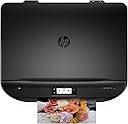
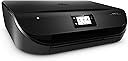
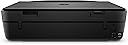
🖨️ Print smarter, live greener, and stay effortlessly connected.
The HP ENVY 4520 All-in-One Inkjet Printer delivers high-quality color and black-and-white prints at up to 20 pages per minute. Designed for the modern professional, it supports direct printing from smartphones and tablets without network setup. Its compact footprint fits any workspace, while automatic duplex printing reduces paper consumption by 50%. Save up to 70% on ink costs with HP Instant Ink, making it an economical and eco-conscious choice for home or office.


| ASIN | B014W49JTM |
| Additional Printer Functions | All In One |
| B&W Pages per Minute | 20 ppm |
| Brand | HP |
| Brand Name | HP |
| Color Pages per Minute | 16 ppm |
| Colour | Black |
| Compatible Devices | Smartphones, Tablets |
| Connectivity technology | USB, Wi-Fi |
| Control Method | App |
| Customer Reviews | 4.3 out of 5 stars 302 Reviews |
| Dual-sided printing | Yes |
| Duplex | Automatic |
| Hardware Interface | USB 2.0 |
| Ink Colour | Multicoloured |
| Item Weight | 11.93 Pounds |
| Manufacturer | HP |
| Maximum Copy Speed Black and White | 20 ppm |
| Maximum Print Resolution Black and White | 1200 dpi |
| Maximum Sheet Capacity | 100 |
| Maximum Supported Paper Size | A4;Legal |
| Maximum print Resolution Color | 5760000 Pixels Per Inch |
| Model Name | 4520 |
| Model Number | J6U70B#ABU |
| Model Series | ENVY |
| Model name | 4520 |
| Network Connectivity Technology | USB, Wi-Fi |
| Other Special Features of the Product | Print Functionality^LCD Display |
| Output sheet capacity | 100 |
| Print media | Glossy photo paper |
| Printer Output Type | Colour |
| Printer Type | Laser |
| Printing technology | Laser |
| Resolution | 1200 x 1200 |
| Scanner Type | Sheetfed |
| Special feature | Print Functionality^LCD Display |
| Total USB Ports | 1 |
| UPC | 889296633334 |
D**W
good value and excellent product
Simple, good value and excellent product. My Epson colour printer - twice the price a year ago, took a day to connect up to my iMac and never managed to get its Bluetooth act together so had to run from a twelve foot wire straight out of the back of my almost completely Bluetoothed Mac. Every second paper feed jammed and I often had the link breakdown even though it was hard wired. There final straw came when a nice code error appeared telling me it had lost the will to live and I should get a service engineer in. In fairness to the build quality it stayed pretty much in one piece after I dropped it from the first floor of my house to the concrete bin area beneath. This Envy 4520, instantly hooked up to my raging iMac, had a virtual scout around the house and hooked itself up to my laptop, iPad and iPhone, sent me a confirmation email that it had done so which it then proceeded to print out and finally set me up with an email account to send my prints to which then were sent straight to the printer which in sleep mode switched itself on and did the job! I simply allowed it to access my network - completely brilliant and took five minutes. It doesn't make a Broadway style number out of simply powering up and printing, and quietly goes back to sleep again. The quality is good - and I'm using 80gsm cheap paper which is fairly absorbent. I'm not printing photos or the home counties' answer to the Mona Lisa, just invoices and paperwork, and the results are excellent. The deal you can sign up for to get replacement inks is brilliant and like the machine, simplicity itself. I have had this printer for a few weeks now and not a problem in sight. Many thanks HP, I was a brand snob before this but will definitely consider staying with this brand for future hardware. Highly recommended.
C**S
What a superb printer
I've been a fan of Cannon printers down the years, for the quality of their scanning and printing and ease of use. However, having got through four within eight years I was starting to question their reliability and build-quality. I was also getting very concerned at the high ink consumption, meager ink tank capacity and their high cost. Eventually I replaced my last Cannon printer that broke down with an old HP printer I'd had for eleven years, had passed on to my wife, then my daughter, and eventually it came back to me again. It still worked perfectly. Eventually it did suffer a mechanical problem it wasn't worth repairing. But I was wary of buying another Cannon and opted for this HP Envy instead. It is TOTALLY BRILLIANT. The touch-screen is very easy to use (easier than manual buttons), the software interface is a little clunky compared with Cannon's, but one I'm used to. Scan and print quality is fine, and, interestingly, print speeds are faster via my wi-fi than via USB cable. Double-sided printing is magic - I don't know how it works, but you don't have to print one side and then reload the paper to print the reverse side - it prints both sides without reloading! Incredible. Thoroughly recommended.
L**S
Excellent value for money printer
Very recently bought this printer from Amazon & so far I'm extremely impressed by its performance. It looks very cool & slimline on my desk, the paper is contained within the printer itself & it holds about 100 sheets, so you don't have those unsightly floppy bits of paper sticking out of the top, as with many printers & all in all I rate it as a triumph of design compared to the many printers I've had before. It has a touch-sensitive window on the front to control its functions, which is a bit basic, but for domestic purposes perfectly functional & pretty nice to use. So, bear in mind this is primarily a wifi printer, so it connects wifily to your router if you give it permission & your router password, & also to your other devices, like your tablet, phones etc. I took out at least 2 metres of USB wiring de-installing my previous printer, so this is a dream. It's so cool, if you know what you're doing, but basic stuff. I'm amazed that people don't know that printers have Never been supplied with pc connection cables because of the variety of connections for about the last 20 years, but there you go, based on previous reviewers comments. I have a cupboard full of printer/USB cables. Don't use the supplied CD to install software.... Windows sorts itself out with drivers automatically when the printer's connected & the CD just tends to drive you towards signing up to the HP Instant Ink rip-off system, which is totally useless & very expensive (remember printer manufacturers sell the printers at below cost & make their money on the ink).... much better just to buy some HP XL 302 cartridges on Amazon before the tiny introductory cartridges run out. Google HP Instant Ink & check the forums for confirmation. It's a very quiet printer, doesn't make a fuss when booting up & has this very cool motorised output tray thing which extends iself out when you've told it to print..... just make sure you haven't put your cup of tea in front of the printer before doing so. It prints extremely well, does automatic duplex printing, connects to my tablet & phone for remote printing & wakes itself up when you're away (hence the automatic motorised paper-collection system, because you're not there & this stops your prints falling on the floor). It's a very nice domestic printer, cheap, stylish & functional & I'm very pleased with it
J**B
An Extremely Good Buy
Wow was quite impressed with this when it arrived as a replacement for my very old (10years!) printer (HP again). I like HP and have found thm to be very reliable and good printers. I wanted one with the airprint/wifi facility which is so nice and easy straight from your phone or device, I love it and it works perfectly. This printer ;ooks very sleek and stylish. It does duplex printing (both sides), booklets (you fold yourself after printing) and has colour of course. It has this magic little effect - when you send something to print, an arm slides out to support the print when it arrives but it's such a good idea as you don't have this tray or arm sticking out all the time; the printer is a nice regular and neat shape! Plus it won't get snapped off. The arm is easily pushed in again after you've finished printing. The tray holds a wodge of paper - enough for me - and feeds itself. The scanner works perfectly with good clear copies and the photocopier is as good too. There's a little screen on the front which tells you what's going on (printing, scanning etc) and it also comes with a host of HP services like ink b post, printables (a crossword or similar to your printer automatically printed at a time of your choice each day for instance!). I'd recommend this to anyone I'm delighted with it - and it was cheap too.
R**T
Ink runs out too fast
Set up was cumbersome and the ink supplied ran out after I economically printed barely a handful of text only documents. It's noisy, slow and expensive. The only positive it's it's hidden paper tray and fairly sleek looking.
R**F
Great printer...
I bought this based on good reviews and I am not disappointed. I have yet to use it a lot but already this printer is meeting all my requirements. HP has come leaps and bounds in terms of setting up printers and I was literally up and running in 5 mins. Printing from your mobile devices and laptop using wireless or directly with the printer is a breeze via the HP app (yes you need to download an app). From that moment on everything integrates. Great print quality and scanning functionality. I was specifically looking at scan to mail and double sided printing. HP ink is not the cheapest on the market, but I find that the ink for this printer is reasonable (you find good discounts on amazon). Last but not least the printer looks good! Definitely not an eyesore in your home office or study.
M**O
Good printer (it is HP Envy 4525 actually) but setting ...
Good printer (it is HP Envy 4525 actually) but setting it up was a bit of a mission. Would give it five stars if it wasn't for that and the fact that setting up instant ink was also a bit tricky and time consuming. Strongly recommended nevertheless. HP ENVY 4525 Thermal Inkjet A4 Wi-Fi Black - multifunctionals (Thermal inkjet, Colour, Colour, Colour, Print, 100 - 400 pages per month)
S**R
Does not allow third party inks – Noisy – Won’t work with Mac
I’ve setup hundreds of printers in my life. This one was the most problematic and uncomfortable ever one to install. The touch screen reacts imprecise, it feels very fuzzy. Also the sensor keys on the left are located too close to the screen so you’ll touch them accidentally. They should have hired a good designer to fix the interface. But well there are other more serious problems: I tried to install it as a Secure AirPrint printer on a Mac running Sierra. Which did not work at all. So I tried with El Capitan. There it worked but only when I turned off IPV6. Setting a new hostname will crash the printers operating system – Requiring a complete reset of the printer. But what bothers me most is this high pitched noise of the power adapter and the fact that you can’t use third party inks with it. Also I should mention the scanner won’t work: Saying error in communication. … what a waste of time.
Trustpilot
2 weeks ago
1 week ago