Desertcart purchases this item on your behalf and handles shipping, customs, and support to SINGAPORE.
⚡ Upgrade your network, upgrade your game — speed that keeps you ahead!
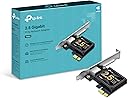
The TP-Link TX201 PCIe Network Card delivers ultra-fast 2.5 Gbps Ethernet connectivity with backward compatibility for multiple speeds. Designed for gamers and professionals, it features QoS for prioritized traffic, Wake on LAN for remote management, and versatile bracket options for all desktop builds. Compatible with Windows and Linux, it comes backed by a 2-year warranty and 24/7 support.


| ASIN | B0BG685PKM |
| Best Sellers Rank | #4 in Internal Computer Networking Cards |
| Brand | TP-Link |
| Built-In Media | 2.5 Gigabit PCIe Network Adapter (TX201), Resource CD, Standard/Low-Profile Brackets |
| Color | Black |
| Compatible Devices | Desktop |
| Compatible Operating System Family | Linux, Windows |
| Customer Reviews | 4.7 out of 5 stars 2,253 Reviews |
| Data Link Protocol | Ethernet |
| Data Transfer Rate | 2500 megabits_per_second |
| External Testing Certification | Não aplicável |
| Hardware Interface | Ethernet |
| Item Dimensions L x W x H | 4.76"L x 3.07"W x 0.85"H |
| Item Highlight | Ethernet Network Adapter, NIC card, Supports Windows 11/10/8.1/8/7, Win Server 2022/2019/2016, Linux |
| Item Type Name | Network card |
| Item Weight | 1.76 ounces |
| Manufacturer | TP-LINK |
| Mfr Part Number | TX201 |
| Minimum Required Operating System Version | Windows 7 |
| Model Number | TX201 |
| Number of Items | 1 |
| Product Dimensions | 4.76"L x 3.07"W x 0.85"H |
| UPC | 840030707834 |
| Warranty Description | 2 year manufacturer |
M**A
Fast, Stable Network Upgrade with Great Value
This TP-Link TX201 2.5GB PCIe network card has been a solid upgrade overall. Installation was very straightforward—just plug it into a PCIe slot, install the drivers, and it was up and running quickly without any issues. In terms of appearance, it has a clean, compact design that fits nicely inside a desktop without taking up unnecessary space or looking bulky. It blends in well with the rest of the components once installed. While I’m using it alongside a Wi-Fi setup rather than strictly wired Ethernet, the system still feels very stable, and I’ve noticed no connection issues or drops. Latency has been consistent and smooth during general use, gaming, and streaming, with everything feeling responsive. The value is really strong for what you get—this is a reliable, future-ready upgrade that offers a noticeable performance improvement potential if you’re moving to faster wired networking later on. Funny enough, I originally bought it for myself, but my boyfriend ended up taking it for his setup because he liked it so much more. Pros: Easy installation and setup Stable, consistent performance Low latency and responsive connection Clean, compact appearance Great value for a 2.5GbE upgrade Cons: Best performance requires wired Ethernet setup Needs a free PCIe slot Tips: Keep drivers updated for best stability and performance Ideal for gaming or future-proofing a PC build Great upgrade if moving from standard gigabit networking Overall, this is a high-quality, affordable networking upgrade that delivers stability, low latency, and strong value—even if you’re not immediately using it at full wired speed.
T**O
Plug-and-Play 2.5Gbps Speed — No Setup Needed!
Installed the TP-Link TX201 PCIe card into my PC, and it worked flawlessly right out of the box. I connected it to my 2.5Gbps switches, and it immediately recognized and negotiated full 2.5Gbps speeds without needing extra driver tweaking or fuss. Transmitting data across my home network is noticeably faster and super stable. If you're upgrading your home network or NAS setup to 2.5G, this is an affordable, reliable, and painless way to do it. Highly recommended!
S**B
So far it’s a beast
I’m a tech, I beta test tech for various companies. So it’s natural for me to test each piece of tech I acquire. I have a custom built pc with the intel 13900, a 4090 gpu connected using 1gig up and down internet speeds. I started having throttling occur on upload, limiting me to 100meg upload speed. So I started troubleshooting, after a week of testing I decided the weakest link was the built in Ethernet adapter, others reported similar issues with my particular motherboard. So I ordered this unit, I’m always an overkill kind of guy with tech, so getting a 2.5g unit seemed appropriate. The unit arrived quickly, and was simple to install. It worked out of the box but of course I went to their website and upgraded drivers. First series of tests show my ping had been cut more than in half from 20 to 8. The speeds were faster slightly than before although a gig is a gig is a gig. That said, I soon encountered the exact same issue of throttled upload. I found it interesting that it seemed to throttle to 100megs give or take a few. At this time I recognized the issue was either my cable, modem or the actual line to my home. I replaced my Ethernet cord with a new one, and since fiber optic doesn’t usually degrade, it’s unlikely a line issue altho it could be a node issue down the line. Armed with the knowledge I had, I reached out and it was discovered my modem was failing. So even tho this unit didn’t specifically solve my issues, it did allow me to find the cause, and since it is a better ping, that to me is worth the cost of this card. Plus it gives me a backup connection if needed. I will be keeping this card and I will update once I get my new modem, and witness the difference real time. Should I encounter issues going forward I will also update this review. Ultimately I like this adapter, it’s super simple to install and use and it did improve my connection ping and speeds. If I ever use it to transfer data locally I will also post an updated review on that.
A**H
Amazing performance
I have one PC with onboard Ethernet using the Intel I225-V (2.5Gbps). Then I have another PC that I transfer files to and fro and wanted faster speeds. I already have a 2.5Gbps switch by TP-Link. So, I installed this in the second PC, immediately downloaded and installed the latest drivers from Realtek and put it to work. PC w/ Intel I225-V + PC w/ TX201 (RTL8125B) > 2.5Gbps switch (which is connectetd to my router's 1Gbps Ethernet port). So, I get 2.5Gbps on LAN, but will be limited to 1Gbps WAN due to my router (Asus RT-AXE7800). Jumbo Frames enabled @ 9014 bytes. Working perfectly as tested in command prompt with 8000+ byte packet pings. SMB file sharing transfer speeds are 295-298 MB/s! I didn't expect that. It makes... a HUGE difference in transfer speeds when you're sending 150GB, 200GB and larger files over LAN to backup. I used to watch a specific file I'd send back and forth that was 9GB and I had time to open Task Manager and HWiNFO64 and just inspect how the speeds were going. With 2.5Gbps speeds? It's done too quick to even get a good peek at what's going on haha. I'm not having any issues at all with it. No throttling for me as of yet, so it seems to run cool enough to deliver max performance. I like TP-Link products and spent the extra for this one over one of the alphabet soup named companies which I don't trust. This one uploads and downloads over Windows 11 file sharing (SMB) at 295-298MB/s every time. Up and Down. That's important. AND it's important to recognize I'm talking about file sharing with SMB overhead... NOT iPerf3 speeds. I should get higher speeds over iPerf3, but I haven't even tested that yet. 100% stability, easy to install, fits easily in my SFF case on my little home "server" PC. Great product.
D**R
TP-Link 2.5GB PCIe Network Card - Failed to work after about 1 year
The original purpose of this purchase was to replace my onboard Ethernet connection, which seemed a bit slow at 1GB. Since my network infrastructure is 1GB, I really didn't need a 2.5GB card, but the price wasn't too much, so I bought it. I did not notice any improvement after upgrading it. I kind of expected that. After running it for a year, it stopped working. I tried different slots, but it didn't work. As a result, I had to switch back to the onboard Ethernet from Intel. I later discovered that the network issues I was experiencing were caused by anti-virus software. Once I removed that, my network speed was way faster. I liked the features of the card, and some people stated that it performed well for them. I assume I got a card from a bad batch, so I half-heartedly only recommend it because it failed on me in about a year but with the price point being low didn't bother me too much. I'd buy it again. Pros Affordable way to upgrade from 1GbE to 2.5GbE. Works in virtually any available PCIe x1 slot. Generally plug-and-play in Windows 10/11. Low-profile bracket included for small form factor PCs. Things to Consider To achieve 2.5 Gbps speeds, you'll also need: A 2.5GbE-capable router, switch, or NAS. Cat5e, Cat6, or better Ethernet cabling. Some users report that installing the latest Realtek drivers can improve performance over the default drivers in certain situations.
M**E
Excellent quality. No drivers or software for W11. Instantly usable.
Does the job. Took 3 minutes to install. Windows 11.. No drivers, or software or anything. I had 2.5GBE within 3 minutes of opening the package. What more could you want. I paired it with a fanless 5 port 2.5GBE switch, hooked up my PC and work laptop in no time
C**S
Great value on a 2.5GB network card
Very high quality and good value on a nic. Very easy to install and drivers worked perfectly. I get great speeds and it was worth the price
J**E
Perfect Ethernet Option
Great option if you need a dedicated card for ethernet. It works as intended and is a plug and play with no extra installs needed. I got this as a replacement for the ethernet port on my motherboard which randomly died, and just having the ease of putting it in my system and just having it work was awesome. I get no latency or hiccups and it just works as intended. I also enjoy its small form factor, makes it easy to fit into a variety of builds.
L**O
Muy mala calidad
Muy mala calidad!, se pierde la conectividad a cada rato!
O**A
Simple 2.5G upgrade, but don't forget the Realtek drivers!
I picked this up to finally get the most out of my high-speed internet plan. Most motherboards are still stuck with standard 1G ports, and this card is a very affordable way to bridge that gap. The Setup: Installation was a breeze. It’s a small card that fits easily into a PCIe x1 slot, and it even includes a low-profile bracket if you’re working with a slim desktop case. It’s built well and feels like a quality piece of hardware that should last. One Important Tip: When I first plugged it in, Windows recognized it immediately, but I noticed a weird issue: my download speeds were great, but my upload speeds were stuck and wouldn't hit that 2.5G mark. I found that the "standard" drivers Windows installs automatically aren't quite enough. To fix this and truly unlock the full 2.5G upload speed, go directly to the Realtek website and download the latest drivers for the RTL8125 chipset. As soon as I installed the official drivers from the source, the upload cap vanished and everything worked perfectly. Final Verdict: It’s a fantastic, reliable card for the price. Just save yourself the troubleshooting time and grab the drivers from Realtek right away
H**I
ممتاز بالنسبة للسعر
يعمل بكفاءة، انصح بشدة
S**I
Good Value Product
excellent product, onboard nics cant handle jitter as these do!
M**A
works on truenas scale
works great on my truenas scale with nuc 9 extreme
Trustpilot
3 weeks ago
2 weeks ago