Desertcart purchases this item on your behalf and handles shipping, customs, and support to SINGAPORE.
❄️ Cool, Quiet, Compact — The Ultimate SFF CPU Cooler You Can't Afford to Miss!
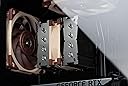
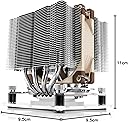
The Noctua NH-D9L is a compact 110mm dual-tower CPU cooler featuring a high-efficiency 92mm NF-A9 PWM fan with ultra-quiet operation. Designed for small form factor and HTPC builds, it offers broad compatibility across Intel and AMD sockets without blocking RAM or PCIe slots. Equipped with premium thermal paste and an easy-to-use SecuFirm2 mounting system, it ensures effortless installation and reliable cooling performance, all backed by a 6-year manufacturer’s warranty.


| ASIN | B00PIPCFX2 |
| Best Sellers Rank | 21,266 in Computers & Accessories ( See Top 100 in Computers & Accessories ) 359 in Fans & Cooling |
| Brand | Noctua |
| CPU Socket | LGA1851, LGA1700, LGA1200, LGA115x, AM5, AM4 |
| Cooler Heatsink Compatibility | Intel LGA1851, LGA1700, LGA1200, LGA115x, AMD AM5, AM4 |
| Cooler Heatsink Material | Copper & Aluminum |
| Cooler heat sink material | Copper & Aluminum |
| Cooler heatsink compatibility | Intel LGA1851, LGA1700, LGA1200, LGA115x, AMD AM5, AM4 |
| Customer Reviews | 4.7 out of 5 stars 1,451 Reviews |
| EU Spare Part Availability Duration | 6 Years |
| Global Trade Identification Number | 04716123315582 |
| Included Components | Please see product Description for what is included |
| Item Dimensions L x W x H | 11L x 9.5W x 9.5H centimetres |
| Item Highlight | Compact 110mm Height, ITX SFF Low-Noise Cooling, For Intel & AMD, 92mm Fan, 100% RAM Compatibility, Rich Accessory Kit |
| Item Weight | 531 Grams |
| Item weight | 531 Grams |
| Manufacturer | Noctua |
| Manufacturer Part Number | NH-D9L |
| Model Number | NH-D9L |
| Mounting Type | Chassis Mount |
| Mounting type | Chassis Mount |
| Number of Items | 1 |
| Number of Packs | 1 |
| Product Warranty | 6-year manufacturer’s warranty |
| Product dimensions | 11L x 9.5W x 9.5H centimetres |
| Unit Count | 1.0 count |
P**L
Compact, effective and very quiet
I replaced the OEM fan and heatsink on my old i5-2500 CPU as I was getting concerned about the 70+C temperatures I was seeing when playing games or transcoding video in Handbrake (which runs all four cores at 100%) with the Noctua NH-9DL cooler. As my inexpensive tower case does not have access to the underside of the motherboard I had to remove it completely in order to fit the bottom plate that the cooler uses for support. Of course, if I had been doing a new build or had a modern processor with an LGA 2011 socket I wouldn't have had to do this. Noctua provide absolutely everything you need in the well thought out packaging, including clear instruction leaflets for each processor type, together with high-quality thermal paste and all the tools, parts and cables you need to finish the job. If you take it slowly and follow the instructions carefully it's hard to get it wrong. The cooler is designed to fit in 3U cases and works very nicely in mine. It doesn't overlap the memory slots, so there's no problem with my tallish RAM sticks. But how well does it work? The answer is that it fits my needs perfectly. At CPU idle the fan spins at just over 800 RPM (I'm not using the silencer adapter cable) and at full stretch the speed rises to around 1200 RPM. This is with my BIOS set to Silent mode. At all speeds it's very quiet - in fact I'm unable to hear it. My CPU never gets any hotter than the mid-50s even when doing a big transcode taking over half an hour. In summary, this is an excellent CPU cooler for the smaller case. If you're an overclocker you might want to consider a bigger cooler or even a water-based solution but for occasional heavy use at stock speeds this works just fine.
D**S
Excellent cooling
I purchased this cooler as it has a fairly low profile and I intend to change my PC case to a HTPC case fairly soon. It should fit inside a 150mm height case (I hope). I've previously had issues with the temperature on my PCs AMD FX-8530 cpu with it ranging between high 58c -75c using an old Arctic Cooling Freezer Pro 7. I had read that these CPUs do run hot so I was more than a little surprised by the improvement. It now runs at around 25c to 35c even when gaming. This cooler does have an option to have 2 fans (the 2nd purchased separately) which I chose to do due to the previous problems I've had. Also, on my PC this cooler is orientated so that it sits directly inline and butted up to the case rear discharge fan. This may be helping to lower the temperature further. The orientation of previous cooler may have been circulating the heated air back around the case before being picked up by the case discharge fan. I am happy with the sound level. The whole pc is at about 45db measured off an iphone app and the other case fans seem to be the main cause of that. Installation required removing the standard AMD bracket that came with the motherboard and fitting a bracket specific to this cooler but this wasn't much of a chore and seems more secure than the original. It comes with a tube of thermal paste. Probably enough to refit it 3 or 4 times. Excellent value for money. I'm very happy with my choice.
M**E
Good quality
Used on a new systems after being unable to find a suitable cooler in my local stores, was a bit of a faff fitting it, but my system is running as expected and i have no issues with heat under load (ai generation and some graphics). Having not used this brand before, I am pleased with the build quality and have had no issues with the cooler since fitting
B**E
Smooth
Ever so good, works like a dream
J**E
Compact and performs well
Keeps CPU temps low and relatively quiet Double heatsink is effective at cooling AMD 5600x and easily fits within low clearance case
S**E
Excellent cooler despite being one of the smaller models
Very quiet with the "low speed" adapter cable. With a closed case below my desk I don't even notice it in my silent room. I'm using it with its low fan speed adapter cable with 1 middle fan on a Gigabyte Z370M D3H motherboard with an i5 8600K processor (currently without overclocking @3.6Ghz). After 5-10 hours of StarCraft 2 gameplay the CPU is always below 40C usually 36-37C only 1-2C above idle temperature. Since my GPU hasn't yet arrived (damned crypto miners) I'm playing StarCraft with integrated GPU only with high settings @30-40fps (surprisingly smooth for casual gaming) which might give the CPU a bit easier time. Before manually tweaking the BIOS settings my motherboard automatically overclocked my CPU to 4.1-4.2Ghz. With those settings the idle temperature of my CPU was usually around 40C. EDIT (19 Jun 2018): After installing a GTX 1060 GPU and switching to a 144Hz QHD (1440p) monitor (which involves higher framerate and thus CPU usage - 144 or 120 instead of 60) my CPU usage has increased and this, along with the epci slot that holds the GPU near to the CPU socket generated quite a bit of heat. The builtin thermometers haven't detected very high temps (at most 40-50 celsius in most cases) but something still got overheated and this caused immediate machine reboots sometimes, mostly while playing Overwatch that uses ~80% GPU with my settings and usually 50% CPU. This reboot happened sometimes 10-20 times in a row, sometimes only once per day but I rarely had a day without a reboot. This can be very annoying during competitive gaming where you lose points for this. Took quite some time to find out what causes the occasional reboots. I was experimenting with custom fan speed settings, removing the low fan speed adapter, lowered game graphics settings and the framerate, plugging cables to different slots in my modular PSU, etc but nothing really worked. The usual suspects in case of such reboots are overheat, bad motherboard or bad PSU. In my case it was overheat because since replacing my nh-d9l to a much larger nh-d15 I haven't had a single reboot for more than 10 days despite playing almost fulltime. Conclusion: - This is a quality piece of cooler but for stronger CPUs buy a the largest cooler that can fit onto your motherboard. - The thermometers of your motherboard might not be very accurate or might not be placed that well.
E**N
Works very well despite it's relatively small size
I had originally bought this in 2016 to cool my 6700K processor and it did a great job. I later upgraded my CPU and switched to an AiO cooler to have a less obstructed look in my case. I'm currently using this on my Core i7 9700K which is an 8-core CPU that tends to run hot. I am using a Corsair Carbide Air 240 case whose design limits the height of what CPU cooler can be used. My previous AiO liquid cooler had a 240mm radiator, but I found its dual fans annoyingly noisy under load, and it wasn't doing such a great job keeping temperatures in check either, my CPU was sometimes exceeding 90C on prolonged AVX workloads (like when encoding video or rendering a complex scene in Blender) and throttling itself. I sent that unit back for a refund and I switched back to this Noctua air cooler and there was a big improvement. Be sure to clean heatsink and CPU thoroughly and apply thermal paste properly when re-using any CPU cooler. With this NH-D9L, I have stress tested for hours using Prime95, OCCT, Blender and games (mainly Doom 2016 and Doom Eternal) and there was never any thermal throttling, CPU core temps never went over 80C even under AVX2 workloads which draw extra current and produce extra heat, this being the worst-case workload. I'm not overclocking manually, but the processor happily boosts itself to 4600-4900 MHz automatically depending on whether it's running a single or multithreaded workload. Overall, very happy with this little guy. Highly recommended if space is a premium in your computer's chassis. It doesn't have gee whizz RGB bling, but that's a positive thing in my book, as I can't stand PCs lit up like a pinball machine. If you do have a roomier case than mine, be sure to check out other Noctua offerings as they make even beefier models more suitable for overclocking.
P**J
Well made, quiet and highly efficient Cooler
I had problems cooling my Intel i7-14700K CPU and getting a suitable fan to fit inside my medium sized case. The Noctua NH-D9L proved to be an ideal solution. It seems exceeding well made, easy to fit (although I had an old case so I had to enlarge the cutout behind the CPU to fit the mounting plate), very quiet, and is able to easily control the CPU temperature between 30-40 deg C in normal use. Considering the problems i had with other fans I think it is good value for money.
山**郎
コンパクトで良いです。
JUNSBO N3ケースにてXeon E-2124Gを使っています。24時間稼働。 当初は手裏剣参を使おうとしましたが、PCケースの後ろに15mm厚の8cmファンが取り付けられない(正確には取り付けられるが手裏剣参が8cmファンのブレードにわずかに触れる)ため、こちらに交換。 ケース背面に8cmファン2つを付けても問題ない状態になりました。 室温26度でアイドル時のCPU温度が43度となっています。
A**R
This little cooler gets the job done.
This little cooler works well even for a 5950x/7950x. Installation is a breeze and fits nicely for any AM4/AM5 motherboard. Keeps the CPU cool however you might not be able to sustain top clocks for long periods of time with high activity compared to bigger coolers. For better cooling attach a 2nd fan.
T**A
Does not fit LGA1700
Doesn't actually fit LGA1700 despite what the product details page says.
K**E
Replacement of failing dissipator
Product as described, Fast and accurate delivery
B**E
Funciona perfeitamente, e extremamente silencioso
o cooler trabalha extremamente silencioso, até parece não funcionar. Mantém o processador resfriado mesmo quando exigido alta performance.
Trustpilot
2 weeks ago
4 days ago