🎨 Unlock your digital masterpiece with precision and freedom!
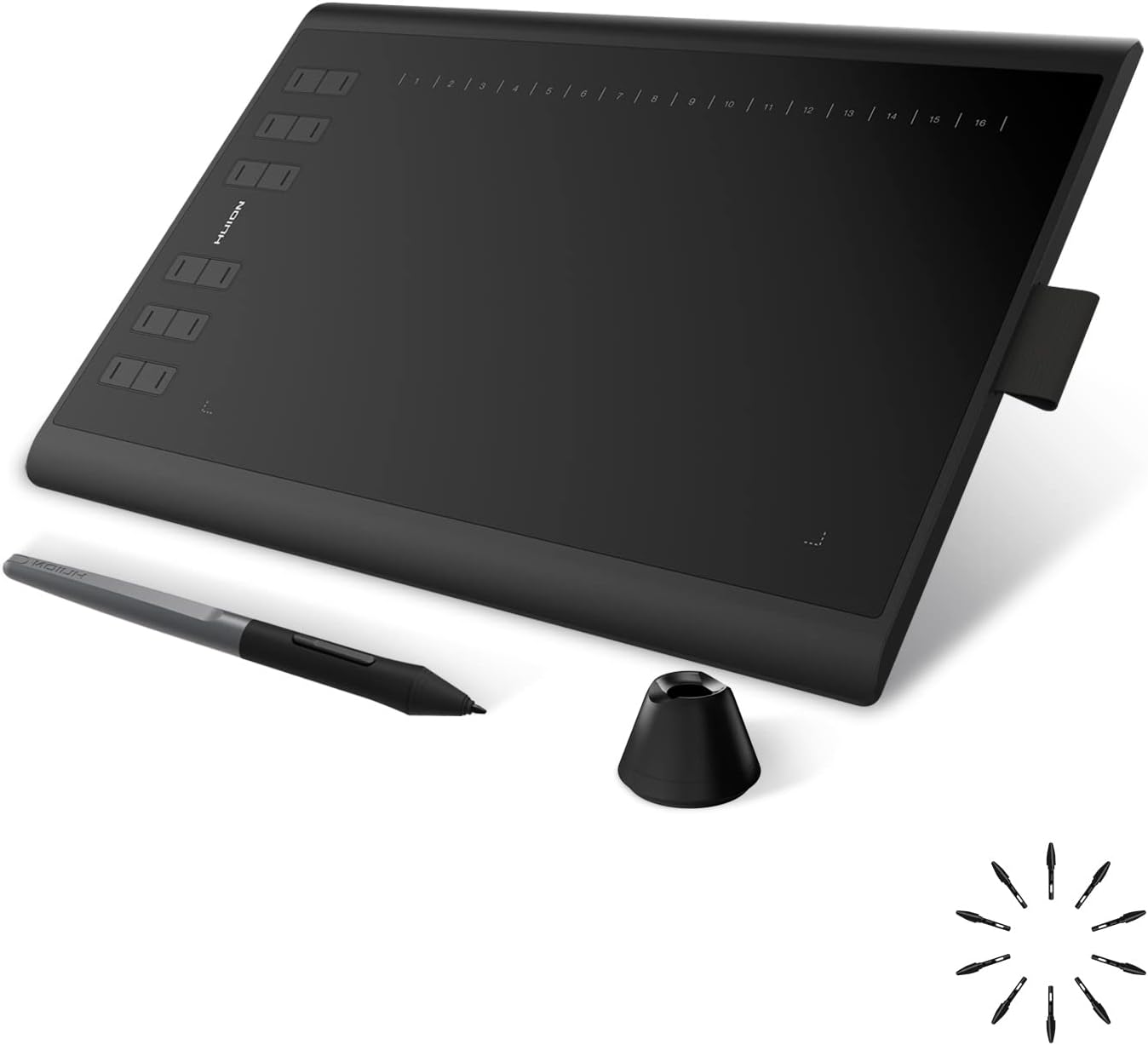
The Huion 1060 PLUS is a professional-grade graphics tablet featuring a large 10 x 6.25 inch workspace and an ultra-responsive battery-free pen with 8192 levels of pressure sensitivity. Equipped with a built-in 8GB SD card for hassle-free driver installation, it supports Windows, macOS, and Android devices. Customizable express keys and a sleek, portable design make it ideal for creative professionals and educators seeking precision, versatility, and seamless workflow integration.


| ASIN | B01FTE9HS2 |
| Active Surface Area | 395 square centimeters |
| Best Sellers Rank | 164,375 in Computers & Accessories ( See Top 100 in Computers & Accessories ) 221 in Graphic Tablets |
| Box Contents | Rechargeable Pen, USB Cable, Charging Cable, Pen Holder, Glove, Carrying Bag, 8GB SD Card |
| Brand | HUION |
| Brand Name | HUION |
| Colour | black |
| Compatible Devices | Desktop, Laptop |
| Connectivity technology | USB |
| Customer Reviews | 4.4 out of 5 stars 5,593 Reviews |
| Display Type | LCD |
| External Testing Certification | Não aplicável |
| Item Dimensions L x W | 25.4L x 15.9W centimetres |
| Item Weight | 0.77 Kilograms |
| Manufacturer | Shenzhen Huion Animation Technology Ltd. |
| Manufacturer Part Number | 2 |
| Model Name | H1060P |
| Model Number | H1060P |
| Model name | H1060P |
| Native Resolution | 1920x1080 |
| Network Connectivity Technology | USB |
| Number of Items | 1 |
| Operating System | Windows,macOS |
| Operating system | Windows,macOS |
| Pressure Sensitivity | 8192 Levels |
| Pressure sensitivity | 8192 Levels |
| Product Features | 8192 levels of pen pressure sensitivity |
| Product Warranty | 1060PLUS Graphics Tablet |
| Screen Size | 10 Inches |
| Special feature | 8192 levels of pen pressure sensitivity |
| Specific Uses For Product | Teaching, Designing |
| Target Audience | Teacher |
| Unit Count | 1.0 count |
T**L
Brilliant product. Fantastic for Maths/Science home-learning.
This is a brilliant product. Big enough for ease of writing, fantastic accuracy, nice writing feel and texture. Actually easily usable as a mouse when switching between windows quickly. I use this for online lessons, and it's very useful for maths/chemistry where typing isn't an option. Also it makes it very easy again to fill in or add to PDF documents, which I found very useful when taking online exams and homework. If you do buy this product, I would recommend using Microsoft Word to create documents using the draw function and saving as PDF or the Microsoft Edge free PDF Viewer for filling in pre-existing sheets. Worth every penny.
S**8
Very satisfied customer
I cannot fault the service or the product. It fully met my high expectations. The tablet arrived within 24 hours of placing the order and in a nice box, so I was eager to just plug in and start using it. Which is what I did. I installed the software from the HUION website and found this to be no different to the standard install of device drivers - it was no hassle at all : just click to download and then restart the pc. This is my first purchase of a tablet, for my son, so it was helpful that we could easily set up the tablet and download Autodesk to start drawing. As other users have mentioned the integrity and quality is quite noticeable, it certainly feels premium enough to me. Owing to a busy schedule I have not yet set up the 12 shortcut keys but I don't expect this to be anything other than straightforward. As a final point, the follow up after sales service from HUION is there if you need it and I received a pleasant courtesy email. If I have a need to make a future purchase I wouldn't hesitate in returning.
K**X
A good quality tablet - feels well made to the touch ...
A good quality tablet - feels well made to the touch and relatively easy to set up. Generally works well although I would have liked the surface to be a bit more mat and less slippery...The hotkeys work well and generally the accuracy is fine - the instructions are pretty sparse and quite misleading in that they say you cannot set it up for multiple extended monitors when in fact you can. Good value for money
M**E
A very good tablet for a first time user, who's now more productive
I've been a keen amateur photo nut for many years and after getting a new MacBook Pro, I wanted to try using a graphics tablet to speed up photo editing and retouching. I've never owned one before, so headed to Wacom first as I knew it was a 'big name', but went pale at the prices! After dropping £2k on a new Mac, I started looking for a cheaper option. Online review spoke highly of Huion and in particular this tablet, a new version of the 1060Plus. HUION 1060PLUS Graphics Tablet with 12 Hotkeys and Storage Function (8192 Pen Levels, 5080LPI) I've been using it for a week now and I can confidently say I love it. I don't have anything to compare it too, but I have no niggles. The accuracy, sensitivity and tracking are excellent, it's comfortable to use and within half an hour I was whizzing through Lightroom and Photoshop very happily. The Wacom I was originally looking at was just over £300. This was less than £65. I think I got a bargain. Very happy.
C**W
New 1060Plus (8192) - It will work on Linux, with a little effort
A note to Linux users: It is possible to get this tablet working on Linux, thanks to the DigiMend project. Unfortunately Amazon does not allow me to post a link to the project here, but a quick search for DigiMend on github will get you there. Go to digimend-kernel-drivers and click on releases. You'll find a deb package for Debian/Ubuntu/Mint, otherwise follow the instructions to compile the source code. Encouragingly, Huion has supplied the team with a tablet and are paying them to write the drivers. That said, support is still limited at the time of writing (Feb 2018) and you may prefer to purchase the much older H610Pro that's better supported. Using in Linux: The pen works well, it's possible to lock the tablet to one screen if you're using a multi-monitor setup, and it's also possible to switch it to left handed operation, both by configuration via xinput. While the physical buttons on the tablet work there doesn't seem to be a way to reconfigure them yet. The virtual buttons at the top become part of the drawing surface. I wouldn't be surprised if this tablet is fully supported a year from now given that Huion is funding driver development. Using in Windows: I downloaded the latest drivers from the Huion website rather than using the driver on the card. Of course you can copy the drivers onto the card if you're likely to be plugging it into other computers. The software includes an easy configuration tool that allows you to reconfigure the keys as well as the button operations on the pen, switch between right and left-handed mode and set the monitor the tablet is locked to. The middle button is mapped to the E key making it an eraser toggle for many drawing applications. Not as handy as an eraser end like we see on Wacom pens, but still usable. The pen glides across the pad effortlessly without slipping, the pressure sensor is very responsive and allows for great control over your brushes. The lack of tilt sensing is a shame but when it's a fraction of the cost of a Wacom it's something I was willing to overlook.
R**Y
Great quality product great price
When this arrived I didn't know what to expect, but from the moment I opened the box I knew this was a good product. Setup was very simple, plug and work. Worked with built in paint software on PC. I highly recommend it for any digital artist
L**T
Amazing product
I used to own a Wacoom tablet years ago. It was over 200€ and less features than this tablet offers. This tablet just blew my mind. It's accurate, precise, easy to set up and overall amazing. A lot of workspace, plenty of hot keys on the tablet to customize within seconds and extra 2 keys on the pen which I use for "Undo" and "Move". Pen requires no charge and feels good to draw with. Comes with an artist's glove which prevents leaving any tracing on tablet itself. 2 adapters to plug to your phones/tablets to draw on. It is impossible to beat this tablet for the price it is being sold. Whether you're new or advanced -- this product got you covered. I highly recommend this to everyone who loves digital art and doesn't want to spend hundreds to enjoy their hobby.
H**G
Beware problems with Windows 10
Beware long-standing problems with Windows 10 'Ink' which may significantly reduce the pen/tablet operability with common applications like Adobe Photoshop and Illustrator. There are suggested hacks to work around some of these problems however they did not work for me.
A**R
ادفع وأنت مطمن
عظمة على عظمة
A**R
Five Stars
Best decision was this Huion 1060 plus
J**S
High quality tablet
Works really well, affordable. I didn't think I would like replacing my old tablet but I was wrong. It works just like the old one with a few important improvements. The improved resolution and sensitivity really shows in all the drawings. I wish I had an easy way to assign buttons but I accept that some things are not perfect. The pen is a delight to hold. I'm quite impressed how well this works.
J**A
Muy buen resultado y muy contento con ella. Tableta Gráfica HUION New 1060PLUS 8192
Envío rápido y producto de buena calidad y que funciona muy bien. Comparada con las que tenía antes, una Wacom Bamboo pequeña de hace unos años (1024 niveles de presión) y una Wacom Bamboo Pen and Touch algo mas reciente y de mayor tamaño y niveles (2048) ha mejorado bastante la experiencia de uso. Es más precisa, mucho más barata y se notan los mejores niveles de presión, buena calidad de construcción, embalaje y accesorios cuidados, facilidad de instalación de drivers, que vienen incluidos en la memoria que trae la propia tableta. Por cierto, ningún problema para instalarlos en Windows 10, cosa que sí me ha sucedido con las dos Wacom. Como cosas a mejorar creo que debería tener el cable USB que la conecta al ordenador más largo, porque puede ser un poco justo de longitud si no está cerca la CPU. El lapiz o stylus tardó bastante en cargarse casi un día conectado a un USB del ordenador, y la luz de estado de carga, apenas se ve, solo se ve entre las pequeñas rendijas de los botones. Si se está cargando mientras se usa, es algo incómodo. En eso llevan ventaja las Wacom, ya que no hace falta cargarlos. Desconozco si conectado a un cargador mejora el tiempo de carga, porque de momento no he realizado una segunda carga y ya ha pasado un mes con un uso ocasional, pero de 4 ó 5 horas cada vez que la he usado. Lo dicho, en precisión, precio y niveles de presión es mejor que mis Bamboo anteriores. Creo que ha sido muy buena compra, sobre todo por haber tenido la suerte de haberla comprado en una oferta Flash, con lo que el precio ha sido bastante bueno: 50 y pico euros frente a los 89 que costaba normalmente.
S**®
Ha tutto quello che serve per cominciare ma l'arte dobbiamo mettercela noi.
Una tavoletta grafica altro non è che uno strumento di input (come una tastiera o un mouse) che consente, attraverso una penna speciale, di tracciare segni (più o meno come si farebbe con carta e penna) sulla tavoletta e vedere il vostro lavoro direttamente sullo schermo del computer. Potete usarla con computer mac o pc purchè vengano rispettati i requisiti di sistema (Windows 7/8/8.1/10 e Mac OS X10.8 o superiori). Io la uso con un macbook dotato di iOS Sierra senza alcun problema. E' necessario installare i driver affinchè funzioni al 100%. Potete scaricarli dal sito della Huion senza problemi. Il passo successivo è usare un programma per il disegno digitale e la compatibilità da questo punto di vista è ottima. Possiamo utilizzarla, con vari livelli di soddisfazione, con software come Corel Painter, CorelDraw, Adobe Photoshop, Adobe Illustrator, Adobe Fireworks, Macromedia Flash, ComicStudio, SAI, Infinite Stratos, 3D MAX, Autodesk MAYA, Pixologic ZBrushand, Sketchbook, ecc. La risoluzione di ben 5080 LPI (linee per pollici) fa si che i movimenti sulla tavoletta vengano trasposti sul monitor in maniera molto precisa. La sensibilità di pressione con i suoi 2048 livelli, ci consente di modificare lo spessore e l'opacità del tratto a seconda di quanta pressione esercitiamo sulla tavoletta con la penna: ottime sfumature, quindi, e disegno più realistico. Sul lato sinistro sono presenti 12 tasti programmabili a piacere, molto utili durante il lavoro per accedere velocemente ai comandi maggiormente utilizzati senza operare direttamente sulla tastiera. Tramite il software che scaricheremo possiamo utilizzare anche 16 softkey programmabili. La vasta possibilità di personalizzazione è in grado di trasformare questa tavoletta in una perfetta appendice creativa. Ovviamente la creatività non è inclusa ma dovete mettercela voi. La tavoletta si collega al computer tramite cavo USB-A e MicroUSB. E' compatibile con Windows e Mac OSX. Senza i suoi driver ovviamente non funziona ma potete scaricare quelli relativi al vostro sistemaoperativo direttamente dal sito Huion. Va detto che questa tavoletta non è touch, quindi non possiamo utilizzare le dita, ma per funzionare ha bisogno di una penna idonea. La penna è fornita con la tavoletta (cosa che non accade sempre per altri marchi) ed è ricaricabile tramite usb: 2 ore di ricarica assicurano 800 ore di funzionamento. Possiede due tasti programmabili a piacimento mediante il solito software. E' facile da impugnare (ottima l'ergonomia) e ben bilanciata, io mi ci trovo bene. Se non l'avete mai utilizzata, all'inizio dovrete esercitarvi per un po'. Nonostante possa, ad esempio, essere utilizzata anche alla stregua di un mouse non è esattamente la stessa cosa. Sfrutta la risonanza elettromagnetica che consente di individuare con estrema precisione la posizione della punta sulla tavoletta e quindi sullo schermo. Di fianco c'è un piccolo slot nel quale troviamo già inserita una scheda di memoria microsd da 8Gb espandibile a 64Gb: utile a salvare momentaneamente i vostri lavori. Nella confezione troviamo anche un pen holder dentro il quale sono inserite 4 punte di ricambio oltre alla mollettina per la sostituzione delle stesse. Comodissima è il sacchetto custodia nel quale riporre la tavoletta quando non la usiamo ed il guanto speciale utilizzabile (se vi ci trovate bene) per il disegno. La Huion Animation Technology propone diverse soluzioni per tutte le tasche e per tutti gli usi. Questa tavoletta ha specifiche tecniche che la mettono di fianco a dispositivi molto più costosi e per uso professionale. Il prezzo contenuto, tuttavia, la rende adatta a chi vuole imparare e divertirsi con il disegno digitale, a chi, come me, si occupa di post-produzione fotografica e . Una delle cose più importanti nell'acquisto della prima tavoletta grafica è, soprattutto, capire cosa ci si deve fare. Inutile spendere un casino di soldi solo per fare rough e sketch. Questa tavoletta, alla fine, considerate specifiche tecniche e costo, è qualcosa di più di un semplice punto di partenza. E' la seconda tavoletta grafica della Huion che ho in casa. Rispetto alla precedente versione questa New 1060PLUS presenta alcune migliorie non trascurabili come una maggiore area di disegno (area attiva 25cmx15,8 cm), la nuova presa microusb e la nuova penna che risulta sensibilmente più leggera della precedente (solo 14gr) e con integrato il power saving mode che la mette in stand-by dopo 10 min di inattività. E decisamente un buon prodotto. Consigliata.
Trustpilot
1 month ago
2 days ago