Desertcart purchases this item on your behalf and handles shipping, customs, and support to SINGAPORE.
⚡ Upgrade your workflow with speed and resilience — don’t get left behind!
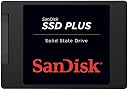
The SanDisk SSD PLUS 240GB is a 2.5-inch SATA III internal solid state drive delivering up to 535 MB/s read speeds. Designed for durability with shock and vibration resistance, it offers a reliable, high-performance storage upgrade ideal for everyday PC tasks. Backed by SanDisk’s decades of expertise, it includes easy setup and cloning software to transform your computing experience.


| Asin | B01F9G43WU |
| Best Sellers Rank | 2,233 in Computers & Accessories (See Top 100 in Computers & Accessories) 18 in Internal Solid State Drives |
| Box Contents | asdfgh |
| Brand Name | SanDisk |
| Cache Memory Installed Size | 240 |
| Color | Black |
| Compatible Devices | Desktop |
| Customer Package Type | Standard packaging |
| Customer Reviews | 4.7 4.7 out of 5 stars (38,376) 4.7 out of 5 stars |
| Data Transfer Rate | 1 Gigabits Per Second |
| Digital Storage Capacity | 240 GB |
| Enclosure Material | Solid State Drive |
| Eu Spare Part Availability Duration | 3 Years |
| Form Factor | 2.5-inch |
| Global Trade Identification Number | 00619659146726 |
| Hard Disk Description | Solid State Drive |
| Hard Disk Form Factor | 2.5 Inches |
| Hard Disk Interface | SATA 6 GB/s |
| Hard Drive Size | 240 GB |
| Hardware Connectivity | SATA 6.0 Gb/s |
| Hardware Platform | PC |
| Installation Type | Internal Hard Drive |
| Item Dimensions L X W X Thickness | 10.1L x 0.7W x 7Th centimetres |
| Item Part Number | SDSSDA-240G-G26 |
| Item Type Name | SanDisk SSD PLUS 240GB Solid State Drive - SDSSDA-240G-G26 |
| Item Weight | 0.07 Pounds |
| Manufacturer | SanDisk |
| Manufacturer Part Number | SDSSDA-240G-G26 |
| Media Speed | 440 megabytes_per_second |
| Model Name | SDSSDA-240G |
| Model Number | SDSSDA-240G-G26 |
| Network Connectivity Technology | SATA |
| Number Of Items | 1 |
| Product Features | Internal^Operating temperature range:0 - 70 °C^S.M.A.R.T support^Shock resistant, Vibration proof |
| Read Speed | 1 Megabytes Per Second |
| Specific Uses For Product | Business, Multimedia, Personal |
| Unit Count | 1.0 count |
| Upc | 619659146726 |
User
Get one you will not regret it.
This thing has made my laptop new again. So fastr now and it was getting to be a bore using it but this thing has worked wonders.I never bothered cloning my hard drive because that was the reason it was slow so please do yourself a favour and do a complete new install of windows 10 or whatever install you want.These are guaranteed for 3 years I think if you register on their site as soon as you get it.They are a good well made brand and should you get any problems then send it back for a replacement. I must admit there must be the odd faulty one that goes through the system but you people who complain should just get a new replacement from the site after you have registered for the guarantee.I cannot fault it and I was amazed at the speed. I also bought a DVD Rom drive caddie for another hard drive. It was a sata III caddy and the hard drive I took from this I used it as a backup using the caddie so now it looks like I have 2 hard drived on my laptop.If you need a DVD rom then buy a caddy for the one you take out and make an external one. DVD's and CD's are becoming obsolete anyway and it is nice now to have my laptop boot up in only 8 seconds using windows 10.Obviously windows 10 when you shut down only goes to some sort of standby mode and that is why windows 10 boots up quickly, but of course it does not affect the reboot because that will do a slower boot up.I will fully recommend these as a budget SSD and I know I forfeited a 1TB hard drive for this 240GB SSD but then as I say I used the 1TB hard drive as a second drive and I install everything to that and store everything on that.It really as made it into a new laptop again and it was 2 years old anyway (Acer Aspire)
User
It worked (including the software) and was easy to install!
As a non-techie person, I was a little bit apprehensive ordering this kit, especially with all the negative reviews. Spurred on by greatbrit's review and a maddeningly slow Windows 10 computer, I took the plunge and am so glad that I did. No problems with the cloning - didn't even need to do the fix that greatbrit used (maybe they've updated the software?). Just did what the very basic instructions told me to do and it took about 2 hours on a very slow computer to clone everything. As greatbrit advised I was patient while the software took it's time to go through it's stages and left the 'shut down pc when completed' box checked. So no real problems. My very old Sony Vaio vgnnw20ef is now functioning again at an acceptable speed for less than half the price it would have cost at the local computer shop (sorry local shop but you're charging £86 for a 240gb ssd and £40 for an hour's labour = rip off!). Other points: if you want to register the ssd at Sandisk then make a note of the serial number - I think it must be on the ssd itself but I'd already put this in by the time I got to the registration process and didn't really want to take it back out. Also, my original hdd was 300gb with about 130gb of info on there - it wasn't a problem cloning this onto a smaller (240gb) ssd. So, overall a very good experience to keep an ageing computer going - which because of so many negative reviews prompted me to do my first Amazon review - please click if it was helpful :)
User
Great SSD, achieving more speed and quieter running
I purchased an entry level notebook Acer Aspire 14 ES1-431 and wanted to see if I could transform it by swapping out the 500GB mechanical hard-drive for the SanDisk Plus 240GB SSD. I was rather wary of the lowish storage (240GB) of the SSD. So before I made the move I downloaded all the latest updates from Microsoft. I was rather taken aback by the huge update for Windows Home v1607. Not only did this take hours to finish but it increased the storage on my hard-drive by 20GB! By utilising the Windows System Cleaner I managed to delete the cause of the extra storage which was the Windows.Old folder which housed the previous Windows version in case one wanted to revert. So having got the storage down to 44GB which included Windows 10 Home, Microsoft Office Plus 2016 and Adobe Acrobat, I set about defragmenting the old drive before cloning the contents to the SanDisk SSD using a USB 3 to Sata adapter (Sabrent) and the free Macrium Reflect software. All went well and I took the opportunity to divide the SSD into separate partitions for the operating system and my data files. I found that there was 222GB storage available on the SSD so I allocated 80GB to the operating system and 142GB to the data files. Once the SSD was successfully cloned (2 hours) and installed, I directed my Desktop, Documents, Videos, Music, Pictures and OneDrive folders to the data partition (E), trying to stop using up the storage on the operating system partition (C). The SanDisk SSD was the same size as the original hard-drive and the screw holes were in similar places, so it was an easy replacement fit. I was pleasantly surprised to see that the notebook took one-third the time to boot to the Desktop screen from pressing the power button. So the new SanDisk SSD did the trick and now I have quieter, faster and cooler running notebook. The modification was worthwhile and great fun!
User
Superb upgrade
Excellent upgrade for an ageing machine. I used to build PCs as a casual gamer years ago and hadn't heard much about SSD hard drives before.I have installed RAM, changed CPUs, power supplies, graphics cards etc before but this has been the most noticeable boost in performance out of all of them. Boot up times significantly faster as is normal running tasks. The data transfer speed greatly surpass the old HDDs.I had been prompted to change my hard drive simply because I noticed some bad sectors on my traditional 500gb HDD, using CrystalDisk software and therefore indicating it potentially failing. I decided to do a little bit of research and it was commonly suggested an SSD as a reasonably cheap upgrade. This particular one is a SATA connection and was a straight swap for an existing spare hard drive (obviously make sure you have spare power supply too!).Easy to install, and a simple piece of software to clone your operating system is all that required. Then adjust boot order in your BIOS to the new SSD, voila!It obviously gets quite pricey with SSDs for lots of memory. For me as I don't do an awful lot of gaming etc anymore I didn't require lots of space other than what was needed for the OS and have spare HDDs for photos and documents etc.In summary, a fantastic upgrade without breaking the bank, especially for a PC that isn't used all that often anymore. Would recommend
User
Great performance but fiddly to clone from original disk
I had a great deal of trouble cloning to this new disk. First thing to notice is that you will need to purchase a usb to sata connector if you wish to clone the disk in situ. I purchased one from Amazon which worked very well though I had to wait another day as I didn't realise i needed one.The description claims it comes with software. There is a tiny leaflet with it with a link for software if you use a magnifying glass to see it - and then you find the link is broken. I used a free download called AOMEI BACKUP . This cloned the original disk ok - it was showing as a new disk with all the folders.However when I then changed to the new disk in my laptop, my laptop didnt boot up. It took me ages of working out why (and I'm quite IT literate) to discover that it was a problem with the master boot record- it was still pointing to my old disk.Solution was to put in a windows set up disk in order to get to a command prompt and then use a simple command- bootrec.exe /fixmbrThat did the trick for me - google it a bit more for more detailed help.Once it was up the laptop loaded faster and programs opened a lot quicker. Word used to take ages - now it open in less than 5 seconds. So I'm very pleased with performanceA final tip - buy a disk same or larger than the one you have currently otherwise you will have to do a lot of tidying up to get it down to the size of the new disk. Some cloning software will only work if you have at least a same size disk. That was another mistake i made and why I used the software that I did.So good product when you get it all up and working.
User
Fast, compact. Excellent delivery (240GB version). Software useful.
240GB of fast access 'disk' space! Reinstallation of Win10 x64bit required - so decided to also upgrade RAID disks (Hard Disks) to a single SSD.Vastly improves start up speed and all apps installed on SSD (5 year old PC - 2.7Ghz iCore7 + 12GB RAM). Partly due to clean install of Windows.Went from 5+ MINUTES "restart and logon" - to less than 30sec!!!Software app seems useful. Monitors 'wear' on SSD (all have this 'issue').120GB is sufficient for Win10 and many apps. 240GB better - but needed urgently (work!). Arrived in under 14 hours! Impressive. Only a drone would have beaten it!I kept Win10 original installation on original HD's - that way I could go back if there was say incompatible issue with Mobo etc. But not problems - easy install.Apparently comes with (online download?) of disk cloning software - but I did not use this (original Win 10 installation was TOTALLY scrood up by a M$ "update"! Grrrh). So you could 'move' your current Win configuration from HD to SDD. Check space used/required.Installation easy. BE SURE to ground yourself. Heed connector label - don't touch. Disconnect power at wall. etc. etc.This is SATA 3 device (fully compatible with previous SATA 2 - as per my ASUS P6T Deluxe mobo). Make sure you have power connection too. My system is self-built so I'd planned for this day!Go buy one! Awesome!
User
SDD works great. Easy to setup as a Windows OS C: Boot disk.
My wife's HDD on her 16 month old Dell 8930 Desktop had been playing up. I already had to re-install windows 10 around a month ago. It was ok for a while, but started getting crashes again over the last few days. I decided to replace the single HDD with a Sandisk SSD Plus 240GB, to be used as the boot disk, and a separate 2TB HDD for Data. The current C-drive was only using around 60GB for Windows 10 and other installed program, so 240GB was more than enough, and its really good price.The Sandisk product comes with an unreadable 2-point 10 x 3cm booklet, don't know what’s in it, I can't read it. However, the Sandisk website is fairly useful.Note 1, the Dell has removable drive bay cradles which can accommodate either a HDD or SDD drive, but many Desktops won’t have that so you may need to also buy a "2.5 to 3.5 inch SDD cradle", some screws to secure the SDD and cradle, a SATA Data cable (most Desktops will come with extra power cables, but check first). I think you can get kits which include all that for about £5.Note 2, when you receive your SDD drive, make a note of the serial number, it’s on the back of the drive you need it to register the product on the Sandisk Website fro 3 year guarantee. If you don’t take a note of it before you install the SDD, you’ll have to uninstall and re-install it all over again.Installation is easy, just install a cradle, screw the SDD to it, connect your SATA Data Cable and power cable.My SDD was to be used as a bootable drive, to hold windows and all installed programs. The easiest way to do that is to use Acronis True Image Software, and clone your existing drive (which is free if using a Sandisk or WD drive, link to Acronis from the Sandisk website). My existing drive was 1TB, but with only around 450GB used. 320GB of that was photos, the SDD is 240GB. So I backed up all the data on the existing C Drive to an external portable 2TB HDD, then removed all the photos from the existing C drive, reducing its size down to about 130GB, which meant it would easily fit on the 240GB SDD.In Windows 10 use the Disk Management program (best to access that via Computer Management App, (run as administrator eg Left click)) to first initialise you SDD, so that the computer will recognise it. Just set it up as a “ Simple” partition, use full size, doesn’t matter what Drive number you assign, but don’t use A, B, or G (Windows will automatically reassign the Boot Disk(SDD) as the C: drive when you restart the PC.) When the SDD is recognised you will see the empty SDD in File Explorer.Run Acronis, select the clone tool, choose automatic mode which will clone all partitions. The amount of data on the source disk must be less than the available space on the destination SDD. I have 5 partitions on my old HDD C: drive, 3 recovery and 1 x EFI. These are replicated exactly by Acronis, the remaining C: partition holding the Boot, and OS and Data is automatically shrunk down into the remaining space on the SDD, about 207GB, so no problem creating 240GB SDD from a 1TB HDD. Follow the instructions, restart the computer, and Acronis will take over and clone.When cloning is complete, PC will shut down. What I did then is unplug the Data cable from the old HDD, and swapped it over to connect to the SDD, that way you don’t have to amend the Boot order in the BIOS, if you don’t do that you have to amend the BIOS.The SDD worked a treat, much faster startup, shutdown and program load and has fixed my crash issues. I could then bin the old HDD and replace it with a new 2TB HDD D:Data drive, and onto that, re-import the photo data from my external backup drive.
User
Great value and excellent performance
I built my PC 8 years ago with an i5 2500k and a 128gb crucial ssd that cost me about £90 at the time.After upgrading to win 10 my PC would boot in about 30 seconds to the desktop. (Win 7 was slower)With this ssd my boot time is 10 seconds to the desktop. Needless to say i am very impressed with the speed of this drive, and the rate of progress of ssd tech over the last 8 years.Nvme might be the last word, but if your mobo doesn't support it, upgrading an old ssd can give your system a real boost.It's worth noting that i haven't noticed a huge improvement in game load times, but i only play gta5 which is at least 80gb of data and my aging cpu is probably at its limit.Overall system performance had noticeably improved.A cheap and easy upgrade. Recommended
User
Fantastic addition to my workstation!
I work in film and television creating 3D animation and VFX. I bought this SSD to use as a dedicated video playback Drive. It's incredibly fast and reliable. Great value!
User
Costly
Good product we use long time
User
Big and very fast
Very fast and solidly performing SSD, the best we have owned to date.
User
Compatible para macbook pro 2012
Sandisk ofrece buena calidad en sus productos en este caso tampoco decepcionó
User
Polecam!
Dysk jest szybki i bezgłośny.
Trustpilot
2 weeks ago
1 month ago