Desertcart purchases this item on your behalf and handles shipping, customs, and support to SINGAPORE.
🖥️ Elevate your rack game with precision and power — mount like a pro, every time!
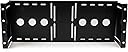
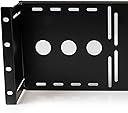
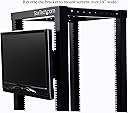
The StarTech 4U VESA LCD Monitor Rack Mount Bracket is a heavy-duty, TAA-compliant mounting solution designed for 19-inch LCD panels. Made from cold-pressed SPCC steel, it supports both 75mm and 100mm VESA standards and features adjustable depth for optimal fit inside AV racks or cabinets. Ideal for IT professionals and government use, it offers versatile mounting options including wall installations, backed by a lifetime warranty and expert technical support.


| ASIN | B002D1GG0C |
| Best Sellers Rank | #582 in Computer Racks & Cabinets #1,261 in Computer Monitor Accessories |
| Brand | StarTech.com |
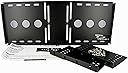
| Built-In Media | 8xM5 cage nuts,8xM5 screws,4xM4x10mm LCD mounting screws |
| Color | Black |
| Compatible Devices | PC |
| Customer Reviews | 4.6 out of 5 stars 315 Reviews |
| Enclosure Material | Alloy Steel |
| External Testing Certification | ROHS |
| Global Trade Identification Number | 00065030834896, 00100177422282, 00151903134429, 00151903600443, 00521227103140, 05054533310957 |
| Item Highlight | Supports 75mm and 100mm VESA panels, Adjustable mounting depth, Cold-pressed SPCC steel, Cabinet |
| Item Type Name | Mounting Bracket |
| Item Weight | 1.65 kg |
| Manufacturer | StarTech.com |
| Material | Alloy Steel |
| Maximum-Supported Screen Size | 19 inches |
| Mfr Part Number | RKLCDBK |
| Minimum-Supported Screen Size | 19 inches |
| Model Number | RKLCDBK |
| Mounting Type | Wall Mount |
| Movement Type | Tilt |
| Number of Items | 1 |
| UPC | 521227103140 065030834896 151903600443 |
| Unit Count | 1 Count |
| Warranty Description | Lifetime |
P**Y
Perfect!
I work in broadcasting and we have a lot of racks with automation servers, satellite IRDs, and just a bunch of equipment that is made for racks. I wanted to use just regular monitors with VESA mounts instead of buying a rack monitor that are so overpriced... This works perfectly... I love that I can adjust the depth if I had a smaller monitor and wanted it to be flush with the rack if I wanted to use a bigger monitor and have it outside of the rack which is the way I am using it. I can't believe this isn't a more common solution to putting monitors in racks instead of the typical sliding tray type monitors or the kvm trays. I will eventually phase out the tray monitors and put these in their place with larger monitors and use my own KVM in each rack. This idea is so simple and perfect that I can't believe it took me this long to get one. Very easy to assemble and mountain. 5 stars all day long!
C**A
Made in Canada? Nice hardware. Self explanatory
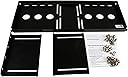
It goes without saying that reviews are purely subjective and never going to be universally agreeable. I am not clear about the criticism about the "hardware"-be it poor quality or confusing at to its placement. This is not a complicated product. To understand this review, it's getting the "terminology" correct/comprehensible for others to read. This kit is as simple as it gets. The components: back plate, side arms (one for the left and one for the right rack tower attachment) and 3 types of screws (4 to attach arms to back plate, 4 to attach back plate to monitor and 8-although not required to use all 8-to mount the assembled bracket to the rack. Note, first determine if you will be able to attached the bracket after the monitor has been attached to it or if you first need to attach the bracket to the server rack and then attach the monitor to the bracket. Either way, it's a very simple process to screw the monitor to the backing plate. In my case, having the bracket and monitor attached first, I wasn't able to mount the bracket using the rear posts of my server rack. Either way, it's beneficial to attach the monitor to the back plate and then line it up/press it up against your server rack to determine the final position you'd like the monitor to protrude outward or inward of the rack posts. Once you know this, you can tighten down the side arm screws into their final position. If you pre-attach the bracket and then mount it to the server rack, you may not have access to the screws. Again, this just allows and 1" of inward/outward positioning of the monitor after its attached to the backing plate. It makes sense when you're assembling it. I found the 3 types of screws, clearly marked and bagged accordingly, to be of good quality. Also, the threaded back plate attachment points were very sturdy. No issue whatsoever in terms of cross threading or stripping. [Pro tip: any time a screw is inserted or re-inserted after being removed from it's original location-particularly when it's anchored into a different material than it is made like a self anchoring metal screw into plastic or sheet metal; first insert the screw with light pressure and slowly turn backwards ("counterclockwise", in other words, the opposite direction of that to tighten the screw) until you feel a little "click" and sink. This "click" is the sound and feel of the screw naturally being re-aligned with the thread pattern. This little trick will prevent 90% of cross-threading mishaps because the screw will naturally realign with the particular thread pattern that has already been "forged" between the materials whether metal to metal or metal to plastic, etc on self-anchoring screws in particular.] The rack mounting hardware in particular is great, it's a complete mounting set of M5 sized (some rack hardware is M6) consisting of a "pass through" screw, a tub washer and a spinner/grip nut. You don't have to use the nut if the threads on your server rack are substantial and no major load bearing requirements. However, I recommend to use the seated washer as it makes for a professional look and it insulates the metal to metal contact and reduces vibration. The good thing about having M5 "universal" mounting screws is that they will work with larger mounting holes as long as you use the supplied nuts. Otherwise, you will have to bore out the holes in your rack rails to accommodate M6 screws and will be obligated to use nuts. Regardless, this mount is solid, heavy gauge metal and it allows for several mounting positions. I took a couple pics to capture how I used the rear post position and recessed the side arms to limit the depth (although it is difficult to see the side arm screws after the bracket is mounted) which keeps my monitor flush with the front rails of the rack. Again, STEP 1, pre-assembly of the frame (using 4 screws to attach the arms that thread directly into the back plate). Don't over tighten as you may want to adjust the final position of your monitor before you attach the bracket to the rack. I recognize that there are all levels of experience and skill when it comes to these types of products but I find it a bit harmful to a product/vendor to trash an item simply because you should've hired a trained monkey to do it for you. If nothing else, take the pro tip as my gift to pass along.
S**P
Adjustable depth and versatile vesa mount
Fit a 4K 32" monitor in my rack vertically. Sturdy, plenty strong for a large monitor Tight fit and PBP for two outputs, works great. Much cheaper than other rack mounted monitor solutions.
S**R
The bottom line is that the variety of mounting options are great. The only issue I had was that I ...
This is very well made. What many others seem to be overlooking is that the side 'ears' need not be attached at their very last positions to the back bar. The design allows the user to install monitors that fit between the side rails at any depth ahead of or behind the rails (up to about 3" of variation. Obviously if you are using a monitor that is wider than the upright rails, you will want to install the monitor in front of the rails. This can be done with up to 3-4" of distance between the rails and back of the monitor. This extra distance may be helpful if you are wanting to tilt and swivel a monitor. The bottom line is that the variety of mounting options are great. The only issue I had was that I needed to obtain some 4mm screws to replace the VESA mount screws that I had as the ones that came with the monitor were a bit too short after placing the horizontal brace up against the monitor. (This need for 4mm screws though did introduce me to the most fantastic hardware store ever that was just around the corner from me and I'd never known of it. Worth every bit of trouble.)
S**R
BYO screws for VESA portion
Only ships with screws to assemble and put in rack - this is a VESA mount with no screws for attaching anything with a VESA mount
J**.
Works flawlessly
Excellent mounting bracket. I have this in the back of my 12U Gator rack for DJ work to hide the mess of wires, holding up an old Samsung SyncMaster 712N, which is actually a bit heavy. Still, it hasn't complained or bent in any way and I'm happy with my purchase. Solid bracket. I highly recommend this. One side note---I see some people have had problems with monitors with a curved back; I can't speak for that, as the Samsung SyncMaster 712N monitor I attached has a flat back. Nonetheless at least know that this has a good weight-bearing capacity.
G**.
Exactly what I needed for my home server rack.
This thing does exactly what it is supposed to do. I was able to mount a Dell 20" monitor at the top of my Chief 36U cabinet with relative ease. It's well built, and was ready to put together. It would be nice if it had an angle adjustment built into it, but it does the job.
F**Y
Mounts a monitor in a rack (if the monitor fits between the rack uprights)
This takes up 4U of space so just be aware of that first. It also only mounts monitors that would fit between the rails of a standard 42U rack so if you are wondering if your monitor will fit just see if the monitor fits between the rack rail uprights. The way it is mounts, if you can get longer screws, you might be able to mount this in the same space where you have devices that only fill the back of the rack like a UPS or a switch. It was fairly easy to assemble and I just wanted a monitor up full time instead of a pull-out type as I run a raspberry PI to monitor the network and server status in this rack.
J**P
Top Für Das Home-Rack
Etwas teuer, aber es ist halt keine Massenproduktion. Qualität ist perfekt, Montage war mehr als leicht. Ich habe in dem VESA Mount einen 14 Zoll Touch Display montiert, auf dem ich meine Home-Assistant Dashboards laufen habe oder Hardware Monitoring einsehen kann.
D**S
Does what it says on the tin
Perfect - didn't need a really decent monitor to sit in my PPU rack as I'm just using it for multi view. Effortlessly mounted a 19" Samsung TV into my rack - doesn't look bodged at all and it saved me about 600 quid altogether! I was going to make something to hold a TV before I saw this advertised. Strange that Startech are the only company that have seen such a gap in the market. Really pleased - solid construction and I now have some cash freed up!
J**Z
Perfecta sujección
El soporte viene en un paquete plano bastante ajustado. Viene con todos los tornillos para su colocación en el rack y para el monitor vesa. Puede ajustarse la altura y la profundidad con los soportes laterales. Ideal por si tienes un rack sin puerta porque puedes dejarlo casi rasante. Volvería a comprarlo sin duda.
F**.
Déçu
Produit renvoyé pour ma part. Mauvais usinage des pas de vis du coup impossible de visser le support écran sur le rail sans déformer l'empreinte des vis. Peut être un mauvais lot... Heureusement, le service retour Amazon est toujours au top.
A**R
Does what it says, one very minor comment.
It does exactly what I needed. The only reason for a 4-star rating is the screws provided to go into the back of the monitor have rather small heads (no washers). This means as they pass through the holes in the device they don't get a solid purchase on the hole edge. It will need washers or different screws if the monitor is subject to vibration over time. If it is a set and forget situation then all should be fine.
Trustpilot
5 days ago
1 month ago