Desertcart purchases this item on your behalf and handles shipping, customs, and support to SINGAPORE.
๐ Scan fast, travel light, stay sharp โ your mobile office just got smarter!
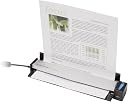
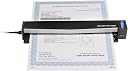
The Fujitsu ScanSnap S1100 CLR is a featherweight, USB-powered mobile scanner delivering 600 DPI high-quality scans in about 7.5 seconds per letter-size page. Designed for professionals on the move, it features automated image corrections and business card data extraction, supporting a variety of media including postcards and plastic IDs. Compact and reliable, itโs the ultimate tool for decluttering your workflow anywhere, anytime.
| ASIN | B004ISGG7Q |
| Best Sellers Rank | #206,380 in Office Products ( See Top 100 in Office Products ) #225 in Document Scanners |
| Brand | Fujitsu |
| Color Depth | 24 bits |
| Connection Type | USB |
| Connectivity Technology | USB |
| Customer Reviews | 4.5 out of 5 stars 610 Reviews |
| Global Trade Identification Number | 00097564307782 |
| Item Weight | 12.32 ounces |
| Light Source Type | LED |
| Manufacturer | FUJITSU IMAGING (SCANNERS) |
| Media Type | Business Card, ID Card, Paper, Post Card, Receipt |
| Minimum System Requirements | Windows 7 |
| Model Name | ScanSnap S1100 CLR |
| Optical Sensor Technology | CIS |
| Resolution | 600 |
| Scanner Type | Text |
| Standard Sheet Capacity | 1 |
| UPC | 043396323919 043396323773 097564307782 042111667079 975643077828 611200610571 |
| Unit Count | 1 Count |
| Wattage | 2.5 watts |
M**J
Wow! I love this scanner (so far)
I have 25 years' worth of family pictures to sort through and scan. I looked at a lot of different kinds of scanners but mostly I wanted a good scanner that would make my job easier and allow me to not be tied to my desktop. I already have a flatbed scanner but it takes forever to scan the pictures and, due to my home office configuration, I have to stand up to scan each picture. So I ordered the Snap Scan S1100 Fujitsu ScanSnap S1100 CLR 600DPI USB Mobile Scanner (PA03610-B005) from Amazon on Monday, July 21, 2014. It wasn't due to arrive for a week (I opted for the free shipping). Imagine my surprise when it was delivered the NEXT DAY! Using my wife's laptop, I had it up and scanning in less than an hour which included me reading all of the instructions first :) Glad I did too! Make sure you load the software first, then update it from the website AND then plug in the USB cable to the scanner and computer (in that order). PROS: Okay, so I've now had the scanner for two days and have scanned 35 pictures (all 4x6) so far. I love it! It is easy to use, it gives you lots of options for scanning both documents (.pdf) and pictures (.jpg) and it is fast. I was able to set the scanner to scan my color pictures at Normal (150 dpi - dots per inch), Better (200 dpi), Best (300 dpi) or Excellent (600 dpi). The higher the resolution setting the slower it will scan a picture, but even at Excellent it scanned my 4x6 inch pictures in 5-8 seconds. It also has an automatic resolution setting. I also scanned a document just to try it and it worked fine as well. I did have one problem (see below) and had to contact Technical Support. I appreciated the honesty and knowledge of my tech person and the ease in getting in contact with tech support. CONS: After only scanning 25 pictures yesterday, I began to notice that the last few pictures had one or two faint white lines on them. This morning I was able to do a "chat" with tech support and resolved the issue very quickly. Interestingly (or not so depending on your perspective), the tech person indicated that the ScanSnap was really not made to scan pictures. He said a flatbed scanner is best for pictures. Really, I thought? That certainly isn't what the advertising indicated. At least the person was being honest and that goes a long way with me. Anyway, the tech indicated that when pictures are scanned they can leave residue on the glass (inside the scanner). The lines and other things like blurriness or spots can be caused by that residue on the glass. He suggested that I take 90% Isopropyl Alcohol (rubbing alcohol) and using a lent free cloth, simply clean the glass. It was a very simple process and sure enough, it worked. Took me less than one minute to do. Note: I used 70% alcohol (didn't have 90% at home) and one of my wife's "lent free" pads she uses for putting on make-up. I am not excited about having to clean the glass every 25-50 pictures but, to be honest, if that is all it takes then I'm okay with it. This was not a deal-breaker for me. Especially because the pictures scan so quickly. I will primarily use the "Best" setting for most of my pictures and they literally scan in 2-3 seconds. Additional Note: I also just received the ScanSnap protective case this morning while writing this review. Scansnap S1100 Carrying Case The scanner fits into the case very nicely. It even allows you to keep the USB cable plugged into the scanner through a slot in the case so you don't have to remove the scanner to operate it. The front and back of the case fold away to allow operation and then fold back over the scanner and is secured by a Velcro strip on the front of the case. I decided to buy the case because I wanted to protect the scanner when I'm on the move or when my wife is using it for her genealogy trips. So far we feel good about these two purchases (scanner and case).
R**T
Tiny, amazing mobile scanner!
I love the ScanSnap line and have had several models. I have adopted this product line at my workplace for personal scanners, and we have never had a failure. They're fast, reliable, durable and this model is no different. I've also owned the model slightly larger than this, the Fujitsu ScanSnap S1300 Instant PDF Sheet-Fed Mobile Scanner (PA03603-B005) . I would definitely choose this model for the mobile traveling worker. This is the first ultra mobile Scansnap, and I cannot convey how impressed I am with it! The device is literally about the size of two snickers bars put end to end. It's tiny, feels well constructed, and does not require external power. The software installation is quick is easy. It does not come with Adobe Acrobat Full version, like some of the older models used to include. It does not scan double sided as do many of the other Scansnap devices. If you've used a scansnap this one puts the brakes on and reverses you-- the paper actually feeds in the front and out the back-- Opposite of all Scansnaps. It works just fine once you realize what's going on there. Those couple of drawbacks considered, if you are a mobile road warrior who needs to scan on the go, (signed paperwork, business cards, receipts, etc.) this is clearly my most preferred choice for a mobile scanner. The quality of scans is completely satisfactory, and honestly this little device does much better with tiny thin pieces of paper like receipts as compared to some of the larger models-- that are designed for a whole stack of paper-- and from time to time will skew a thin tiny receipt sideways and crinkle it up. My thoughts on this model vs. the S1300: If you travel and set up at a hotel, temporary office or trade table type environment for a few days or all day, or need double sided scanning, the S1300 is a fine option. It's larger and takes more space if you're flying. If you travel or fly daily, or move from client to client during the day and want the smallest lightest option, this would be my recommended option. It would be perfect for sales forces, insurance company members, consultants, and others who go from place to place quickly, want minimal bulk, and the ability to scan a few documents quickly & easily. If you need to scan small stacks of paper, go with the S1300. As I continue to have the scanner longer I will plan to update the review. But at this point, the install was easy, the scan quality is good and use is easy, and the device is unbelievably small yet feels "not flimsy" and I couldn't be any more pleased with it's functionality and portability. If you have any specific questions or would like a certain additional feature tested, please leave a comment below and I will answer you ASAP. Update: I have added a photo of it in my hand for size comparison. It's unbelievably trim! Update: I've completed my first business trip with 13 pages of various sized receipts, full page receipts, baggage fee wide receipts, etc. I was able to scan them all in about 2 minutes. As well, a couple features I didn't mention explicitly above: The scanner auto aligns the images-- you don't have to worry about feeding them through exactly straight. Finally, the software "sits and waits" between receipts you feed through, until you click "finished". This is a FAR superior software feature to the larger S1300-- because it takes a few moments to put down & pick up another receipt. The scanner sits patiently and waits for you to feed through as many receipts or pieces of paper as you want, with no urgency. The scanning went perfectly and I'll post a few examples of the scans with no personal info on them as an example of scan quality. Since I've had the scanner I carry it with me in my backpack every day to & from work and everywhere I travel with my work backpack. Still going strong with no issues. Update: I recently needed to scan some very plastic like paper and it didn't want to curl upwards to come out of the scanner. I then learned that the back "door" on the scanner can very easily be removed so the paper feeds straight through without bending it. Another question, and another problem solved easily. Update: I discovered that the rear door can easily be removed so you can scan hard cards like plastic credit cards, membership cards, etc. right through the unit without bending them at all! Also great for older style hard photos as long as they're not too thick.
J**E
perfect little scanner
I was looking for a scanner to organize receipts from a renovation job I was completing and wanted something I could carry with me. After looking at NeatReceipts Mobile Scanner and Digital Filing System I decided against it, mostly due to the many negative reviews. I cannot compare the two products because I only bought the fujitsu scanner. I will start with the scanner. It is small, I looked at the product dimension before I bought it but for some reason it did not register in my brain how small it would be. It is slightly wider than a piece of standard printer paper. If you use it to scan printer paper size pages make sure you start the page straight because there is not much room for a crooked page, and it will continue to feed it through and crinkle your paper. With that said, it is not hard to start it straight because when you first insert the page the scanner pulls it forward about 1/2 inch, at this point it is easy to see if it is straight. As I said, I bought this scanner primarily for receipts, and it is great. It will create a clear, crisp image on nearly any receipt. The only times I had inferior images was if I left the receipt lying around too long before scanning and the receipt itself became faded or crammed into a tiny ball at the bottom of my pocket. Even the images it produced from these were readable. Register receipts are a little harder to keep straight because they are usually on thin flimsy paper. It does not matter if they are fed exactly straight because the software will automatically straighten the image for you. Long receipts are no problem, I have fed several receipts that were longer than a legal size page and the scanner didn't care. It scans a page pretty fast too, insert the receipt, press the scan button, and by time you move your hand to the exit slot the receipt is already ahead of you. Will it do a standard page in the 7 seconds the description say? I don't know, I've never actually timed it, but my guess is that it would. The scanner has a flip down inlet tray that seems to be flimsy plastic, I was worried this would break easily but even being crammed in my computer bag thrown on the seat of my truck it hasn't, so I'm going to say this shouldn't be a concern. The software that comes with it loaded easily onto both windows xp and windows 7. Sorry Linux users, this scanner will not work for you, and I don't know about Macs. The scan snap organizer works well and I use it, but all it really is, is a separate program that organizes your files into folders, much like you can do with your documents folder anyway. The OCR program works well to create editable documents in word, excel and other similar programs, but I use it mostly for creating searchable pdf files. This works great, even on those faded and crumpled up receipts, and allows me to find for specific receipts by searching for items on them. For example, I was looking for all the receipts that I purchased house insulation, I simply searched for insulation, and it found every receipt that I purchased insulation on. I do not know anything about the cardminder software because I have never used it, and don't intent to...I don't collect business cards. And I have never used the scan to mobile software because I don't have an iPhone or iPad. Overall this is a great little scanner that is built well, creates great scans, and is easy to use.
S**U
WOW...
I reviewed several models before making my decision. I settled on the Fujitsu and I'm very glad I did. This scanner does it ALL!!! I love the portability of this peripheral. It's light and small enough to fit in my roller bag, where I carry a laptop and portable printer. Now, I literally have a POWER Mobile Office. In my industry, I have to scan financial statements and other related documents when meeting with clients. Additionally, the need to scan a driver's license to open new accounts for reasons of the Patriot Act is also very important. Did I say this scanner scans a driver's license? It sure does and with no problems what-so-ever. Also, if you want to scan credit cards this scanner will also do that job seamlessly. There is a constant feed feature which will scan many pages into one file. Even though the scanner scans one page at a time, it's very fast and efficient. If you are getting this for business, your clients will say "That's COOL!" They also say that about my wireless HP Portable Printer. Well, all these peripherals are cool but also necessary at the same time if you have a mobile office. :o) The scanner is powered by a USB which you plug into your laptop. You feed documents from the front and they come out the rear. You can also open the top lid and as you feed each document, it will feed through the scanner and exit back towards you. This is a very ingenious option. The software that comes with the scanner is similar to the NEAT portable scanner. I almost bought that scanner but heard many complaints about memory and lag time. I'm glad I opted for the Fujitsu Scan Snap and will update this review as I continue to use it. I love this thing so much that I just placed my order for the case too. Thanks. Update 11/23/2012: Using the Scan Software when scanning Business Cards is AWESOME. Even if you scan a business card crooked or at a 45 degree angle, the software will straighten it once scanned and saved into CardMinder.
S**T
Highly recommended!
I haven't been this pleased by a product in a long time. At first, I was hesitant about the price, but after scanning a few hundred pictures, I know it's worth it. First, the rationale--I received a hand-scanner from work to do some research, where you manually rake it across a photo. Short of being a nightmare, it was, however, a pain. Dust was an issue (white lines/streaks), and stability as well (trying to prevent rotations and the smearing of photos that were too glossy). It was quick, and saved to onboard microSD, which was great, but then you have to go back and look at them on a computer to see what didn't work. And, good luck rectifying those. For some family photos (in the process of archiving hundreds of pounds), I decided to upgrade. Saw this scanner and the auto rotate/skew and auto-feed, and decided to give it a shot. Bingo! Plug it in, and you're seconds from scanning. It stays off/dormant when the cute lid/cover is closed, and when you open it, it lights up, and provokes your software. There are a ton of options, but I set mine to grey scale and color versions of "600 dpi, let me feed you, you auto-name, and let me feed one after another, save them as different names, and put them in a folder". Feed a picture, it spits it out, it's saved automatically, and you can start putting the next picture in. Brilliant! When you're done, click finish, and the scan window on the computer goes away. You can scan pictures that are merely an inch or so by an inch or so (it crops automatically!!), all the way up to anything that's 8.5" or so wide by however long. It's nice to look at the pictures in the folder as you're scanning to ensure there's no dust. Wait, dust? Yeah, some of these pictures are quite ancient, and now matter how much I wiped or sprayed air, dust gets in. Is this a problem? No. Lift up the scanner lid, and there's a strip of glass that's a cinch to clean! After maybe 100 pictures, I noticed one white streak, cleaned it, and haven't seen it since. You can scan to JPG or PDF or whatever you'd like. In the slowest scanning mode, you can scan about 28 inches in length per minute. It doubles in speed when you switch from 600dpi to 300dpi. I'm doing high, but don't mind the slow because it's not too slow. I just scanned 28 8x10 photos and it took 12 minutes or so. Quality is awesome--I couldn't ask for better colors and images. It will also do full duplex scans, apparently, where it prompts you to flip the paper. UPDATE: I've scanned over 2,000 pictures with this. The only issue I have is that reds and brown seem to be 'overmodulated' and splotchy. In other words, light reds and browns go to this dark red shade, making a lot of the pictures useless. I turned to my flatbed (which Fuji recommended, as opposed to this ScanSnap) for scanning any pictures with reds/browns of certain shades. For EVERYTHING else, colors, greys, it's great. There are no controls for color correction, so nothing can be done about it. That's what tech support at Fuji said. For old pictures, you'll be dusting more often. I use a strip of black thick paper to check and see if I have any dust in my sensor, taking a look at the image on the computer before moving on (every once in a while).
D**.
Invaluable for the road warrior or anyone who wants to file paper on their computer
I've had a ScanSnap S510 for some time now and found it very useful, but because the S510 isn't very portable, it still necessitated my remembering to bring receipts and papers home and then making time to scan them. Now, because I can keep my ScanSnap S1100 in my computer bag, I can scan stuff as soon as I get it, making it that much easier to get rid of paper. I like the S1100's size, that it doesn't require a separate power adapter, that the S1100 uses a standard USB to mini USB cable (convenient if you forget the supplied cable -- you can borrow one), and that it does a good job deskewing crooked paper. It's quick, which helps to make up for its not being a duplex scanner -- scanning one side and then flipping a page and scanning the second side doesn't take too long. It's much easier to scan receipts because you can feed a receipt into it without having to line up guides (which was necessary on the S510). For scanning a stack of double-sided letter- or legal-sized pages, the S510 is still better, but for doing one or two pages at a time, even double-sided ones that require twice the scans as the S510, the S1100 is still pretty quick. I have had a few scans of letter-size pages done by the S1100 end up a tad warped at the bottom, so if having an absolutely perfect scan, say to make a copy of a letter-sized document that you'll later want to print, you have to be a bit more careful feeding letter-sized pages in the S1100, but if you're just scanning stuff for your records, that's not a problem. The updated driver, compared to that which came with the S510, is nice -- you can see a thumbnail of the page after each scan. One problem, however, with the new driver, is that if you scan a receipt that's longer than 14 inches, it will not complain but just cuts off the scan after 14 inches -- the S510 would complain so you'd know that you had to do something (cut the receipt into two pieces smaller than 14 inches). But if you're aware of that problem, you can avoid it. After a few days of using the S1100 -- heavily, because I had a back log of stuff to scan, and having the S1100 with me whenever I was at my computer made it easier to catch up -- I can highly recommend it. If you do not scan a lot of double-sized, multi-page documents, save the money on the S1500 or other desktop ScanSnap scanners by Fujitsu and get the more portable S1100 -- you'll be more likely to use it!
S**L
Amazing little scanner
Overall, I will give this little (and I do mean LITTLE) scanner 5 stars for scanning ability and performance. So far, I have been very pleased with all of the documents I have scanned. The portability means I can take it with me quite easily; it adds virtually no weight to my laptop bag, and the convenience factor completely overrides any concerns about having to carry yet another device. When it is on my desktop, it takes up about the same footprint as a ruler - and to use it I just flip it open, press the button and scan. Very quick, very easy. In the interest of full disclosure, we utilize only Apple products at our house, so please keep that in mind regarding my comments on the software. The one thing I would change about this little scanner is the software. I find the interface to be clumsy at best. I don't understand why Fujitsu didn't take advantage of OS X's native ability to scan directly into Preview, and simply create a small app to handle the default settings when you plug it in. Instead, it appears that they tried to port over the Windows software, which is clunky and awkward. Software issues aside, however, I highly recommend the scanner based on it's performance and portability alone.
C**.
Very Good, but
Pros: You can't beat the small footprint, weight, speed, and clarity of scan for a scanner this size. A must-have for road warriors Cons: Placing the document in the feed slot requires an unnecessary amount of fiddling. Failure to place a docuent absolutely squarely in the feed slot results in a skewed document that the software does NOT correct unless you convert to text. The Software require much more than the usual glance through the instructions and is a bit disjointed. I have the S1500, which I LOVE, so when my old travel scanner bit the dust, I didn't think twice about ordering anything but another Scansanp product. I ordered through Amazona and received the scanner promptly, as usual. (I should mentnion that my old "travel" scanner was actually a very lightweight, flatbed Canoscan LIDE210, with which I was very happy other than toting around the extra 2 lbs of weight. It gave me great scanning options, both single sheet and books, but it wasn't meant to be gate-checked, or travel in a suitcase that was going to be drop-kicked by an airline baggage-handler.) Installation was relatively simple, although the options require some reading if you aren't familiar with Evernote, etc. The scanning program launches automatically when you open the feed slot cover; a very nice feature. You don't have to look for an icon to click or scroll through a list of programs. Otherwise, the software is pretty full-featured but a little annoying. The menu screens are very small, and the option icons require some study. The scanner setting are in a program that is separate from the program(s) that launch when you open the scanner. Placing the document in the feed slot is unacceptably difficult (watch some of the YouTube videos), particularly if you have arthritis, and if you don't have the document seated dead square when you scan it, the software does NOT correct the skewing unless you use the conversion to text. This is a TRAVEL scanner, ostensibly developed for business travel. Given that basic assumption, there needs to be more care put into the document-handling aspect of this product. I'm not going to be scanning reams and reams of paper at at time, but when I do scan a document, I expect the results to be professional and acceptable for business use, not just for archiving. This, more than anything, is what dropped my rating to 3 stars. Having said that, I did find a pretty good workaround by making my own sheet carrier. There are probably more elegant solutions, but I used what I had on hand. I cut the 3-hole-punched side and the bottom off of a clear plastic sheet protector and used that as a carrier sheet. That makes it MUCH faster and easier to seat the document quickly and squarely. I made 6 that I carry for multi-sheet document, rather than loading and removing each one in succession. This is also a better solution, in most cases, than the carrier sheet that came with my S1500 (I tried that first) because it has no markings on it that are otherwise captured in the scan. I strongly recommend the optional case to anyone who plans to use it extensively for travel. While it appears to be pretty sturdy, it is a small, dark-colored item that can be easily overlooked, stepped on, sat upon, etc.. The case is rigid, and as others have noted, you can use the scanner without removing it from the case. All in all, I am happy that I purchased this scanner, and would recommend it to other road warriors with the caveats I have mentioned above.
Trustpilot
3 weeks ago
1 month ago