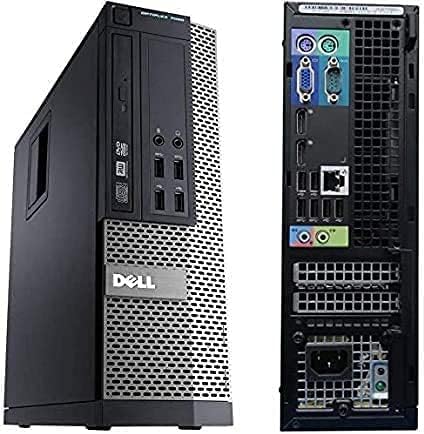
🚀 Elevate your workspace with power and speed that means business.
The Dell OptiPlex 7020 SFF is a renewed desktop powerhouse featuring a 4th Gen Intel Core i7 processor, 16GB DDR3 RAM, and a 512GB SSD, running Windows 11 Pro. Designed for professionals seeking reliable performance and modern connectivity, it supports Full HD displays and 300Mbps WiFi, making it an ideal choice for productivity and entertainment in a compact form factor.
| ASIN | B09XHQ7Y6F |
| Aspect Ratio | 16:9 |
| Available Memory Slots | 1 |
| Best Sellers Rank | 3,885 in Computers & Accessories ( See Top 100 in Computers & Accessories ) 9 in Desktop PCs 15 in Renewed Computers & Accessories |
| Box Contents | Keyboard, Mouse |
| Brand | Dell |
| Brand Name | Dell |
| Colour | Black |
| Compatible Devices | External Storage Drive, Keyboard, Monitor, Mouse, Printer |
| Cooling Method | Air |
| Customer Reviews | 4.2 out of 5 stars 862 Reviews |
| Display Type | LCD |
| Graphics Card Interface | Integrated |
| Graphics Coprocessor | Intel HD Graphics 4600 |
| Graphics Description | Integrated |
| Graphics Ram Type | DDR3 SDRAM |
| Graphics card description | Integrated |
| Graphics co-processor | Intel HD Graphics 4600 |
| Hard Disk Description | SSD |
| Hard Disk Interface | Solid State |
| Hardware Interface | Ethernet, USB |
| Human Interface Types | Buttons |
| Keyboard Description | Standard Keyboard |
| Keyboard Layout | QWERTY |
| Maximum Display Resolution | 1920x1080 |
| Memory Storage Capacity | 16 GB |
| Memory storage capacity | 16 GB |
| Model Name | OptiPlex 7020 |
| Model Number | OptiPlex 7020 |
| Model Year | 2014 |
| Native Resolution | 1920 x 1080 |
| Network Connectivity Technology | Ethernet, USB |
| Operating Systems | Windows 11 Pro |
| Operating system | Windows 11 Pro |
| Personal Computer Design Type | Computer Tower |
| Power Plug Type | Type G |
| Processor Brand | Intel |
| Processor Count | 4 |
| Product Features | Wifi |
| RAM Memory Installed | 16 GB |
| RAM Memory Technology | DDR3 |
| RAM Type | DDR3 SDRAM |
| Ram Memory Maximum Size | 16 GB |
| Resolution | 1920 x 1080 |
| Security Features | [Possible options: TPM chip, Secure Boot, UEFI, preinstalled antivirus, firewall, encryption tools] |
| Speaker Type | External Speakers Required |
| Specific Uses For Product | General Use |
| Specific uses for product | General Use |
| Style Name | New |
| Total HDMI Port | 1 |
| Total USB Ports | 1 |
| Total Video Out Ports | 1 |
| Video Output | [STANDARD] |
| Video Output Interface | HDMI |
| Video Processor | Intel |
| Wireless Compability | 802.11n |
| Wireless Network Technology | Wi-Fi |
| Wireless Technology Type | Wi-Fi |
I**M
Good machine at low cost
Nice machine is very good condition. Very easy to set up in Windows 11. WiFi was dongle supplied was fairly low speed variety and I replaced for a low cost. Otherwise very happy with purchase. Delivery got snarled up in Birmingham delivery hub by one day but considering it was a busy time of year delivery did well.
K**N
A great buy!
Brillant valueformoney. Worked perfectly out of the box and still an amazing deal.
C**D
Excellent buy, but with minor niggles
Summary ----------- Great computer upgrade - the cost of Windows 11 Pro and the SSD alone are probably higher than the cost of this item. It's refurbished, but very clean though probably needs a bit of tech savvy to get set up. The SSD is very slim and stuck to the HDD cage with a double-sided sticky pad. I carefully removed it and attached it to the top of a 3.5" 4Tb HDD and put it into the proper Dell HDD cradle sourced from eBay for £5. This just about fitted. I needed an extra SATA cable (there is a spare socket on the motherboard) and a power cable splitter to make it all work. Obviously, you will need to use an existing screen, video cable, keyboard and mouse, but most people will buying this will probably already have these. A few minor niggles (see below) caused it to drop a star. Plus Points ------------- o Superb value, especially for a 4-core i7 processor o Super-quick delivery (it arrived the same day as ordering!) o Small Form Factor (hence the 7020 SFF name) that doesn't take up much desk space o It came with a WiFi dongle o Supplied with Windows 11 Pro ready installed Negative Points ------------------ o The supplied mains cable was DOA - I had to find another o There was no manual to tell me which of the 2 DisplayPorts to use (use Google to find Dell manuals on-line) o There was no Windows 11 media supplied so can't create a recovery USB drive as it asks for files that are not installed
J**H
5 months after purchase and I'm delighted
After my last desktop stopped working properly, I didn't want to continue paying a local computer guy to keep trying to upgrade/fix it, £190 having been invested so far and my trust having diminished. 5 months ago I came to Amazon to see if I could find something newish that I could afford, found this company with some great reviews and several items to choose from. I took a calculated risk and I am SO happy that I did. Out of the box there were a teeny tiny couple of cosmetic scuffs that I discovered when scrutinising up very close. Closer than I would have if I'd purchased a shiny new desktop with a big fat price ticket. Otherwise it looked brand new. It is a third of the size of my old one but three times as powerful, with three times the space. It is 100 times quieter than my old one! I struggled a little with setting it all up initially but I persevered because I was determined to do it myself. Windows 11 was a new experience for me, so this probably contributed to my task. I imagine this came out of a big organisation where all the computers were on a big network as I seem to be a 'user' rather than the owner, if that makes sense. It doesn't affect anything. Great quality, virtually silent, compact, fast, loads of space to store everything. I no longer need to use an external hard drive. Honestly, I'm grateful and thrilled.
S**R
LOOSE & FAULTY CD DRIVE!
DON'T BUY! After being in my house for a few weeks, I decided it was time to see how this machine handles CDs and DVDs. It's not even a drive I'd be likely to use a lot, in fairness, but I'd expect it to work, when I do! One press of the CD drive's button...nothing! Another press of the CD drive's button...nothing! A 3rd press and the entire CD drive slid backwards and into the main computer's casing! Quite a shock and a great disappointment! Even after opening the side panel and putting the drive back in place, and on having to HOLD the drive in place, THE EJECT BUTTON DOES ABSOLUTELY NOTHING! That's a faulty CD drive not even properly secured in the machine's casing! You decide! I would be happy to edit this review, on provision of another machine that is FULLY functional...until then, I warn potential buyers to read this review, again!
B**O
Fantastic value for money, works a treat
I wasn't expecting much but the extraordinarily low price for this relatively high spec workstation drew me in. You could pay 3 times more for an i7 with 16GB of RAM and my last performance PC cost me 7 times this. That said the graphics capability isn't going to set the gaming world on fire but not what I need it for however the dual DP video ports are great for many screens. It appears to easily handle multiple instances of very CPU intensive development environments without lagging, alongside my other wasteful blizzard of windows so can't complain. The 512 GB SSD is a bit on the small side for the C: drive and I would normally just add an additional large HDD. I did manage to cram the extra drive from my old PC into it after a bit of a struggle, the case is a mini with very limited drive bay space but is possible with a bit of ingenuity. I had to buy a SATA Power Splitter Cable as well because there were no spare SATA power sockets left inside. Pros: . Cheap . Fast (i7 + 16GB RAM) . 2 DP Video ports . Win 11 Pro Cons: . Small case . Small SSD . Difficult to add extra hard disk . Upgrade options limited Summary: A great buy at this price for a workhorse business machine.
D**D
Good value
Great job
S**L
The PC hardware is good, but I've got some opinions and a big issue.
Straight to the point: The computer itself is good, but has some giant issues. Pros: 1. The CPU is pretty solid even today 2. 16GB of RAM is very nice, and was enough for me MOST of the time 3. You can put in another 16GB of RAM if you want to 3. DVD player is neat 4. Easy to set up 5. Free wifi dongle!! 6. Very small compared to other PCs, hence the 'Small Form Factor' in its name. You could probably just put it flat on your desk with a monitor on top. 7. You can put in another 16GB of RAM if you want to 8. Adequate amount of USB ports. All around, a great lightweight PC for browsing, doing office work, and even gaming if you put in an appropriate graphics card. Even for its age, it can put in some work. Cons: 1. Arguably overpriced. 2. This PC shouldn't be able to use Windows 11, and that has caused me significant problems. 3. My PC would blue screen more often than any PC normally would, and it might be because of the problem above. 4. The free wifi dongle is not the best. 5. No Bluetooth without a separate dongle. 6. Kind of annoying to open up and do stuff with. If you want to make a 'gaming budget PC' like those videos on YouTube, don't buy this one. And if you're concerned about keeping important work safe, the same might go to you as well. More in depth now: (Summary at the bottom!!) I used this PC for about a year and a half, and the main things I used it for were internet browsing, Unity game development (I was on a Games Development College Course), and gaming. I put a GTX 1650 in it for that, and it was pretty good - even though I couldn't put the side panel on (but that's my fault for buying too big of a GPU for such a small PC). The specs of the PC by itself are honestly pretty good. Whilst the listing says it's an Optiplex 7020 with an i7 4770, I actually got an Optiplex 9020 with an i7 4790. A minor upgrade, which was nice. The 16GB of RAM let me have a couple dozen Opera GX tabs open with no problem. With Unity open and developing a small project in it, those 16GB started to feel limiting when I needed more than 10 or so tabs open so I could read some Unity documentation. Script compilation started to take a while on more developed projects, but I don't know if that could be chocked up to the CPU, RAM, SSD, bad code, or something. The SSD I got was only 480 GB, with only around 450GB - 460GB usable before the PC would become unstable. I felt that it was quite restrictive, and I'd have to delete games to accommodate for other games I wanted to play often. The DVD drive is neat, but I only ever used it twice. Removing it to fit in a 3.5' drive is a possibility, or you could do what the sellers did and stick a 2.5' SSD in with double sided tape instead. I don't have a photo of it, but they did that for whatever reason. It would have probably worked for decades if I didn't take it off and mounted it 'properly' with screws after a year. The biggest problem I had with my PC was how often it would blue screen. Sometimes, they'd be caused by pushing my RAM usage to its limit. Another consistent way of a blue screen happening to me would be by downloading or doing some sort of process with more than 20GB of files. However, sometimes I'd look away from my PC for a couple minutes and I will come back to a blue screen. Almost everytime, the error code be RAM or SSD related, and after that the PC wouldn't be able to boot back into windows because it would say 'NO STORAGE DEVICE DETECTED'. Reseating the SSD never worked, and I reseated the RAM once but it didn't change anything. The only way I found to make things work again would be to turn the PC on and off again for like 3+ minutes on average. This was really annoying, and it sometimes would ruin hours of unsaved work on Unity, corrupt my minecraft worlds, and so on. I've checked the SSD's health on Crystal Disk Info and it was healthy. I checked the health of my RAM as well and it was healthy too. So, I'm led to believe that it's caused by the OS. Neither the 4770 or the 4790 officially support any Windows 11 version, and I couldn't update the W11 on the PC by any means without it bluescreening. If you want to buy this PC still, I'd advise either look for one with Windows 10 or install an OS yourself. In fairness I should probably have tried contacting the seller about these issues, but still. One last point, this PC is quite pricy even for how capable it is. If you're on a tight budget, or are doing a budget gaming PC, then I'd recommend looking on Ebay for a refurbished Office PC. Just do a bit of research, avoid listings that are ambiguous with the CPU, and you could get a better PC for less money. I got a Dell Precision T3620 with all around better specs for £110, and it even came with a Quadro M2000 GPU which did alright in games. It wasn't a second hand PC caked with dust either, it was from a well established seller with multiple of the same PC in stock. Summary: If you don't have lots of space, and don't want to modify your PC's hardware and don't plan on doing anything very intensive. Then only then would I actually recommend this PC. A lot of issues I've had with this PC stem from me needing a reliable PC for work and games stuff. With Windows 10 support ending soon, you should do some research and decide if you're fine with potential problems and security issues that arise. I've moved onto my own custom built PC because of the issues I've had with this PC, but they might not apply to you. If you want an Optiplex 7020, get one with Windows 10. You'll find one on Amazon pretty easily. Optiplex PCs on Ebay cost more somehow. Also, use an ethernet cable or buy a different Wifi dongle. The one I was given was a 2.4ghz model. Get a 5ghz one, or buy a wifi card and put it in, or whatever. You'll also need to get a bluetooth dongle if you want to use bluetooth.
Trustpilot
2 months ago
1 week ago