


๐ Double your display, double your impact!
The XtremPro 2 Ports DisplayPort MST Hub Splitter leverages MST technology to enable dual 4K UHD (3840x2160@30Hz) monitor setups from a single DisplayPort input. It supports HDCP, SST, and extended MST protocols, delivering high-quality video and 7.1 channel audio at 192kHz. Compact and lightweight, this hub is designed for professionals seeking efficient multi-display configurations with plug-and-play ease.
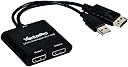
| ASIN | B07BBFKLV1 |
| Additional Features | Extended MST, High-Speed Data Transfer |
| Best Sellers Rank | #83,216 in Computers ( See Top 100 in Computers ) #1,331 in USB Hubs |
| Brand | XtremPro |
| Color | Black |
| Colour | Black |
| Compatible Devices | Monitors |
| Compatible devices | Monitors |
| Customer Reviews | 3.7 out of 5 stars 86 Reviews |
| Data Transfer Rate | 54 Gigabits Per Second |
| Data transfer rate | 54 Gigabits Per Second |
| Enclosure Material | Plastic |
| Global Trade Identification Number | 04897054364891 |
| Hardware Interface | DisplayPort |
| Hardware interface | DisplayPort |
| Item Weight | 86 g |
| Manufacturer | Xtrempro |
| Mfr Part Number | XtremPro 61068 |
| Model Number | XtremPro 61068 |
| Number of Items | 1 |
| Number of Ports | 2 |
| Special features | Extended MST, High-Speed Data Transfer |
T**G
it doesn't really add any addtional monitor display
I had GTX 1060 currently only able to run 4 monitors (1 DVI + 3 DP) got this MST today and give it a try (2DP + 1DP connect to MST to 4 monitors), hoping to achieve 6 monitors output however, system says the maximum display is still 4 monitors. So using this MST doesnot really make any more display more than what the display card already can achieve. very disappointed unless i am doing it wrong. I thought from the description 1 DP port can output up to 4 DP monitors.
J**N
Better than expected
Bought this product a few months ago, and wanted to wait before I wrote a review, so I could get a good sense of how the splitter was working. I didn't have high hopes when I bought it. I was looking for a way to connect my computer up to two monitors, as well as, a 40-inch television. It only took a few minutes to install and then changed the display setting to "extend my desktop." I had worried that Windows would still treat my television as a monitor even when it was turned off, but the settings change automatically based on which monitors/television is turned on. I have a gtx 1060 graphics card that is a few years old, but the picture quality, no matter which display I'm using, is clear and runs at 60 hz (gaming display runs at 120 hz). Overall, very satisfied.
C**B
Works Great!
It works great for my purpose. Using it with a 2560x1080 and 2560x1440 as external monitors for my laptop.
J**Y
Died 10 Months later - No Warranty
Device was working fine and just now I think it shorted out and locked up my computer. Brought it back up on a restart and the two displays connected to this are black. I tried each display individually and they both work fine. I did swap the USB port and rechecked cables but no change. Looks like there is a faint electrical smell coming from the main junction box. My guess is the cheap electronics burnt up. I will crack it open but will likely be unable to repair. I would not offer this device on anyone else, and with no warranty to back it up it's a waste of money. Get something from Star-tech (3yrs) or Mono-price (1yr) warranties.
T**.
Occasionally flashes / blanks each monitor randomly for about a second
Trustpilot
3 days ago
4 days ago