Desertcart purchases this item on your behalf and handles shipping, customs, and support to SINGAPORE.
💨 Keep your system chill and in control — don’t let heat slow your hustle!
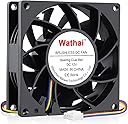
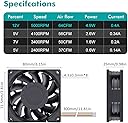
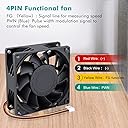
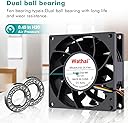
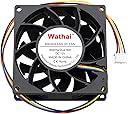
The Wathai 80mm 4-pin PWM computer case fan delivers a robust 65 CFM airflow at up to 5000 RPM, powered by a 12V, 5W motor with durable dual ball bearings. Designed for precise temperature-triggered speed control, it fits standard PC and server cases, ensuring efficient cooling and extended component lifespan with a quiet 44 dBA noise level.


| ASIN | B081JH39B8 |
| Air Flow Capacity | 65 Cubic Feet Per Minute |
| Best Sellers Rank | #235,877 in Computers & Accessories ( See Top 100 in Computers & Accessories ) #1,289 in Case Fans |
| Brand | Wathai |
| Brand Name | Wathai |
| Compatible Devices | Cpu, Inverter, Server, computer case, motherboard |
| Cooling Method | Air |
| Customer Reviews | 4.4 out of 5 stars 169 Reviews |
| Item Dimensions L x W x H | 8L x 2.5W x 8H Centimeters |
| Item Weight | 3.7 Ounces |
| Manufacturer | Wathai |
| Material Type | Lead |
| Max Rotational Speed | 5000 RPM |
| Model Number | 8025B12V4P-ZY |
| Noise Level | 44 Decibels |
| Number of Items | 1 |
| Number of Packs | 1 |
| Part Number | 8025B12V4P-ZY |
| Power Connector Type | 4-Pin |
| Product Dimensions | 8L x 2.5W x 8H Centimeters |
| UPC | 702334355947 |
| Unit Count | 1.0 Count |
| Voltage | 12 Volts (DC) |
| Wattage | 5 Watts |
N**R
It's a server fan, not a normal desktop PC fan.
I bought this as a cheap fan to pair with my Noctua as my motherboard takes four-pin connector and with the exception of that Noctua all I have are 3-pin 80mm fans. The Noctua came with some adaptors, including a splitter and noise reducer. When I first fired this baby up when it was connected to the splitter with my Noctua, it was louder than a jet engine. I ended up hooking the noise reducer between it and the splitter and it quieted right down. Even with the noise reducer, it has great airflow. It was after I set it up that I went back to the product page to realize it's a server fan. Explained the noise and the fact it was cheap. It's actually a good fan, it was my fault for not paying attention about it being more for servers than normal desktop PCs. So yeah, five stars due it it's ability to keep my PC cool.
É**T
Good airflow, noisy
Installed in RackChoice 2U micro ATX server rack. Noisy, but less than my HP Proliant DL380P. Very good airflow.
コ**O
商品について
冷却能力は高いですが、若干風切り音が気になります。商品としては十分機能しています。静かな部屋での使用には向かないですね。
K**N
めっちゃうるさいけど、風量もはんぱない
50%越えるとケース内から、「ウィーン」と聞こえますが風量はかなりあります。 ケース内の冷却したいデバイスにピンポイント設定し、指定温度で一気に廃熱したり空冷目的で使う設定すると効果抜群です。
P**S
Great upgade!
I have a Dell 7060 MT I7-8700 (mid-tower) desktop I recently purchased and upgraded. One of those upgrades was to replace the original case fan with this fan. So a couple of things to consider. The original fan was 12V / .36A and rated at 40 CFM, and was whisper quiet. This fan is 12v / .45A and rated at 65CFM and is not whisper quiet, but is not in my subjective opinion very loud. In fact I like being able to hear it because I know it's working and have no false sense of security. I should add that I have been in IT for many years and am therefore innately suspicious of electronics in general. But I digress. So here's my end game - this fan generates way more air flow that the original. It spins at a much faster RPM and has almost 3 times the number of blades. Hence its relative noise to the original. I could barely feel the air from the old fan with my hand, but this fan's air flow is way more than the difference in the specs would indicate. My internal 512GB SSD (Win 10 Pro drive) dropped 5 degrees F and my 3T HHD (data drive) dropped 7. Well worth a little additional background noise because heat is a common killer of any type of drive. In addition to having the same DCV rating of 12 it's also important to use a replacement fan that has the same or lower current rating. A little higher difference is ok in *most* cases, again depending on a number of system variables. So to be absolutely safe use a fan with the same DCV and an amp (A) rating the same or less. In my case new fan's .45A was close enough to the old of .36A to not matter. Installation was easy as far as the new fan goes. Getting out the old fan was a pain in my case (no pun intended). However, I did have to trim off a piece of the new fan's 4-pin connector on its backside in order for it to fit into the socket on the motherboard. You may, or, may not, have to do that. Good luck!
Trustpilot
1 month ago
1 month ago