Desertcart purchases this item on your behalf and handles shipping, customs, and support to SINGAPORE.
🚀 Upgrade to the future-proof mesh system that keeps your whole world connected flawlessly!
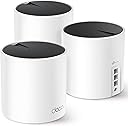
The TP-Link Deco AX3000 (Deco X55) Mesh WiFi System delivers next-generation Wi-Fi 6 speeds up to 3000 Mbps, covering up to 6500 sq.ft. with a 3-pack setup. Designed to replace traditional routers and extenders, it supports up to 150 devices simultaneously and features 3 Gigabit Ethernet ports per unit with Ethernet backhaul for superior wired performance. Ideal for professionals and smart homes demanding seamless, secure, and high-capacity connectivity.


| ASIN | B09PRB1MZM |
| Antenna Location | Home |
| Antenna Type | Internal |
| Best Sellers Rank | #638 in Computers ( See Top 100 in Computers ) #4 in Whole Home & Mesh Wi-Fi Systems |
| Brand | TP-Link |
| Built-In Media | 1 x Quick Installation Guide, 1 x RJ45 Ethernet cable, 3 x Deco X55 units, 3 x Power adapters |
| Color | Black, White |
| Compatible Devices | Smartphone, Personal Computer, Security Camera, Smart Television, Tablet, Printer, Gaming Console |
| Compatible devices | Smartphone, Personal Computer, Security Camera, Smart Television, Tablet, Printer, Gaming Console |
| Connectivity Protocol | Wi-Fi |
| Connectivity Range | 6500 Square Feet |
| Connectivity Technology | Ethernet, Wi-Fi |
| Control Method | App |
| Controller Type | App Control |
| Coverage | Up to 6500 sq. ft. |
| Customer Reviews | 4.4 out of 5 stars 12,771 Reviews |
| Data Transfer Rate | 3000 Megabits Per Second |
| Frequency | 5 GHz |
| Frequency Band Class | Dual-Band |
| Frequency band class | Dual-Band |
| Has Internet Connectivity | Yes |
| Has Security Updates | Yes |
| Is Modem Compatible | Yes |
| Item Dimensions L x W x H | 11L x 11W x 11.4H centimeters |
| Item Type Name | Mesh WiFi |
| Item Weight | 2.3 Kilograms |
| LAN Port Bandwidth | 1000 Mbps |
| Manufacturer | TP-Link |
| Maximum Upstream Data Transfer Rate | 3000 Megabits Per Second |
| Mfr Part Number | Deco X55 |
| Model Name | Deco X55 |
| Model Number | Deco X55 |
| Model name | Deco X55 |
| Number of Antennas | 3 |
| Number of Items | 1 |
| Number of Packs | 3 |
| Number of Ports | 3 |
| Operating System | Omada |
| Other Special Features of the Product | Guest Mode |
| Router Firewall Security Level | True |
| Router Network Type | hybrid |
| Security Protocol | WPA3 |
| Special features | Guest Mode |
| UPC | 840030703010 |
| Unit Count | 3 Pack |
| Voltage | 12 Volts |
| Wi-Fi Generation | Wi-Fi 6 |
| Wireless Compability | 802.11ac, 802.11ax, 802.11b, 802.11g, 802.11n |
| Wireless communication standard | 802.11ac, 802.11ax, 802.11b, 802.11g, 802.11n |
M**A
Perfect for Villas
Great Product, Easy to setup and really good performance.Works perfectly in a 2 storey villa with thick precast walls
E**T
Super easy to install
Recently moved into a new home - which was larger than our previous. The three pack covers it perfectly. It is a game-changer for home connectivity in a larger home. With blazing-fast speeds and reliable coverage, it's a breath of fresh air for anyone tired of dead zones. The setup is a breeze, thanks to the user-friendly app, and the small Deco units seamlessly blends into almost any decor.
C**V
Great system
Really easy to set up and gives great coverage. Also easy to add on to with external units available as well.
A**R
Decent coverage and easy to setup
Provide good coverage and easy to setup. Once connected an update is needed for the firmware, other than that it should be straight forward. I’m giving it a 4 star rating due to the range it covers. Most of the rooms (4 rooms) have at least 4/5 signal strength except for 1 room where the signal is weak and keeps dropping.
A**S
As usually
No comment for this great product Really 💯 satisfied
Z**I
Easy installation. Very good coverage
Great product
N**R
Don’t waste your money!
Generally, a terrible piece of equipment! I could be stood next to it, and my phone will still try to connect to the satellite device downstairs with the worst signal. Devices constantly drop out, satellites constantly drop out. I’ve tried all the methods mentioned on the app to improve coverage and reliability, but have come to the conclusion that it’s just a terrible expensive product!
A**N
May Wi-Fi issue resolve
Thanks a lot tp link
S**L
TP-link
O produto funciona como anunciado, embora tenha vindo aberto, usado, já configurado.
K**D
سريع جدا وثابت
المنتج مثالي، ويشتغل كويس مع مودم اس تي سي، اهم شيء لازم توصل بينهم بسلك ethernet نوع Cat6 او Cat6a انا اشتراكي 300ميقا، وواصلني 300ميقا في كافة انحاء البيت، وبشبكة وحدة (مايحتاج اني اغير الواي فاي من الجوال، وين مارحت المكان كله شبكه وحده) وفي الالعاب، ال ping 8 منتج مثالي، لي سنة تقريبا، ولا غلطة
A**R
Slightly expensive, but the performance justifies the cost
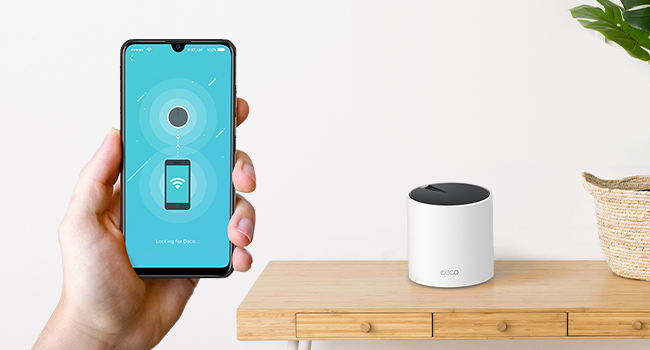
Performance and Coverage WiFi 6 Technology: The Deco X55 supports WiFi 6, which offers faster speeds, greater capacity, and reduced network congestion compared to previous WiFi standards1. Coverage: It can cover up to 6,500 square feet with a three-pack setup, making it ideal for larger homes2. The system uses multiple units to create a mesh network, ensuring strong signal strength in every corner of your home1. Features Speed: With speeds up to 3.0 Gbps, it handles high-bandwidth activities like 4K streaming and online gaming with ease2. AI-Driven Mesh: The system intelligently learns your network environment to provide optimal WiFi unique to your home2. Security: TP-Link HomeShield offers comprehensive network protection, robust parental controls, and real-time IoT protection2. Setup and Usability Easy Setup: The Deco app guides you through the setup process step-by-step, making it user-friendly even for those who are not tech-savvy1. Design: The units have a sleek and modern design that blends well with home decor1. Pros and Cons Pros: Super-fast WiFi 6 speeds1. Extensive coverage with seamless connectivity2. Simple and intuitive setup process1. Cons: Slightly expensive, but the performance justifies the cost. Only one Ethernet cable included in the box1. Overall, the TP-Link Deco AX3000 WiFi 6 Mesh System (Deco X55) is a solid choice for anyone looking to upgrade their home network with reliable and high-speed WiFi coverage
J**Z
Excelente producto
Hice una investigación previa para reemplazar los dispositivos mesh anteriores que ya estaban siendo intermitentes y degradando la señal de wifi. Fácil de configurar, me funcionó perfecto en una casa antigua con muros de concreto en un área de aproximadamente 240m2 distribuidos en dos plantas, la señal de internet llega perfecto a todos los rincones de la casa y se puede administrar con buenos features de seguridad a través de la aplicación. El diseño es discreto y elegante, en mi caso los coloqué en zonas donde no se ven. Llegaron en tiempo y forma y todo sin contratiempos.
J**R
Affordable, stylish, and strong wifi.
Fairly easy to connect using the free app on my phone, though coordinating the reboots of the internet service provider (ISP) modem and first TP-Link router was a bit confusing to me as a novice. Of course, you lose your existing Wifi connection upon disconnecting the old router and then have to rely on a connection using cellular phone data to look up and clarify any uncertainties. So it would have been nice to have printed instructions or a downloadable PDF file of such detailed instructions before starting. With everything connected—and connecting the two additional nodes only required plugging them into wall outlets—I have very good wifi coverage throughout my 1850 square foot home. The 3 nodes of the mesh system by default automatically choose how to best connect to one another based on signal strength. The ISP cable enters my home on one end of the house where the first node is located. The second node is in the middle where of my house on the other side of a wall, and the third node is on the other end of the house where a convoluted hallway means there are multiple walls between the second and third nodes. I expected the third node to automatically connect to the second node closest to it. But, instead, it automatically connected to the first node and the signal is having to pass through an extra wall. This is not ideal and the connection strength is only fair or good for the third node instead of excellent. Manually forcing a connection between the second and third nodes was easy enough using the app. But it did not improve the connection strength to the third node. I will try moving the third node around, perhaps elevating it on a shelf to see if that helps. No matter that issue, related to the signal strength for the third node, my wifi coverage is much better than it was before using an older router and extender: For example, I have some outdoor security cameras and one of them repeatedly lost its wifi connection or complained about a weak signal using the old router and extender. That problem has been resolved completely with this new mesh router system.
Trustpilot
2 weeks ago
3 weeks ago