⌨️ Elevate your typing game—comfort, control, and style in one sleek split keyboard!
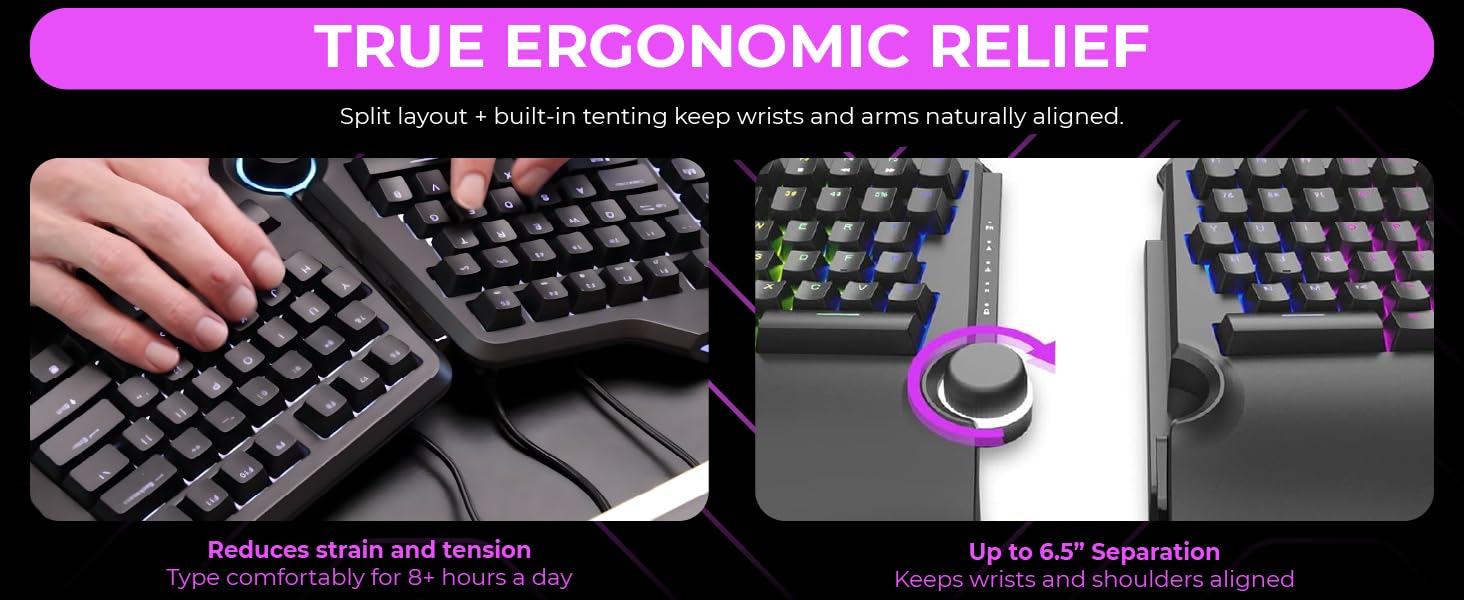
The Cloud Nine ErgoTKL is a tenkeyless ergonomic mechanical keyboard featuring a split design that separates up to 6.5 inches to minimize wrist and shoulder pain. It includes built-in 7° tented palm support, professional Kailh Brown switches with customizable RGB backlighting, and an aluminum smart wheel for seamless volume and app control. Designed for both productivity and gaming, it offers programmable hotkeys, USB pass-through, and adjustable tilt angles to support both sitting and standing desk setups.


| ASIN | B09G5L6Z53 |
| Best Sellers Rank | #626 in Computer Keyboards |
| Customer Reviews | 4.2 4.2 out of 5 stars (377) |
| Date First Available | September 14, 2021 |
| Item Weight | 4.73 pounds |
| Item model number | C959-US-BROWN |
| Manufacturer | Cloud Nine |
| Product Dimensions | 9.9 x 16.1 x 2.1 inches |
J**J
Great Ergonomic Keyboard for Work/Play
Great keyboard. First day using it I was convinced i'd made a terrible purchase, by day 3 I was convinced I loved it. Decided on this while searching for a mechanical keyboard that was split, ergonomic, and had a media/volume knob. I use this keyboard for work (code) and play. I am dealing with RSI in both my wrists and wear wrist braces most days. This keyboard significantly reduced my strain so I rarely wear the left wrist brace. I still wear one on my right as it is my mouse hand. (Recommended a vertical mouse for fellow RSI/carpal tunnel people. I use the Logitech Lift) I do really miss having a tenkey, but the tenting and angling of the keyboard make it worth it to adapt. I've added a standalone tenkey device to my desk that I keep out of the way until I need it. I don't really make use of the macro keys on the left but i'm sure others will. Keyboard does need 3rd party software, kind of disappointing but I guess it's pretty standard. It's not Razer Synapse, at least. It seems pretty lightweight, I've had no issues with it. Havent had to touch it since first setup. Keyboard has typical RBG lighting capabilities, I just leave it on a default pattern. Ergonomics are great, the extended 'lip' at the bottom of the keyboard looks a little odd but it's there for your wrists to rest on. I keep it tented at half tent (there's 2 feet on each half that have a half tent or full tent length, no inbetweens) My left wrist in particular is doing way better. The angle of the keyboard is much more comfortable for extended use of WASD or MMO layouts. It was Wow classic killing my wrist that made me decide to jump on the ergonomic/split boat, and it's much more comfortable now. Only cons: Normal keyboards feel weird now USB cable connecting the 2 halves seems proprietary and may be very hard to replace, I have not checked if it is sold standalone. I think the keyboard will not function properly without their specific cable.
A**R
Great Keyboard
This keyboard presents itself as a well architected device with a great deal of engineering attention to detail. For example, they seem to have figured out the right amount of ergonomics such that placing my hands on the keys with my palms on the rest pads felt very comfortable. This was the fourth split keyboard in my recent search and the clear winner. I have never used a split key pad so there is a short learning curve. The bottom-line is that while I type slower I make fewer mistakes so my typing speed has actually increased! I love the ability to program the keys and change their color. I use a KVM which uses double scroll lock as a trigger to switch monitor, keyboard and mouse to another computer. Originally that required the Fn key as the key was labelled Print Scr / ScrLk. By flipping those keys I no longer need the Fn key. If you are a gamer you would probably use Print Scr more and not flip the keys. I also flipped Pause Break / Insert. I never use Pause Break but occasionally use Insert. I love the built-in Copy, Paste, Cut, Select all keys but changed the Select all to Undo. (P.S. Programming required a direct USB-Computer connection - would not program through the KVM.) The color coding is a wonderful aesthetic touch. I was not enamored of all the built in color schemes they offered which wave and oscillate so I created a static color scheme. Letters are light blue, numbers are purple, ctrl keys are red, etc. This of-course makes very little difference to the typing experience but it's like your house color - it makes no difference to your house's functionality but it's a nice personal touch. I have the brown keys and many people have commented on how loud they are. No question they are louder than membrane/rubber keys which have been my primary experience for years. (The red keys are much quieter but don't offer the same tactile feedback.) In the grand scheme of things people talking in the next cubicle or an overhead A/C unit contribute more to overall noise pollution. The pinging some people have mentioned is subtle - did not even notice until I started listening for it. If you are in a conference call or on the phone people will hear you typing. But even membrane keyboards are not stealthy - I muted myself on calls when using my old Logitech membrane keyboard. Someone mentioned this is clone of the Kinesis Pro - not really. I ordered and received the Kinesis Pro upon which I saw their warning that it was not to be attached to a KVM so I could not even try it out. The other split keyboard option is the Goldtouch which I did not order but it does not have the custom Copy, Cut, Paste buttons which I am enamored with. The software application and the firmware are not signed as several people have mentioned so be prepared for the warnings but I just carried on. They both installed. The keyboard works out of the box so if you do not need to program the keys it is not necessary to install.
C**E
Ningun problema con el funcionamiemto pero desde que llego tambaleaba al escribir, al parecer una de las gomas es mas chica lo cual me parece inaceptable en un teclado de esta categoria
W**Z
Al principio dude por que lei que no era compatible con mac.. y si, hay un problema por que el fabricante no tiene software para mac... pero si no te importa tener el teclado con la configuration by default... no te vas a arrepentir y tus muñecas te lo van a agradecer.. puedes a travez de mac modificar las keys para que tengas el mismo orden que un teclado mac... otra solución que propongo.. es que a travez de alguien con windows.. realices las modificaciones que necesitas, como iluminación, configuration de macros etc. Fuera de eso.. la mejor compra que he echo, me dedico al desarrollo de software y desde los primeros typings sientes la diferencia en tus muñecas. Adjunto una imagen del espacio es ideal para un mouse y tu celular, también cabe un magic trackpad sin problema. Una de las razones por la que lo adquirí este producto es porque la silla de mi oficina tiene reposa brazos pero no permite que se muevan mas que para atrás y adelante.. generándome dolor en los antebrazos pues van en otra dirección a mis brazos al utilizar un teclado tradicional.. pero ahora al poder separar el teclado y ademas utilizando el pad que incluye el teclado.. esos problemas se han acabado. Anteriormente utilice teclados como el Microsoft Sculpt Ergonomic y el Logitech ergo, pero este no tiene comparación por el confort de los materiales y la posibilidad de separar el teclado a la distancia que necesites. Date una oportunidad... tus muñecas te lo agradecerán.
D**E
I’m been regularly searching an ergonomic keyboard with mechanical keys for years, and this one is also a good gaming keyboard, so I was heavenly happy to see this keyboard. But I was quite disappointed to receive the wrong key color. ERGONOMY: Split, forward inclination and no numpad – all boxes checked! The problem is that the keyboard is so thick that the full inclination doesn’t incline it back at all, it just makes it flat. This can be adjusted with a towel, but for the price and ergo advertisement it’s quite a letdown. FUNCTIONS: The keyboard has innate macro binding (up to 4) and I love it, especially for work. I use it for frequent characters that I otherwise have to type with ALT codes. Some key placements have to be used to (eg. the four travel buttons, aka Home End PageUp PageDown, are not all together, they are peculiarly split by the Delete button; that can be fixed with software and key replacement, but this innate placement is weird). The color schemes are well designed too, and the central wheel multifunction is actually quite useful for common uses. WRONG KEY COLOR RECEIVED: And as the product is not advertised with switchable switches, I understand the switches are soldered. At the time of writing (and buying), the product title says "MX Cherry Blue", the description says "Cherry Blue", the color choice says "Blue", the specs also say "Blue", but I received Kailh White keys. As the shipping took a few weeks and Kailh White keys are <similar to Cherry Blue, I don’t want to return it and wait again twice the time; I chose to keep it. I still enjoy the Kailh White keys, but I’m still a bit disappointed for the mistake. If it’s a stock issue, I would have prefered if the vendor first contacted me about the replacement. That mistake apart, the keyboard itself is definitely a five stars. I also hope that more fully ergonomic keyboards with this whole set of ergo features will appear on the market.
S**M
Good keyboard aside from vital flaw. Can't see a way to get in touch with seller
N**N
I have previously used a Microsoft and Logitech ergonomic keyboard and I really found that the ergonomics felt so natural but hated the typing and gaming experience. I had mechanical keyboards in the past before making the switch to ergonomic keyboards so was really missing that experience. This keyboard is the best of both worlds. The layout of the keys is a little different but only took a couple of days to get use to. The included software feels a bit clunky but hope that future software updates will improve.
Trustpilot
2 weeks ago
2 months ago