Desertcart purchases this item on your behalf and handles shipping, customs, and support to SINGAPORE.
🚀 Elevate your workspace with the ultimate customizable mini PC kit!
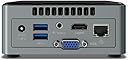
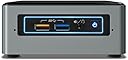
The Intel BOXNUC6CAYH NUC Kit is a compact, quad-core mini PC barebone featuring an Intel Celeron J3455 processor, integrated Intel HD Graphics 500, and 4K HDMI 2.0 output at 60Hz. It supports up to 8GB DDR3 RAM and a 2.5" SSD or HDD, allowing full customization of OS, memory, and storage. Designed for quiet operation and versatile connectivity, it’s perfect for media streaming, digital signage, or a sleek PC replacement.


| ASIN | B01MSZTD8N |
| Additional Features | Microphone |
| Aspect Ratio | 16:9 |
| Best Sellers Rank | #65,232 in Computers & Accessories ( See Top 100 in Computers & Accessories ) #1,968 in Mini Computers |
| Brand | Intel |
| Built-In Media | NUC |
| CPU Model | Celeron |
| CPU Model Number | Celeron J3455 |
| CPU Model Speed Maximum | 2.3 GHz |
| CPU Speed | 1.5 GHz |
| Cache Memory Installed Size | 2 GB |
| Cache Size | 2 GB |
| Color | Black |
| Compatible Devices | Monitor, Keyboard, Mouse, External Storage Drive, Headphone, Speaker, Printer, Smartphone, Projector, Touchscreen Device, Microphone |
| Connectivity Technology | Wi-Fi |
| Cooling Method | Air |
| Customer Reviews | 4.0 out of 5 stars 611 Reviews |
| Display Resolution Maximum | 3840x2160 |
| Display Type | LCD |
| Global Trade Identification Number | 00675901405904, 00735858320344, 05032037088770 |
| Graphics Card Description | Integrated |
| Graphics Card Interface | Integrated |
| Graphics Card Ram | 1 GB |
| Graphics Coprocessor | Intel Integrated Graphics |
| Graphics Description | Integrated |
| Graphics Ram Type | L2 cache |
| Hard Disk Description | SSD |
| Hard Disk Interface | USB 3.0 |
| Hardware Interface | HDMI, VGA |
| Human-Interface Input | Touchscreen |
| Item Dimensions | 4.92 x 3.46 x 5.39 inches |
| Item Type Name | Intel® NUC Kit, NUC6CAYH (no OS) |
| Item Weight | 1.2 pounds |
| Keyboard Description | No keyboard included |
| Keyboard Layout | QWERTY |
| Manufacturer | Intel |
| Memory Clock Speed | 1866 MHz |
| Memory Slots Available | 2 |
| Memory Speed | 1866 MHz |
| Memory Storage Capacity | 8 GB |
| Model Name | FBA_BOXNUC6CAYH |
| Model Number | BOXNUC6CAYH |
| Model Year | 2017 |
| Native Resolution | 3840 x 2160 |
| Number of Component Outputs | 2 |
| Operating System | No Operating System (Supports Windows 10) |
| Optical Storage Device | DVD-RW |
| Personal Computer Design Type | Mini PC |
| Processor Brand | Intel |
| Processor Count | 4 |
| Processor Series | Celeron |
| Processor Socket | [LGA 1151, LGA 1200] |
| Processor Speed | 1.5 GHz |
| RAM Memory Installed | 2 GB |
| RAM Memory Technology | DRAM |
| RAM Type | DDR3 SDRAM |
| Ram Memory Maximum Size | 8 GB |
| Resolution | 3840 x 2160 |
| Screen Size | 39.6 inches |
| Security Features | Basic Windows Security Features |
| Speaker Type | External Speakers Required |
| Specific Uses For Product | personal, gaming, business |
| Style Name | Celeron|Tall |
| Total Usb Ports | 2 |
| UPC | 735858320344 |
| Unit Count | 1 Count |
| Video Output | HDMI, VGA |
| Video Output Interface | HDMI, VGA |
| Video Processor | Intel |
| Warranty Description | 3-year limited warranty |
| Wireless Compability | 802.11ac |
| Wireless Network Technology | Wi-Fi |
| Wireless Technology | Wi-Fi |
A**D
Small, quiet, well built. Perfect as my new media player.
I bought this little guy to replace a very old WD TV Live Hub 1TB Media Center (Old Model) that hadn't had firmware upgrades in forever, was extremely slow, had an awful interface and crashed all the time. I could also never get subtitles to work on it. It was pretty amazing in 2012 but times have definitely changed. I was concerned that this little guy (Celeron i3) wouldn't have enough umph to play video off the file server where all our movies are stored but after reading some reviews I decided it should do the trick so I got this along with the Kingston Technology HyperX Impact 8GB Kit 1600MHz DDR3L CL9 SODIMM 1.35V Laptop Memory (PC3 12800) HX316LS9IBK2/8 Black . It arrived a couple days ago. First, I'm extremely impressed with how small this thing actually is when you pull it out of the box. It's very well made and heavy enough with nice rubber feet that keep it from sliding around on the desk. Given how stiff my HDMI cable is that's important. The AC adapter is a wall brick so the only thing going to the NUC is a cable which is pretty long, 6ft? The BIOS lets you play with the lighting on the front for the power button and the LED ring around the USB ports and power button. You can even turn them off which is what I've done. It's ridiculously quiet. Even with the fan profile set to "Cool" you have to be right next to it to hear the fan. Setting it up is super easy. Take the bottom off, pop the ram in, put a hard drive in (I already had a 1TB drive laying around) and put the bottom back on-less than 5 minutes. Then I did a fresh Windows 10 Pro install on it. I guess Linux is an option but I don't know how and don't really want to learn right now. After waiting overnight for Windows 10 updates because my internet is crap I installed Kodi 17.6 Krypton (formerly XMBC) and pointed it at my media share folder. A while later all my movies and TV were scanned and in the library. When I travel with my wife I plan to load movies directly on to the hard drive so we can hook it up to the hotel TV. This machine is not a performance beast like my newly built desktop PC but it's perfect for the intended use. Kodi is snappy once it gets started, navigation is quick and playback starts immediately even reading the files from the media server over Wireless-N. I've tested 1080p content and it plays fine, no stuttering or other issues. And subtitles work! No more burning them in with Handbrake. The built-in IR receiver works great with my Logitech Harmony 650 remote and with some tweaking I've got all the major functions on the remote now. Any time I need a keyboard I have a bluetooth one ready. I paid $150 for the WD media player in 2012. I wish these had existed then because for not much more money I've put together a much more capable box that allows more customization and can run Firefox and other Windows (or Linux) apps. I'm very happy with this item and my wife loves being able to actually play a movie without having to futz with the antique, slow interface on the WD media player. As a media player/streaming device I can highly recommend this computer.
C**Y
Nice little PC kit
Bought this to run as a macro machine, installed two 4GB RAM sticks (be careful to choose a compatible memory, other comments for this product lead me in the right direction after I almost purchased a cheaper DDR3 RAM that would have been incompatible), and a 250GB samsung SSD. Works like a charm, and especially for the price. Not the fastest or most powerful, I find I am running at a constant %100 CPU usage with 5 Firefox tabs open and a macro program running. But it has yet to crash and I've been running it 24/7. Recommend getting a cheap external USB fan if you're planning to run it hard like I am, it does heat up pretty quick and the internal fan isn't cutting it. Installing components and OS was a cinch, although it was slightly picky about loading Windows from an external hard drive. Tried a couple drives which wouldn't appear in the BIOS, eventually I loaded the bootable windows onto a USB flash drive and then it worked. I would recommend using a flashdrive to boot the OS for the first time to avoid this. A bit heavier than I expected, not quite a "portable" PC on the level of the slimmer micro-PCs or PC sticks. Good product overall, I would recommend.
C**D
Don't purchase - Beautifully designed with horrible graphics card
Don't purchase! Sadly, a beautifully designed piece of non-working crap. A beautifully designed piece of crap. We were getting a half dozen of these as lightweight web machines; the specs looked decent for our needs. I do like the ease of upgrading the machines with memory modules and an SSD drive, hence the 1 star. But there is an inherent problem on this Intel-designed box with the INTEL video driver that FAILS out of the box! Intel is aware of it but won't fix it-duplicate machines we ordered had the same issue. Think I'm kidding? Here is the link to Intel's fix - they want you to spend $100 on a graphics piece (Dr. HDMI) that plugs into the HDMI port-half the cost of the darn box! Now I will truthfully admit this probably only affects you if you run in headless mode or need to remote into your machine, but still. Looks-wise, this machine is..stunning for the price. But a half dozen of these, each needing a monitor is a non-starter, and truth be told, I expected better from Intel with as much experience as they have in the PC market. They will be whining at the next stock meeting about the drop in PC sales and the rise of competitor ARM - never admitting the main problem with the industry now seems to be them!
S**K
It's small, quiet, fast, and works great
I bought this to use as a bitcoin node, it replaced an old full-size desktop box. It's great to have all that space back and this little box is more powerful than the full size desktop too. It uses the same type of memory and hard drive an recent laptops so, if you're like me, you may already have what you need in your junk box. The first thing I did was update the BIOS, which was as easy as downloading the new BIOS from Intel's website to a USB flash stick and rebooting. I outfitted it with 8GB of RAM and a 1TB hard drive. I booted a CentOS GNU/Linux install CD from a USB DVD drive and installed CentOS without any problems at all. It's now sitting up on an out-of-the way shelf, happily serving the bitcoin block chain to users and miners everywhere and it's quiet enough I don't even notice it running. I liked it so much I'm thinking about replacing my personal Dell desktop with one of the more powerful Intel NUCs sometime soon.
R**.
Great Basic Plex Server
I made this a dedicated Plex Server. I don't have multiple devices using this at once. With only one device I can say it works great playing 1080p content. I am running Linux mint on it. Took me awhile to get sonarr, etc installed since I am not a Linux user and had to find step by step guides that worked for the latest Linux build. The only thing that concerned me is make sure you buy the correct RAM. I originally bought two 2GB ram but the SDRAM density wasn't correct. I had no idea what that was until I thought I had a defective unit because I couldn't get video from HDMI or VGA. There is a diagram with photos what the correct RAM should look like. There is also a list of tested compatible able RAM through Intel. I suggest you use it. Once I got the correct SDRAM density it worked great.
J**.
Could easily replace most users full desktop systems
Have built a lot of systems over the years but this has got to be the slickest one ever. Build quality seems excellent. Bought two 4gb sticks of memory, a 250 SSD and of course Windows 10. Install went smooth, so after a few reboots and lots of updates device manager showed all devices accounted for and no errors. Windows runs incredibly snappy. Tried the included Windows 10 games, no lag. Surfing, no lag. Youtube videos, no lag. Wordprocessing, spread sheets, no lag. Have hooked it to my 65 inch 4k tv. Looks perfect. Have hooked it up to two 24 inch monitors. Works perfect. This thing could easily replace a full desktop system for those that dont do any heavy duty gaming, video editing or other high processing stuff. Highly recommend.
R**H
Fantastic for the price!
Bought this because I already had the ram and it wasnt' that much. It's SCREAMING FAST for its class! I'm bummed that one of the outputs is VGA because that's really obsolete these days. But, I'm running it with Ubuntu on two monitors, the VGA is a dashboard so I don't mind that it's a little blurry, and the machine is just STUPID FAST when all I wanted was a cheap spare machine. Full-res bluetooth movie file, viewed on VLC over wireless, played flawlessly at 1080p with no dropping at all. Browser is fast and responsive. Great little machine! (I'm running it with 8G of ram and a Samsung SSD.)
S**R
This might very well be a good little Windows 10 system
This might very well be a good little Windows 10 system, and I should have looked before purchasing, but it does not run Linux well. No other operating system is supported by Intel. Nothing but Fedora will even boot cleanly on it. And the NIC, the physical network adapter, disappears between reboots. Sometimes it is there, sometimes it is not.
I**B
Maravillosamente genial.
Hace mas de un añito que compre esta maravilla de aparato y paso a contar mi experiencia con el. Voy a dividir la reseña en diferentes partes para que todo quede bien claro. He de decir que soy una persona a la que le encanta la informatica y un maniatico de que mis ordenadores vayan como la seda ,pero que nunca habia montado ningun ordenador ,hasta ahora,me decidi por comprarlo y montarlo y la verdad es que no se puede estar mas contento con la compra. -Primera parte: Voy a explicar un poco a a la gente que es este aparato y para que sirve ya que muchos amigos mios que me lo han visto y no tenian claro que es, y a mucha gente le pasara lo mismo, pues este aparato es igual que un ordenador de sobremesa pero muchisimo mas pequeño y muchisimo mas versatil, lo puedes usar como un ordenador normal como cualquier otro conectado a su pantalla de pc, lo puedes usar como sistema multimedia conectado a la tele del salon,ademas se puede colocar justo en la parte de atras de la tele sujeto a ella y usarlo como una smart tv pero infinitamente mejor, y para finalizar lo puedes usar como un portatil mas o menos ya que es tan pequeño ,que te lo puedes llevar y conectarlo donde quieras,que es lo que yo hago, ademas al ser tan pequeño lo puedes meter como lo tengo yo en el mueble de la sala,conectado a la tele y a todo en general y de paso no rompes la estetica del salon con un aparato mas. Aclarado lo que es este aparato decir tambien que al comprarlo viene vacio y tienes que montar tu los componentes que prefieras,para mi eso tambien es una ventaja muy grande ya que cada uno se lo monta dependiendo de sus necesidades y gastandote mas o menos dinero, un 10 en este aspecto. -2ª Parte es comolo uso yo: Pues decir que yo lo uso como centro multimedia en el salon,lo tengo conectado a la tele de la sala y veo peliculas,series o simplemente navego desde el sofa y tambien lo tengo conectado a mi equipo de musica mediante un DAC y desde el sofa pongo la musica que quiero, una autentica maravilla,lo uso con un teclado inhalambrico que a su vez hace de raton que es otra gozada, y para todo esto lo uso yo. -3ª Parte la instalacion: Empiezo por los componentes, yo compre un disco duro Kingston SSD A400 - Disco duro sólido, 2.5", SATA 3, 120 GB y una memoria ram de 8 gigas de crucial, a la hora de montarlo es relativamente facil y yo sin tener practica segui un tutorial en youtube y listo todo a la primera, eso si con un poco de paciencia. El ssd va como la seda y la memoria de 8gigas de crucial pes una garantia total de perfecto funcionamiento,recomiendo comprar unas memorias ram de un buen fabricante y no cualquier cosa, ya que no te van a dar ningun problema de nada ,siguiendo con las memorias para este ordenador en concreto la memoria tiene que tener esta especificacion ( 204-pin SO-DIMM, DDR3L 1.35 voltios ),comprarlas asi y no tendreis problema alguno,Tambien decir que el ordenador viene con 2 ranuras para las memorias y tu lo convinas como quieres , yo por ejemplo solo compre una de 8 gigas y si quiero en el futuro le meto otra de 8, pero puedes metele 4y 4 tambien,cuestion de gustos. -4ª parte Instalacion windows: En el tema de sofware decir que no he tenido el mas minimo problema de verdad, instalar windows 10 es facil, busca algun tutorial ,paciencia y ya esta.Un vez funciona ya el ordenador lo primero que recomiendo hacer es bajar los drivers de la pagina de intel y actualizar tu ordenador para que no tengas problema alguno . Y como dato y para que elordenador fluya de lujo y te dure mcho yolo que tengo hecho es instalar en el ssd solo windows, osea que no hago descargas de musica ni de pelis ni nada en el ssd ,y asi aumento y mucho su durabilidad y rendimiento, las decargas cuando las hago, las descargo a un disco duro externo y ya esta,mas acil y comodo. -5ª Parte Lo que mas me gusta de el: Pues que es una autentica pasada lo rapido que va,arranca windows en nada,y lo cierra mas rapido todavia,abre los programas super rapido,en resumen que es una maravilla. Yo las pelis me las descargo muy pesadas, de mas de 20 gigas y las mueve sin despeinarse,una gozada. 6ª Parte Lo que menos me gusta: Pues que no puede con las pelis de 4K, su procesador y su grafica integrada no pueden con estas pelis, una pena, pero en mi caso me da igual ya que mi tele no es 4K . Y lo que menos me gusta de esta maravilla es que no se porque motivo los ratones y teclados inhalambricos si los conectas directamente a sus entradas usb tienen cortes de señal y no funcionan bien,se atascan y es desesperante, pero tiene una facil solucion,yo tengo conectado un Hub usb 3.0 al ordenador y y en ese hub conecto el transmisor de mi teclado o del raton problema resuelto,todo sin cortes y como la seda, la solucion es no conectar directamente los transmisores al ordenador,se tienen que conectar a un hub o a algun cable alargador usb para que no haga interferencias. En resumen si lo que quieres es un buenisimo ordenador para uso normal,navegar ver pelis, descargas y demas no lo dudes este pequeñin es una autentica maravilla, y una relacion calidad precio genial.
N**N
コストパフォーマンスが良い。
ベアボーン版には、メモリとSSD、WindowsOSが入っていない。 「あわせて購入」の項目にあるメモリ8GとSSD240Gを追加し、合計27000円ほどで購入。 組み立ては簡単で、プラスドライバーで裏蓋を開けて、メモリとSSDを差し込むだけ。 最後にあらかじめ持っていたWindowsOSをインストールして完成。 CPUは値段の割にはまあまあな Intel Celeron J3455。メモリ8G、SSD240G。静音、省電力、省スペース。日常で使うPCとしては不満なし。 コストパフォーマンスがいいのにIntelのメーカー品で、中華の謎メーカーのようなギャンブル性もなく、安心して買えたのも良かった。
J**R
Exceeded my expectations.
Awesome little mini computer. Construction is solid, and anyone knowing how to put ram into a laptop, connect a sata disc drive, and install an operating system can put this together. It's easy. It has a regular HDMI connector (no adapter needed), a VGA video connector, 2 USB3 and 2 USB2 ports in addition to the SD card reader. It is inaudible when running. Although it states it can only support a max of 8gb of ram, I have 12gb installed and recognized and running. I also have two monitors (a regular 24" as well as a Huion pen monitor) operating on it. I use it for video-conferencing on a regular basis, and it works great. i updated the 0064 bios using the F7 bios recovery version to the latest 0066 from the manufacturer's website. The process was simple. I'm running it with a Linux operating system, and it works great. I'm loving this little quad core box. It's quiet, compact, and fast enough for me.
T**F
Guter Medien PC zum kleinen Preis.
Ich habe den Medien PC nun eine Zeit lang im Einsatz. Generell nutze ich den NUC als Office Rechner für kleinere Arbeiten, z.B. Fernaufschaltung beim Kunden. Natürlich habe ich ihn auch als Medien PC getestet. Installiert habe ich als Betriebssystem Windows 10, welches auch stabil und flüssig als Office und Medien PC funktioniert. Eingebaut habe ich eine 120GB SSD 2,5" sowie 4GB Arbeitsspeicher. ACHTUNG: Hier sollte man auf JEDEN FALL nachsehen, welcher Arbeitsspeicher von Intel freigegeben ist. Zwei ältere Arbeitsspeicher Module funktionierten bei mir nicht. Das sollte man jedoch bei jedem PC beachten. Den Lüfter höre ich im normalen Office und Medien Aufgaben nicht. Nur, wenn man den Prozessor längere Zeit komplett auslastet, wird er hörbar. Der IR Empfänger arbeitet zuverlässig. Die IR Signale einer Universal Fernbedienung greife ich bei Windows mit einem Programm ab und ordne sie verschiedenen Funktionen oder Tastatur-Eingaben zu. Somit lässt sich Kodi oder auch andere Programme sehr gut bedienen. Es könnte lediglich mehr Apps für Windows geben, die sich durch reine Tastaturbefehle bedienen lassen. Dann könnte man mit der Universal Fernbedienung noch besser alles bedienen. Als Maus- und Tastatureingabe bevorzuge ich Bluetooth deutlich gegenüber meinen vorhandenen Funk Mäusen/Tastaturen mit USB Empfänger, da ich bei letzterem sehr nah an den NUC heran muss, dass keine Signalstörungen auftreten. Bluetooth funktioniert bei mir 5m weit entfernt super. Störsignale in der Umgebung können das Ergebnis je nach Einsatzort natürlich abfälschen. Im BIOS kann man einmal den Powerknopf und auch die leuchtende Umrandung an der Front in verschiedenen Farben, in verschiedenen Helligkeiten leuchten, blinken oder auch "pulsieren" lassen. Die Einstellung kann man je nach Power-Zustand einstellen. Zum Beispiel, wenn der NUC im Standby ist, soll es grün pulsieren und zwar mit nur 30% Leuchtkraft. Wenn der NUC komplett an ist, soll er rot mit einer Leuchtkraft von 80% leuchten. Diese Einstellungen sind wohl eher spielerisch, verleihen dem NUC im Wohnzimmer jedoch einen schönen Eindruck. Ich habe derzeit das Problem, dass der NUC im BIOS von meinem Fernseher nicht erkennt wird und kein Bild erscheint (HDMI). Am PC Display funktioniert es jedoch. Ebenso flimmert ab und an das Bild im unteren Bereich etwas. Das passiert beim Display jedoch ebenso nicht. Wenn ich den NUC am HDCP 2.2 Eingang des AVRs anschließe, fällt das Bild immer wieder für einige Sekunden aus. An den Ports ohne HDCP 2.2 passiert das nicht. Woher das kommt, weiß ich nicht. Da es jedoch beim Display nicht auftritt, tippe ich auf den AVR bzw. das Zusammenspiel des älteren Fernsehers, AVR und NUC. Andere HDMI Kabel brachten keine Besserung. Alternativ zu Windows kann für einen Media PC auch super LibreELEC mit KODI installiert werden. Für das reine Betriebssystem reicht hier sogar locker eine SD Karte aus. Insgesamt bin ich daher sehr sehr zufrieden mit dem NUC und bereue den Kauf keineswegs.
S**H
Robust and capable entry level NUC
I liked the first NUC I got so much I got another one! The Intel Next Unit of Computing (NUCs) are essentially tiny form factor barebones PCs. They go all the way to i7 CPUs but the entry level ones are perfectly good, particularly if you don't want to use Windows. I wanted to use this one as an Ubuntu-based web development platform that was always on, but did not need a connected keyboard, mouse or monitor. Therefore I needed remote desktop capability. ## Initial setup: I already had a spare HDD lying around, and I needed to get RAM. I opted for 8GB again (the max supported). Connecting together was as simple as removing four screws and plugging the parts in. Initial OS setup required a monitor/keyboard/mouse to be connected. I checked and set the BIOS to USB as primary boot device. I plugged in an ISO of Ubuntu 16.04 LTS 64bit burnt onto a USB stick and on reboot the Ubuntu setup began. All peripheral devices (sound, NIC, wifi, etc.) are recognised out of the box by Ubuntu, so I performed the install with an active network connection for immediate updating of packages. ## Additional software: The main requirement of remote desktop connection is that SSH is present. This is not installed by default with Ubuntu Desktop. This is easily installed via the apt package manager (from the console). Once this was set up and tested, I disconnected the peripherals and put the NUC on a shelf... Everything else (Apache, Eclipse, GIT etc.) was installed and used via RDP or PuTTY. I also wanted to test as a platform for Steam and WINE. Steam has a native client for Ubuntu and this little NUC is quite capable (when plugged back into monitor etc.) of playing Half-Life 2 ep 2 perfectly well. WINE can be installed either from the Ubuntu Software Centre, or from winehq.com. This allowed me to run GZDoom + Brutal Doom + various megawads, again prefectly well. HL2 and Doom... Who needs Windows anyway? WINE of course means you can install any of your 'essential' Windows applications. ## Reliability The NUC has been very reliable - being on 24 hours a day and handling light webserving duties as well as regular RDP development sessions with Eclipse or NetBeans. Because it has Ubuntu rather than Windows, it does not need to be restarted after updates (usually) so it is quite possible for this to be on continuously for several months with no issues at all. ## Summary: This is a very capable box. If you are comfortable with tinkering as well, then you will definitely get the most out of it. It will run Windows, but it really comes into its own with Linux (Ubuntu for my case). It will run the current version (18.10 at the time of writing) using much less resource than Win 10. A little bit of knowledge and some minor techy setup means that you can still run any Windows apps you can't do without, but without the cost and pain-in-the-bum-ness that Windows has. If you just want a desktop replacement, this NUC, with a suitable OS, is a drop-in replacement for your current desktop as it has enough connections to support most older keyboard/muse/monitor combos you may have. Highly recommended.
Trustpilot
1 week ago
2 months ago