✈️ Elevate your flight sim game with cockpit precision at your fingertips!
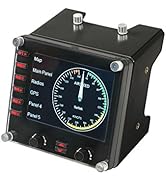
The Logitech G Pro Flight Instrument Panel features a vivid 3.5-inch LCD that integrates seamlessly with major flight simulators, providing real-time, accurate cockpit instrument data across 15 customizable displays. Designed for professional sim enthusiasts, it offers robust build quality, USB connectivity, and compatibility with Windows 7 through 11. Ideal for creating a multi-panel glass cockpit setup, it delivers an immersive, lag-free flight experience.


| ASIN | B01LYE4J1C |
| Additional Features | Motion Sensor |
| Best Sellers Rank | #21,198 in Video Games ( See Top 100 in Video Games ) #61 in PC Game Flight Controls |
| Brand Name | Logitech G |
| Button Quantity | 6 |
| Color | Black |
| Compatible Devices | Windows 7, Windows 8.1, Windows 10, Windows 11 |
| Connectivity Technology | USB |
| Controller Type | Joystick |
| Customer Reviews | 3.9 3.9 out of 5 stars (491) |
| External Testing Certification | Não aplicável |
| Global Trade Identification Number | 10097855127928 |
| Hardware Platform | PC |
| Included Components | Mounting Bracket, Pro Flight Instrument Panel, QSG, Screws |
| Item Dimensions | 5.71 x 4.65 x 3.94 inches |
| Item Type Name | Logitech G Pro Flight Instrument Panel (945-000027) |
| Item Weight | 14.11 Ounces |
| Manufacturer | Logitech, Inc |
| Model Name | Pro Flight |
| Package Quantity | 1 |
| Power Source | Information Not Available |
| UPC | 097855127921 |
| Warranty Description | 90- Days |
P**T
Great if you know what you're doing.
Like the rest of the Logitech/Saitek panels, the build quality is rock solid. Be aware that this is an addon for simulator software; it will not work as a game controller straight out of the box with manufacturer's drivers on a standard gaming setup. Took me several days to locate an archived Saitek driver package that even made Windows 11 recognize that it was plugged in. Once you find a 3rd party support program to sit between the device driver and your simulator software (for example SPAD Next, other solutions are available), the ease of use goes from "nope" to "awesome".
V**R
A must have for flight sims!
I had no idea how good this display was going to be but it has rapidly turned into my favorite tool for FS2020. The good stuff: 1. The display has many quality gauges to choose from as well as a super useful multi-gauge page which means one physical display is probably going to meet the needs of most players. 2. Installation is cake; go to Logitech to find the sim you play and its driver, then do the auto-install. 3. Great update rates, no visible lag. 4. No trouble leaving it plugged into Thunderbolt 4 hubs during power cycles. It wakes up properly and starts communicating with no need to plug-pull reset. If only my HOTAS could be that way... The bad stuff: 1. Kinda spendy if you want a full setup. I'd like six displays but at the current price I can get a sim glass cockpit started for the same money. 2. Logitech does not seem to prioritize this product or any of their flight sim related products. Wouldn't be at all surprised if Logitech stopped making flight sim stuff altogether.
A**C
Drivers not updated since 2020 - poor support from Logitech.
Save your time if you are on Windows 11 or FS 2024. Logitech has not updated the driver's since 2020 as of this writing, and if you want to try to make this work, you need to go to a third party software solution that adds to the cost of adding an instrument to your sim. When the price dropped on this instrument display, I snapped it up, but didn't realize that Logitech hasn't supported it despite claiming Win11 support. I suspect there will be a lot of returns after Xmas due to not supporting modern platforms. It also requires a USB 2 interface; many new computers just offer USB 3, showing how this hardware has not kept up with the times.
S**6
Enhances the flight simulator experience
Great concept, a bit dated lcd for 2025. Official drivers are dated, have not been updated since 2020. Needs Spad.next to be recognized and work in MS2024, even Logitech support recommends that. You will need the additional FIP gauges (fipgauges.com) to get a better experience. See Photos attached. Expensive if not on a sale. Definitely enhances the overall sim experience. I got 6 of them for the six pack instruments in a Cessna. If you have all Logitech flight yoke setup it complements them well.
T**R
Really like these instruments
I use the instrument with MSFS 2020 and Spad.Next. Spad gives you choices of which instrument you wish to display and includes free and for-purchase options. It shows well over a dozen choices. I use this exclusively for airpseed indicator, very much more convenient than having to search around in the sim cockpit for the gauge when you're trying to maneuver or land. It's a bit pricey - but it works well, has bright display, decent choices of instruments.
E**O
Maybe but if you need something more affordable in price
I’ve owned these for several years, and while they do work, I strongly recommend avoiding the stock drivers and software. The default interface feels very outdated and limits what the hardware can really do. To get the most out of them, I recommend using SPAD.neXt, which unlocks significantly more functionality. Pair that with gauges from fipgauges.com, such as the PFD and HSI if you’re using them for flight simulation and you can configure them to replicate instruments like the Garmin G5 or many other gauges. In my opinion, this is the only way to truly maximize their potential. On the positive side, the build quality is solid. The buttons could be improved, but they’re acceptable. They’re also fairly straightforward to use if you stick with the stock firmware. However, the biggest downside is performance. These units are noticeably slow when displaying real-time data. There’s a slight but consistent delay, and I often find myself relying on my main cockpit display for smoother, more accurate readings. While the lag isn’t a complete dealbreaker, there are situations in flight simulation where immediate, precise feedback is important, and these fall short. Would I buy them again? No. Instead, I would choose the RealSimGear G5. It uses an HDMI connection, eliminates the delay issues entirely, and offers far more flexibility without requiring additional third-party software purchases.
J**S
They really Improve the Flight Simulation experience....
With appropiated drivers, they really work plug&play.. Not in all aircrafts, but in those where they are present like Cesna 152 / 172.Bad: they don't bring any information about how to configure the left side buttons. This devices circle in several instruments (monitors) and I bought only 3 to improve IFR flights without having to click the screen with the mouse. Selecting them by timne you can have them all, in case you need more info. Price is high and could be abrake, but after several flights, you just enjoy them..!
C**Z
Super funciona perfecto
M**A
Excelente visor, tamanho e fácil configuração. Deixa a experiência muito real.
N**N
Al principio que ví este accesorio se me hizo caro y que nunca compraría.. Sin embargo tuve la curiosidad de usar uno de estos, lo compre en promoción y al montarlo me cambio completamente la experiencia de mi simulador de vuelo, me encantó y ya estoy juntando para adquirir los próximos para hacer la experiencia más real al simulador de vuelo.. Si eres fan de la simulación de vuelo, es un must que no te debes perder
D**.
You can never have too many FIPs. And if you use SPAD.neXt instead of the Logitech/Saitek software that comes with it you can use it for racing gauges as well.
Y**S
Excellent product, works very well
L**E
Plug and play, it’s work when you plug it, at the first time, For MSFS 2020
Trustpilot
3 weeks ago
2 weeks ago