Buy anything from 5,000+ international stores. One checkout price. No surprise fees. Join 2M+ shoppers on Desertcart.
Desertcart purchases this item on your behalf and handles shipping, customs, and support to SINGAPORE.
โจ๏ธ Elevate your desk game with silent power and seamless control!
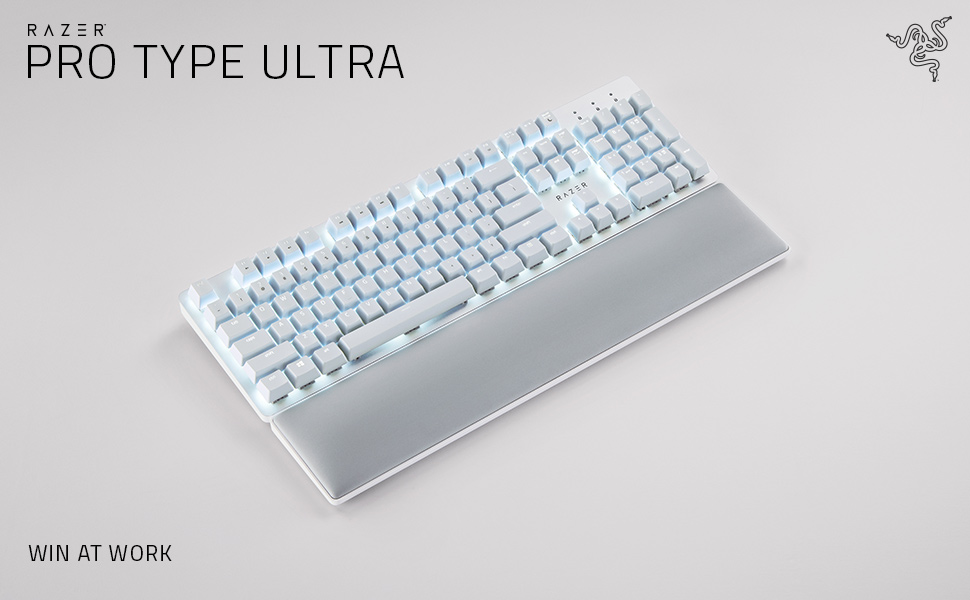
The Razer Pro Type Ultra Wireless Mechanical Keyboard combines silent linear switches and ergonomic design with hyperspeed wireless technology, enabling connection to up to 4 devices simultaneously. Built for durability with up to 80 million keystrokes, it features fully programmable keys and smart controls, making it the ultimate productivity tool for professionals seeking comfort and efficiency.


| ASIN | B09J72K6SM |
| Additional Features | Ergonomic |
| Antenna Location | Office |
| Best Sellers Rank | #55,087 in Computers ( See Top 100 in Computers ) #1,420 in Computer Keyboards |
| Brand | Razer |
| Built-In Media | Razer Productivity Dongle, Wrist Rest |
| Button Quantity | 78 |
| Color | White |
| Compatible Amazon Tablet Models | Amazon Fire 7 12th Generation |
| Compatible Devices | Laptop, PC, Tablet |
| Compatible Operating System Family | Android |
| Compatible Tablet Computer Models | AAUB P30 |
| Compatible devices | Laptop, PC, Tablet |
| Connectivity Technology | Wireless |
| Connectivity technology | Wireless |
| Customer Reviews | 3.9 out of 5 stars 454 Reviews |
| Enclosure Material | Acrylonitrile Butadiene Styrene |
| Generation | 2nd Generation |
| Hand Orientation | Ambidextrous |
| Is Electric | Yes |
| Item Dimensions L x W x H | 43.9L x 13.1W centimeters |
| Item Type Name | PC Gaming Keyboard |
| Keyboard Backlighting Color Support | Single Color |
| Keyboard Description | Wireless |
| Keyboard Layout | QWERTY |
| Keyboard description | Wireless |
| Manufacturer | Razer Inc. |
| Mechanical Keyboard Switch Model | Razer Green |
| Mfr Part Number | RZ03-04110200-R3U1 |
| Model Name | Pro Type Ultra |
| Model Number | RZ03-04110200-R3U1 |
| Number of Keys | 104 |
| Number of Sections | 3 |
| Power Source | Battery Powered |
| Recommended uses for product | Office |
| Series Number | 304110200 |
| Special features | Ergonomic |
| Style Name | classic |
| Switch Type | Linear |
| Theme | Productivity |
| UPC | 810056145170 |
| Water Resistance Level | Not Water Resistant |
A**R
Love it but too sensitive
Its really nice and i love it. But its too sensitive and almost always I misspell words because of its high sensitivity.
H**.
Excelente producto, pero la entrega no me pareciรณ que fuera la adecuada de parte de Amazon
Fue una confusiรณn, todo bien con el paquete, pero lo entregaron de forma incorrecta y sin aviso
A**W
The backlight is... frustrating, not great for gaming
This is a really excellent keyboard for typing. The best I've ever used. Buttery smooth in a way I didn't realize a keyboard could be. A joy. Noticeably better than any other keyboard I've used. And it looks absolutely gorgeous. I just look at it on my desk from time to time. Just really well done. I added some fancy keycaps and occasionally swap them out for different designs, but mostly I leave the white keycaps in place because it just looks so good. For gaming, the keys are a little TOO responsive. By that I mean I will rest my fingers on WASD and spacebar, and accidentally push them just because the weight of my fingers can push the keys and trigger the switches. Like the slightest pressure activates the key. For typing text, AMAZING. For resting my hands on the keys to play games, not the best. If you're primarily gaming with your keyboard, choose another. If you're primarily typing text, this is the one. My biggest problem is the LED backlighting. The photos usually make it look like they are neutral white; neither warm white nor cool white. But the LEDs are cool white with that slight blue tint to them. This wouldn't be such a problem, but you'd think since they are white LEDs and not RGB, they would use neutral white. This problem is compounded by the yellow switches. The cool-white LED light reflects off the yellow switches. So now you have a mix of blue and yellow shining out from under every key and it just looks a bit muddy and ugly. I know they want to be able to say "our yellow switches" to keep in the parlance of the mechanical keyboard world, but they should have been white or clear. And the LEDs should have been neutral white. Update: I can now push Fn + Esc to swap Function keys/Media keys. So they are now, once again, swappable. The function keys can be edited now in the synapse software; the media keys still cannot be edited and will say as much in synapse if you don't switch them to Function keys first.
M**A
Love it
So far no complaints about this keyboard. Iโve been waiting for razer to come out with this since they announced it and was very happy to see i can order it off amazon. About the silent part it definitely still had a noise as you can hear in the video but if you own a gaming keyboard from razer you know that they can get very clicky and loud so compared to their other models yes its much quieter. I pared it with a Microsoft mouse and the colours match well. I just decided i didnt need a $120 mouse for what i do but the keyboard im very happy with. The wrist rest is also very soft and comfortable
R**N
Solid product
works well with my Macbook pro and my PC both on separate profile si I'm able to use a single keyboard and mouse for my 2 computers.
L**Y
Best dang keyboard and I've tried a lot of them.
Broke my Logitech G513 keyboard which was previously the best dang keyboard. I liked it because it had black keys that were backlit in white. Logitech, in their infinite wisdom apparently discontinued it because this Razer is now the BDK keyboard you can get if you're not a gamer. It's pricey to be sure. But it feels great and the key action has just the right feel without being too clicky. Wireless means that your desktop is just a bit cleaner. It remains to be seen how these white keys look after a couple of months worth of use (hey Razer why not offer a version with black backlit keys?) but they're removable and washable. The backlighting is lovely and you can turn it down/off. As others have said, if you're going to use it for business, do update the firmware and take the time to load teh Razer Synapse software so that you can customize the keys. I did not like that the function keys didn't work like function keys. With that software, now they do. Get a Razer. You deserve it.
Trustpilot
1 month ago
2 weeks ago