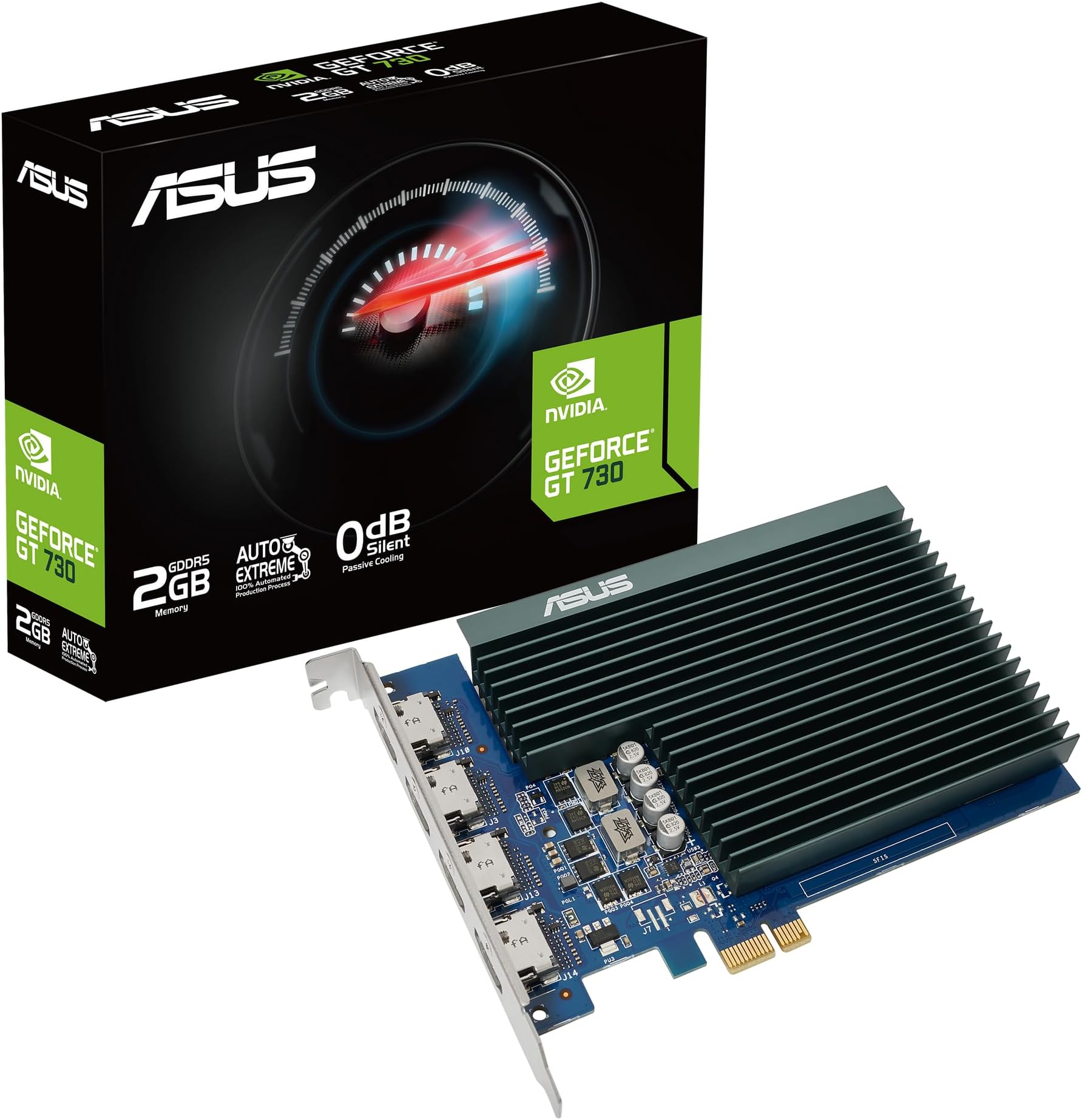
🚀 Elevate your multi-display setup with silent power and crisp 4K visuals!
The ASUS NVIDIA GeForce GT 730 is a compact, energy-efficient graphics card featuring 2GB of fast GDDR5 memory and four HDMI outputs, enabling seamless 4K HDR streaming across multiple monitors. Its passive cooling design guarantees silent operation, making it ideal for professionals seeking reliable, multi-display productivity without noise distractions.


| ASIN | B09DVN7QWH |
| Are Batteries Included | No |
| Batteries | 1 Lithium Ion batteries required. |
| Best Sellers Rank | 5,283 in Computers & Accessories ( See Top 100 in Computers & Accessories ) 28 in Graphics Cards |
| Brand | ASUS |
| Colour | GT 730 2G 4 x HDMI |
| Computer Memory Type | DIMM |
| Customer Reviews | 4.4 4.4 out of 5 stars (8,462) |
| Date First Available | 28 Aug. 2021 |
| Form Factor | Dual Slot |
| Graphics Card Description | NVIDIA GeForce GT 730 |
| Graphics Card Interface | PCI Express |
| Graphics Card Ram Size | 2 GB |
| Graphics Chipset Brand | NVIDIA |
| Graphics Coprocessor | NVIDIA GeForce GT 730 |
| Graphics RAM Type | GDDR5 |
| Guaranteed software updates until | unknown |
| Item Weight | 211 g |
| Item model number | 90YV0H20-M0NA00 |
| Lithium Battery Energy Content | 2 Kilowatt Hours |
| Lithium Battery Packaging | Batteries packed with equipment |
| Lithium Battery Weight | 2 Grams |
| Manufacturer | ASUSTEK - VIDEO CARDS |
| Memory Clock Speed | 5010 MHz |
| Number Of Lithium Ion Cells | 5 |
| Number of Lithium Metal Cells | 5 |
| Product Dimensions | 14.8 x 10.5 x 0.25 cm; 211 g |
| RAM Size | 2 GB |
| Resolution | 3840x2160 |
| Series | NVIDIA GeForce GT 730 |
| Wattage | 3 watts |
T**H
Does a fine job
This card replaces the GT720 2GB DDR3 that the 5+ year-old Acer computer came with, so I can watch HDR content on the large screen 4K smart TV. Good performance, ultra quiet, occasionally buggy startup (erratic visual glitches) causing constant rebooting - turned out the latest driver was the culprit - problem resolved after reverting to the older Aug 2024 driver.
D**C
Great value!
For the money, it's hard to beat; granted, you're not going to get much from it if you're planning to game on it, but if you only need to run 2/3/4 monitors for work-related content, then this card is perfect. I'm running 2 screens, for audio editing, and the screens (top-end Dell) are crisp and will replay HD content very well.
V**M
[Phoenix 1050-Ti] Decent card, way too expensive atm. Change the default colour range!!
Easy install if you remove the old software and your current driver from device manager beforehand. The default NVIDIA setting for colours are a bit washed out so I went into the Change Resolution section and changed the 'Output dynamic range' to Full and the Brightness and Contrast to 45%, also set it to Full in the advanced section of the 'Video colour settings'. Looks great now with nice dark blacks and a better colour range. Works very well in less demanding titles like the indie games or ones that are a few years old, runs very quiet even during gaming. You can get an RX 570 or GTX 1060 3GB for about the same price atm, but I would need a new PSU and could not even find an adapter for my proprietary mobo power sockets, so opted for the GTX 1050 Ti. Tried an ASRock RX560 at first but it stuttered on all games and video and I found the AMD software a bit 'glitchy' to use i.e. not responding when first opened to Gaming section and found the update always told me I needed to update to the same version of Crimson. Also when I did update it corrupted the software and I had to install it from the new download file. Considering the GTX 1660 6GB is about twice as powerful and can be bought for around £200 then £150 for the 1050 Ti seems a bit much. But if you have limited power (in my case just 200W) then the 1050 Ti is a good option, but now the GTX 1650 is a better 75W PCIe only card and costs about the same price atm. Update 16.05.2020 Having done more research it seems I could have gone for the RX570 (120W) or the 1060 (120W) I mentioned. A 200W PSU will be ok with these cards in my OEM system. A system like mine would draw about 185W from the wall with a GTX 1060, so at the PSU after its 20% loss in efficiency it would be about 150W. Just to be sure the GTX 1650 Super (100W) would be a great buy atm. Of course you would need a 6 pin connector from the PSU, my PC has a socket on the MOBO for this purpose.
D**M
A great compact fanless graphics card for high res low noise builds. Can be painful with linux.
This is the card to get if you need a fanless card for normal desktop work on 4k type screens with decent UEFI support. A lot of fanless cards can't even display 4k let alone manage decent performance like this card. It only over heats and throttles if you try and use it for computation flat out for too long and don't directly cool it. I tried it's video encoding and it spent most of it's time throttled down. The card is also small enough to not need a slot support and will easily fit in a compact case (e.g. a 2U rackmount). I didn't actually buy it for a silent build but in order to have a less cramped build when using multiple graphics cards while passing through a high powered graphics card to a windows VM. This high powered card has a similar db to a jet engine under load when it gets too hot and wasn't going well cramped in with a super high speed NIC, high core CPU and silly fast NVME drive. This card solved the problem and has hugely reduced temperatures without me adding any fans. So .. buy this if you need high res. and minimal 3D. It's great for any 3D desktop effects your into, and You can certainly play older games and some simpler modern games with this card, but you may need a fan / open case with low ambient temp. to prevent throttling. If you have such a retro CPU you need it for video decoding you probably can run a decent looking dekstop at a decent resolution anyway and would be better paired with a cheaper card. It pays to use the propietary drivers under linux if you want a slick high res fancy desktop like kde and gnome with loads of effects .. but as they aren't open source they aren't well integrated and can cause no end of problems .. e.g. required more work than I could be bothered with to integrate with my monitoring software (libre) .. the only hardware I have in a large stack like that, doesn't like wayland at all, required hacks to allow DDC (which I used for switching displays when doing VM passthrough) .. oh yeah .. and required fixes to work with the recent kernel I was using. I or someone like me would have patched all them of course .. but it's not open source .. so .. you're really better off with AMD for linux or if you can bear it .. using the open source drivers (they're not that bad .. but personally I get tweaked out by clunky mouse pointers or 2 bit colour 4k res desktops). As far as I can tell .. there is no extra pain under windows vs other graphics cards so do not hesitate if you're going for main use in windows.
S**M
Just works and has all the power I need
Needed three large monitors. I removed the limited output gpu in my HP pavillion i7 and simply plugged this in its place. The Asus graphics card has a shortened connector that fits in the end of the PCi express motherboard socket. No other power leads or connectors are needed. I then plugged in two HDMI monitors and an older large monitor with an HDMI to VGA adaptor and turned on. Went to Asus on the Internet and downloaded the latest ASUS graphics driver for Windows 10. Lastly i set the screen order and resolution in settings. The Asus Software has plenty of settings for gamma correction etc. It works superbly and the definition (or clarity) seems better than before. I don't play games on this PC, it is used for office applications and development and I still can add another monitor if i really wanted too. It has the power for multiple instances of Adobe creative suite graphics programs, CAD and live 3d rendering, all without any issue or stutterring at all. I cannot reccomend this solution higher, it's one of the best plug and play devices I have purchased and so much easier to install than the older graphics hardware.
A**F
كارت معاد تصنيعه وبه مشاكل كثيره ولا انصح بالتعامل مع الموقع فى شراء كروت شاشه ثانيه اشتريت منتجين وسيتم ارجاعهم غدا كل شئ معيب
N**O
Reçue rapidement. Achetée en promotion, une superbe carte élégante, simple à monter, performante et ultra silencieuse. Différents modes à disposition selon l’utilisation mais que du bonheur, à portée de main.
S**.
✍️ Scheda video 🖥️ di una certa età 👴. L'ho acquistata per il mio PC 💻 che ormai ha i suoi anni 🏚️. Ho cercato di rivitalizzarlo 🖖 un po' e devo dire che sono riuscito a farlo. Non vi aspettate miracoli 🔮 della tecnologia 🤖, la scheda è buona ma non alla pari ⚖️ con le schede di ultima generazione 🦾. ✍️ Si tratta di una Asus ®️ GT730 da 2GB. Io avevo la scheda video 💻 integrata con il processore, di conseguenza non ho mai avuto una scheda video dedicata 🖥️. Ho optato per questa scelta in quanto oramai per poter usufruire dei software 📀 di ultima generazione🦿 hai bisogno di potenza di calcolo🧮. Giustamente acquistando qualcosa di più potente avrei dovuto cambiare alimentatore 🔌 e verificare altri parametri. Avendo bisogno di poca potenza 🧲 giusto per non far laggare i software questa scelta si è rivelata azzeccata. ✍️ Se non pretendete miracoli 😇 la CONSIGLIO vivamente. 👍 ✍️ Amazon 〰️ come venditore e spedizione 🚛 perfetto come sempre. ❌ Ha una certa età 👴. Con qualche offerta 🏷️ in corso può essere un ottimo acquisto 💸. A prezzo 💶 pieno un po' un azzardo. ✅ Aiuta molto, soprattutto PC 🖥️ obsoleti. ✅ Graficamente ancora valida. ✅ Prezzo 💶 a volte in offerta 🏷️, contenuto. ✅ Prestazioni migliorate. 🏪 Venditore 8/10 🚛 Spedizione 9/10 🏭 Produttore - 8/10 💲 Prezzo - 6/10 📦 Packaging - 8/10 ↪️ Utilità - 7/10 🍃 Materiale - 8/10 ✅ Se sei arrivato fino a qui, spero che la mia recensione sia stata utile. 🙏
A**S
Ho acquistato questa scheda grafica ASUS perché pensavo che ASUS fosse il top ma purtroppo ho dovuto ricredermi almeno su alcune caratteristiche di questo articolo. Nonostante sia stata pensata per sistemi Gaming Entry Level e per sistemi HTPC non riesce a gestire se non con affaticamento eccessivo la modalità DirectWrite (Direct2D). Infatti se uso una applicazione che ha bisogno di questa modalità il mio PC inizia a rallentare parecchio e la temperatura della GPU sale di 5 punti. Avendola acquistata per usare un Monitor 4K HDR da 28 pollici Samsung sono rimasto molto deluso nel vedere questo glitch. Per il resto è esageratamente alta il ché ha comportato che lo slot PCI-E 2.0X4 è stato occupato dalla scheda che come ingombro ha finito per nascondere lo slot, potrei anche spostare la scheda video sull'altro slot PCI-E 3.0X16 ma è troppo vicino alla CPU e alla sua ventola da 120 mm, dunque per me è un grosso problema, per il resto essendo un cooler di tipo passivo non fa rumore e anche se sale la temperatura non c'è rischio di bruciare o rompere la ventola perché non ci sono parti meccaniche. I 4K HDR li raggiunge a 60 Hz senza problemi, gli aggiornamenti dei driver li faccio direttamente dal sito ASUS invece di nVidia perché i driver che rilascia ASUS sono ottimizzati per questa scheda video. Ho una scheda madre ASUS Maximus Gene VII, un processore i7 4790K a 4.00 Ghz, 16 GB di RAM DDR3 a 1600 Mhz in dual channel, SSD da 512 GB, Monitor 4K HDR 28 pollici Samsung e due Hard Disk meccanici da 3 TB ciascuno WD RED. In 4K HDR la scheda fa 55 gradi centigradi a riposo d'estate, in inverno 47 gradi centigradi. Raggiunge i 70 gradi centigradi sotto sforzo, i giochi faticano tantissimo e li devo giocare alla risoluzione FullHD sia pure con dettagli al massimo. Nel complesso è un buon compromesso, occupa un solo slot del case e viene fornita con una staffa anche a basso profilo intercambiabile. Ovviamente ci faccio girare tranquillamente Windows 10 64bit. Vi lascio alle mie foto dalle quali vi potrete rendere meglio conto di ciò che ho scritto qui. Valutazione complessiva: Risoluzione 4K HDR (a 60 Hz): ★★★★★ Velocità di risposta del motore grafico: ★★ Capacità di raffreddamento: ★★★★★ Compatibilità con applicazioni moderne: ★★★ Prezzo: ★★★★★ Ingombro: ★★★★★ Uscita HDMI: ★★★★★ Conclusione: ottima ma non eccellente. Un buon prodotto entry level per aggiornare un PC che ha qualche annetto di troppo. Valutazione finale: ★★★★ Grazie!
A**.
Installed smoothly in a compact build. Delivers solid performance for media playback and light gaming. The passive cooling keeps it silent, ideal for HTPC setups. Not for demanding titles, but perfect for what it's designed to do. Great value if you're upgrading from integrated graphics.
Trustpilot
1 month ago
3 weeks ago