Desertcart purchases this item on your behalf and handles shipping, customs, and support to SINGAPORE.
๐ Secure your network like a pro โ because your data deserves VIP treatment.
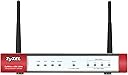
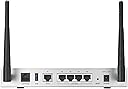
The Zyxel ZWUSG20W ZyWALL is a sleek silver 802.11n wireless security firewall designed for small businesses and home offices. It combines powerful routing and bridge modes with zone-based access control lists and a 100 Mbps SPI firewall throughput, delivering enterprise-level protection and reliable Wi-Fi connectivity. With easy VPN setup, frequent firmware updates, and responsive US-based support, itโs a cost-effective solution that safeguards your network without recurring fees.
| ASIN | B00433101I |
| Antenna Location | Business, Home |
| Best Sellers Rank | #315 in Security Monitors & Displays |
| Brand | ZyXEL |
| Built-In Media | ZyXEL ZyWALL ZWUSG20W 802.11n Wireless Internet Security Firewall |
| Color | Silver |
| Compatible Devices | Laptop |
| Connectivity Protocol | Wi-Fi |
| Connectivity Technology | Wi-Fi |
| Control Method | App |
| Controller Type | Android, iOS |
| Coverage | Wireless Network Coverage |
| Customer Reviews | 3.5 out of 5 stars 84 Reviews |
| Data Transfer Rate | 100 megabits_per_second |
| Frequency | 5 GHz |
| Frequency Band Class | Single-Band |
| Global Trade Identification Number | 00760559118907 |
| Item Type Name | ZYXEL ZWUSG20W ZyWALL 802.11N Wireless Internet Security Firewall |
| Item Weight | 12.8 ounces |
| LAN Port Bandwidth | 10/100/1000 megabits_per_second |
| Manufacturer | ZyXEL |
| Maximum Upstream Data Transfer Rate | 100 megabits_per_second |
| Mfr Part Number | ZWUSG20W |
| Model Name | ZWUSG20W |
| Model Number | ZWUSG20W |
| Number of Ports | 5 |
| Operating System | ZyNOS |
| Other Special Features of the Product | Internet Security, QoS |
| Router Network Type | wireless |
| Security Protocol | WPA2 |
| Special Feature | Internet Security, QoS |
| UPC | 760559118907 |
| Warranty Description | Limited Warranty |
| Wi-Fi Generation | 802.11n |
| Wireless Communication Standard | 802.11n |
| Wireless Compability | 802.11n |
O**E
GET ONE... OR TWO! AWESOME SMALL BUSINESS / HOME ENTHEASUST FIREWALL!
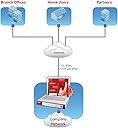
I have several of these at various client sites and they are rock solid. HIGHLY programmable, like ones costing 2x or 3x but a fraction of the costs with no ridiculous recurring licensing fees. Firmware updates are frequent so you know ZyXEL is always updating and improving. The last 2 I setup was for site to site VPN from Boston to Philly. IPsec setup was super easy and well documented. I did run into a wall so I called tech support. I figured I would be on hold for a long time and get transferred overseas. Nope. My wait time was about 5 minuted and I was talking to someone in Cali. We did a remote session and he had my issue resolved in 15 minutes! He saw I was trying to connect LAN to LAN but I needed to set it up as LAN to bridge in my case. He also helped me make it a little more streamlined and auto-reconnect. All very easy once you know where to look. AWESOME support, price and reliability. How is that possible these days!? I don't know but ZxXEL does it and they have my business!
D**N
Great router, lots of features, but serial port interface does not work
This is a really capable router. It is like getting a professional router at a home price. I must qualify this by saying that this is the first stand-only router I've owned. It has a well-written 900 page manual (available by download). It not only routes, but it can do spam filtering, bandwidth management, VPN, IPSEC, and lots of other stuff. Some of the things like spam filtering require a subscription. It collects statistics. It is managed via a web-based GUI. It works quite well, but could be a tad better organized. (I've always got to go to the "site map" to get between things.) But this navigation thing is something you quickly get used to. Not really a problem. The one serious problem is that the serial port command line interface does not work properly. One of the commands is "interface" followed by an interface name, and that is supposed to get you into a sub-command prompt for managing that interface. But it just says "syntax error". Now I must say that after this experience, I discovered that there was a firmware update. I've not tried it since I updated the firmware. Here is how I use it: I've got AT&T U-verse. I use its WiFi for my internet radio, and my cell phone, and also for guests. One port on the U-Verse router comes into the ZyXEL's wan port. I have my desktop computer, Linux box, and RAID storage server plugged into wired ports, and my laptop is on the ZyXEL's WiFi. The U-verse modem/router doesn't even have any way to update the firmware,and there is a good chance that the bad guys have found plenty of vulnerabilities. So I feel a lot safer now that I have the ZyXEL to protect me, and can treat the U-verse modem/router as untrusted.
F**K
Disappointment in every way
(UPDATE APRIL 2013) After being sent a beta firmware bundle to try and still have the issue... I was told but support this was a hardware issue (even though the SAME thing happens on 2 of them) - they told me they would be testing and sending a new unit as of Jan 2013 - nothing. So - now the device has wireless turned off and is acting as their CHAPER wired model. I couldn't be more disappointed or disgusted with ZyWall and their handling of this. I can tell you I will NEVER buy another one of their products EVER again. (UPDATE DECEMBER 2012) - As you can see in the comments ZyWall cared enough to reach out to me and get me in the support loop. Still having the issue but am working with a dedicated support rep who seems to know what he's doing. Here's to keeping my fingers crossed that we can determine the root cause of the stability issues with the WLAN. ------------ I have been running ZyWall products for years and love them because they LAST for years. I agree with many of the other reviews here these are not your friendly "easy to set up" products - they carry the ISCA labs certification because they are rock solid and through that comes complexity of configuration. Still - you can find the information you need on the web or in their support docs. This review is because of some unacceptable stability issues I have experienced on 2 pieces of hardware with this model and the latest firmware. At random intervals the wireless network will just stop. It's there, you can see it, but it will fail to pass traffic. There is never anything in the logs, nothing in a capture, it's like it never stopped - except there's clearly no traffic. The hard wired network continues to function fine without issue. Here's the licker - any change vi the UI to the wireless configuration - no matter how small results in the wireless network becoming available again. Change the channel - works. Change a DHCP time-out setting - it works. The change shows in the logs and immediately all the activity shows in the logs. It's nuts. Given there's no artifact of the event there's nothing support can offer yet the event happens 1-2 times in a 24 hour period. Second piece of hardware does the exact same thing when configured the same. Worst part about this is - it's a very basic configuration with the WLAN bridged to the LAN and a cable modem on the outside. Add insult to injury - a less than fifty dollar Medialink Wireless N Router works just fine 24/7. Sorry ZyWall - you were my goto hardware for years... this experience has left me with a nearly 200 dollar paperweight.
B**N
Good inexpensive full featured router with performance and wireless flaws
I really wanted to like this device, so I gave a lot of effort to keep this, but just couldn't do it. I don't typically write reviews, but I wanted to help other IT professionals based on my experiences with this. I'm not a full-time networking guy by trade, but have to deal with networks and was expanding my home office capabilities. First the features are really good in an inexpensive SMB or home router. VLANs, DMZ, Firewall, NAT, DDNS, etc. demonstrates the capabilities that this device can do. Has Content Filtering, AV, IPS, but you will need to pay for a subscription after the trial. Also it can log to their online service which is also somewhat unique based on what I've seen. The cons are really impacting for something like this though. The wireless is horrible. Dropping connections every 6 or so hours, made my wife ticked off! Basically, it would look like the wireless is connected fine, but there would be no internet traffic. I would have to reboot the router in order for it to come back online. Mobile phones were also having signal issues where a previous wireless router did not have those same issues. The other issue that I had was in relation to performance. It seemed that when accessing video, there was an initial delay before the video started. Also, I was seeing some performance issues on "busy" web sites that had a lot of stuff going on. I think they just changed their support where there is no longer a number on the web site. However, if you open up a ticket, after the first response they have a phone number that you can call at that point. I talked with them and they commented it was a hardware issue and that I would have to pay shipping to return it to them! I had this for a week...no way am I paying to return a problem with their stuff! Amazon was GREAT and I returned it directly to them with no return shipping charges. I was not going to see if this was a hardware or firmware issue and going through that pain again so I ended up getting a WatchGuard XTM 25. It cost a little more, same features, but great performance and stable wireless. It really was too bad the Zyxel had those issues, I really wanted to like it. Maybe if you get one without the wireless you would be happy with it.
T**F
A solid SOHO/enterprise middleground, not without a few qwerks - just know what you're buying!
As a lone IT consultant focusing on value, uptime and agility for my clients, I've chosen ZyXEL USG products for several deployments over the last couple years. Results have been top-notch on every project so far (*knock on wood*!). Pros: Good (or better) build quality Core competencies are mature and stable Out-of-the-box feature set vs cost is excellent Licensing fees are pretty reasonably priced Support is actually domestic-based and fairly capable, even at Level 1 Cons: GUI can be a bit of a bear to learn/operate, CLI is usually the way to go in lieu Lower amount of VPN licenses included with these units than most competing products (then again, look at the price...) USG series has gradually upped throughput numbers over time, but they're falling behind the rate of growth of broadband speeds (both residential and commercial) -- this definitely needs to be a focus and be addressed as ZyXEL plans End-of-Life on the current series and segues into the successor models It's been my observation that most lesser reviews, bypassing the ones around a teething time of the first few firmware versions, stem from novice shock or preference clash over ZyOS/GUI, or those who skimp on due diligence prior to purchase (usually on licensing -- SSL VPN, etc.). Those most apt to get the best bang for their buck will thus be the use cases where the out-of-the-box functionality meets the core needs. For those weighing more of their valuation based on subscriptions, services and overall licensing structures, the story may be different -- but regardless, stability and value seem a trend in most of ZyXEL's stuff, the USG series notwithstanding.
J**M
Not so easy. Get ready for needing technical help.
If you're not a LAN tech, beware. It's not easy-peezie to setup. To bridge the wireless LAN to the LAN was a pain in the arss!! With my SonicWall that I was used to, the LAN and wireless LAN could easily be seamlessly and easily bridged into one network. When I tried it with this one (had to find instructions on the Internet by others), the darned thing locked up. Too confusing. It now just sits in a box and I plugged the SonicWall back in (which has a wireless adapter going out). I'll just hookup an access point to the SonicWall and call it a day.
A**M
A good home and small-business router for serious network admin
The manual is online at ZyXEL, so I will only mention key points that made me choose it. No other router has this much capability at this price range, so it is something to consider for any small-scale use. It has a higher throughput than a typical home router, fully configurable, and provides more security. It is almost like using a small commercial Cisco router without the expense. It can be configured easily via the web interface for a simple home use, but people with a tad more knowledge can take advantage of additional capabilities not found in a typical home router like Linksys. It can handle up to 100 IP address ranges to allow/deny, extensive logging filters, and status reports. It can create multiple subnets for traffic isolation, security, and load balancing. For example, I have a subnet for guests to use that has a separate and simple WiFi password, and it provides isolation from the important main LAN. It can also run using a wireless USB card, so it can be used to access the Internet even when cable/DSL quits. Their e-mail security and content filtering is subscription based, and I am not crazy about that. But this unit offers the advantage of 1-unit simplicity that has everything a router needs.
T**Z
Fantastic Customer Support for a Fantastic Product!
I recently purchased a USG20W and I simply cannot believe the outstanding features and the hardware quality. I've been looking for a router like this for a LONG LONG time. The Check Point versions I've used in the past cost thousands more than this one! I was particularly looking for an L2TP IPSEC solution that works with the native Windows 7 VPN client. It is absolutely perfect, although it did take a couple of calls to tech support to configure it properly. If anything, Zyxel could create more complete and more clearly written examples on how to set this thing up. It is SO flexible you literally have control over every piece of the software hardware - down to the subnet and feature set on EACH port of the USG. I simply have not had a better Tech Support experience from ANY company - large or small - in the last 10 years. They are AWESOME. US-based. Resaonably short hold times. Professional and knowledgeable assistance. They don't read scripts from a screen or try to blame it on you or even pretend they know everything - when my support rep reached the end of his ideas on how to solve my problem he quickly went to one of his superiors for extra help. And yes, they solved every single one of my problems! I am now a #1 Zyxel fan and will not purchase anything else!
Trustpilot
2 weeks ago
2 months ago