


Desertcart purchases this item on your behalf and handles shipping, customs, and support to SINGAPORE.
🚀 Ship smarter, print faster, save bigger—your ultimate label sidekick!
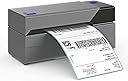
The Rollo USB Shipping Label Printer is a commercial-grade, inkless thermal printer delivering high-speed 4x6 label printing at 150mm/s with 203 DPI clarity. Compatible with Windows and Mac, it supports all major shipping platforms and offers a custom label maker app. Its USB plug-and-play design and exclusive shipping app integration make it a must-have for efficient, cost-effective small business shipping.
| ASIN | B01MA3EYC5 |
| Additional Printer Functions | Print Only |
| B&W Pages per Minute | 250 |
| Best Sellers Rank | #4,217 in Office Products ( See Top 100 in Office Products ) #32 in Desktop Label Printers |
| Brand | Rollo |
| Built-In Media | Power Adapter, Thermal Printer, USB Cable |
| Color | Black / Combined Ash (Gray) |
| Color Depth | 1 bpp |
| Color Pages per Minute | 250 |
| Compatible Devices | Laptops, PCs, Windows, Mac |
| Connectivity Technology | wired |
| Control Method | Remote |
| Controller Type | Mac, Windows |
| Customer Reviews | 4.6 out of 5 stars 16,302 Reviews |
| Display Type | LED |
| Duplex | Simplex |
| Global Trade Identification Number | 00646791961023 |
| Hardware Interface | USB |
| Initial Page Print Time | 4 seconds |
| Ink Color | Black |
| Item Dimensions D x W x H | 4"D x 8"W x 4"H |
| Item Type Name | Thermal Printer |
| Item Weight | 2.2 pounds |
| Manufacturer | ROLLO |
| Maximum Copies Per Run | 30 |
| Maximum Copy Resolution Black and White | 203 dpi |
| Maximum Copy Resolution Color | 203 dots_per_inch |
| Maximum Copy Speed Black and White | 1 pages_per_second |
| Maximum Media Size | 4.1 Inch Width |
| Maximum Print Resolution Black and White | 203 dots_per_inch |
| Maximum Sheet Capacity | 30 |
| Maximum print Resolution Color | 203 dots_per_inch |
| Model Name | X1038 |
| Model Number | X1038 |
| Model Series | X1038 |
| Number of Drivers | 1 |
| Number of Trays | 1 |
| Other Special Features of the Product | Auto Label Detection, Inkless Printer |
| Output sheet capacity | 30 |
| Paper Size | 4 inch x 6 inches |
| Power Consumption | 50 watts |
| Print media | Labels |
| Printer Connectivity Type | wired |
| Printer Output Type | Monochrome |
| Printer Type | Thermal |
| Printing Technology | Thermal |
| Processor Count | 1 |
| Resolution | 203 x 203 DPI |
| Series Number | 1038 |
| Special Feature | Auto Label Detection, Inkless Printer |
| Total USB 2.0 Ports | 1 |
| Total Usb Ports | 1 |
| UPC | 646791961023 |
| Unit Count | 1 Count |
| Warranty Description | 1 Year Limited |
| Warranty Type | Limited 1 Year |
| Wattage | 50 watts |
N**E
Seriously if you're on the fence - buy this one! A great printer for Small Business Owners
I am not compensated by any means for this review. Honestly, this is how I feel and strangely enough I invested this much time into writing a review that doesn't benefit me.. So I researched thermal printers online for a long time and I am happy I bought this printer. I was originally going to get the Dymo label printer, but after reading the countless horror stories I opted for a safer option than the "mainstream printer." (Dodged that bullet) **This is probably one of the best purchases I have made this entire year. The printer is super easy to use and isn't any hassle at all. It prints beautifully with all the barcodes and words coming out crisp and clear. (Adjust printing density and speed until perfect in printing preferences) With small lettering and fonts, you will see some pixelation. However, I have only had this awesome printer for only a week or so, so there is probably some way to fix it (haven't discovered it yet). As a small business owner, I only have seconds to adjust printer settings or make changes, and this printer makes it sooooooo easy. Make sure to read the setup manual and take the time to learn the functions or the button and what the different flashing lights are. But, you could also do a bit of learning on your own (like how I did) and read up as you go along. The setup took less than half an hour. Be prepared to go through and ruin the first 10-15 labels before you have the process perfect. It's just the name of the game of 'zeroing it in'. I love the fact that I can switch paper sizes extremely quick. All you have to do is move these two sliders within the printer either wider or smaller to fit the paper you want to use. After that, you feed the paper in - close the lid - and run the scan so the printer can recognize the size. *Before you click "Print" on your computer make sure to have your Printer Preferences or Settings set to the correct paper size. ---- EDIT --------- December 3rd, 2018 Printer is still going strong with thousands of labels printed. We do FBA product labels and shipping labels through Shipstation day in and day out. Haven't had one issue at all. Integration is super simple and not an issue as long as you follow the directions. One thing we've learned is to make sure you have a decent PDF editing program so you can crop and print labels on the fly if you need to. This is done by using the snapshot tool to print what you select off of a PDF, which is great for FBA product labels and such. ---- EDIT --------- March 4th, 2019 Still going strong. None of my opinions have changed about this printer. Shipped 1,000's of packages with the thermal printer without any concerns. I still recommend this printer to all small business owners.
M**A
Edited review.........PLEASE READ IF YOURS SPITS OUT BLANK LABELS
The recommend comment to my initial review left by the company was a life saver. This machine now works like a pro and is soooooo much easier. For those that are having troubles like me "read initial below review" do not just hit the red reset button for a second or turn the machine off. You need to HOLD down the red button while machine is powered on until you hear a light beep, maybe 5-7 seconds. The machine will re-read/align the labels. It will spit out I think 2 blank labels after it's done. Just tear those off and put aside. Now your all set to print. Since doing this, I can print as many as I want at a time and I have not had to redo the red button since. Now I understand all the 5 star reviews. ~original review~ I use this for shipping labels and that's it. I was printing my shipping labels on paper and taping them on prior to getting this thermal printer. I was so happy to get this thinking it was going to be so much less hassle and save me loads of time. Unfortunely I was the 1% that got a lemon. I LOVED this for maybe 2 months than I started having problems with the labels misaligning/erroring while printing. First it was every 5-6 labels I printed in a batch and it would error. I tried hitting the top button to reset/re-align the actual labels and it would clear 1 blank label and start reprinting what I already printed out prior, creating a waste of duplicate printed labels. I then since I could print about 5-6 labels ok, I would just turn the printer off, open it up, re-feed the blank labels and be on my way. Since I don't have to print too many, I would only have to do this once or twice a night while printing out my batch of labels and it didn't seem so bad. Fast forward to owning this label maker for 9 months. I now can only print one label at a time before it misaligns/errors and I have to shut it off, turn it back on and feed the blank labels through before it will print correctly for the next label, every single friggin time. I may only need this for 10-12 labels a night, not like I'm printing 50 at a time, but this still get very tiresome and aggrivating. If your wondering, I do swipe down the inside bar with an alcohol pad every now and then, thinking it's just collecting dust and why the labels may be erroring, but it hasn't helped much at all, since I can only print 1 label at a time now. I do have the label holder as well "I use the flat labels, not rolls", I thought maybe this would help. I also for about the first 6 months bought only rollo brand blank labels and finally switched to an off brand made in the USA as I noticed there was really no difference in the amount of errors this machine was having. I will likely buy a different label maker next year if I don't end up smashing this machine sooner then that, making this machine less then a year old before going in the trash. I don't think I have ever cussed so much in my life either then I do now when it comes time for me to print my shipping labels. Every body in the house knows when I'm "TRYING" to print my shipping lables.
C**S
Rollo could possibly the best at what they do!
The printer would not print on my Dymo labels. I thought I was doing something wrong, so I opened a support ticket late last night, fully expecting to see an email sometime the next day. Within a few minutes, my phone rang. It was a Rollo Customer Care Specialist named Arnold. Arnold quickly worked to determine that my label would not work and then offered to send me a free pack of their labels to get me working quickly. I was astonished at the speed, accuracy, and WILLINGNESS to help me. In an age where customer service is only a buzzword, Rollo and Andrew restored my faith in tech support. I quickly learned that Rollo is committed to their customers. With attention to detail and giving Arnold the autonomy to take care of their customers, I am blown away by this experience. While I only had the ten sample labels to print last night, the printer seems to be just what I needed. It is lightning fast, highly accurate, easy to operate, and creates a great-looking label. How do I give 10 stars?
F**A
A+ Customer Service, Prints Super Well, Seamless Set Up
Customer service - Jay - super helpful. Newbie here and was patient, kind and informative! Thank you! Printer is awesome!!! Works great, setup was pretty seamless, just be sure to get the labels turned to the correct side!
A**R
A million stars For A great printer and best customer Care
First off when choosing a printer I narrowed it down to the Rollo or the competitor dymo. Then I read the reviews and decided on Rollo for three reasons. Ease of Setup, Customer Care and Print Speed. Rollo Delivers on all three. First ease of set up was important to me as I'm not a computer person by any means. The printer arrived as Scheduled. I simply plugged it in, went to their website, watched their short video and had it up and working in a matter of minutes. My only issue was I had an adjustment modification I needed for ebay and being unfamiliar with a mac that I inherited (lifetime windows user) decided to contact customer support to save some time. Soon after i sent the email I received a call from Kevin at Rollo, and within minutes the issue was resolved. But this is where the story gets good. While Kevin was in my computer he noted that I had some unresolved wifi issues. I assured him it was an ongoing problem and was going to work in the future on getting it fixed. He asked if I minded if he tried a few things. So Kevin proceeded to try different issues that it might be. He worked on it for some time when he suggested I Update the computer. Update was to take about half an hour so Kevin said he would call back in 30 minutes if I didn't mind. I told him he had already gone way beyond the call of duty, so it was not necessary but would appreciate it if he would. Sure enough, I just got the computer back up and running and Kevin was on the phone again. The update still didn't resolve the problem, but he said he had two more things to try and sure enough his last attempt resolved a year long problem. So their slogan, that they feel they should earn our business not expect it they absolutely take to heart. This printer absolutely has the speed I expected. You hit the print button and before you can turn your head to look at the printer it has already been printed. You have to be quick if you want to see this cute little printer work. I have nothing to compare this to as this is my first label printer but I cannot imagine a printer working better then this one. I just ordered flat fold labels so the extra Tray behind the printer would not be an issue. I've only been using this a couple days now, but I do not expect to see any future issues. Rollo Printer is there to earn our business and grow their company, so I imagine they will be standing behind their product for the long term. If Customer service and print speed are important in your selection then there is no other printer choice that can deliver like Rollo. So if you are set on a thermal label printer but our just trying to decide between this and the other guys, do yourself a favor and put your trust in Rollo. I think in the future they will become the standard to keep up with for thermal printing and you will be ahead of the curve.
R**N
Don't give up on this little workhorse! Turned out to be a worthwhile investment.
I was like some of the negative reviewers, frustrated with the unclear print outs this Rollo printer was producing. I have a little small business and was desperate to get this printer working optimally like a lot of the better reviews. My main problem was that some of the labels were not coming out clear, especially the bar-codes for international orders and for certain websites (I sell on Amazon, Etsy, Shopify). I tried everything in Rollo's manual and troubleshot via their website -- which did help me with getting clearer prints of labels for some of the aforementioned websites. I finally contacted their tech support to set up a meeting to troubleshoot for the remaining labels that still weren't coming out clear, i.e., international mailing labels. Their technical support helped me install a "Hi-Res" or High Resolution firmware update which did wonders across the board with all my printing of mailing labels and bar-codes. So, if you're having what seems like endless issues. Do yourself a favor and go the same route I did, as there are steps to get you back on track that I believe the bulk of the negative reviews on here aren't trying. And that's to utilize Rollo's website first and foremost. Then if you still are having trouble with your prints. Open a support ticket and their helpful tech support will meet with you virtually to solve any and all problems. I understand that with all companies, you may not find the right tech support rep. While that wasn't the case with me, try another tech support rep if you still aren't getting the results you should be. I'm so glad I took proactive steps to find a solution, the idea of boxing and returning it would have been a greater waste of time. It has been 10 months since I first purchased this printer, hence I waited before doing this review. The prints are still super clear. I do get a jam once in a great while but it's easy to get the label reset. And contrary to another review, YOU DO NOT need to buy a $20 label holder. While the latter will help keep the labels centered and stable during use, it's not a must. I print straight from the pack of labels with general ease. This little beast has been a time saver and life saver for my little business. And while the cost of it is on the higher side, it is well worth it in quality and the savings of cheap but reliable printing labels. Plus no ink costs!!!!
T**D
Great, super-fast label printer, with stellar customer service.
Sleek, fast, clear printer. At first, I misread the instructions and loaded the labels backwards, so nothing was printing. I submitted a support ticket and they called me back within 2 minutes. Seriously, that fast. The customer service representative, Jay, went above and beyond to help me get everything sorted and running smoothly. He even stayed on the line and suggested I print a sample label before letting me go. The shipping label was from eBay. When I initially hit the print button, the size was all wrong. Jay knew what was happening, and helped me adjust my printing settings on eBay. He really was THAT knowledgeable, friendly, and helpful. Top-tier customer service.
C**Z
3 to know before you buy...
Tomorrow is my 4 month-anniversary with this printer. I absolutely love it. It prints on any thermal label you throw at it (UPS, USPS, FEDEX, etc.) The printer has worked great with the exception of two things. It cannot be set up as a shared printer via USB enabled Router (I have ASUS RT-AC68U) which has limited the use in our home office to only one computer. Productivity wise, it's a bummer and hinders our capacity to have multiple people fulfill orders [docks it half a star]. Network sharing the printer via USB of another computer is a nightmare, glitching/freezing the devices. Another little annoying thing is that the printer preferences reset every time you turn it back on, and the AutoDetect label size is off (by about .25 of an of inch or more) which can really mutilate labels. With that being said, I've had to edit the printer preferences everyday to fix the printing offset for our 4 x 6 labels. [docking it another half star]. Another thing is that I highly recommend you by the ROLLO Roll Label Holder . It is unfortunate that the printer does not include one with purchase because it really needs it to function properly, however, I don't dock any stars for that because by price comparison to Zebra Technologies GC420-200510-000 Printer, Direct Thermal, 203 Dpi Resolution, EPL and ZPL LANguage, 8 MB SD RAM and others out there, you can get this printer for a frigging banging deal. I (sadly) paid $220 for it by this same vendor and it is now $165. It gives me a bit of a gross feeling. As the number of printers in stock go down, the price goes up. So watch out. (GET IT WHILE YOU CAN). I regret paying that much for it only because I had to then turn around and by the ROLLO Roll Label Holder only a few weeks later, manually setting up the labels is a complete disaster and I don't recommend it (for your sanity). Otherwise, this printer is amazing, nearly perfect. I do absolutely recommend this printer and get it while the price is under $200. It's easy to set up, plug and play kind of thing. Prints clear images, bar codes, etc. Satisfied with it, with only a few docked cool points.
O**C
Rapid
Amazing , but i Wanted to buy wifi model in EU but couldnt find . Product is so rapid . The rapidest one i can say .
Z**A
Wrong plug
Not sure what I must do with a non Aussie plug?
T**T
Excelente para tus ventas
Excelente producto si estas en el mercadode venta en lÃnea . Yo vendo en Amazon yercadolibre.e ahorraicho tiempo al etiquetar mis productos para envÃa a las bodegas
J**E
Incompatible in UK
Not happy expensive purchase , not option to speak to supplier , I cant use this due to plug , would like a replacement of UK version
N**U
working perfectly
working perfectly and its great
Trustpilot
3 weeks ago
2 days ago