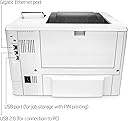
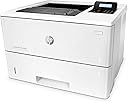
Update 1/13/25: Just want to say again how much I love this printer! It's still going strong after 4.5 years. I was afraid I was going to have to buy a new one, but it turns out the power cord was bad, so I plugged an extra cord in and it's working great! And I'm still using that toner cartridge that I installed back in May of 2022. so it lasts quite a while. I mostly use it for random printing of one or two pages maybe once a week, but at least once a year I print out about 500 pages at a time. So it's a great at-home printer, but we also had one in a small office I worked in, and it worked like a dream there, too.Update 5/5/2022: Updating because I just now, after 18 months of using this printer, had to install a new toner cartridge. It comes with what is referred to as a "starter toner" or something like that, so I was unsure when I bought it how long that would last. So, in case anyone else is wondering, the starter toner lasts quite a while! I've been using it to print LONG documents fairly regularly, so I'd say it's printed 3000-4000 pages in that time.Update 10/21/20: I changed my review from a one-star to a five-star review because this really is an EXCELLENT little printer, now that it's working. I spent 2 weeks on the phone with HP support, and waiting around for parts, service men, etc. They finally ended up replacing the formatter board (?). Not sure what that is, but it looked like the brains of the printer, and now it works great! I've printed two separate print jobs in the past week that were each 300 pages, and it spat them out lickety-split! I'm still using the starter toner that came with the printer. I can't recommend the printer completely, simply because it was a nightmare to get it working, and TWICE I was told things by the HP support team that my service guys said weren't true (that the USB cable connecting the printer to my laptop had to be less than 6 ft [so I ordered a new one]; and that the problems were happening because the USB port on my laptop is 3.0 instead of 2.0 like the one on the printer), so I don't entirely trust the HP team. But in the future, I'll just verify everything they tell me if it sounds wrong or doesn't fix a problem. I've had many HP small printers in the past, and they always worked great, so I expect good things from this mega printer now!(Original review:)I bought this printer two months ago to replace a cheaper ink-guzzler. I really wanted to love this printer, and I did love it the first couple of times I used it to print out a large document. But 5 days ago, I tried to print 50 pages, and it stopped after 20 pages. From that point on, the printer was throwing a fit that makes me hate it. It gets stuck in the warm-up phase, so the "status" and "error" lights never stop flashing, which means it's not ready to print. Sometimes it does get through the warmup ok and the readout says it's ready, but when I send the job, it might print out one or two pages and stop, or it might just print out one blank page. Most of the time, though, it doesn't do anything. The green status light may flash like it's receiving the job, but nothing happens. I called HP support the first day I was having problems, and they said the USB cord I was using was too long. They said anything over 6ft can cause problems. So I ordered a new cord and received it two days later. Plugged it in... and the same old problems. Called HP and was on the phone with them for 2 hours (changing firmware, etc.). FINALLY thought we got it fixed, and I managed to print out 80 pages. I didn't want to overheat the printer, so I decided to wait until the next day to print the rest. The next day, the printer was throwing the same old fits again, but HP support wasn't available since it was a Saturday. Fortunately, I had gotten the additional Assurion 24/7 service plan, so I called them. The tech told me to unplug everything and hold the power button down for 30 seconds while it was unplugged. That got the printer past the warmup phase, but then it still wouldn't print. I tried plugging it into a different outlet and that worked 5 times in a row (turning it off and back on) so I thought we had fixed it. I was able to print out 10 pages... then it started throwing a fit again. So I just called HP support again today (Monday) and THIS time, the guy had me look on my laptop's Device Manager, USB controllers, and he saw that the root hub is a 3.0... and this printer only works with 2.0 USB ports. The rep said that means my laptop won’t work with the printer and that I had to get some kind of adapter that only an IT person could install. When I got off the phone with that rep, I realized he never answered my question about whether the printer getting stuck in the warm-up phase was a problem, so I called back and the new tech I talked to had me push a paper clip into the back of the printer, which performed some kind of engine test and made it print out a paper with a bunch of lines on it. Then the tech told me to turn off the printer, then hold down the up arrow while also holding the X button, then turn on the computer (while still holding the buttons). Then a message popped up after the computer finished the warmup. I can't remember what it said other than it ended with the word "init." which I think meant something was initializing. And THAT got the printer past the flashing green and red lights. So I called my IT guy to ask him about getting that adapter so the USB 2.0 printer will work with my 3.0 laptop, and my IT guy said that’s not true at all and that any IT person would know it’s not true. He said a 2.0 printer should work fine, which was also what some stuff I’d found online said... so now I don’t really trust the HP reps (and yes, it was the real HP tech guys I was talking to, using the number on the warranty card).