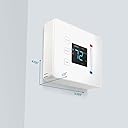
๐ก๏ธ Elevate your comfort game with smart precision and effortless style!
The Centralite Pearl Thermostat is a sleek, battery-powered smart thermostat compatible with major platforms like SmartThings and ZigBee. It supports 2-stage heating and cooling, installs quickly in about 15 minutes, and features a built-in power amplifier for superior wireless range. Its satin finish and touch controls combine modern aesthetics with user-friendly functionality.
| ASIN | B01KVDFRGC |
| Additional Features | ู ูุธู ุญุฑุงุฑู ุฐูู ููู ูุฒู |
| Brand | Centralite |
| Brand Name | Centralite |
| Color | White |
| Connectivity Protocol | ZigBee |
| Connectivity Technology | ZigBee |
| Control Method | App |
| Control Type | Touchpad Control |
| Controller Type | SmartThings , Vera |
| Customer Reviews | 4.0 out of 5 stars 145 Reviews |
| Display Type | LCD |
| Finish Types | Satin |
| Global Trade Identification Number | 00812489022264 |
| Included Components | Pearl Thermostat^Mounting Screws(4)^AA Batteries(4)^Quick Start Guide^Wiring Labels |
| Item Type Name | Pearl Thermostat |
| Item Weight | 15.52 ounces |
| Manufacturer | Centralite Systems, Inc |
| Manufacturer Part Number | 3000-wC |
| Material Type | Pearl |
| Model Name | Centralite Pearl Thermostat |
| Model Number | 3000-wC |
| Mounting Type | Wall Mount |
| Number of Batteries | 4 AA batteries required. (included) |
| Number of Items | 1 |
| Power Source | Battery Powered |
| Product Style | Touch |
| Special Feature | ู ูุธู ุญุฑุงุฑู ุฐูู ููู ูุฒู |
| Specification Met | GAMA |
| Temperature Control Type | Programmable, Digital |
| UPC | 812489022264 |
| Unit Count | 1 Count |
| Voltage | 230 volts |
M**L
I was expecting a catch ... nope. It's excellent
Buy this if all of the following are true: - You have a ZigBee-capable hub (SmartThings/etc) or ZigBee USB Stick/home automation software (Home Assistant/etc ... mine worked out of the box with the Nortek GoControl Z-Wave/ZigBee USB stick (firmware updated ZigBee) and Home Assistant) - You don't care about the thermostat, itself, having features beyond "set temperature/humidity/heating/cooling" with compatible heating system(s) - You do or don't have that "Common" wire that only newer installations have (it's not needed, though others have complained about batteries not lasting terribly long). This was the least expensive "smart" thermostat available on the site when I purchased it a couple of days ago. I have no interest in a Nest/EcoBee, I've got my own setup and they're over budget for me. I also leaned toward Z-Wave/ZigBee instead of WiFi since the wifi units in my budget appeared to have similar problems to other lower-end IoT devices, but the cost of Z-Wave/ZigBee thermostats are quite high despite them generally being not very interesting. On the WiFi side, there's plenty, but they're all more than this, all use cloud services so I have to worry about the provider quitting/failing and me losing remote control of my thermostat (minor, yes, but I paid for it). Then there's this one... no cloud, ZigBee, inexpensive, looks better than every other one within $40 of its price tag. Setup was *simple* -- pairing with ZigBee was simple, I just set the device to "add" mode, plugged the thing in and it showed up. Mark the wires, take the old one off, put the new wires where the old ones were, screw it into the wall/pair and done. Two extra points for getting a couple of things right that the cheaper models don't: - It looks nicer than the pictures. In fact, it looks "expensive" (certainly more expensive than it was). The front panel doesn't feel like cheap trash like most thermostats; it falls way short of the sleekness of an EcoBee/Nest, but the thermostat isn't meant to be a conversation piece. - They either nailed the temperature, or I got lucky. This is within a few tenths of my most accurate ambient temperature sensors. Knowing that most thermostats have pretty terrible sensors in them, I planned on triggering the heating/cooling based on other, more accurate, sensors in my home. Bonus: The temperature being reported by the unit is better than the higher-end one I replaced it with. It's a few tenths off, southward, at least at the current temperature. Since my other was two whole degrees (Fahrenheit) off, that's an improvement, but it's also moot since I'll be triggering the thing based on readings from multiple, very accurate, sensors. If it's this accurate all around, I'll probably include it in the values - The super-short manual was readable, but unnecessary. It's a simple installation.
W**G
Exactly what I wanted
December 2022 Update. My black Centralite thermostat that was installed by Cox started to malfunction in Heat mode after 6 years in use. I purchased a white Centralite a few days ago and it works great. I am still using Smartthings as the hub for both thermostats and other legacy devices. I was a little sceptical at first since a few purchasers stated they were unable to connect with Smartthings. I took "another" leap of faith and didn't have any issues connecting. I have the black Centralite Pearl that was installed by Cox when I first got Cox Homelife. I have since transitioned to Ring for alarm and monitoring and Alexa and Smartthings for my smart home functions. I needed a second smart thermostat for my second system, a heat pump, and thought that this thermostat was a steal for the price. It was easy to wire and connected quickly to Smartthings and Alexa. I have no complaints.
D**W
Works great in home assistant
I got this for my basement. We needed a smart thermostat that integrated well into home assistant and decided to take a shot on this cheaper option. I'm not overly knowledgeable with HVAC, but I am pretty handy so the install was a breeze (the provided wire labels didn't stick on the wires very well, so be careful during installation not to forget which wires are what). Once in pairing mode this connected right away to my home assistant instance and worked right away! My only complaint is that even though the C-Wire will power the unit, if you don't put in batteries in it will show 0% in HA and there will be a low battery light on the unit itself. It doesn't bother me too much or have an effect on the thermostat's operation, but I wish that if it was on a C-Wire the battery indicator light would be off. (I'm just lazy and don't want to have to replace batteries if I can avoid it)
M**T
Nope.. not reliable
Bought many of these for use with Snartthings. Purpose was to monitor and control temp while away for a few winter months. Installed new batteries before we left. 60 days later, 2 out of the 5 were OFFLINE. Never came back online. Instructions say to reset. Pretty tough when you are 3000 miles from home. My router resets every day at 2am. Smartthings resets also every day. Tried static IPs, even had an occasional power outage. Nope!!! Lost till i get home. So, my recommendation is to spend the money and get better quality units that have their own apps. Ecobee or Nest is an example. For centralite, put in circuitry that detects loss of WIFI for X time and reboot itself. Just not reliable.
K**X
works with home assistant, seems to do it's job, and it's affordable.
I was a bit all over one this one... The first one I got was off by 2F when I first installed it. I understood this wasn't a big deal just a bit of error. After a day that gap increased to 3-4F seeing some other reviews this worried me about the longevity of the device, so I asked Amazon for a replacement. I installed the replacement and it was within 1-2F of other thermometers I have nearby. After 24 hours, I noticed that the gap was really 1.4F, so I used the temp calibration option in the settings. I have been keeping an eye on it for about a week and it seems to be correctly doing what a thermostat is made to do. I am planning on buying a few more in the near future! The wire terminals for the thermostat are really weird. I haven't seen this style before, so I didn't realize that you have to pull the tab and insert the wire at an angle to get it to lock in place. I much prefer other designs. Some notes about home assistant: First of all... it works great with home assistant. It was picked up as soon as it turned on, and home assistant created a card with the basic functionality. I also love the ability to see a chart of the temp changes with what action the thermostat is doing. It should be trivial to calculate the heatloss of the home with this information. Thermostats require different thinking than plugs and light bulbs. A thermostat is an external device that does its own thing. You put it into a state (cool/heat) and give it a desired temp and the thermostat does the rest. I was thinking I would tell it "run cool for 5 minutes", but to do that you would have to say "set the target temp 2F lower than the current" I also wanted to tell it to turn on the fan only for say 10 minutes if it is cooler outside instead of using the AC unit. To turn on the fan only mode from home assistant apparently you have to call a service to set the HVAC mode to "fan_only" this has to be done in yaml editor not from the web gui. I was able to get the fans only to run, but I couldn't get it back into the cool state, so I manually pushed the mode to cool from the device itself. There is a little delay to get the thermostat with a change, so don't expect immediate response. It seems to take 1-3 seconds, so not bad but if you are trying a few things at one time have to give it some time. Sometime the thermostat won't update for some time. Watching the home assistant website I have seen where the device hasn't sent an update for 1 hour. I even walked over to the thermostat to read the temp it shows. Every time I have done this, I noticed the temp is the same as the room. My conclusion is that the temperature hasn't changed enough to warrant sending an update to home assistant. This seems to be normal activity for temp sensors with zigbee. Overall, I have never paid so much attention to thermostats. Having it patched into home assistant made me realize how little I understood how they work. For example, I can see the swing temp in action... the house's temp gets 1.2F above the target it will turn on the AC to lower it to 1.2F below the target. In home assistant I can see it cycling around this temp...it's really cool.
H**3
Working perfectly with SmartThings
If you're like me and don't like Wi-Fi smart home devices and you have a ZigBee hub like SmartThings, get this. Unlike our old Wi-Fi unit this one responds faster and more reliably in the app. This unit can run off C-Wire or batteries, and in my opinion is very nice looking. Centralite products always seem to have good build quality and this thermostat is no exception. I'm not sure why some people are having such a hard time. My experience was fine and I actually thing this is the best option for a ZigBee setup.
A**N
good value for money but be prepared to figure it out on your own..support sucks
update: 28-Nov-2020 So something changed and I am literally not sure how it happened but I noticed that there is now a thermostat device in Alexa and when I checked it is giving the readings of the Centralite. I remember messing around months ago trying to get it to work but couldn't and I don't recall exactly what I did nor how I left it. However, I can now control the temperature of the Centralite via Alexa and it also reports the temperature via Alexa. I can't do anything fancy like control the fan or even turn off the thermostat but I can at least do the basics. This is great news as I was planning to replace this unit due to my perceived lack of Alexa integration. Support still is non-existent however so still not sure I would go as far as to recommend it just yet. update: 30-July-2020 I installed a C wire and now the device is constantly backlit displaying the current temperature which is a big plus and how I initially expected it to operate. I have therefore revised my rating to 2 stars as support still sucks. I had to figure this out on my own. I also wished that it worked with Alexa which it doesn't so I will have to replace it due to that lack of functionality. This thermostat fits all the right checkmarks until I finished installing it. Installation was super easy. Integration with my Hubitat hub was also super easy. The operation is generally good. However, one major flaw is that the unit display goes blank and stays completely blank when it's in normal operating mode, no display of temperature, mode nothing. You have to touch the display for it to come alive and it goes out after a few seconds so interaction with the unit via the touch screen is annoying at best. The seller responded to my question to have this clarified but they detracted and made it seem like it was a feature rather than a flaw... Also, the support phone number is out of service, not a good sign. I logged a ticket with their Service Desk and never received anything more than the auto-response. LOOK ELSEWHERE!! This thermostat is not worth the spend and the lack of support makes any item by this manufacturer a high risk if you encounter an issue that requires support services.
J**A
Pearl 3000 works flawlessly with Echo Plus with Zigbee Smart Home Hub, great support
Wiring and initial installation was very easy. Find out if you have a conventional heater or a heat pump before wiring thermostat. Very easy to tell, if you turn on your heater and your AC compressor comes on, you have a heat pump. Or google the model of your compressor. The Pearl 3000 sensed the system I had and adjusted the settings automatically. Alexa was able to discover the thermostat and add the device without any problems. I put it in a Group called Thermostat and now I can control the temperature from anywhere any of my Echoโs can hear me. I purchased the white model because it would have become cheesy very quickly if I had to the call the device The Black Pearl! Most important to me, when I contact support they answered very quickly. I called with questions before I purchased the device. They picked up right away and did their best to answer all my questions. After I purchased the device I emailed a couple questions, they responded very quickly, on a Friday afternoon before a 4 day Christmas weekend. They even followed up to make sure everything was working for me. That impressed me more that the fact that the device connected without any problems.
Trustpilot
5 days ago
4 days ago