

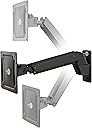


OmniMount PLAY40 Interactive Flat Screen TV Mount, Fits 30-55 TVs, Holds 18 to 40 LBS, Pans 180 Degrees, Black
Product ID: 33630691
📺Fits 30-55 TVs
🔄Pans 180 degrees
⚖️Holds 18-40 lbs
📏 Elevate Your Viewing Experience!
The OmniMount PLAY40 is an innovative flat screen TV mount designed for TVs ranging from 30 to 55 inches, supporting weights between 18 to 40 lbs. With its patented Constant Force technology, it allows for effortless adjustments in all directions, ensuring an ergonomic viewing experience. The mount extends 24 inches from the wall and retracts to a slim 5.5 inches, making it a perfect space-saving solution for any modern living space.


| ASIN | B0196FG9AE |
| Best Sellers Rank | #9,880 in TV Wall & Ceiling Mounts |
| Brand | OmniMount |
| Built-In Media | Wall plate, Arm/Wall plate hardware. Wall plate cover, Rear arm cover, CFT arm, 200x200 VESA minitor plate, spider adapter, Instruction manual, Complete hardware kit |
| Color | Black |
| Compatible Devices | Television |
| Customer Reviews | 4.6 out of 5 stars 396 Reviews |
| Global Trade Identification Number | 00698833020601 |
| Item Weight | 21.4 Pounds |
| Manufacturer | OmniMount |
| Maximum-Supported Screen Size | 20 Inches |
| Mfr Part Number | PLAY40 BLACK |
| Minimum-Supported Screen Size | 30 Inches |
| Model Number | PLAY40 BLACK |
| Mounting Type | pan |
| Movement Type | Tilt |
| UPC | 698833020601 |
| Warranty Description | 5 Year Warrenty |
S**E
Bought this twice. Challenging to install, but LOVE IT and would buy again. Worth the extra cost.
This is the second OmniMount PLAY70 TV Mount I’ve purchased. Thanks to hurricane Harvey, we had to take down and repair the entire wall due to water damage. When it came time to purchase a new tv mount, despite all the choices on the market, we decided to continue to spend the extra money due to the features of this product. This isn’t your ordinary tv mount. It’s more like a surgical arm for a heavy, big tv, but it’s great to have. PROS: 1) It produces such a variety of angles of viewing that we can watch the tv in more than one room. Family can enjoy football while eating at the dining table or working in the kitchen. 2) We can easily move the tv to avoid the sunset glare coming from the windows. 3) It works well with our L shaped sofa, avoiding neck strain for everyone. 4) the TV can be moved to work with the location of the Christmas tree in December. 5) The customer service for OmniMount is FANTASTIC. I called them twice. The first time was due to a broken part with the first install that my handyman caused while installing the tv mount (see con #1). The company sent me a FREE replacement plus a couple of other parts that fit near the broken part to ensure the mount worked as designed. The second call was during the second installation, when a single/important screw was missing (again, NOT OmniMount’s fault). We tried a different screw we had and it just wasn’t working. I identified the part number from the installation document, and the customer service team was able to identify the EXACT size/specifications of the screw while I was on the phone. I bought the replacement part locally for just over $1, avoiding install delays. 6) Solid build and great quality. CONS: 1) The installation with the first TV mount was HORRIBLE. It took forever and my handyman lost his patience and broke a part as a result. The second installation worked almost perfect. See PRO#5. I bought an open box (“like new”) with the second purchase. If I buy this a third time, I will buy brand new and spend the extra money to ensure new. 2) STUDY, RE-READ and FOLLOW the installation document!!! I wish it was more descriptive, but search on the internet for videos about the installation. 3) Still time consuming, but the second installation went much better. Three people worked to install the mount and TV, and maybe that wasn’t necessary but it was to me. Buy the installer option, if available. 4) the mount isn’t flush against the wall. This doesn’t bother me at all, considering all the pros. 5) the mount is very heavy, and so is the tv. Be aware of this with your install.
M**O
Wow! The Play25X is a STRONG well-designed & attractive mount with with PERFECT design and packaging.
Wow! The OmniMount Play25x is a STRONG well-designed mount that is very attractive with PERFECT design and packaging. GET THIS ONE if you need to do a wall mount with good extension and placement versatility. I own a lot of TV and monitor mounts including a desktop mount very similar to this OmniMount. This exceeds them all. I was most blown away by how the hardware was packaged in sleeves with the labels on each compartment so you can easily match up which bolt is needed as you attach and assemble the mount. Assembly is actually as straightforward as uncomplicated as you could ask for. The instructions are easy to understand. I was able to install my heavy 28" TV single handed. I bolted the mount to a stud in the wall with the 2 supplied lag screws and for extra credit, added 4 #14 x 3" wood screws. (You need to drill the four holes on the bracket to 1/4" and use a 3/64 pilot hole.) I was impressed that the VESA bracket can be modified to the 200mm x 100mm I needed to hold the TV solidly. (I had to half mount it when I had it on that desktop mount.) The mount had the extension from the wall I needed so I can swing the TV almost 360 degrees to be viewable in two rooms. It will serve as my kitchen table TV screen, and then swing to be a security monitor in the living room. Shhhh, don't tell anybody but this mount is from Ergotron. It says Ergotron on one label. I suspect that you could use the Ergotron extension arm if you wanted to be able to bring the screen out even further. Ergotron 45-289-026 Mounting Extension The package even includes extra arm hardware. My only minor gripe is with the silver on advertising labels on the screw covers on the bracket. I'll eventually black those out.
H**T
Nearly Perfect
I am installing two of these to mount two monitors (24" and 27"). Have installed one so far (the left one). I used desk clamp systems in the past because my desk faced a window, but now it is against a wall. This is a much cleaner look and better space saver. I have a credenza on the front of my desk, so the bottom of the wall mount is about 12 inches away (in front of) from my desk work space, and 12 inches above the desk surface. The stud I mounted it to is about 24 inches to the left of dead center of my desk. It works nearly perfectly. The only problem is that if I try to pull the monitor laterally into the middle of my field of view, an extreme position, it is slightly off horizontal (rotated clockwise). If I put the monitor slightly to the left it can be set perfectly horizontal, but at its far lateral and downward reach it is slightly rotated. The mount only allows the monitor to rotates 90 degrees (for landscape or portrait mode). There is no more give. If it was able to over rotate just a little bit it would be perfect. Its only off at this extreme position. I couldn't mount it dead center because the studs are off to the sides. I'll mount the second one (due to arrive in a couple days. I wanted to test one first) closer to the center and maybe that will work. I only need one dead center. Anyways, I still like it a lot (which is why I bought a second). Its real clean look, a handsome piece of hardware, and sturdy. Update: installed the second a bit closer to center and works perfect. These are great monitor arms.
J**G
Easy to mount if you follow these directions.
This is a really great TV mount and it truly moves every way and the extension reach is fantastic. We mounted our 32" Vizio on the Play25x on our patio and we can turn it around and down to see the TV from inside the pool. This is the only TV mount we could find with this range of motion. The instructions are limited and I had to ask a question here and then I called Omnimount support. Here's what I learned; 1, Don't let your husband try to mount this thing until you read this or there may be a few colorful words, as the directions are vague. 2, The arm will stay in the highest position until you mount the TV to the arm, this is because the arm is actually counter balanced and will go down only when the TV is mounted, you can then use the tool to adjust it to a more precise point of your choice. 3, To find the height you want to hang your TV you will need a second person to help you measure. 4, Hold the whole unit up on the wall, the arm will be up in the air at it's highest point, this is how it is suppose to be, you want to then have someone measure FROM THE MIDDLE OF THE TV MOUNTING PLATE DOWN 10" this will be where the middle of your TV screen will be, NO MATTER WHAT SIZE YOUR TV IS. You will be able to adjust from there if you want your TV higher or lower by moving the whole unit up or down on the wall, just remember to re-measure from the middle of the TV mounting plate down 10" then mark the wall when you find the height you want and attach. 5, Before you get upset, call the Omnimount support number, you can find it on their site, very helpful and they do have all the answers. I think you will really be happy you went with this TV mount if what you are looking for is true total range of motion, I know we are very happy with it.
M**Y
Excellent mount! Full list of required tools in this review.
I just received the item (Play40), so for those who, like me, are wondering before they buy if they have all of the right tools, the included socket does NOT fit the lag bolts, despite the non-answer provided by the seller and the incorrect answer provided by the manufacturer when I asked in the Q&A section. For those who are wondering exactly what you'll need to install this, read on. You will need a 1/2" size (or metric equivalent) box wrench or socket for the lag bolts that go into the wall, as well as the large hex lag bolt in the hardware kit that is in a bag labeled "P-K, M8 HEX Screw." FWIW, the lag bolts that go into the wall are pointed with threads that indicate they are clearly meant to drill directly into the wood, so if you are going to replace them, just get some screws/bolts that are meant to hold a lot of weight (these look like they're each rated to 500lbs - about 3/8" thick shafts), and will not slip through a washer hole that would be stopped by a 1/2" hex head (or just buy your own washers to fit whatever you buy - the ones included are 3/4"(22mm) in diameter). Hope this helps someone in the future. UPDATE: After installation I discovered that a fair number of the larger screws are optional, depending on your TV's VESA configuration. If it is larger than the 400 size, you may need a larger sized Phillips, otherwise a #2 will be all that you need. Most of the tools needed are listed in the manual, but a complete list of the tools you will need are: - A drill - 1/2" (or metric equivalent) box wrench, socket (preferably with a 1/4" drive, see below) - You will want to get a socket adapter that goes onto a drill (for the lag bolts that screw into a stud). Trust me, you'll thank me later. If you get the drill adapter, I recommend a 1/4" drive so it will also fit the small socket that's included in the hardware kit for tightening the arm. Obviously, if you're buying a socket, you'll want a 1/4" drive on that too. - 3/8" box wrench or socket for some smaller lock nuts - I recommend having an adjustable crescent wrench also. - Some of the screws take a larger than standard Phillips. Based on my cursory examination, you're going to want Phillips sizes 2, 3, and 4 (NOT LISTED IN THE MANUAL). - Scissors to cut the zip ties if you use them - The rest of the parts all appear to be pretty standard sizes and types - You'll probably want a measuring tape, level, stud finder, and pencil, but that kind of goes without saying. If you didn't understand most of what you read above, I'd recommend having a pro install it for you, or having a friend help you out with the installation - preferably one who owns a lot of tools, and knows their way around them. UPDATE CONT'D: Once I actually got into the mounting process, it's very easy, and it's a great product, so I'm giving this mount 5 stars!
Y**P
2/26/18 update. can not mount over fireplace.do not advise doing it. not enough rooom. returned item.
heavy, strong. mounting a 50 inch, 30 lb.UHDTV over a gas fireplace. must remember to off set center line. in my case,17 inches to the left where it almost centers it to mantel. w/o weight. upon viewing the TV (pull down) it won't be centered. TV to wall space of 3-5 inches. I "mocked up" plywood acting as a dummy TV. )44"X25") It moves freely but needs an adjustment to stop it from raising up. no weight causes it raise. you must factor in the TV weight. IF you were to draw a large circle. number it like a clock, the range of viewing your TV head on, goes like this: 2,,4,6,8,10 12 you can view TV from another room because it swings left and right at the pivot where TV meets arm. good looking, nice, clean. well worth it if you have the room.
C**.
A Fantastic Product If You Want Flexibility.
I wanted a wall mount that would allow me to move my TV up and out of reach of children, and also to expand seating when we had people over. Once you decide against a cheaper fixed-position mount, your options are pretty much between this and fireplace mounts. The Omnimount Play70 seemed to offer the most range of motion and I love all the options it gives you. This mount does it all but you'll want to know what you're getting into and you'll need *at least* a 50" TV to be satisfied with it. (I have a slim-bezel 55" TV and I don't think I'd go smaller.) With that size TV, you will completely cover the mount when positioning the TV to the left or right of it against the wall, excepting extreme angles (see pic). A smaller TV would allow the considerable mount to show and I wouldn’t recommend it outside of an industrial application. Being my first wall installation, I took my time and read the instructions more than once. I also watched the installation video and used a level to make sure I was getting it right. Installation is fairly simple but could be dangerous if it goes wrong, so don’t be shy about hiring a pro. The arm itself is extremely heavy and is hung on the wall with 3 bolts. After hanging the TV you turn a tension screw until the arm can support your TV’s weight at all heights. Despite many advantages it is worth considering the downsides this mount has compared to a fixed-position mount. For instance, the arm creates unique mounting challenges. A traditional wall mount would let you drill into a stud and then slide the TV to the left or right, but with this mount you need to account for a fixed starting point and a 20” arm. This can make choosing your mounting point tricky/ counterintuitive and it may even be impossible to have the TV positioned where you want while also hiding the mount behind it. It's also worth noting that the TV cannot be flush against the wall at every angle. If it is positioned directly above/ below/ in front of the mounting point, it will stick out. “Flush” is a relative term anyway since the arm plus mounting apparatus will create a roughly 7” gap between the wall and your TV. This isn’t dramatic at all in practice, and it makes sense for cord management, heat dissipation, etc. But the end result is more of a floating object than a picture on the wall. I think the best thing about the Play70 is that I don't have to commit to one viewing angle. Contrary to what I had heard, there are plenty of scenarios where a TV that is way up high and angled downward is more comfortable than one at eye level. Having the TV out from the wall makes it look profoundly larger. And since we are relatively new to our house, there is plenty of range available to reposition the TV in a way that would be more aesthetically pleasing should we want to move the furniture around. Good Points: Incredible range of motion in all directions, plus bi-directional tilt and even a few degrees of rotation. Looks more or less like a traditional wall mount when desired. Once installed, anyone can manipulate the tv without difficulty and the TV stays where you leave it. Compared to many mounts, this one looks almost elegant. The arm is enclosed in metal and has no scaffolding or innards showing. The ability to move the tv closer to the viewer (2 feet from wall!) makes your screen appear substantially larger. The arm is hidden in all but a few positions. The mount is ready for that 70” OLED in a couple years:) Bad Points: Takes some calculation to choose the right installation position. It’s a beefy mount and creates a 7” gap between the TV and wall at its closest point. The weight of the arm makes the install a little bit scary if you’ve never done one before. A TV with less than a ~53” diagonal footprint would look awkward since it wouldn’t hide the mount. The 40" to 60" description is obviously not the intended range for a product called PLAY70.
W**D
Good versatile monitor mounting bracket.
This is a good, heavy, and versatile mounting bracket is well designed and very useful. I work at home on a small desk where I was constantly running out of room. I also have some difficulties with vision and need to maintain an optimal distance. The combination of the two factors makes full work days cumbersome. I purchased a larger monitor (Asus 23 inch) for more screen real estate and this mounting bracket for more real desk top space. The bracket was easy enough to mount (although a little tricky to determine the optimal position in the back of my desk), sturdy enough, and I can move the monitor in any optimal position while having plenty of desktop space. At first I thought a hundred bucks was a little pricey, but after examining the sturdy construction (it is heavy with heavy-duty springs) and resultant operations, I decided the price is commensurate with the product.
F**I
Funziona perfettamente
Ho attaccato il supporto al muro tramite i tasselli inclusi e utilizzo un monitor ultrawide 34". Il supporto funziona come descritto dal venditore, infatti se si vuole muovere lo schermo basta toccarlo e riposizionarlo. Ci sono delle viti per calibrare il supporto al peso del proprio monitor. Manuale completo e multi-lingua e spedizione veloce come al solito. Sono molto soddisfatto.
R**N
Pricey but well built and smooth operation
This is a pricey monitor mount but it has a long reach, which is hard to find and it built very strong. The arm looks like it could hold far more weight than what rated and it operates very smoothly with little effort. So in the end you do get what you pay for and this is worth it ultimately.
.**.
Omnimount lo mejor
Este es mi 5to brazo de esta marca l verdad es que están muy buenos y me costó una ganga 900 y algo. Algo fuera de lo común y con mucha calidad aunque recomiendo el que tiene dos brazos. Aquí si necesitaba este pequeño x tema de espacio
M**E
Passt!
Trägt meinen ca 5KG schweren Monitor ohne wenn und aber. Lässt sich mit beiden Händen ohne viel Kraft jederzeit in alle Richtungen bewegen, drehen (max 90°) und neigen (+5° nach unten und bis -70° nach oben) und hält diese Position. Die Kabelführung könnte besser sein. Vor allem am Erweiterungsarm, hier sollen die Kabel mit Kabelbindern (diese liegen immerhin bei) fixiert werden. Optisch nicht schön, aber ok. Am ersten Arm (dem, der näher an der Wand ist) ist es besser, hier werden die Kabel unter einer abnehmbaren Kunststoffabdeckung geführt. Umfangreiches Montagematerial und Adapter für allerlei Monitorbefestigungen ist dabei.
M**R
Just the best. And worth it.
This is a beast. After trying not one but TWO other wall mounts for my 34" curved monitor screen, I got fed up neither of them were working properly. Even though the other two mounts were SUPPOSED to handle my screen's weight (not even that much at just under 10 kgs), neither of them worked well. So I decided to stop messing about and just buy the best. And I did. At first I was worried this Omnimount PLAY25X appeared to have only 2 anchor points, but in fact it got 6! Works beautifully, extremely sturdy, this is what I should have bought from the very beginning. Very happy.
Trustpilot
4 days ago
1 month ago