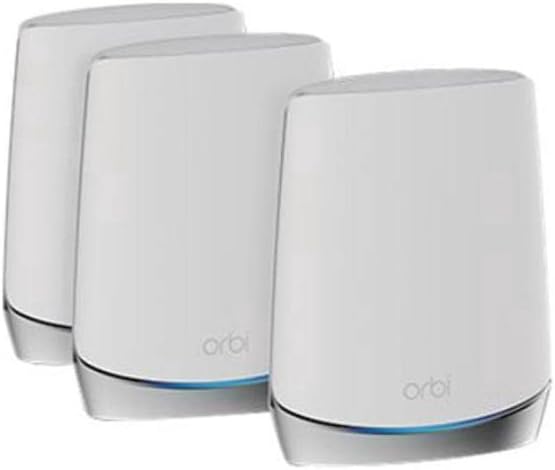
RBK753
Product ID: 320800273
Details
- BrandNETGEAR
- ColorWhite
- Compatible DevicesLaptop
- Connectivity TechnologyEthernet Wi-Fi
- Frequency Band ClassTri-Band
- Model NameRBK753-100NAS
⚡AX4200 WiFi 6 speed
📶7,500 sq.ft. coverage
🔒NETGEAR Armor security
Desertcart purchases this item on your behalf and handles shipping, customs, and support to SINGAPORE.
🚀 Elevate your WiFi game—because buffering is so last decade!
The NETGEAR Orbi RBK753 Tri-Band Mesh WiFi 6 System delivers expansive 7,500 sq.ft. coverage and supports over 40 devices simultaneously with AX4200 speeds up to 4.2Gbps. Featuring advanced security via NETGEAR Armor and multiple Gigabit Ethernet ports, it ensures seamless connectivity and protection for modern smart homes and professional environments.




| ASIN | B08Z3FGSDH |
| Antenna Location | Gaming, Home |
| Best Sellers Rank | #24,046 in Computers & Accessories ( See Top 100 in Computers & Accessories ) #371 in Whole Home & Mesh Wi-Fi Systems |
| Brand | NETGEAR |
| Built-In Media | Ethernet Cable, One (1) Orbi Router (RBR750), Quick Start Guide, Three (3) 12V/2.5A power adapters, Two (2) Orbi Satellites (RBS750) |
| Color | White |
| Compatible Devices | Laptop |
| Connectivity Protocol | Ethernet, Wi-Fi |
| Connectivity Range | 7500 Square Feet |
| Connectivity Technology | Ethernet, Wi-Fi |
| Control Method | App |
| Controller Type | Amazon Alexa, Google Assistant |
| Coverage | Up to 7,500 sq. ft. |
| Customer Reviews | 4.2 out of 5 stars 445 Reviews |
| Data Transfer Rate | 1 Gigabits Per Second |
| Frequency | 5 GHz |
| Frequency Band Class | Tri-Band |
| Has Internet Connectivity | Yes |
| Has Security Updates | Yes |
| Is Modem Compatible | Yes |
| Item Dimensions L x W x H | 7.2"L x 2.8"W x 9.1"H |
| Item Weight | 1.9 Pounds |
| LAN Port Bandwidth | 1000 Mbps |
| Manufacturer | Netgear |
| Maximum Upstream Data Transfer Rate | 2100 Megabits Per Second |
| Mfr Part Number | RBK753-100NAS |
| Model Name | RBK753-100NAS |
| Model Number | AX4200 |
| Number of Ports | 6 |
| Operating System | NETGEAR OS |
| Other Special Features of the Product | WPS |
| Security Protocol | WPA2, WPA3 |
| Smart Home Compatibility | Smart Home Compatible |
| Special Feature | WPS |
| UPC | 606449147766 |
| Unit Count | 3.0 Count |
| Warranty Description | 1 year warranty |
| Wi-Fi Generation | Wi-Fi 6 |
| Wireless Communication Standard | 802.11ax |
| Wireless Compability | 802.11ax |
R**S
Solved my buffering issues, super easy to set up
I got these on a Amazon 2nd chance deal due to a damaged box for less than half price. Unpacked them and threw the box away. These were brand new and undamaged. Setup was super easy, reused my old SSID and Pwd and everything adapted seamlessly. Fixed my buffering issue ( Dad is a very demanding streamer, retired with multiple TV's). We have multiple homes on the property and these are providing excellent coverage. They seem to be performing very good, my camera streams are nice and steady and dad had stopped calling and complaining about his shows getting that damned circle while he is watching them (that alone is worth the price!). Your results may vary.
S**T
Highly recommend for AT&T Fiber Users
I feel foolish for struggling with the absolutely terrible AT&T wifi router (BGW210) and 5 extenders in my roughly 4500 sqft 3 level house for the past 3 years. When the wifi worked (which was becoming increasingly less common) I got maximum of 250mbps downloads on the 1gbps fiber connection and very spotty coverage in many parts of the house. That was more than enough if not particularly satisfying. Well, this set up (ultimately the 3 unit version plus one more satellite for good measure) is now giving me >600mbps downloads OUTSIDE my house! While it wasn't the easiest to set up the satellites (each took several attempts) they have been working reliably for a week now with NO ISSUES (which could not be said for AT&T set up EVER). You do need to run the AT&T router in the IP Passthrough mode, but youtube video from "Miller Technical Services" on how to do that was perfect. It took 5 minutes and now I have real wifi. I highly recommend this set up for AT&T Fiber customers who are having problems with the terrible AT&T equipment.
R**T
Great Speed and Connectivity
Many of the products I have used are from Netgear. I used a Nighthawk router in one home that was great and I have used a Netgear Mesh system (1 satellite) in my current home. I decided to upgrade to a Netgear Orbi 750 Series Tri-Band WiFi 6 Mesh and I couldn't be happier. This system provides much better coverage (2 satellites) and faster speed than my previous system. As the number of devices in my home needing WiFi increased, I simply needed a better mesh system. I now have excellent download and upload speeds all through my home. It was simple to set up and I couldn't be happier with the results.
U**S
Glorified paperweight
I don't even know where to start on this review. I bought these three months ago to replace my 7 year old Google WiFi (1st generation). I spent a while researching different mesh systems, talking with friends, and reading input from the community. Ended up settling on this Orbi system. Walk through the various aspects of this mesh system: 1) Setup is reasonable easy. Thankfully seeing as how I have had to do it 4 times in 3 months. I will say, changing the network name is a bit of a hassle. You need to connect to the router WiFi network to set it up. If you change the name, the app will not automatically connect you to the new network, or be smart enough to adjust things automatically. You need to go into your settings, connect to the new network name, and then wait 5 min for the Orbi system to setup. 2) Performance wise, it is okay. Not great. Speeds are definitely higher than they were on my old system. I don't see a lot of dead zones in my house. My biggest issue here is that if the main router loses power, I need to do a factory reset and create the network again. That means going through the entire setup again for anything from a power surge, a power outage because of weather, or needing to manually turn the power off to the room because of electrical work. The routers restart, and only about half of my devices will reconnect. Even within similar apps (one Wyze camera will connect, one will not). I will restart the system, and then other devices will connect and be disconnected. It is absolutely ridiculous that I need to do a factory reset to get the network back working. 3) Customer support is an absolute joke. I forgot how bad it is. First off, everyone you speak too is borderline hard to understand. Guess the overseas connection isn't superb, go figure. Second, they give you 90 days support. So I spent hundreds of dollars on Netgear products, and after 3 months, they will not help unless I spend more money. Did not realize that before I bought the Orbi system otherwise I would. Have never considered them. Thirdly, the support they give is absolutely worthless. Two people I spoke to both told me to factory reset. And when I asked if I will have to do that everytime I lose power, I was told "No! Of course not!". What a joke. Avoid this at all costs. Might be good for some people, but not me. They have become glorified paperweights. Expensive paperweights at that. Should have just gone with the newer Google mesh. Least their customer support is good. And they stand by their products without asking more money for useless help.
B**T
Works Awesome
The setup was beyond easy. I work in tech and I found it so simple to setup. Just install the app on your phone and follow the easy step by step process. Had zero problems with the setup and just went seamless. I have always questioned internet speeds as my old router (an older Netgear) was showing 50 mbs on a speed test. Same modem, new Orbi, and now around 450 mbs. What a difference. TV streaming is better, no lag on conference calls, no dropping wireless. Well worth every dollar spent! And I was way out in the middle of my street the other day and still had full wireless signal. So happy I did this. Zero regrets.
F**Y
Easy to install, easy to modify settings
Start by downloading the Orbi app to your phone and things move swiftly and easily when installing the router unit. Place and plug in the satellites units and they connect automatically. We have a fast, strong signal on all three floors of our 3400 sq ft home. Update on the downsides: supports only two networks, one for you and another for guests. Then you’ll be nagged about subscribing to additional security for it. Maximum security should be an unquestionable given in my view.
M**0
Simply amazing!!
I’m not sure where to begin. Our old system had very limited range. Even with multiple satellites installed, it just wouldn’t handle our needs. We live in a 4 bedroom home. We bought this system at the suggestion of a tech who came out previously to TRY to improve our service with the old system. Since we got this, it has been a dramatic improvement. So easy to install. Everything is labeled perfectly and the app lets you know step by step how to install everything. The WiFi service had been drastically increased. I’m paying for 600 mbs thru our provider. We’re getting 600 mbs. Before I was lucky to get 15-30 mbs in any part of the house. Now, even the farthest parts get amazing service I’m actually considering increasing our data package simply because the new system could handle it so easily. The price is a bit much. But it’s well worth it to avoid the hassle and delays a lagging system causes. I just wish I would’ve done it so much sooner.
J**Y
**⭐️⭐️⭐️⭐️⭐️ Outstanding WiFi System for Large Spaces**
The NETGEAR Orbi Whole Home Tri-band Mesh WiFi 6 System (RBK753) is exceptional! With coverage up to 7,500 sq. ft. and support for 40+ devices, it provides a strong, reliable signal for our staff of 20. The AX4200 speed ensures fast internet throughout our office. The router and 2 satellite extenders were easy to set up and have greatly improved our connectivity. Highly recommend for any large space needing robust WiFi coverage!
A**S
Excelente!!
Mi casa es de tres niveles y con el sistema se nos acabo el problema de no tener señal. Toda la casa queda cubierta, se mantiene una velocidad estable y buena y acepta varios dispositivos conectados.
H**A
WiFi constantly disconnecting
This thing is a headache, I had it connected to my modem which was on bridge mode and used PPPoE with it to connect, it kept constantly disconnecting my clients at least 5 times a day so I had to return it
R**A
EXCELENTE !!
Funciona perfecto para una casa con muros gruesos y de unas 4 habitación s y sala amplia
J**E
Excelente producto, cumple lo que promete
Tenía problemas dentro de la casa para estar conectado al Wifi por distancia y por la construcción misma. Esta solución me ha resuelto el problema manteniendo un excelente rendimiento de conexión tanto para carga como descarga.
Trustpilot
1 month ago
1 month ago