

Buy anything from 5,000+ international stores. One checkout price. No surprise fees. Join 2M+ shoppers on Desertcart.
Desertcart purchases this item on your behalf and handles shipping, customs, and support to SINGAPORE.
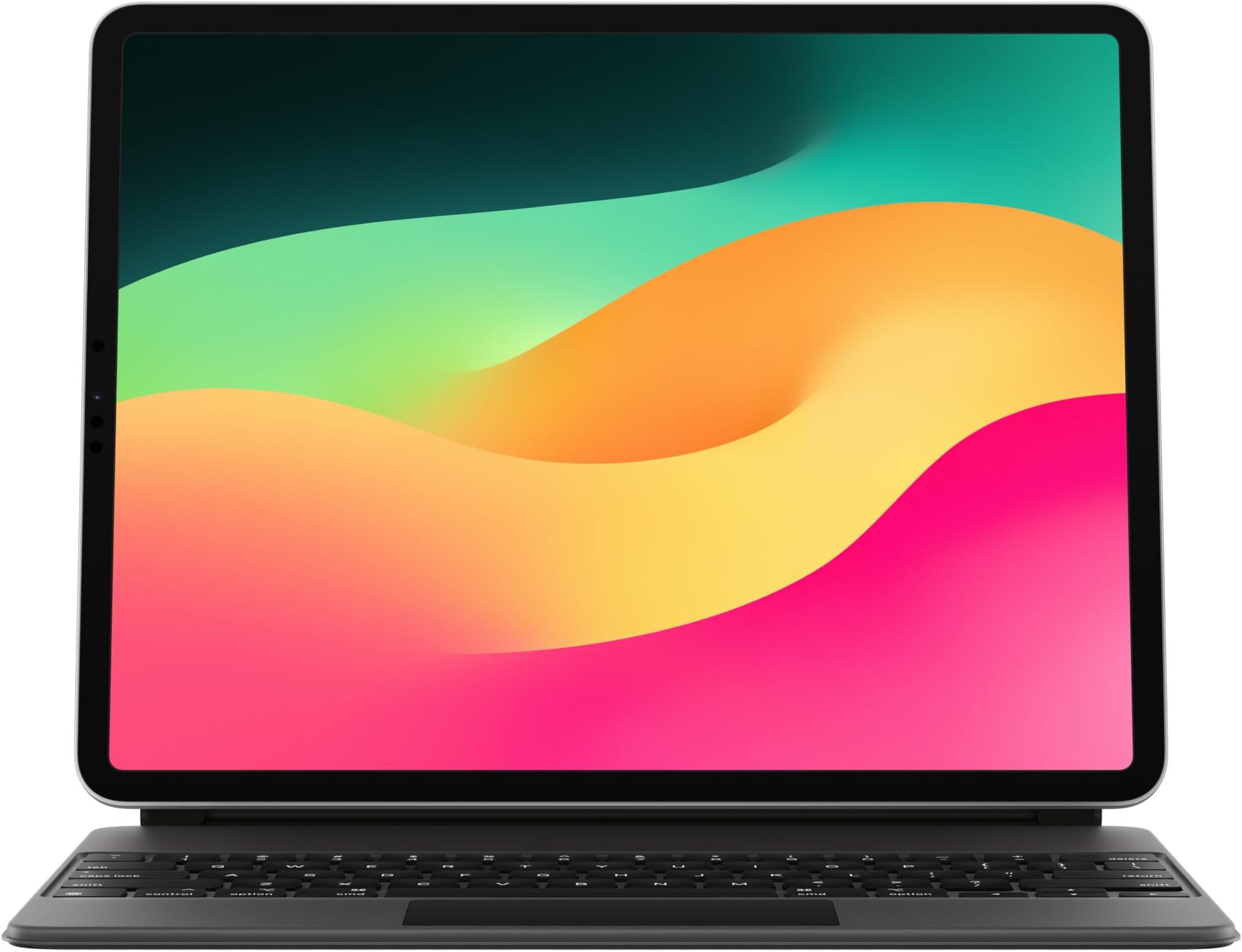
⌨️ Elevate your iPad game — type, track, and protect like a pro!
The Apple Magic Keyboard for iPad Pro 12.9-inch (3rd to 6th gen) and iPad Air (M2) combines a premium typing experience with a built-in Multi-Touch trackpad, backlit keys, and a USB-C pass-through charging port. Its floating cantilever design offers adjustable viewing angles, while the protective case guards your device front and back. Compatible with multiple keyboard languages and designed for seamless attachment without pairing or charging, it’s the ultimate productivity accessory for professionals on the go.
| ASIN | B09327XWMP |
| Date First Available | April 20, 2021 |
| Item Weight | 2.4 pounds |
| Item model number | MJQK3LL/A |
| Language | English |
| Manufacturer | Apple |
| Product Dimensions | 11.46 x 9.37 x 0.86 inches |
C**Y
Love it
I travel a lot for work, and use the iPad Pro as my entertainment on the plane or in the hotel, my presentation tool with clients, and for general computer tasks. But it was never quite ‘there’ for everything I needed. Sometimes I might want to do various tasks that still had me reaching for my MacBook Air or Mac Studio when I returned home. Eventually, however, I went on a minimalist spree of lightening the load for travel. So I took a punt on this ridiculously priced keyboard. While I am still in the honeymoon phase, and only on my first business trip, I am already completely converted. The keyboard itself is outstanding. Feels as good as a laptop. The lighting is smart, coming on at just the right moment when ambient light in the room would make seeing the keys a little tough. The touch pad is smaller than a laptop, but super functional, and integrated into the OS far better than I imagined it would be. So between that and the ability to touch the screen, it is an absolute winner. On the plane, and in the hotel, if I just want to watch a movie or TV show, I sometimes use a relatively cheap stand. But when I want to type something, I can just pop this onto the magnets and type away. A few years back, I had a different MacBook which developed a flaw and needed a repair. So I bought a keyboard for my iPad, and remember being very disappointed. There was lag, it was a very cheesy solution, and as soon as my Mac came back from repair, I returned the keyboard for a refund. Fast forward, and my M1 iPad Pro 12.9 flies with this keyboard. No lag, in fact it is as fast as my Air. The only real issues are the limitations of iPadOS, and various applications that either offer a cut down or no version for the iPad. However, I think for most users, it will be fine. Now, would I advocate having the iPad Pro and this keyboard instead of a laptop? No, absolutely not. But for travel, it does 95% of what I need it to very well. I find the iPad to be an extremely versatile product for business and fun. Thanks to this keyboard, I now have a travel solution that weighs considerably less than also carrying a laptop. I was originally going to go with black, but then Amazon offered me the instant gratification of next day delivery on the white one. I also heard from some reviewers that while it might be counter-intuitive, the white is easier to keep clean. The matte black is easier to get noticeable fingerprints on it. Unless something radically changes, I’m going to turn in my old MacBook Air for a trade in that I can put towards my next Apple purchase. Thanks expensive Apple keyboard!
W**S
Hard to find but worth it
This case was hard to find, but it ended up being perfect for my iPad. It has the premium fit and feel you would expect from Apple, and everything works exactly like it should. Great build quality, solid keyboard, and overall a really good match for the iPad Pro.
B**Y
I’m Happy!
Okay, so the first question that every one has when it comes to this case/keyboard, “is it worth the full price?” In short, I can’t say that it is, BUT, I can say that I have no regrets about purchasing it. Apple has superior quality, that’s why I stick with them so hard, but unfortunately that does come with a high sticker price. I also have a MacBook Air, so I didn’t NEED this keyboard, but it has brought even more enjoyment to my iPad Pro, so for me it is money well spent. Something I have noticed a lot of people saying is that they hate that the keyboard brightness cannot be adjusted, but it can, so I am not sure where they’re getting that information. Although there is currently not a shortcut to adjust the brightness, it can be dimmed and brightened through the keyboard settings. It is also very easy to clean, but I would advise not to use anything harsher than a damp cloth to do so. In the future, a top row of shortcut keys would be a great upgrade, but I also understand why they opted not to have them on this version, as they would be directly under the floating iPad and would be hard to reach. The alternative would be making the keyboard bigger, which would go against the portability and slim design. I’m interested to see where they improve it in the future though. Also, the keys are super easy to navigate, just like a regular laptop keyboard. The keys are very responsive and the trackpad, although smaller than normal, is still great and easy to use. The keyboard out of the box requires a full click on the trackpad to select, but if you go into trackpad settings, you can change the click to simply a tap, which is my preferred option. If you’re on the fence about this purchase, or trying to justify it to yourself, just go ahead and hop on board, you won’t be disappointed!
N**C
Has lasted over two years
I bought the keyboard in the fall of 2023 as a college student who weighed the cost vs necessity. Since graduating I still find the keyboard useful as it also works as a great case. While most people at the time were buying iPads for note taking I bought the iPad Pro to replace my MacBook that quit in the first week of a new semester. I’ve never had much connectivity issues and if I did I simply lifted my iPad from the magnetic portion of the case and placed it back on and it was fine. All the keys work and the backlighting works great. You can charge from the case as well which can be useful in certain areas. I do find the case to be a good protector for the iPad. In my opinion it has a sleek look and good keyboard size comparable to having an averaged sized laptop. Very minor peeling around the edges from constantly shoveling into a bookbag but otherwise I think it is was worth for me.
P**O
⭐️⭐️⭐️⭐️⭐️Premium Quality item as expected from apple⭐️⭐️⭐️⭐️⭐️
This is just what the pictures show, a keyboard that is perfectly compatible with the new 12.9 inch iPad Pro. While the price point is quite steep in comparison to the other tablet keyboards found on amazon, the authenticity, quality, and feel of an original apple product is unparalleled. As you have come to expect from apple the unboxing experience alone is second to none. This keyboard boasts a very rigid/durable build that resists scratches even in a use case like mine where I carry it in my backpack most of the day. It has a very tactile and pleasant feel similar to the one you get while using a MacBook. The touchpad as well is in a league of it's own its quite cool how apple can fit such a trackpad into such a small form factor, even though its area is quite small you feel in no way limited by it, it feels nice to the touch and is very responsive. This thing essentially transforms your iPad into a mini laptop I can honestly say it brings you as close to a full-fledged MacBook experience as possible, despite a few inevitable limitations that come with it being a tablet. If you are looking for a top of the line keyboard for your iPad go for this one. Don't be put off by its price point it is well worth it.
K**T
Premium, Productive, and Pricey
The Apple Magic Keyboard for iPad Pro 12.9-inch is one of those accessories that feels overpriced right up until you actually start using it. It’s expensive, no doubt, but it also changes the way the iPad feels day to day. Instead of feeling like a tablet with a keyboard attached, it makes the iPad Pro feel much closer to a compact laptop setup. The typing experience is easily the best part. The keys feel solid, responsive, and comfortable enough for long typing sessions. There’s very little flex, and the backlighting is a big plus if you work at night, on a plane, or in a dim room. The built-in trackpad is also surprisingly useful. It’s not as large as a MacBook trackpad, but it works smoothly with iPadOS gestures and makes editing documents, browsing, emailing, and multitasking feel much more natural. The magnetic attachment is excellent. The iPad snaps into place quickly, and the floating design looks clean and premium. Adjusting the viewing angle feels smooth, and the whole setup has that polished Apple feel. Another feature I really like is the USB-C pass-through charging port, which lets you charge the iPad through the keyboard while keeping the iPad’s own USB-C port free for another accessory. Apple lists this as one of the main features, along with the trackpad and front/back protection. That said, it’s not perfect. The biggest downside is the weight. Once attached, the iPad Pro becomes noticeably heavier, and it can feel closer to carrying a laptop than a tablet. It’s also not ideal for using the iPad in handheld mode because the keyboard does not fold fully behind the screen. When you want pure tablet use, you’ll probably end up removing the iPad from the keyboard. The white color looks beautiful, but it may require more care than the black version. It gives the setup a clean, modern look, but fingerprints, dust, and marks can stand out more easily over time. Also, for the price, it would have been nice to have a dedicated function row on this older 12.9-inch model. Some newer iPad keyboard designs include more laptop-like controls, so this version can feel slightly limited in that area. Pros Excellent typing feel Smooth, useful built-in trackpad Premium magnetic floating design Backlit keys are great in low light USB-C pass-through charging is convenient No pairing or separate charging needed Makes the iPad Pro much better for productivity Cons Very expensive Adds noticeable weight Doesn’t fold back for tablet mode White color may show dirt more easily Trackpad is smaller than a laptop’s Not a full laptop replacement for everyone Final Verdict The Apple Magic Keyboard for iPad Pro 12.9-inch is worth it if you use your iPad Pro for writing, email, schoolwork, business, travel, or light laptop-style work. It’s beautifully made, easy to use, and makes the iPad feel much more productive. But it’s not the best buy for someone who mostly watches videos, draws, reads, or uses the iPad casually. In that case, the price is hard to justify. For serious iPad users, though, this is probably one of the best accessories you can buy — just be ready for the added weight and premium price.
D**S
Perfect for Working
I absolutely love this keyboard case for my iPad. The keyboard feels smooth and comfortable, and it makes working, typing emails, and using my iPad so much easier. It also gives the iPad a very elegant look while protecting it at the same time. Definitely worth it!
L**B
If you THINK you need this, then buy it
I contemplated on whether or not I wanted to throw more money at Apple after buying the new iPad Pro 12.9”. I was on the boat of, “It would be really useful to have a keyboard attached to this, but would I frequently use it enough to warrant such purchase”. Before I bought this, I was using separate Logitech Bluetooth keyboard with a folio case. This was useful because I didn’t have a keyboard attached to get in the way when I used my iPad for media consumption, but if I needed to type some stuff, I could just go grab the keyboard. Of course, the main downside to this is that I have to go grab the keyboard. My main dilemma (other than price) in buying this was whether or not it justified replacing my MBP at my work desk (while I’m working). When I do any personal browsing or responding to personal emails, I use my MBP (I don’t do any personal tasks on my work laptop). Pros of replacing my MBP: > smaller footprint > battery lasts longer with same amount of screen time Cons: > less screen estate (I have MBP 16”) > no real multi-app (not referring to opening apps side by side, like on my MBP desktop I have several apps open that is spaced out to be a click away) After using the iPad Pro with this magic keyboard, I can confidently say the cons aren’t as big as I expected. I’m working with less screen space, but it’s not like you can actively work on more than one app at a time. While you can’t have actively open (in view) apps on the iPad (or any mobile OS), it’s not like taking the extra second to 3-finger swipe up to see all open apps and switching is that big of a deal. As a matter of fact, it becomes second nature just after a couple days of use. With all that said, let’s get to the product itself. Overall: The look and feel of this magic keyboard is amazing. It’s sturdy, feels nice in the hand, and stuff doesn’t like flap around like other keyboard cases do (even considering the surface lineups). I hate how when you grab the tablet to move somewhere, you either have to close the keyboard or it just hands down flapping. This magic keyboard essentially holds like a laptop. The mechanic that supports the back magnet (where iPad attaches) is stupid solid. You can grab and go to the next room like you would with any laptop. No need to close the keyboard or have it dangle as you move. Keyboard: Yes… this keyboard is super nice. Very comparable to the latest generation keyboard on MacBooks that replace those horrid scissor switch keys. My best feel keyboards rank as such: MacBooks, PixelBook Go, Magic Keyboard, and Samsung Galaxy Book Pro. The fact that it even ranks with other LAPTOPS is a feat itself. It’s clicky, but not too loud. Backlit keys are subtle and clean. The texture of the keys aren’t soft, fabric like, or mushy like other keyboard cases. This is the closest feeling to a laptop keyboard that you can get on a tablet keyboard case. It far surpasses the feeling of the keyboard on my MS Surface back when I had like the 2nd gen one. How about the cons? There are few notable ones that every other reviewers have said… > No function keys > No ESC key Look… it’s not like it was a mystery whether or not you’d get this on the keyboard. You know before you buy that it doesn’t have those. If I were to compare this to another keyboard, then yes it’s a con relative to what I compared it to. However, when rating the magic keyboard by itself, it’s not a con because it wasn’t there. Hopefully that makes sense. Like, I would LOVE for there to be function keys and I don’t see a reason why they didn’t add on (on the surface) based on the available space. The only key I absolutely miss is the ESC key. ESC key I definitely frequently use, whereas I hardly ever use function keys on any of my keyboard devices (laptop or desktop). That’s just personal usage, so mileage will vary. Even though I miss it, again.. I don’t consider this a con because I knew before buying. One thing you can do is actually re-map one of the keys on the bottom left (world symbol, control, option, cod, shift, caps lock) to be an ESC key. This is easily changed in settings. I use the world key as my escape key. I think this key by default is for language switching if you use more than one language keyboard set up. I don’t type in any other language, so that functionality is useless and therefore now it’s my ESC key. It takes a bit getting used to, using my pinky to go down left corner vs top left corner. This doesn’t make the iPad a replacement for my MBP. I’m not going to go sell my MBP because it’s been replaced on my work desk. However, everything I was doing on my MBP while working is easily doable on my iPad with this keyboard. It first started out having my iPad sit on top of my MBP (that way I can just move my iPad and flip open the MBP if there was something I couldn’t do on it) to my MBP now staying in my other room for my “music studio” set up. I air quote that because I’m an armature and I do it for fun. Before I would have to carry back and forth the MBP (including the charger), but that’s no more. I have had SOO much doubt about the usability of this keyboard. Never would I have thought it would replace my MBP (not as a laptop replacement, just in my office) in just couple days. It’s crazy how much I love this now and have ZERO regrets. There are some shortcuts you have to learn to do things that you wouldn’t need to on a laptop, so there are some learning curve. A couple of shortcuts that I found valuable (these are default, I haven’t look any further to see if they could be re-mapped): > “World icon” + C -> this opens up the control center that you’d normally get from swiping down on the right side of the iPad or if you hover your mouse pointer there. This is super useful for screen brightness and volume. Especially volume, because I got annoyed having to raise my hand off the keyboard to lower the volume by using the button or using the mouse to open it. Just use this shortcut, hover the mouse on the volume slider and you can use TWO-FINGER swipe UP/DOWN to change it, no need to click and slide. > CTRL + CMD + Q -> this puts the screen to sleep. I use this frequently when I turn play/change music and want to turn display off so it doesn’t waste battery. The last few things I want to mention that is important, if you’ve read this far down. While I gave this magic keyboard some high praises, I still don’t think it’s worth the price tag they are charging. The value is there, but I would argue most of the price comes from Apple still trying to get a return in investment from their R&D vs what it costs to make this. I played a bit risky by purchasing this from Amazon Warehouse. The condition was “Acceptable” and it dropped the price down $100 from MSRP. I took my chances and man I got lucky. This keyboard had a few scuffs, but it was nothing like I expected based on the description of “Acceptable”. I was able to wipe it all down completely, so now this magic keyboard looks brand new. Not only that, I had a good bit of gift card balance from over time that I used. At the end of the day, I paid just over $100 for this keyboard. I don’t count the gift card balance as part of the balance I paid because they were just accumulated over time from promotions or gifts. I would 100% value this keyboard at the price I would’ve paid at “Acceptable”. $250 is a solid price for it to be MSRP. Then, if it went on sale, it would be possible to get it at $200 or so. I would not have bought this keyboard at MSRP, that’s a fact regardless how much I love this thing. Something to keep in mind of charging the iPad through the keyboard. If you have the Apple 29W fast charger that Apple discontinued couple years ago, you will not get the best charging. I can’t recall 100%, but the 29W doesn’t have a certain piece of hardware that makes it compatible with the magic keyboard to get normal charge output. Basically, the 29W charger will only output 9W to the keyboard, whereas you get the full fast charging if you connect it directly to the iPad. Apple did release a 30W fast charger (after discontinuing the 29W) that does NOT suffer from the same issue. You still won’t get the max output as you would connecting it directly to the iPad, but the keyboard will recognize it as a higher watt charger and will charge iPad via keyboard at (I THINK) 27W. Google search “iPad Magic Keyboard 29W charger”, and it should be one of the first articles.
E**S
Doesn't fully fold.
This keyboard doesn't fully fold back. It's impractical if you want to keep using your iPad as a simple tablet.
T**M
Was soll ich sagen...
Verdammt teuer, aber halt Apple Qualität und Kompatibilität...
A**N
Expensive but worth every penny
I have been questioning whether or not to buy the Magic Keyboard for months due to the price. I bought a cheaper alternative and hated it, having to pair the Bluetooth every time and features that work on the Apple Magic Keyboard not available on the alternative one annoyed me and so i decided i would return it and got the official Apple Magic Keyboard for my iPad 12.9” on Black Friday and like all Apple product i have not been disappointed. Yes the Magic Keyboard is expensive but the quality is what you would expect from Apple, well made and it just works, no mucking about with Bluetooth and once you know how operate it with your iPad it will effectively turn it into a laptop. Best decision i ever made.
J**S
Transformez votre iPad Pro avec l’Apple Magic Keyboard : Frappe réactive et trackpad intuitif
L’Apple Magic Keyboard pour iPad Pro 12.9 pouces de 5e génération (Français - Blanc) est un accessoire exceptionnel qui rehausse considérablement votre expérience iPad. Son clavier rétroéclairé offre une expérience de frappe remarquable, avec des touches précises et un espacement optimal pour un confort optimal. Le trackpad intégré révolutionnaire facilite la navigation fluide et intuitive sur votre iPad Pro. Vous pouvez effectuer des gestes multitouch pour parcourir des documents, faire défiler des pages et accéder facilement aux fonctionnalités de vos applications préférées. La qualité de frappe est tout simplement incroyable, avec une réponse uniforme et agréable à chaque pression sur les touches. La coque en aluminium offre une protection solide pour votre iPad Pro, préservant son état et le protégeant des rayures et des chocs légers. L’Apple Magic Keyboard se connecte physiquement à votre iPad Pro à l’aide d’une connexion propriétaire, offrant ainsi une stabilité et une compatibilité optimales avec votre appareil. Son design blanc épuré complète parfaitement l’esthétique de l’iPad Pro, ajoutant une touche de sophistication à l’ensemble. En conclusion, l’Apple Magic Keyboard pour iPad Pro 12.9 pouces de 5e génération (Français - Blanc) est un accessoire exceptionnel pour les utilisateurs exigeants qui recherchent une expérience de frappe de qualité, une navigation fluide et une protection solide pour leur iPad Pro. Son design élégant et son intégration parfaite en font un choix idéal pour maximiser votre productivité et votre plaisir d’utilisation avec votre iPad Pro.
S**T
Perfekte Ergänzung für das iPad Pro - Das Apple Magic Keyboard
Als stolzer Besitzer eines iPad Pro war ich auf der Suche nach einer Tastatur, die sowohl einen hervorragenden Tippkomfort als auch eine nahtlose Integration mit meinem Gerät bietet. Das Apple Magic Keyboard erfüllt diese Anforderungen und noch mehr. Der erste Eindruck war beeindruckend. Das Magic Keyboard fühlt sich robust und hochwertig an, mit einer perfekten Passform für mein iPad Pro. Die magnetische Anbringung ist stabil und bietet einen sicheren Halt, während die Einstellbarkeit des Betrachtungswinkels eine bequeme Nutzung in verschiedenen Situationen ermöglicht. Die Tastatur selbst ist ein Genuss zum Tippen. Die Tasten haben einen angenehmen Tastenhub und einen präzisen Druckpunkt. Die Hintergrundbeleuchtung ist ein großes Plus, da sie das Tippen auch bei schlechten Lichtverhältnissen erleichtert. Ich habe das Gefühl, dass ich auf dem Magic Keyboard genauso produktiv sein kann wie auf einer herkömmlichen Laptop-Tastatur. Eine herausragende Funktion des Magic Keyboards ist das integrierte Trackpad. Es reagiert präzise auf meine Fingerbewegungen und ermöglicht eine intuitive Navigation auf dem Bildschirm. Das Trackpad unterstützt auch Multi-Touch-Gesten, was die Bedienung des iPads noch effizienter macht. Es ist unglaublich praktisch, das iPad Pro in einen Laptop-ähnlichen Arbeitsbereich zu verwandeln. Obwohl das Magic Keyboard mit einem höheren Preis verbunden ist, finde ich, dass es den Wert und die Funktionalität, die es bietet, rechtfertigt. Die Qualität, die nahtlose Integration und die verbesserte Produktivität machen es zu einer perfekten Ergänzung für das iPad Pro.
Trustpilot
2 months ago
1 day ago