Desertcart purchases this item on your behalf and handles shipping, customs, and support to SINGAPORE.
โจ๏ธ Light up your productivity โ never miss a keystroke again!
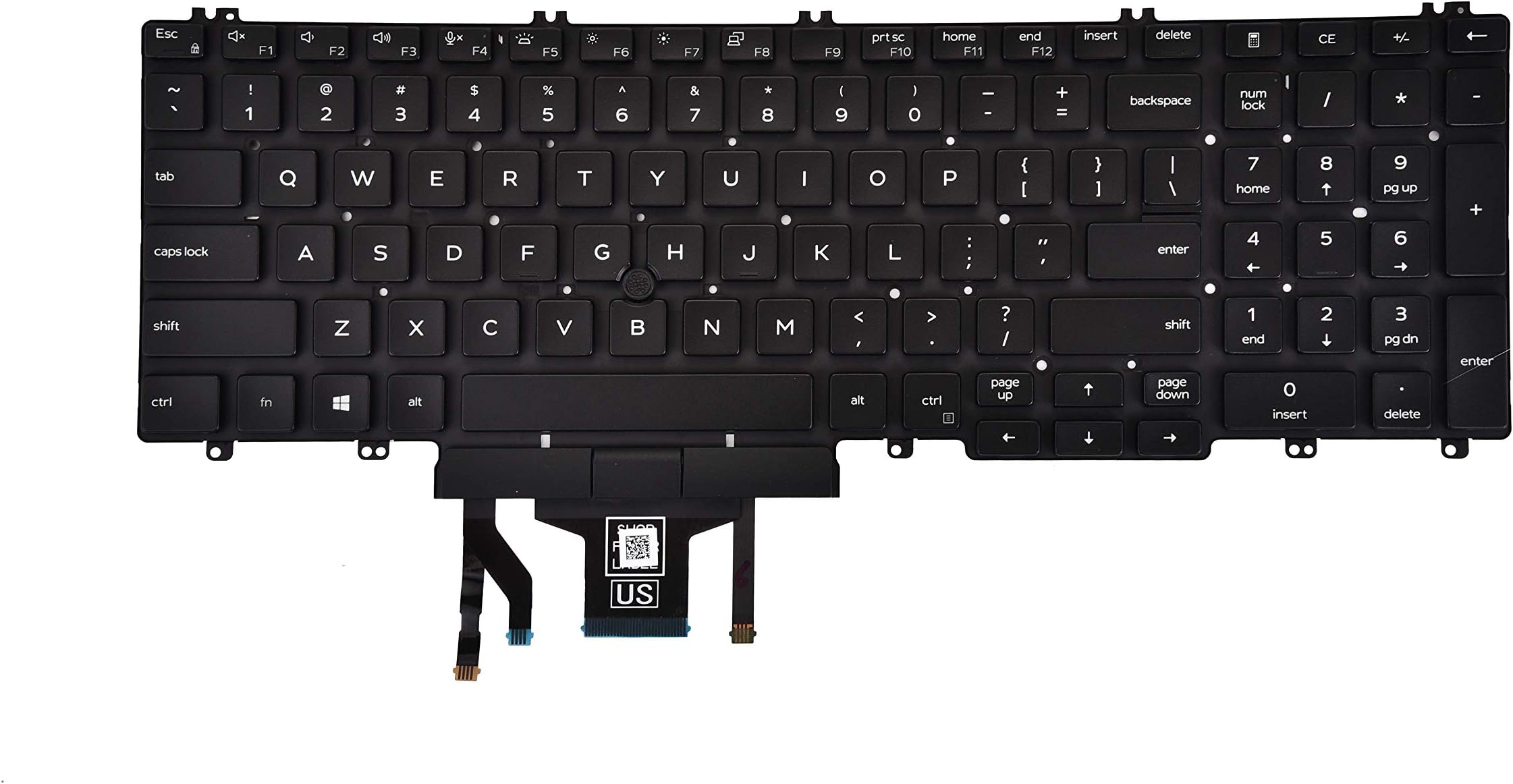
This replacement keyboard, compatible with Dell Latitude 5500/5511 and Precision 3540/3551 series laptops, features a durable UV-processed backlit US layout with 104 keys and an integrated pointer. USB-powered and rigorously tested, it offers a seamless, stylish upgrade for professionals seeking reliable performance in any lighting condition.


| ASIN | B08KZGX52D |
| Additional Features | Backlit |
| Antenna Location | Office |
| Best Sellers Rank | #223 in Laptop Computer Replacement Parts |
| Brand | KBRPARTS |
| Built-In Media | USB Cable |
| Button Quantity | 104 |
| Color | Black |
| Compatible Devices | Dell Latitude 5500 5501 5510 5511, Precision 3540 3541 3550 3551 Laptop |
| Connectivity Technology | USB |
| Customer Reviews | 4.2 out of 5 stars 35 Reviews |
| Enclosure Material | Acrylonitrile Butadiene Styrene |
| Hand Orientation | Ambidextrous |
| Keyboard Backlighting Color Support | Single Color |
| Keyboard Description | Backlit US layout keyboard with model number 0MMH7V NSK-EX0BC PK132FA1B00, designed for Dell Latitude 5500, 5501, 5510, 5511 and Precision 3540, 3541, 3550, 3551 laptops. Color: Black. Keyboard Description Backlit US layout keyboard with model number 0MMH7V NSK-EX0BC PK132FA1B00, designed for Dell Latitude 5500, 5501, 5510, 5511 and Precision 3540, 3541, 3550, 3551 laptops. Color: Black. See more |
| Keyboard Layout | QWERTY |
| Manufacturer | KBRPARTS |
| Mfr Part Number | 0MMH7V NSK-EX0BC PK132FA1B00 |
| Model Number | 0MMH7V NSK-EX0BC PK132FA1B00 |
| Number of Keys | 104 |
| Number of Sections | 2 |
| Power Source | USB Power |
| Recommended Uses For Product | Office |
| Special Feature | Backlit |
| Style Name | Contemporary |
| UPC | 715377880215 |
| Unit Count | 1.0 Count |
B**E
Can't go wrong!
Works better than the original! No regrets..
S**.
Perfect OEM repair part
Perfect OEM replacement. Maybe 1 hour to replace. I'm an IT pro, with hardware integration experience. I had a good work laptop keyboard that got gummed up, but didn't want to send it back to get an unknown replacement (backups, lose data, have to submit work requests to get prior-installed custom applications re-installed.....). I got this, replaced it myself, and was functional again. Caution: The replacement process only needs a screwdriver, but it is a VERY LONG process. There is a video online demonstrating - I never would have been able to complete this on my own without detailed instructions. This IS NOT a PLUG and PLAY replacement (old Dells had 4 screws on the front to replace the keyboard - the Latitude I have now had to be completely disassembled from the rear to access the keyboard - case, battery, disk, heatsink, wifi, NIC, touchpad, video, mainboard.... everything.... somewhere near 60 screws of 4 different sizes. If you don't have experience with this kind of disassembly/assembly, I would suggest finding someone more experience to do it.
G**G
Do not fit Latitude 5510
These do not fit Dell Latitude 5510... Lat 5510's do not have a mouse nub or the mouse buttons beneath the spacebar. I didn't even notice until I had the laptop back together...
M**B
Perfect fit.
I wore right through a key on my original keyboard. Too much down arrow during game play... This keyboard is a perfect fit and all of the keys work smoothly and are perfectly centered in the keyboard bezel - so no rubbing. I've been using it for about 5 months now and it still looks and works like new - even though I've continued to regularly play that game where I wore through my old keyboard. Installation in Latitude 5511 is not for the faint of heart. Lots of little screws to remove to gain access. Tedious but achievable.
T**N
Nice Keyboard but Difficult Install
The keyboard appears good quality, reasonably priced, fits well, and after install the pointer mouse and keys work great. The backlighting does not work but that could be a bad cable connection on my part. Not a big deal for me either way. What I want to point out is this is not a simple Do it Yourself job for the inexperienced. There are dozens and dozens of very small screws on this Dell 3541 that have to be taken out and put back in in the proper sequence. On most laptops only a few screws and the keyboard pops out the front. Not on this Dell. The keyboard has do come out the back after you pull out everything else. If you do this search for the video. You'll be glad you did. Again It can be done, but if you haven't built PC's or are very experienced get some help with this one.
N**N
Easy install!
Very easy replacement on a Latitude 551 , only took me about 20 minutes to remove the old, faulty keyboard using just a small screw driver.
J**0
Perfect Fit for Dell 5511
Nice item and fit perfectly on the Dell Latitude 5511, Which is not that easy of a job. There must be around 60 screws total to deal with. But again, the keyboard fit perfectly and works great.
J**E
happy customer
product delivered is product viewed. shipping was quick and on time. keyboard works like a dream
Trustpilot
3 weeks ago
2 weeks ago