🚀 Elevate Your Office Game with Epson's All-in-One Wonder!
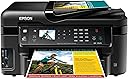
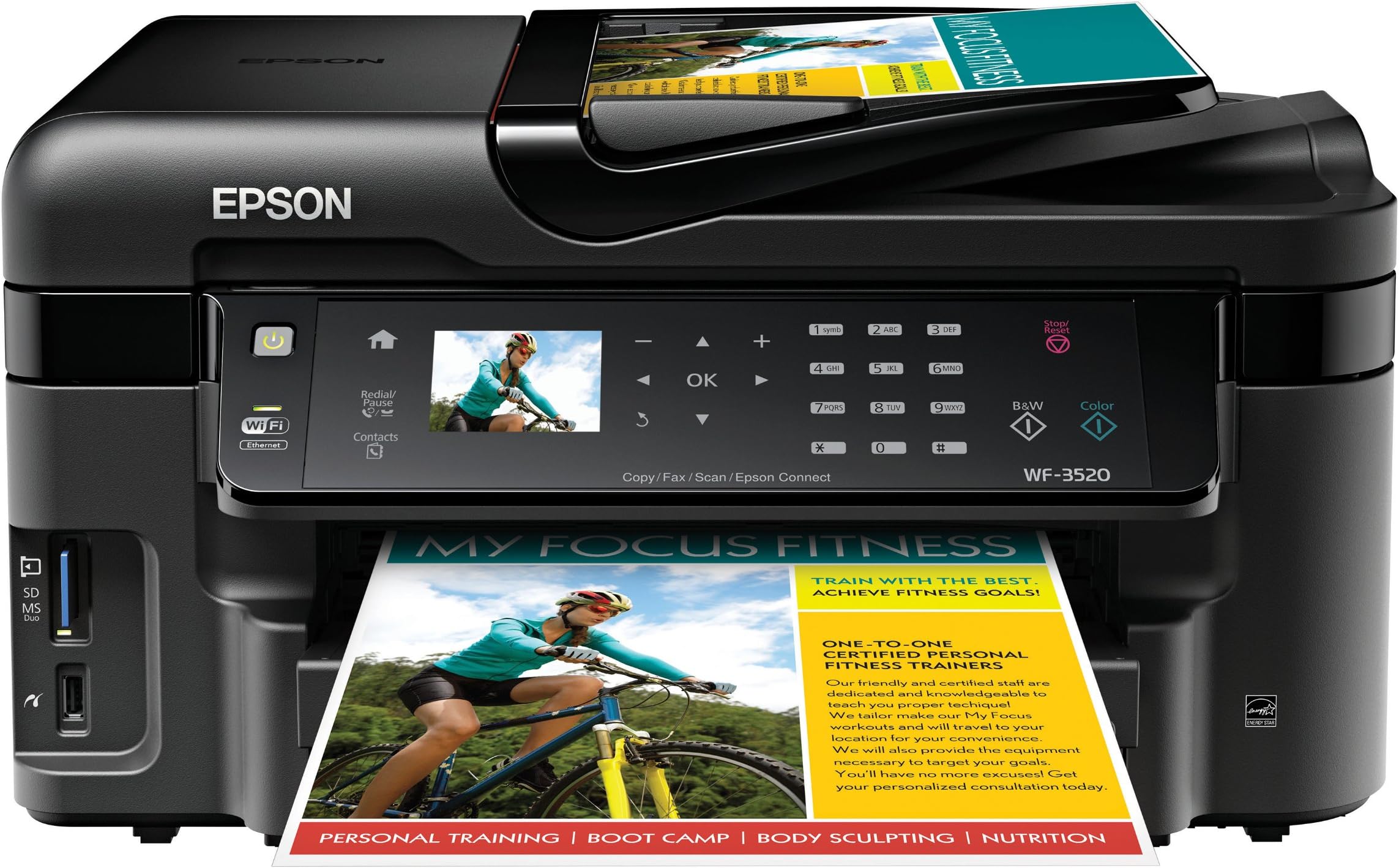
The Epson WorkForce WF-3520 is a versatile wireless all-in-one color inkjet printer that combines printing, copying, scanning, and faxing capabilities. With a 250-sheet capacity and the ability to print from mobile devices, it offers fast, efficient, and cost-effective solutions for any professional workspace.
| Additional Printer Functions | All In One |
| Asin | B0091UBCB6 |
| B W Pages Per Minute | 15 ppm |
| Best Sellers Rank | #1,549,977 in Office Products (See Top 100 in Office Products) #605 in Ink Tank Printers |
| Brand | Epson |
| Built In Media | Printer |
| Color | black |
| Color Pages Per Minute | 9.3 ppm |
| Compatible Devices | Laptops, PC, Smartphones |
| Control Method | Voice |
| Controller Type | Amazon Alexa, Vera |
| Customer Reviews | 4.0 4.0 out of 5 stars (1,659) 4.0 out of 5 stars |
| Display Type | LCD |
| Dual Sided Printing | Yes |
| Duplex | Yes |
| Global Trade Identification Number | 00010343889477 |
| Hardware Interface | Ethernet |
| Ink Color | black, cyan, magenta, yellow |
| Item Weight | 19.8 Pounds |
| Manufacturer | Epson |
| Maximum Copy Resolution Black And White | 5760 x 1440 dpi |
| Maximum Copy Resolution Color | 5760 x 1440 dpi |
| Maximum Copy Speed Black And White | 15 ppm |
| Maximum Media Size | 8.5 x 11 inch |
| Maximum Print Resolution Black And White | 5760 x 1440 dpi |
| Maximum Print Resolution Color | 5760 x 1440 |
| Maximum Sheet Capacity | 250 |
| Model Name | WF-3520 |
| Model Number | C11CC33201 |
| Model Series | WorkForce |
| Number Of Trays | 1 |
| Other Special Features Of The Product | Network-Ready |
| Output Sheet Capacity | 250 |
| Paper Size | 4 inch x 6 Inches, 8.5 inch x 11 Inches |
| Power Consumption | 17 Watts |
| Print Media | Card stock, Envelopes, Glossy photo paper, Labels |
| Printer Connectivity Type | Wireless;Mobile; Memory Card; USB |
| Printer Output Type | Color |
| Printer Type | Inkjet |
| Processor Count | 1 |
| Resolution | 5760 x 1440 |
| Scanner Type | Sheetfed |
| Specific Uses For Product | Office |
| Total Usb 2 0 Ports | 1 |
| Total Usb Ports | 1 |
| Unit Count | 1.0 Count |
| Upc | 010343889477 |
| Warranty Description | 1 year limited |
| Warranty Type | One-Year Quality Satisfaction Guarantee |
| Wattage | 17 watts |
User
Nice printer-good print quality-good price-Recommended
Never thought I would say this about an Epson printer due to all the duds I've had in the past but this is a very good printer. Fairly easy to set up and the wireless feature works great. I can send print jobs to the printer from my computers in different rooms all over the house. Print quality is excellent and the scan and copy features are easy to use. Especially like being able to save paper with two sided printing. Print speed is very good and the noise level is acceptable. The document feeder worked fine the few times I have used it. I don't print pictures often so I can't comment much on the picture printing quality however the pictures embedded in the documents I have printed are good. The problem I had with my previous Epson printers was that if you didn't use them for a few days the ink would dry up in the jet nozzles and you would have to repeatedly run the cleaning cycle to get them to work again. This uses up a tremendous amount of expensive ink. Epson sold their printers for next to nothing but they ripped you off something terrible on the ink cost. If I remember right they even had a lawsuit about underfilling the cartridges in order to sell more ink. I have not had any of those problems with my WF-3520. I've had it for about two years now and have never had to run the cleaning cycle. I'm also still on the first set of cartridges which is amazing because I'm sure by now I would have had to put in at least 3 or 4 cartridges of each color in my other Epsons. The Epson cartridges seem to be lasting almost as long as the cartridges in my old Canon i560 which is a big complement. The Epson picture print quality is not quite as good as the Canon but that was one of the best printers I've ever come across. Overall I'm very well satisfied with this printer and the price was very competitive.
User
Very Impressed :-)
The Epson WF-3520 is so nice! I work as a digital printer. This printer has a lot of the features that we look for in the much larger printers that we use at work such as 2 sided print, 2 sided scan and scan to a searchable pdf file. For a home or small business use it is a fantastic printer hands down. The scanner is awesome too. I never use the Fax because I don't have a home phone with a dile tone.I love the scanner. What I like to do is take all of my bills that I receive during the week and I scan them in and make them in to a pdf file. Then I email them to myself so I have them with me all the time. When I get paid witch is on my lunch hour while I am at work, I can sit down and pay some of my bills. Works out real nice for me and I don't have to carry a lot of paper bills and envelopes around with me. I just pull up my bill on my iPad, go to there web page on my iPads web browser and pay the bill. Once it is paid I file it away in my email.I have also been taking a hand full of my older photos that I have in an old shoe box and while sitting watching TV at night I have been scanning them and saving them digitally. As I'v been doing this I have been adding them to my iPhoto program and when I am done I am going to burn them to a DVD for safe keeping. I like doing this because a lot of my photos are starting to show signs of age and getting all scratched up. The quality of the scans are real nice.The printer is also awesome. A lot of the products I purchase now come with manuals in pdf format and sometimes I just want and/or need to have a printed copy. I print out the manual double sided and staple it by hand. Looks very nice and saves on paper by printing it double sided rather than single sided.There are some real nice features that this printer has that is real nice for me and would be awesome for students.I was looking at some of the extras in the printer that you don't need a computer to use. This is a few that I like.Most of the time I just print out stuff on Xerox paper but from time to time I need or would like to use lined paper such as you would fine in notebooks. I also like to sometimes use graph paper for different projects. With this printer you can just go in to the settings and print out as many pages of standard rule, college rule note paper or graph paper both single sided or double sided. Also you have a choice to print it in B&W or color. When it prints, it is the FULL width and length of the paper. When it is printed in color, it looks exactly like what you would get in a notebook you would purchase anywhere. You can also print out watermarks on the paper. I have not used that feature yet but I would imagine you can design your own watermark and use that too.It also does a real nice job at setting up a pdf to be printed. I had this one manual that I wanted to setup to be printed in landscape mode with 2 pages on each side that you can fold in half and make it in to a 8.5"x5.5" book. this pdf file had 34 pages in it. The printer set it up properly so that the numbers were in proper order and four pages of the pdf fit on to one full sheet of Xerox paper (Both sides). It also collates the book properly while printing. When I was done all I did was fold the book in half. Looks very professional :-)As far as the setup goes, it was very simple. Everything in my house is wireless now. I love having less wires around. Looks a lot more clean to me. I can print from my computer and I have printed to my printer from my iPad and iPhone with air-print with no problem at all. The initial setup was very easy and only took a few minutes. Now you are all set to go.One of the other features I love about this printer is the individual ink cartridges for each color. If you run out of one color, all you do is replace that color. Cheep and easy with no waste. I keep one of each color on hand just in case I need it. If I use one I order a high capacity color ink cartridge (127) from Amazon for around $20.00 or a standard capacity color ink cartridge (126) for about $15.00 and I am all set. Easy.All in all I love this Printer/Scanner and I think it is worth every penny!Happy New Year all :-)
User
Good feature set with only minor flaws
I'm very pleased with the EPSON WF-3520 for light use in my home office. In terms of speed, print quality, scanning capabilities, and connectivity options, it's superior to the HP PhotosmartPlus, which it replaced.PRINT QUALITY: Good, when printing on ink jet paper. Text is crisp. Photos embedded in docs are decent but a bit washed out. Very fast output. Duplex printing works great.SCANNING: Overall image quality is superior to my HP PhotosmartPlus. Also, the ADF is terrific. I had 15 pages double-sided, some with corners raised from a removed staple and heavily creased from folding. Nonetheless, the ADF scanned both sides with no problems. It's definitely best to use USB connection if scanning more than a couple of pages; WiFi takes a really long time. I found some of the "Scan to PC" options on the device menu confusing. It's simpler to use the "Epson Scan" software on my Mac when scanning to the computer.FORM FACTOR: Really appreciate the 250 page paper tray. With my HP, I was constantly filling the tiny paper bin. Build quality is decent and seems less flimsy than other inkjets I've had. My only gripe is that I wish the printer had a print output tray that didn't require you to manually extend a plastic flap (or leave it always open).ON-SCREEN MENU: Although full of features and easy to navigate, the menu system feels dated. For a mid-range inkjet released in late 2012, it's odd that it doesn't have a full touch screen interface. That said, it gets the job done, if inelegantly. Similarly, the "Epson Scan" software for the Mac looks like it got its last UI overhaul sometime in the mid-1990s.PHOTOS: I didn't buy it for this feature but have printed a few photos on it. Print quality on specialty paper is decent and a bit better than my HP but quickly decimates black ink supply. Unlike more photo-oriented printers, there isn't a separate photo black. Definitely not a good choice for more than occasional photo printing.CLOUD FEATURES: These are cool, but I'm not yet sure how useful they will prove to be. "Scan to Dropbox" was easy to set up and works as advertised. Connected to Google Cloud Print no problem. But I think the handiest cloud feature is "Epson Connect," which allows you to email your printer and it will wake up, print the email, and open and print any attachments. It will even alert you by email when the print job is complete. Helpfully, Epson allows you to customize the email address to something you can easily remember.Overall, I am very satisfied.
User
Great Printer
I love this printer. I bought it to replace a similar HP 4 in 1 printer that I only bought a few years ago, which was an absolute piece of junk. For those of you who remember the movie Office Space, the scene in the field summarizes my relationship with HP's lowcost printers. Cartridges would run out after 70 pages, the wifi never worked properly, documents constantly crashed, half my devices could not recognize the printer, etc. There were times it took me half a dozen attempts to print a 12 page document, and I would end up wasting half an hour. I cannot emphasize how much I hated printing and how much I despise the hewlett packard logo now.Espson's WF-3520 provided us with everything we wanted and for a similar price (which I emphasize to bash HP again). This printer delivers on everything it promises. ALL of my devices can print wirelessly without a problem. I was never able to print from my Ipad before, but this printer does so effortlessly. It never crashes mid print, even if I am walking around with my laptop from room to room. I can also scan wirelessly, which was impossible with our previous printer that was manufactured by the heart of darkness (HP).But, what I love most, is that the cartridges last a long time. What really irked me about the old printer is that, in an attempt to make cartridges cheaper, many printers (not just HP) produced 15 dollar cartridges that only lasted 70-80 pages. You quickly realize that this idea of a "cheap" cartridge was a massive ripoff, especially when they died on you mid print.I don't really know how many pages these cartridges print (which is a good thing), but I do know each cartridge lasts form many month, probably more than half a year. My partner and I are both educators, and we tend to print regularly. I definitely recommend getting the XL cartridge as it lasts 3 times as long.CONS: My only real issue is that the printer will not allow you to print once any of the cartridges (1 black and 3 color) runs out. Even if you don't need the magenta, it will not allow you print a black and white document. The machine will also not allow you to squeeze every last drop out of cartridge, as it uses its own detectors to tell you the ink has run out. And will not allow you to continue until you replace it. A mild annoyance for sure, but one I can definitely live with. Make sure to keep a back up handy.Combined, all the cartridges can seem expensive, but individually, they are reasonably priced. Especially the black cartridges, which again, last a really long time (if you get the XL). In my mind, this is a bargain for the price.
User
This is not your grandma's Epson
I am the grandma, and ever since I gave up my dot matrix, I have used nothing but Epsons at home. I even gave away the Lexmarks I got for free with computer purchases. I loved my CX6600 and would still be using it if the ink hadn't irreparably clogged the jets.Unfortunately, this machine does not come up to the standards Epson used to have, and customer service is horrible. The housing is much cheaper than my old printer, and the display is confusing. Epson tried to pack all the bells and whistles an office business needs into what is essentially a home machine. I suppose having a fax is nice, but if I use it more than twice in the next five years, I'll be surprised.So here's how it performs on the tasks I bought it for:+Set up from CD takes 4 hours. Yes, FOUR hours.+Two-sided printing works well.+Printing for documents is very fast.+Network printing seems to work well, though we don't use it much.+The manual paper feeder is NOT a bypass. If you want to use it, you have to choose it from the printer menu, and you can only feed one sheet at a time. I had hoped to use this feeder for paper printed on one side that I'm reusing for throwaway projects, but it won't work that way.+USB connection does not work on older computers, even if they are running the recommended OS.+Set up (after four hours) isn't complete or has some bugs. From here on, some of the details may be a bit sketchy, because I had to do SO MUCH to get this printer working I forget some of the details. In short, it wouldn't print or scan, so after hours of searching for a solution, I had to download the drivers from the Epson site. This seemed to fix the printing for a while. When it quit printing, I tried switching the USB ports, and it helped. Scanning was still a no-go.+After all my research and fixes failed, I called Epson support. First call was 38 minutes. Tech was obviously reading from a cheat sheet, step by step. I did everything she said, nothing worked. I don't think she knew anything about computers, because when she told me to reboot, she didn't understand why it took so long, and she didn't know what "hardwire" meant. She kept telling me to go into this or that file, but they are named differently on Win7 than what she was telling me. She wanted me to download the drivers again, even though I told that I already had, so I did. She told me to switch the USB ports, so I told her I already had, but I did it anyway. When that didn't work, she wanted me to do it again. I flat-out refused, because I have to crawl under my desk with a flashlight and I had done that all ready. She really wanted to get off the phone, so I finally let her go.+Second call took 65 minutes. The guy told me to do different things, but it still didn't work. He kept putting me on hold. I finally asked to speak to a supervisor because I wanted a replacement. He finally, grudgingly, transferred me. She gave me a hard time, and the only replacement Epson will send is a refurbished one.+I found that by plugging the USB into the port on my mechanical keyboard, the scanner would work. This is not satisfactory, because that means a cord going across my desk, and it ties up the port that I usually use for my camera and phone.+My son troubleshot the printer--several hours of his time--and went through all kinds of problems. Finally, he decided to do away with the USB and just have it print over the network, but he couldn't do that since it wasn't set up that way. He had to reload the CD--another 4 hours--and finally got both printing and scanning working over the network, no USB connection (because it can't do both).+Tech support is a 562 number, no toll-free option.Now a word about tech support from India: I really don't care where my techie lives, if I can understand him/her and he/she knows what he/she is doing. But when the people are unknowledgeable AND hard to understand, it's really shoddy of a company to use them.This review is making good on my promise to the supervisor that I would write a 1-star review on Amazon and never buy an Epson again.
User
The best printer in its class period!
A very nice printer full of useful features. The best feature I truly love is the ability to scan directly to email. And also print directly from email. Wow! That’s truly chic! And not to mention AirPrint.Before buying this printer I got tempted into buying HP Pro-8600 at my BJs. Then back home I researched this HP printer and found that HP guys actually embed expiry date into cartridges digitally! So in effect what these guys (HP) mean is first you spend money on buying very very expensive cartridges then you better use it or else! (Although you CAN override the expiry; but it’ll keep nagging you to spend money). Really! I know this review is about the Epson printer but I’m just comparing it to HP printer. So as to review something you DO compare it against competitors. Especially when they are there to get you money!More about this Epson printer. So this is a cloud enabled printer. You have an iPhone app also (and probably Android; I use iPhone). So to print when you are not at home; so can simply email the doc/pic to the printer (printer has its own email) or using the app you can select content from iPhone or from online storage (such as Google drive, dropbox etc.). At home you can directly print using AirPrint from your iOS device. Or you can also print using your laptop/computer the way it used to work in the good old days! Not to mention the printer connects to you WiFi network seamlessly. The user interface (on the printer panel) is very simple and intuitive. Though the printer display is not a touch screen but you select/scrolls options using touch sensitive buttons. This is probably to save cost but you’ll hardly use the panel as most of the things can be done remotely. Also the printer footprint is small as compared to other printers in its category. Another feature I truly love is the ability to print double sided without manually flipping the paper. It also scans double sided!A small thing I noticed – the color quality is just ok. Not photo quality but adequate for other tasks.One more thing I would like to point about the printer cartridges – these cartridges do not have printer head embedded into the cartridges due to which the cartridges are less expensive. Though in other reviews the printer nozzle does gets clogged. But let’s see how it works. The total cost of ownership seems to be very low as compared to other brand name legacy printers.All in all a great printer.
User
My New Friend
I have used many brands of printers and many sizes, from home economy size to office industrial size printers. I did much research before purchasing a quality printer for myself. Of all of the printers I have used at work, I was most impressed with the Epson I had for doing billing and statements. So, after researching I decided to go for the Epson. I highly recommend the Epson WF-3520. It was a dream to set up. It walked me through the whole process. The wireless connected easily with the use of the set-up wizard. It found my signal right away. The test print I did was so crisp, and I had poor quality paper. I was very impressed with the photo quality picture I printed out next. The ink is quality and the print has almost laser quality crispness. I have used it with iWork on my MacBook Pro using the new Mavericks OS X without a hitch. A dream for a home office or small office. The ink replacement is very reasonable, and many people have had luck with the generic replacements. However, if you wanted to stick with the Epson brand ink, the fact there are 4 cartridges means you won't have much out of pocket expense at one time. You only need to replace the cartridge that is low at the time. I replaced my economy Canon printer happily, and received HP quality for less price. You won't be disappointed. I also purchased the inexpensive extended warranty with Amazon for peace of mind.Update: I just used my printer to print several professional quality photos for the holidays, and have been using it extensively for professional quality desktop publishing. I am very pleased with my purchase, and have no regrets! The photos came out wonderful! You cannot tell the difference between ones done in a studio and the ones I printed. I used high quality HP Ink Jet Photo paper. The ink lasts quite a while, but it really depends on how much you use your printer. I have only had to replace mine once since since I purchased last year. It uses the generic ink cartridges just fine. I had a small issue with recognition on one ink cartridge, but it eventually recognized it after reinstalling it.
User
WF-5320 Looks to be yadda,yadda - UPDATE 2 DEC 18/6 Mar 19: GREAT! UPDATE - F'ing lousy!
UPDATE - Worthles POS! GD Epson is crippling with prohibiting with S/W not allowing 3rd party ink! LAST EPSON PRODUCT I WILL EVER BUY. Today, tried to print a fancy envelope for wife's anniversary card and d*amned printer got black ink allover the graphic. S*it! Old review: I had an NX-625 purchased in 2010 (at a very low price (at the time the depot for offices was much cheaper than the river in South America for this item) - and only a bit under Amazon's price for this WF-3520). The NX-625 wasn't the fastest, but it soon became my favorite over my past (many) printers. Price for ink was very inexpensive, once I found good 3rd party sources (best was sw&ftinkdotcom). Never a problem with cartridges, never ever a problem with paper feed (generally on-sale 22# or 24# paper used)...so this isn't supposed to be about the NX-625. The reason I got this WF-3520 - which I recently found looking to see if perhaps my NX-626 had a worthy successor - was that just last week I returned home to find that a 'weather event' had cooked (!) both my NX-625 as well as my (dedicated snapshot photo) Selphy printer. Both were not on, and the power button wouldn't turn them on. Schade! So I ordered the WF-3520, and installed it a few days ago...got my wife's laptop (and my laptop) configured for it and on the network...IT IS MUCH faster than the NX-625, which is great(!), and it can use all the stock of 127 ink cartridges which I have on hand, which makes me even happier!! The Epson Workforce line looks to be a step up from the Stylus line (the NX-625), it has paper feed for scanning and printing, which is welcomed. I greatly appreciate being able to stuff an envelope in the rear feed, instead of removing and resizing the single paper feed tray of the NX-625. I look for it to be a good successor to my former Epson printer. Good buy for 120 bucks; and, of course, quick Amazon service. UPDATE, FWIW: Several years down the line, a GREAT cheap printer. LOVE IT! Sw$ftinkdotcom has pretty cheap generic ink...little problem there (THANKS! Quick service for replenishment and never an issue with the generic ink.) I fear, when this printer eventually gives up the ghost, I hope I am either out of ink...or find a replacement that takes the same E-127 ink. Hopefully that's a ways away. Again, I am VERY HAPPY with this inkjet printer. Update in early 2019: Still a GREAT printer. I was looking for what I'd do if I had to replace it and found the 702 ink is a problem ($$$s) and doesn't always work if you buy generic. Easy to scan to PDF on my PC...good, very good printer! UPDATE _ DO NOT BUY EPSON. EVER!
Trustpilot
1 month ago
3 weeks ago