


🎬 Unlock your media universe with speed and style!
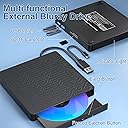
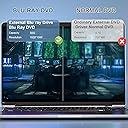
The Wintale 5-in-1 External Blu-ray Drive is a slim, high-speed optical drive featuring up to 6x Blu-ray read speeds, dual USB 3.0 and Type-C connectivity, and multifunctional ports including SD/TF card readers and USB hubs. Compatible with Windows and Mac OS, it supports 3D playback and DVD/CD burning, delivering a versatile, plug-and-play solution for professionals seeking seamless media access and data transfer on any modern laptop or PC.




| ASIN | B085HNNPG6 |
| Are Batteries Included | No |
| Brand | wintale |
| Customer Reviews | 3.7 3.7 out of 5 stars (319) |
| Date First Available | 22 March 2020 |
| Form Factor | Slim |
| Hardware Platform | Laptop, PC |
| Item Weight | 399 g |
| Item model number | 612068425017 |
| Manufacturer | wintale |
| Operating System | Windows 10, Windows 2000, Windows 7, Windows 8, Windows Me, Windows XP, macOS 10.14 Mojave |
| Product Dimensions | 14.1 x 14.6 x 1.8 cm; 399 g |
F**R
I use this drive with my computer to watch my old DVDs and BluRays. It’s compact and sits nicely upon my tower. Note: You will need to download software, PowerDVD, to use the player. Also, when my drive stopped working (I suspect it was a problem with the USB cord), the company worked with me to troubleshoot the issue, then sent me a free replacement because I was still within the independent 2 year warranty period. The issue was taken care of within a week. Thank you very much.
D**T
aucun lecteur dans mon ordi et pas d'espace pour en mettre un
R**.
For the money (inexpensive) this "wintale External Bluray DVD Drive, Portable Blu-ray External DVD..." plays well and delivers a good clear picture. However, (1) it is somewhat delicate, so handle it gently, and (2) while it is "plug and play" from a Windows driver perspective, it is unlikely to play many of your Blu-ray (BD) discs until you download (a) a Blu-ray/DVD software player, and (2) various Windows (I'm using Win 11 Pro) .DLL files, and get them installed in the proper directories on your PC or laptop. Even then, there will be Blu-rays and even some hard-protected DVDs that aren't going to play on this device (but from what I've read, it seems you'll encounter this problem with most any external computer BD/DVD player you buy). I found that by using (after installing and setting them up) 3 FULLY-FREE (not trial period, no watermarks, etc) software players (VLC, MPC-HC, and Leawo, all 64bit versions), and using 5 Blu-ray disks and 2 known hard-lock DVDs for testing, neither of the hard lock DVDs played to the end of movie, but I was able to get 4 of the 5 Blu-ray disks to play on either 1, 2, or all 3 of the 3 software players I installed. The other one, I couldn't get it to start at all (I know the disc works, because the box-type BD/DVD player connected to my TV will play this disc). Another note: If you want to be able to use the menu (Play/Chapters/Scenes/Extras, etc.) on your Blu-ray or DVD disks, you'll need to have Java Runtime Environment (JRE) on your computer. Sometimes not being able to use a menu will be problematic, so as a last resort I offer this: using VLC player, specify "Open Disc", click the round radio button for Blu-ray, mark (select) the check-box for "No Disc menus", then select the appropriate "Disc Device" (i.e., your optical BD/DVD drive) holding the disc you want to play, then click the "Play" button. Disclaimers: (1) I am no super techno-wizard, but I am not techno-illiterate either, and it still took some time to figure out how to get this (hardware and software) all to work for me. Unless you are a techno-wiz, expect to put some time into getting this set-up. Maybe you'll do I better, and quicker, job than I've done! (2) I bought this primarily to watch Blu-ray disc movies. I have not tried playing any home-made discs, nor have I tried burning any discs with the drive. Lastly, I don't know about the longevity of this device as I've only had it for a couple of days, but when it plays, the picture quality is good.
T**0
So out of the box it will can work but limited. You must own software to play bluerays ($80 investment). Must replace the cables. I replaced them with micro usb- usb for charging, an absolute must it is super power hungry and needs its own power brick this will reduce the artifacting when playing bluerays. I also replaced the split cabe to usb c for data. Unfortunately this port isnt fast enough to play bluerays flawlessly. With my set up i still get artifacting during cut scenes and action scenes. I will work on a usb c hub but only if using a usb c cable data from the player
M**E
Don't even try this product. It not only did not work on my computer, but also destroyed a 70 dollars movie. This product has no name and is one of the worst I have ever seen in my life time. If it was possible to give no star, I would without any hesitation give no star. It is not worth to spend a penny for this product. I returned it within just few hours.
Trustpilot
3 days ago
1 week ago