Desertcart purchases this item on your behalf and handles shipping, customs, and support to SINGAPORE.
๐ฎ Elevate your desk game with style, silence, and spill-proof confidence!
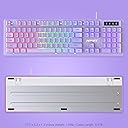
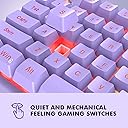
The NPET K10 Wired Gaming Keyboard combines vibrant RGB backlighting with a durable spill-resistant design and whisper-quiet membrane keys. Featuring dedicated multimedia keys and ergonomic stability, itโs a budget-friendly powerhouse compatible across Windows, macOS, and Linuxโideal for gamers and professionals seeking reliable performance and sleek aesthetics.


| ASIN | B01ALLT2W4 |
| Additional Features | Backlit, Spillproof, Ergonomic, Water Resistant, Fade Resistant, Doubleshot ABS Keycaps |
| Antenna Location | Gaming, Multimedia, Office |
| Best Sellers Rank | #10,328 in Video Games ( See Top 100 in Video Games ) #777 in PC Gaming Keyboards |
| Brand | NPET |
| Built-In Media | Keycap Puller |
| Button Quantity | 104 |
| Color | Black |
| Compatible Devices | Compatible with Windows 95/98/XP/2000/ME/VISTA/7/8/10 and Mac OS |
| Compatible Operating System Family | Linux, Windows |
| Connectivity Technology | USB |
| Customer Reviews | 4.5 out of 5 stars 18,312 Reviews |
| Enclosure Material | Acrylonitrile Butadiene Styrene, Metal, Plastic |
| Generation | 1 |
| Hand Orientation | Ambidextrous |
| Item Dimensions L x W x H | 17.32"L x 5.51"W x 0.98"H |
| Item Weight | 2 pounds |
| Keyboard Backlighting Color Support | RGB |
| Keyboard Description | Gaming, Mechanical, Ergonomic |
| Keyboard Layout | QWERTY |
| Manufacturer | NPET |
| Mechanical Keyboard Switch Model | Brown |
| Mfr Part Number | FBA_HY-ECCAK |
| Minimum Required Operating System Version | Windows 95 |
| Model Name | FBA_HY-ECCAK |
| Model Number | FBA_HY-ECCAK |
| Number of Items | 1 |
| Number of Keys | 104 |
| Number of Packs | 1 |
| Number of Sections | 5 |
| Power Source | USB |
| Recommended Uses For Product | Gaming, Multimedia, Office |
| Special Feature | Backlit, Spillproof, Ergonomic, Water Resistant, Fade Resistant, Doubleshot ABS Keycaps |
| Switch Type | Membrane |
| Unit Count | 1 Count |
| Water Resistance Level | Waterproof |
W**.
Good keyboard at an amazing price
I'm just your regular type of guy. I surf the web, play some games, and occasionally write a review. During a moment of game induced rage, I slammed my hand into my old keyboard and snapped the space bar in half. It still worked, but it wasn't reliable and I could see more rage coming if I wasn't able to use my space bar properly. That is when my search for a keyboard began. I found this bad boy for under 20 bucks and thought it would be ok... you know, do the job. Well, it does. It even has features I don't care about. Like LED lights under the keys. It has 3 different color schemes + 1 more to turn them off. They are also dimmable with 3 different levels of brightness. The keys feel nice under my fingers. They aren't clicky loud like the keyboard my kid uses. So far i'm happy with my purchase. For the price, I feel it would be hard to beat it. UPDATE: So, as of November 2022 (so about 3.5 years of use) this keyboard is still going strong. I have successfully worn off the letters from the S and D keys, with the A and C keys barely still displaying the letter. The cat knocked the keyboard off my desk and the space bar flew off. After a bit of trying I was able to get it back on and it works fine again. I feel like at this price point, this is an absolute bargain gem. Final update: I have now started experiencing some functional issues. The usb plug needs to be held in a certain way when plugged in to work. I have decided to retire this budget winner. I got 3.5 years of heavy use out of this inexpensive keyboard. I'm not mad that it broke, just sad. RIP budget goat.
S**N
Spill Resistant!
I've wasted so much money on expensive keyboards just to accidentally spill a drink on them and ruin them. As a gamer/streamer, I sometimes get caught up in the moment and lose track of my drink and/or hands and the next thing you know, your keyboard is soaked. With this keyboard, it's not an issue. I have actually spilled multiple sticky sugary drinks on it and it keeps pluggin' away. I have not gone so far as to intentionally spill large amounts of liquid or submerge it to test it. My experience is based on actually accidentally knocking over a drink and spilling a small-ish amount of liquid. The feel of the keyboard is good. It's much quieter then a mechanical keyboard, but louder then a membrane one. The keys have a nice click with decent finger feedback. I'm a gamer, but not a professional by any means, so I don't need a super expensive keyboard with Cherry Switches, etc. This style works great for me. The only downside is that in the time I have had this keyboard, the paint on the S, A and D keys have worn off and the Left Shift, Space Bar, C and W keys are wearing off too. But the function is still 100%! The RGB is limited to Four modes, 3 different sets of static rainbow colors and off. Overall, a solid keyboard at a great price. I liked it so much I bought a second one for my second computer. Highly recommend!
J**G
Cheap, but good
My original review didn't do this key oard justice. This was the first gaming, mechanical, keyboard I ver bought. I originally went for it because of the price and the fact the lights looked cool. I'm glad I bought it. There are only three selections with the lights and it gets boring, but what I paid attention to most was the feel of the keyboard. I originally bought it for my desk at work and sometimes took it home for gaming. It was responsive enough for gaming, but when it came to work this thing increased my typing speed. It's comfortable for my fingers to move nimbly over the keys and with the design I've never had the issue of my fingers pressing two keys at once. The key that I press would be the key I wanted. It helped greatly with wrist pains as well. The old dell keyboard I was using made my hands tired over time, but I could comfortablely use this keyboard for long periods with no issues. The noise to me isn't so bad though my coworkers could tell I was in when by my typing, lol. Over time the black paint comes off but not in a drastic way and it's a sturdy keyboard that doesn't feel cheap. I gave it to my sibling since they were having pain in their hands and even though it's a hand me down my sibling loves it. They said they felt relief. Would recommend to buy and would have zero issue buying another.
M**Z
For a budget price a good keyboard that both a general purpose or office and gamers should like.
NPET K10 Backlit Gaming Keyboard, Black, Purchased 10/22, Reviewed 10/22/2022 I purchased the K10 budget membrane faux mechanical keyboard. I was searching for a backup budget keyboard because my main PC keyboard gave up the ghost after 7 years. I needed a backup so I could continue working from home, while I waited for the new replacement keyboard to arrive next week. 1st impression: when I grabbed the Amazon package at my front door, I thought, "Wow, this is a heavy keyboard." Opening the package, I was impressed with its mechanical keyboard look, and it looked like a quality keyboard but at a budget price of $20. Of course, as soon as I set the K10 on the desk, I started testing the keypress feedback, noise, and how typing felt. Key travel felt a tiny bit stiff but still good for this price point. Any keying noise was surprisingly low. Plugging in the K10's braided USB cable, the first con is revealed: the cable is too short at 67" long, another 6 to 12 inches would be better. The board's RGB lights lit up, and my Windows 10 Pro PC had no issues with the new K10. The next thing I noticed, which is not necessarily a negative, is that the keys are smaller than typical full-sized keyboard keys. [Update "edit" 4/12/23: I later compared my full size keyboard and the new replacement keyboard I had ordered, and the keypad surface area is the same. (What was different was the K10's top surface has a slightly deeper concave indentation, so the feel is slightly different.)] I am a touch typist capable of 60+wpm so the size of the keypad felt a little off; however, with use, it would feel fine. With nearly 40 years of using and owning many computers and their keyboards, touch typing resulted in some initial missed direct keypad hits, but adjusting was easy. One additional observation: right after startup, a distinct odor was coming from the board, sort of an electrical and plastic overheating smell (note, I had the RGB lights off). After about 20 minutes, it faded, and I haven't noticed it since. [edit 4/12/23 I have been using nearly 5 months most days on my Hosting Music pc and no issues at all.] What does a touch typist think of the key typing on the K10? โข Sore fingers. My fingers were tired after 1 hour, and after 2 hours, they were sore. The problem is how I type, pushing down slightly harder than the average typist, who maybe learned to type on a mushy membrane keyboard. I learned on IBM Selectrics, which required a slightly heavier key press. The keystroke travel is higher or longer on the floating keys of the K10 than on most keyboards at 3.6mm, so I have to push further down for it to bottom out the key travel, and if I am typing hard and fast, my fingers are sore. I tested where the action point in the key travel seemed to be; it's either halfway or slightly higher. So if I type with a lighter keystroke and try to avoid the key bottoming out, there should be less soreness. A lighter touch is possible, and the keys feel good as you type along and shouldn't cause sore fingers. I would like the stroke to be a little softer or less stiff. [edit 4/12/23 After some practice, I haven't had any soreness issues.] โข "Noise," a comment about YouTube reviewers Any YT review doing their keyboard review on a wooden desk or a hard desk surface with no large mouse pad that cushions and accommodates both the keyboard and mouse is only testing the keyboard's resonance with the hard desk, and that is likely 2x or 3x louder than typing with a keyboard on a desk size keyboard - mouse pad. Typing noise on the K10 sitting on a 32" x 12" x 2-3mm thick pad was very low. โขNo movement, the K10 on my full-size keyboard/mouse pad does not slide or move at all. The K10's weight and three rubber grip pads on the front bottom of the chassis, plus the two pull-out feet, securely hold the board with no movement. โข Key wobble was not noticeable, very slight on the space bar. โข RGB lights, are not my thing, but if there was an RGB selection that lit only the key letters and numbers, that would be ideal. However, it's not an option. I have about 27 days to decide if I should keep the K10 or return it to Amazon. I'm pretty sure it's a keeper. [Update: 4/12/23, I kept the K10 and use it almost daily. For the price and for my type of usage, I would recommend the K10. Would it be a good gaming keyboard? I do play games, I tried it for one game, and it was fine, I have never owned an expensive gaming board or typed on one, so I cannot compare. ]
J**B
Awesome, with a great glow, and outstanding look!
The keyboard has 3 different color which is adjustable by clicking the 'LED' key on the keyboard. The glowing component is also great, with a nice cool, not too bright, but not too dark look. Perfect for gaming in a darker environment. If you're a gamer, this keyboard is for you, due to the nice tall buttons, and the illuminated keys for typing or just gaming. The color on the keyboard goes off after 10 minutes of inactivity, and if you want, you can turn off the glowing and use the keyboard as it is when the color is off. Another great thing about the keyboard is the nice packaging they deliver it in. It comes in a box with a protective case covering the keyboard, keeping it safe, therefore there probably won't be any damages to it, if you're careful handling it. There is a switch to put down in the back to prop up the keyboard as well. So far with this keyboard, I haven't had anything to complain about it with. It comes with a regular USB plug for you to plug into you're PC or laptop. If you're a gamer and you're looking for a great, cheaper, glowing keyboard... Well, then I would highly suggest this keyboard for you! (side note: this can be used for regular use too, such as typing and regular use, though the keys are meant for gaming)
T**X
Price Tag of a Membrane, Feel of a Mechanical!
"NPET K10 Wired Backlit Floating Gaming Keyboard": Nice keyboard! There are 2 types of keyboards, "Membrane" (or "Rubber Dome") and "Mechanical". Mechanical keyboards are usually more costly, but they also last a lot longer than membrane ones. A lot of folks feel mechanical keyboards are more comfortable and satisfying to type on than membrane ones. They find the 'clack' of the keystroke satisfying as it seems to give an audible reinforcement that aids their typing. And they like the springy feel of the buttons. But, they're more costly, and they're not water resistant. Water resistance is important to me as I'm a klutz! This keyboard is an inexpensive, membrane keyboard. So it's water resistant. But it feels like typing on a mechanical one. Probably not as springy feeling as a top of the line, but I like it! It's got the price tag and water resistance of a cheap, membrane one but the satisfying feel of a mechanical one. What's not to like? I can't comment on ghosting, as I don't type fast enough to experience it all that often. A gamer or someone who types all day would be better to rate that aspect. And it's got the satisfying clacking sound of a mechanical. So if you like a quite keyboard, this isn't for you. But I'm happy with it. For the $17.99 that I paid for it, if I get 2 or 3 years out of it I'll have no complaints. And the lights are pretty too.... :)
J**Y
First time spending money on a gaming keyboard.
I always just used my K120 Logitech Keyboard, its 10 bucks, I can use up to like 5 keys at once and never had trouble with how many keys Im allowed, its quiet when typing, the keys are easy to press and find, and it did the job well. However, after 5 years of use, it broke. (Finally, I know right?) and I decided to spend a whole 7 dollars more on a keyboard. Then I bought this, its terrible, the buttons are clickey, the cord is flimsey, the lights are so shiny it hurts my eyes. Just kidding. The buttons are amazing, what become easy to click, became easier, everything feels so smooth, the keys are fairly quiet but its probably just because I am a light typer. The lights allow me to turn my lights off and not have to guess where my keys are when I type. I found my WPM went up by 10 words per minute, originally it was 60, now its 70. Much easier to type because of the smooth and easy transition for my fingers and how open, easy, and strong the buttons are. Each button feels distinct and easy to find for my muscle memory. The buttons are tough as nails, I can easily tell this keyboard will last a while, its easy to clean under them due to how the keyboard was made, literally can just blow the gunk off with a can of ultra duster. As for the gaming part, every single key I press reacts, I can press as many damned keys as I want and they all work perfectly. The best part is how the F1 - F4 is set up, each F keys are lined in 4, this means in games that require me to use F1 - F4 are much easier to play because of how the intelligent designers set this up. For instance, in SC2 I need to press the F keys to set up my camera hotkey so its easier to move from location to location, I am CONSTANTLY pressing these keys as Zerg and before I always tended to hit ESC or F5 but because of how these keys are set up, I never make those mistakes again. And due to the distinction of the F keys, I never accidently hit the wrong F key anymore either. Dramatically improving my capability to play. Whats more, sometimes even with my K120, I have to press more than 5 keys and that 6th key wont go through. This means if I have to run and turn, which is A, D, Shift, and then jump, space, and then press Capslock to talk, and then ult which is `, my ult wont go off because thats 6 keys. In Overwatch this is incredibly common. You need to constantly run, jump, talk, and sometimes ult at the same time. Many times I make this mistake, I will wind up dying or causing someone else to die. However, no longer does this happen with this keyboard! The LED keys are great, not too bright. I wish I could have a only blue option but I dont mind. I only have one negative thing to say: The space sucks balls, its loud, and... well its just loud. I am a very quiet typer because of how my fingers have to move quickly accross the keyboard and every time I have to press space I cringe a little. I found out why its like this, the springs arent tightened, whoever made this keyboard made the springs on it very loose however thats also another great thing about this keyboard: You can fix it because you can see the springs, which means with a knife or tweezers, you can easily push the springs apart a bit to tighten up the spacebar. I just havent gotten around to it. This keyboard is a work of art, for the price, I'd say its 100 percent worth it. I'd say this is worth 60 bucks in my opinion but I'll go with 19, I aint complainin.
N**C
A Good Gaming Keyboard Depending on Your Gaming Genre
This NPET K10 Gaming Keyboard is an excellence product with an issue that may affect some users. The keyboard has great features, and the responsiveness of the keys easily makes the user believe that it could last for years to come. As well, the led colors are very bright, and the keys are easily accessible for both use and cleaning. I have used the keyboard daily for over a month and my impressions are the following: Pros: - IP32 Spill Resistant - 5 LED Backlighting Modes - 7 LED Breathing Colors - Wear Resistant Keycaps - Quiet Key Operation Cons: - Occasional Multi-Key Pressing Issues - LED Colors No Solid Theme Throughout - Key Cap Wear Overall: This NPET K10 Gaming Keyboard has a good cost/benefit, at this price point it. However, there were some combinations of key, multi-key, pressing issues with certain games. Such issues are seen when playing some games, but absent when playing most others. I only had an issue with the keyboard when playing two of many games. Moreover, such issues may also arise when using the keyboard for general use programs that require three or more function/hotkey combinations. Therefore, I had to take off two stars because of the Cons listed above. However, I still recommend it if you are mindful of the points above.
J**X
quick delivery
exactly as advertised
Trustpilot
2 weeks ago
2 weeks ago